
由于C# Maui是跨平台,所以按钮是没有写PointerOver这个样式的。本例子通过两种方法展示Button的Style修改。
方法一,使用xaml。这个方法,可以看我前面的教程,在App.xaml中添加MyStyles.xaml,然后自定义的按钮样式就可以被所有项目使用了。
<!--Button定义-->
<Style TargetType="Button" x:Key="WpfStyleButton">
    <!-- 基础样式 -->
    <Setter Property="BackgroundColor" Value="#DDDDDD" />
    <Setter Property="TextColor" Value="Black" />
    <Setter Property="BorderColor" Value="Gray" />
    <Setter Property="BorderWidth" Value="1" />
    <Setter Property="CornerRadius" Value="4" />
    <Setter Property="Padding" Value="12,6" />
    <Setter Property="FontSize" Value="14" />
<!-- 视觉状态管理 -->
<Setter Property="VisualStateManager.VisualStateGroups">
    <VisualStateGroupList>
        <VisualStateGroup x:Name="CommonStates">
            <!-- 默认状态 -->
            <VisualState x:Name="Normal" />

            <!-- 鼠标悬停状态 -->
            <VisualState x:Name="PointerOver">
                <VisualState.Setters>
                    <Setter Property="BackgroundColor" Value="#BBBBBB" />
                    <Setter Property="BorderColor" Value="#888888" />
                </VisualState.Setters>
            </VisualState>

            <!-- 按下状态 -->
            <VisualState x:Name="Pressed">
                <VisualState.Setters>
                    <Setter Property="BackgroundColor" Value="#999999" />
                    <Setter Property="TextColor" Value="#EEEEEE" />
                </VisualState.Setters>
            </VisualState>

            <!-- 禁用状态 -->
            <VisualState x:Name="Disabled">
                <VisualState.Setters>
                    <Setter Property="BackgroundColor" Value="#EEEEEE" />
                    <Setter Property="TextColor" Value="Gray" />
                </VisualState.Setters>
            </VisualState>
        </VisualStateGroup>
    </VisualStateGroupList>
</Setter>
</Style>
方式二,自己写一个WpfButton,这个按钮是支持直接内容的,是wpf的button使用方法一样。在写之前,我在Shares.Utility项目里创建了VisualManager.cs,这样以后所有的状态切换可以在这里实现。
using System;
using System.Collections.Generic;
using System.Linq;
using System.Text;
using System.Threading.Tasks;

namespace Shares.Utility
{
    public static class VisualManager
    {
        public static Dictionary<string, VisualStateGroupList> Visuals = new Dictionary<string, VisualStateGroupList>();

        static VisualManager()
        {
            Visuals[nameof(WpfButton)] = CreateWpfButtonStyle();
        }
        public static VisualStateGroupList CreateWpfButtonStyle()
        {
            return new VisualStateGroupList
            {
                new VisualStateGroup
                {
                    Name = "CommonStates",
                    States =
                    {
                        // 正常状态
                        new VisualState
                        {
                            Name = "Normal",
                            Setters =
                            {
                                new Setter {Property =WpfButton.BackgroundColorProperty, Value = Color.FromArgb("#DDDDDD")},
                                new Setter {Property = WpfButton.TextColorProperty, Value = Colors.Black}
                            }
                        },
                        // 指针悬停状态
                        new VisualState
                        {
                            Name = "PointerOver",
                            Setters =
                            {
                                new Setter { Property = WpfButton.BackgroundColorProperty, Value =Color.FromArgb("#BBBBBB") },
                                new Setter { Property = WpfButton.BorderColorProperty, Value =Color.FromArgb("#888888")},
                            }
                        },
                        // 按下状态
                        new VisualState
                        {
                            Name = "Pressed",
                            Setters =
                            {
                                new Setter { Property = WpfButton.BackgroundColorProperty, Value = Color.FromArgb("#999999") },
                                new Setter { Property = WpfButton.TextColorProperty, Value = Color.FromArgb("#EEEEEE")},
                            }
                        },
                        // 禁用状态
                        new VisualState
                        {
                            Name = "Disabled",
                            Setters =
                            {
                                new Setter { Property = WpfButton.BackgroundColorProperty, Value = Color.FromArgb("#EEEEEE") },
                                new Setter { Property = WpfButton.TextColorProperty, Value = Colors.Gray },
                            }
                        }
                    }
                }
            };
        }

    }
}
WpfButton类代码
    public class WpfButton : Border
    {
        // 事件
        public event EventHandler? Clicked;
        public event EventHandler? Released;
        public event EventHandler? PointerEntered;
        public event EventHandler? PointerExited;
        // 命令绑定
        public static readonly BindableProperty CommandProperty =
            BindableProperty.Create(nameof(Command), typeof(ICommand), typeof(WpfButton), null);

        public static readonly BindableProperty CommandParameterProperty =
            BindableProperty.Create(nameof(CommandParameter), typeof(object), typeof(WpfButton), null);

        public static readonly BindableProperty TextProperty =
            BindableProperty.Create(nameof(Text), typeof(string), typeof(WpfButton), null);

        public static readonly BindableProperty TextColorProperty =
            BindableProperty.Create(nameof(TextColor), typeof(Color), typeof(WpfButton), Colors.Black);

        public static readonly BindableProperty FontSizeProperty =
            BindableProperty.Create(nameof(FontSize), typeof(float), typeof(WpfButton), 14f);

        public static readonly BindableProperty FontAttributesProperty =
            BindableProperty.Create(nameof(FontAttributes), typeof(FontAttributes), typeof(WpfButton), FontAttributes.None);

        public static readonly BindableProperty FontFamilyProperty =
            BindableProperty.Create(nameof(FontFamily), typeof(string), typeof(WpfButton), null);

        public static readonly BindableProperty BorderColorProperty =
            BindableProperty.Create(nameof(BorderColor), typeof(Color), typeof(WpfButton), Colors.Gray);

        public static readonly BindableProperty BorderWidthProperty =
            BindableProperty.Create(nameof(BorderWidth), typeof(float), typeof(WpfButton), 1f);

        public static readonly BindableProperty CornerRadiusProperty =
            BindableProperty.Create(nameof(CornerRadius), typeof(float), typeof(WpfButton), 0f);

        public ICommand Command
        {
            get => (ICommand)GetValue(CommandProperty);
            set => SetValue(CommandProperty, value);
        }
        public object CommandParameter
        {
            get => GetValue(CommandParameterProperty);
            set => SetValue(CommandParameterProperty, value);
        }
        public string Text
        {
            get => (string)GetValue(TextProperty);
            set => SetValue(TextProperty, value);
        }
        public Color TextColor
        {
            get => (Color)GetValue(TextColorProperty);
            set => SetValue(TextColorProperty, value);
        }
        public float FontSize
        {
            get=>(float)GetValue(FontSizeProperty);
            set => SetValue(FontSizeProperty, value);
        }
        public FontAttributes FontAttributes
        {
            get=>(FontAttributes)GetValue(FontAttributesProperty);
            set => SetValue(FontAttributesProperty, value);
        }
        public string FontFamily
        {
            get => (string)GetValue(FontFamilyProperty);
            set => SetValue(FontFamilyProperty, value);
        }
        public Color BorderColor
        {
            get => (Color)GetValue(BorderColorProperty);
            set => SetValue(BorderColorProperty, value);
        }
        public float BorderWidth
        {
            get => (float)GetValue(BorderWidthProperty);
            set => SetValue(BorderWidthProperty, value);
        }
        public float CornerRadius
        {
            get => (float)GetValue(CornerRadiusProperty);
            set => SetValue(CornerRadiusProperty, value);
        }

        public WpfButton()
        {
            //默认是一个Label
            this.Content = new Label();
            this.HeightRequest = 40;
            this.Padding = new Thickness(12, 6);
            //初始化绑定
            this.SetBinding(Border.StrokeProperty, new Binding(nameof(BorderColor), BindingMode.TwoWay, source: this));
            this.SetBinding(Border.StrokeThicknessProperty, new Binding(nameof(BorderWidth), BindingMode.TwoWay, source: this));
            this.StrokeShape = new RoundRectangle();
            ((RoundRectangle)this.StrokeShape).SetBinding(RoundRectangle.CornerRadiusProperty,
                     new Binding(nameof(CornerRadius), BindingMode.TwoWay, source: this));
            //初始化样式
            VisualStateManager.SetVisualStateGroups(this, VisualManager.Visuals[nameof(WpfButton)]);
            //初始化事件
            EnablePointerInteraction();
        }
        protected void UpdateLabelBindings(object? obj)
        {
            if (obj is Label label && (this.Content?.GetType() == obj.GetType()))
            {
                label.SetBinding(Label.TextProperty, new Binding(nameof(Text), BindingMode.TwoWay, source: this));
                label.SetBinding(Label.TextColorProperty, new Binding(nameof(TextColor), BindingMode.TwoWay, source: this));
                label.SetBinding(Label.FontSizeProperty, new Binding(nameof(FontSize), BindingMode.TwoWay, source: this));
                label.SetBinding(Label.FontAttributesProperty, new Binding(nameof(FontAttributes), BindingMode.TwoWay, source: this));
                label.SetBinding(Label.FontFamilyProperty, new Binding(nameof(FontFamily), BindingMode.TwoWay, source: this));
                //只有一个Label时,则自动对齐
                label.VerticalOptions = LayoutOptions.Center;
                label.HorizontalOptions = LayoutOptions.Center;
            }
            HeightRequest = -1;
        }
        protected override void OnPropertyChanged([CallerMemberName] string? propertyName = null)
        {
            base.OnPropertyChanged(propertyName);
            if (propertyName == nameof(Content))
            {
                UpdateLabelBindings(this.Content);
            }
        }
        protected void EnablePointerInteraction()
        {
            var pointer = new PointerGestureRecognizer();
            pointer.PointerEntered += (s, e) =>
            {
                if (!IsEnabled)
                    return;
                PointerEntered?.Invoke(this, e);
            };
            pointer.PointerExited += (s, e) =>
            {
                if (!IsEnabled)
                    return;
                PointerExited?.Invoke(this, e);
            };
            pointer.PointerPressed += (s, e) =>
            {
                if (!IsEnabled)
                    return;
                if (Command?.CanExecute(CommandParameter) == true)
                {
                    Command.Execute(CommandParameter);
                }
                Clicked?.Invoke(this, e);
                VisualStateManager.GoToState(this, "Pressed");
            };
            pointer.PointerReleased += (s, e) =>
            {
                if (!IsEnabled)
                    return;
                Released?.Invoke(this, e);
                VisualStateManager.GoToState(this, "Normal");
            };
            GestureRecognizers.Add(pointer);
        }
    }
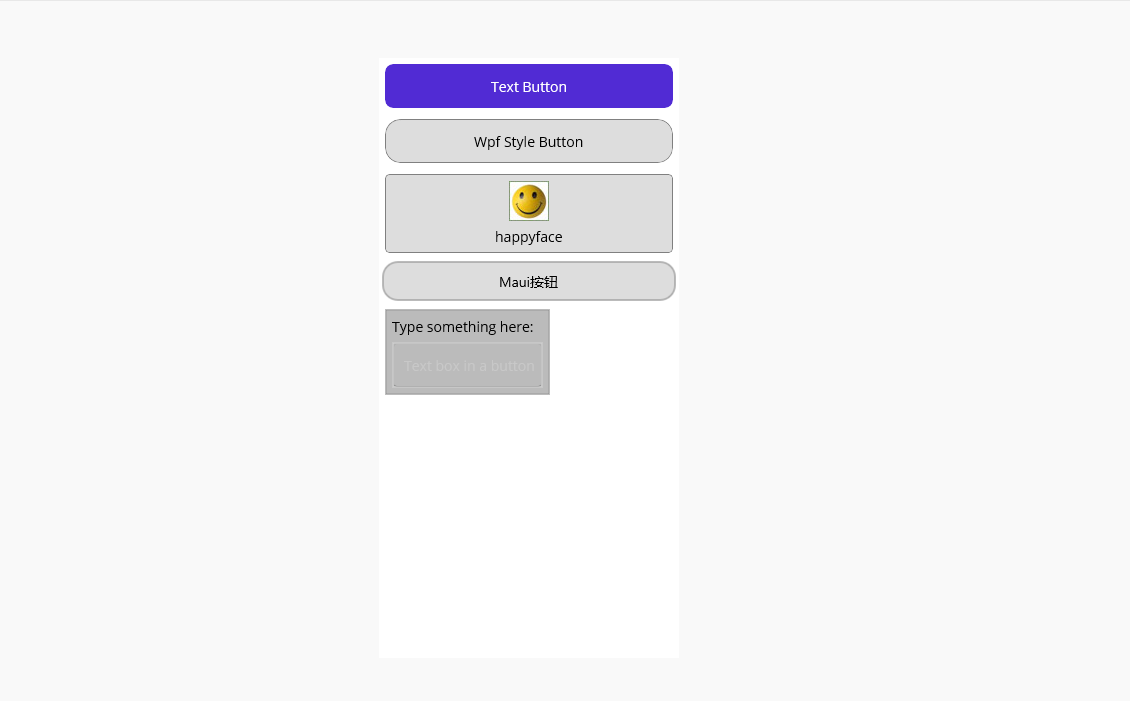
ButtonsWithContent.xaml使用例子
<?xml version="1.0" encoding="utf-8" ?>
<ContentPage xmlns="http://schemas.microsoft.com/dotnet/2021/maui"
             xmlns:x="http://schemas.microsoft.com/winfx/2009/xaml"
             x:Class="MauiViews.MauiDemos.Book._06.ButtonsWithContent"
             Title="ButtonsWithContent" WidthRequest="300" HeightRequest="600">
    <ScrollView>
        <StackLayout Margin="3" Spacing="5">
            <Button Margin="3" Text="Text Button"/>
            <Button Margin="3" Text="Wpf Style Button" Style="{StaticResource WpfStyleButton}" CornerRadius="15"
                Clicked="Button_Clicked"/>
            <Button Margin="3" Style="{StaticResource WpfStyleButton}" ImageSource="happyface.jpg" Text="happyface"
                    ContentLayout="Top, 5"/>
            <WpfButton Text="Maui按钮" CornerRadius="15" />
            <WpfButton Padding="3" Margin="3" HorizontalOptions="Start">
                <StackLayout>
                    <Label Margin="3" Text="Type something here:"/>
                    <TextBox Margin="3" HorizontalOptions="Start" Placeholder="Text box in a button"/>
                </StackLayout>
            </WpfButton>
        </StackLayout>
    </ScrollView>
</ContentPage>
对应的cs代码
using Shares;
using System.Diagnostics;

namespace MauiViews.MauiDemos.Book._06;

public partial class ButtonsWithContent : ContentPage
{
	public ButtonsWithContent()
	{
		InitializeComponent();
	}

    private void Button_Clicked(object sender, EventArgs e)
    {
		Shell.Current.MessageBox("提示", "你按下了WPF样式的按钮");//这个是Shell扩展中实现,大家可以看看之前代码。
    }
}
运行效果

 浙公网安备 33010602011771号