
写过wpf的,都知道WrapPanel,这个在C# Maui里用FlexLayout实现。为了简化使用,我直接扩展了FlexLayout,增加了HorizontalSpacing和VerticalSpacing属性,这样就和toolkit:DockLayout中的间隔属性功能一样了。
大家可以重命名toolkit:DockLayout,这样以后就不用添加下面代码了。
xmlns:tk="http://schemas.microsoft.com/dotnet/2022/maui/toolkit"
重命名DockLayout,因为之前的例子,我已经把Share.Utility加入到了默认命名空间,所以可以直接使用了。请注意,需要调用我扩展的Shell.Navigate("你自己的xaml")才有效。
 //重命名CommunityToolkit
 public class DockLayout : CommunityToolkit.Maui.Layouts.DockLayout
 {
 }
回到扩展FlexLayout,代码如下
public class  WrapLayout : Microsoft.Maui.Controls.FlexLayout
{
    public static readonly BindableProperty VerticalSpacingProperty =
    BindableProperty.Create(
        nameof(VerticalSpacing),
        typeof(double),
        typeof(WrapLayout),
        0d,
        propertyChanged: OnSpacingChanged);

    public static readonly BindableProperty HorizontalSpacingProperty =
        BindableProperty.Create(
            nameof(HorizontalSpacing),
            typeof(double),
            typeof(WrapLayout),
            0d,
            propertyChanged: OnSpacingChanged);

    public double VerticalSpacing
    {
        get => (double)GetValue(VerticalSpacingProperty);
        set => SetValue(VerticalSpacingProperty, value);
    }

    public double HorizontalSpacing
    {
        get => (double)GetValue(HorizontalSpacingProperty);
        set => SetValue(HorizontalSpacingProperty, value);
    }

    public WrapLayout()
    {
        Direction = Microsoft.Maui.Layouts.FlexDirection.Row;
        AlignItems = Microsoft.Maui.Layouts.FlexAlignItems.Start;
        Wrap = Microsoft.Maui.Layouts.FlexWrap.Wrap;
    }

    private static void OnSpacingChanged(BindableObject bindable, object oldValue, object newValue)
    {
        var layout = (WrapLayout)bindable;
        layout.UpdateChildMargins();
    }

    protected override void OnChildAdded(Element child)
    {
        base.OnChildAdded(child);
        if (child is View view)
        {
            UpdateChildMargin(view);
        }
    }

    private void UpdateChildMargins()
    {
        foreach (var child in Children)
        {
            if (child is View view)
            {
                UpdateChildMargin(view);
            }
        }
    }

    private void UpdateChildMargin(View child)
    {
        // 直接设置子视图的Margin属性
        child.Margin = new Thickness(0, 0, HorizontalSpacing, VerticalSpacing);
    }
}
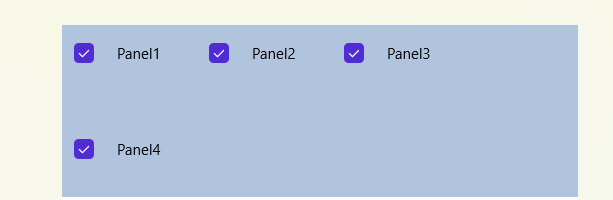
xaml使用例子。之后不再强调自定义控件了,比如这里的Checker,在前面的例子中,给出了源代码。希望大家按顺序学习,不然可能会跟丢嗷。
<WrapLayout x:Name="pnlList" Background="LightSteelBlue" HorizontalSpacing="15" VerticalSpacing="20">
    <Checker IsChecked="True" Text="Panel1"/>
    <Checker IsChecked="True" Text="Panel2"/>
    <Checker IsChecked="True" Text="Panel3"/>
    <Checker IsChecked="True" Text="Panel4"/>
</WrapLayout>
运行效果

 浙公网安备 33010602011771号