
C# Maui的CheckBox暂时没有Label属性,继承Border扩展CheckBox。其次,为了简单,写一个PropertyManager,共用代码,这样以后换肤时,也可以动态修改对应属性。这里先实现一个CornerRadiusProperty的动态修改。
public class PropertyManager
{
    public static void CornerRadiusProperty(BindableObject bindable, object oldValue, object newValue)
    {
        if (bindable is Border border)
        {
            border.StrokeShape = new RoundRectangle { CornerRadius = (double)newValue };
        }
    }
}
Checker类
public class Checker : Border
{
    public static readonly BindableProperty TextProperty =
        BindableProperty.Create(nameof(Text), typeof(string), typeof(Checker), "选项");
    public static readonly BindableProperty TextColorProperty =
        BindableProperty.Create(nameof(TextColor), typeof(Color), typeof(Checker), Colors.Black);
    public static readonly BindableProperty FontSizeProperty =
        BindableProperty.Create(nameof(FontSize), typeof(double), typeof(Checker), 14d);
    public static readonly BindableProperty FontAttributesProperty =
        BindableProperty.Create(nameof(FontAttributes), typeof(FontAttributes), typeof(Checker), FontAttributes.None);
    public static readonly BindableProperty FontFamilyProperty =
        BindableProperty.Create(nameof(FontFamily), typeof(string), typeof(Checker), null);
    public static readonly BindableProperty SpacingProperty =
        BindableProperty.Create(nameof(Spacing), typeof(double), typeof(Checker), 5d);
    public static readonly BindableProperty OrientationProperty =
        BindableProperty.Create(nameof(Orientation), typeof(StackOrientation), typeof(Checker),StackOrientation.Horizontal);
    public static readonly BindableProperty IsCheckedProperty =
        BindableProperty.Create(nameof(IsChecked), typeof(bool), typeof(Checker), false);
    public static readonly BindableProperty CornerRadiusProperty =
           BindableProperty.Create(nameof(CornerRadius), typeof(double), typeof(Checker), 15d,
               propertyChanged: PropertyManager.CornerRadiusProperty);

    public event EventHandler<CheckedChangedEventArgs>? CheckedChanged;

    public string Text
    {
        get => (string)GetValue(TextProperty);
        set => SetValue(TextProperty, value);
    }
    public Color TextColor
    {
        get => (Color)GetValue(TextColorProperty);
        set => SetValue(TextColorProperty, value);
    }

    public double FontSize
    {
        get => (double)GetValue(FontSizeProperty);
        set => SetValue(FontSizeProperty, value);
    }

    public FontAttributes FontAttributes
    {
        get => (FontAttributes)GetValue(FontAttributesProperty);
        set => SetValue(FontAttributesProperty, value);
    }

    public string FontFamily
    {
        get => (string)GetValue(FontFamilyProperty);
        set => SetValue(FontFamilyProperty, value);
    }

    public double Spacing
    {
        get => (double)GetValue(SpacingProperty);
        set => SetValue(SpacingProperty, value);
    }
    public StackOrientation Orientation
    {
        get => (StackOrientation)GetValue(OrientationProperty);
        set => SetValue(OrientationProperty, value);
    }
    public bool IsChecked
    {
        get => (bool)GetValue(IsCheckedProperty);
        set => SetValue(IsCheckedProperty, value);
    }

    public double CornerRadius
    {
        get => (double)GetValue(CornerRadiusProperty);
        set => SetValue(CornerRadiusProperty, value);
    }

    private StackLayout layout;
    private CheckBox checkBox;
    private Label label;
    public Checker()
    {
        checkBox = new CheckBox() { HorizontalOptions = LayoutOptions.Center, VerticalOptions = LayoutOptions.Center };
        label = new Label() { HorizontalOptions = LayoutOptions.Center, VerticalOptions = LayoutOptions.Center };
        layout = new StackLayout
        {
            Children = { checkBox, label }
        };
        UpdateBindings();
        this.StrokeShape = new RoundRectangle() { CornerRadius = CornerRadius };
        this.Padding = new Thickness(5);
        this.Content = layout;
    }
    private void UpdateBindings()
    {
        layout.SetBinding(StackLayout.OrientationProperty, new Binding(nameof(Orientation), mode: BindingMode.TwoWay, source: this));
        layout.SetBinding(StackLayout.SpacingProperty, new Binding(nameof(Spacing), mode: BindingMode.TwoWay, source: this));
        label.SetBinding(Label.TextProperty, new Binding(nameof(Text), mode: BindingMode.TwoWay, source: this));
        label.SetBinding(Label.TextColorProperty, new Binding(nameof(TextColor), mode: BindingMode.TwoWay, source: this));
        label.SetBinding(Label.FontSizeProperty, new Binding(nameof(FontSize), mode: BindingMode.TwoWay, source: this));
        label.SetBinding(Label.FontAttributesProperty, new Binding(nameof(FontAttributes), mode: BindingMode.TwoWay, source: this));
        label.SetBinding(Label.FontFamilyProperty, new Binding(nameof(FontFamily), mode: BindingMode.TwoWay, source: this));
        checkBox.SetBinding(CheckBox.IsCheckedProperty, new Binding(nameof(IsChecked), mode: BindingMode.TwoWay, source: this));
        checkBox.CheckedChanged += (s, e) =>
        {
            CheckedChanged?.Invoke(this, e);
        };
    }
}
在自己的公共项目里,我这里是Shares项目,加入AssemblyInfo.cs代码,让自定义控件全部加入到默认命名空间。
using System.Runtime.CompilerServices;
using System.Resources;

[assembly: NeutralResourcesLanguage("zh-CN")]
[assembly: XmlnsDefinition("http://schemas.microsoft.com/dotnet/2021/maui", "Shares.Utility")]
LocalizableText.xaml代码,有了上面的代码,现在不用自己写local了。
<?xml version="1.0" encoding="utf-8" ?>
<ContentPage xmlns="http://schemas.microsoft.com/dotnet/2021/maui"
             xmlns:x="http://schemas.microsoft.com/winfx/2009/xaml"
             x:Class="MauiViews.MauiDemos.Book._03.LocalizableText"
             Title="LocalizableText" HeightRequest="365" WidthRequest="600"
             MinimumWidthRequest="350" MinimumHeightRequest="150">
    <Grid RowDefinitions="*,auto" ColumnDefinitions="auto,*">
        <StackLayout>
            <Button x:Name="cmdPrev" Margin="10,10,10,3" Text="Prev"/>
            <Button x:Name="cmdNext" Margin="10,3,10,3" Text="Next"/>
            <!--
              <StackLayout Orientation="Horizontal">
                  <CheckBox x:Name="chkLongText" Margin="10,10" CheckedChanged="chkLongText_CheckedChanged"/>
                  <Label Margin="-20,10" Text="Show Long Text" VerticalOptions="Center"/>
              </StackLayout>
            -->
            <Checker Margin="10,10" CheckedChanged="chkLongText_CheckedChanged" Text="Show Long Text"
                     Background="LightGreen" CornerRadius="15"/>
        </StackLayout>
        <Editor Grid.Column="1" Grid.RowSpan="2" Margin="0,10,10,10" WidthRequest="300" AutoSize="TextChanges"
                Placeholder="This is a test that demonstrates how buttons adapt themselves to fit the content they contain when they aren't explicitly sized. This behavior makes localization much easier."/>
        <Button Grid.Row="1" x:Name="cmdClose" Margin="10,3,10,10" Text="Close"/>
    </Grid>
</ContentPage>
对应的cs代码
namespace MauiViews.MauiDemos.Book._03;

public partial class LocalizableText : ContentPage
{
	public LocalizableText()
	{
		InitializeComponent();
	}

    private void chkLongText_CheckedChanged(object sender, CheckedChangedEventArgs e)
    {
		if (e.Value)
		{
            cmdPrev.Text = " <- Go to the Previous Window ";
            cmdNext.Text = " Go to the Next Window -> ";
        }
        else
        {
            cmdPrev.Text = "Prev";
            cmdNext.Text = "Next";
        }
    }
}
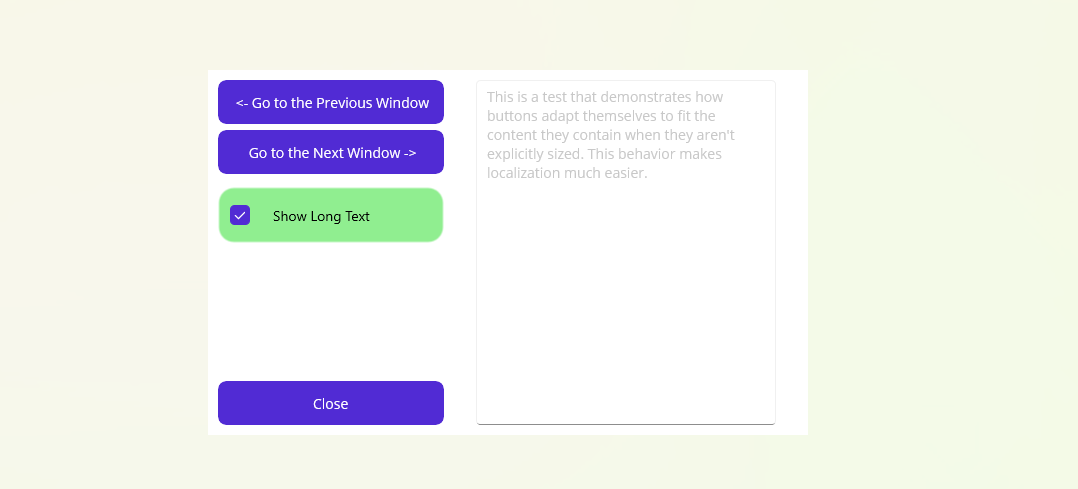
运行效果

 浙公网安备 33010602011771号