
TextBoxColumn.xaml对应代码
<?xml version="1.0" encoding="utf-8" ?>
<ContentPage xmlns="http://schemas.microsoft.com/dotnet/2021/maui"
             xmlns:x="http://schemas.microsoft.com/winfx/2009/xaml"
             x:Class="MauiViews.MauiDemos.Book._03.TextBoxColumn"
             Title="TextBoxColumn" WidthRequest="400" HeightRequest="300">
    <Grid Margin="3,3,10,3" RowDefinitions="auto,auto,auto,auto,40,37" ColumnDefinitions="auto,*,auto" RowSpacing="5">
        <Label Grid.Column="0" Margin="3,0,3,0" VerticalOptions="Center" Text="Home:" FontSize="18"/>
        <Entry Grid.Column="1" Margin="3,0,3,0" VerticalOptions="Center"/>
        <Button Grid.Column="2" Margin="3,3,3,3" Padding="2" Text="Browse"/>

        <Label Grid.Row="1" Grid.Column="0" Margin="3,0,3,0" VerticalOptions="Center" Text="Network:" FontSize="18"/>
        <Entry Grid.Row="1" Grid.Column="1" Margin="3,0,3,0" VerticalOptions="Center"/>
        <Button Grid.Row="1" Grid.Column="2" Margin="3,3,3,3" Padding="2" Text="Browse"/>

        <Label Grid.Row="2" Grid.Column="0" Margin="3,0,3,0" VerticalOptions="Center" Text="Web:" FontSize="18"/>
        <Entry Grid.Row="2" Grid.Column="1" Margin="3,0,3,0" VerticalOptions="Center"/>
        <Button Grid.Row="2" Grid.Column="2" Margin="3,3,3,3" Padding="2" Text="Browse"/>

        <Label Grid.Row="3" Grid.Column="0" Margin="3,0,3,0" VerticalOptions="Center" Text="Secondary:" FontSize="18"/>
        <Entry Grid.Row="3" Grid.Column="1" Margin="3,0,3,0" VerticalOptions="Center"/>
        <Button Grid.Row="3" Grid.Column="2" Margin="3,3,3,3" Padding="2" Text="Browse"/>
    </Grid>
</ContentPage>
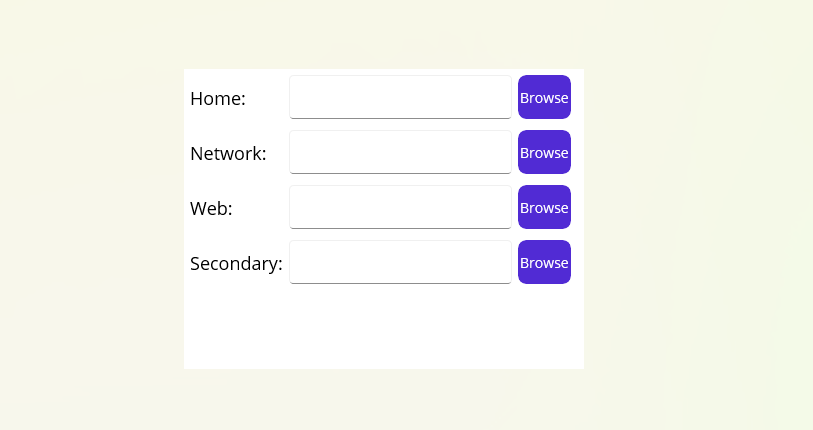
运行效果

 浙公网安备 33010602011771号