
下面代码,我是放在Shares项目里的Utility文件夹里。
GridLine重写GraphicsView和IDrawable,自动适应大小。
using System;
using System.Collections.Generic;
using System.Linq;
using System.Text;
using System.Threading.Tasks;

namespace Shares.Utility
{
    public class GridLine : GraphicsView, IDrawable
    {
        public Color StrokeColor { get; set; } = Colors.Gray;
        public float StrokeThickness { get; set; } = 0;
        public string StrokeDashPattern { get; set; } = "0"; // 虚线模式:[实线长度, 空白长度]
        public float StrokeDashOffset { get; set; } = 0; // 虚线起始偏移
        public GridLine()
        {
            Drawable = this;
        }
        public void Draw(ICanvas canvas, RectF dirtyRect)
        {
            var grid = Parent as Grid;

            if (grid== null)
            {
                return;
            }

            int Columns = grid.ColumnDefinitions.Count, Rows = grid.RowDefinitions.Count;
            Grid.SetRowSpan(this, Rows);
            Grid.SetColumnSpan(this, Columns);

            canvas.StrokeColor = StrokeColor;
            canvas.StrokeSize = StrokeThickness;
            canvas.StrokeDashPattern = StrokeDashPattern.Split(" ").Select(s => float.Parse(s)).ToArray();
            canvas.StrokeDashOffset = StrokeDashOffset;
            // 绘制垂直线
            var colWidth = dirtyRect.Width / Columns;
            for (int col = 1; col < Columns; col++)
            {
                var x = col * colWidth;
                canvas.DrawLine(x, 0, x, dirtyRect.Height);
            }

            // 绘制水平线
            var rowHeight = dirtyRect.Height / Rows;
            for (int row = 1; row < Rows; row++)
            {
                var y = row * rowHeight;
                canvas.DrawLine(0, y, dirtyRect.Width, y);
            }
        }
    }
}
SimpleGrid.xaml代码。对应cs代码是默认,无改动。
<?xml version="1.0" encoding="utf-8" ?>
<ContentPage xmlns="http://schemas.microsoft.com/dotnet/2021/maui"
             xmlns:x="http://schemas.microsoft.com/winfx/2009/xaml"
             xmlns:local="clr-namespace:Shares.Utility;assembly=Shares"
             x:Class="MauiViews.MauiDemos.Book._03.SimpleGrid"
             Title="SimpleGrid" WidthRequest="400" HeightRequest="300">
    <Grid RowDefinitions="*,*" ColumnDefinitions="*,*,*" RowSpacing="5" ColumnSpacing="5">
        <Button Text="Top Lef"/>
        <Button Grid.Column="1" Text="Middle Left"/>
        <Button Grid.Row="1" Grid.Column="2" Text="Bottom Right"/>
        <Button Grid.Row="1" Grid.Column="1" Text="Bottom Middle"/>
        <local:GridLine StrokeDashPattern="5 3" StrokeThickness="1"/>
    </Grid>
</ContentPage>
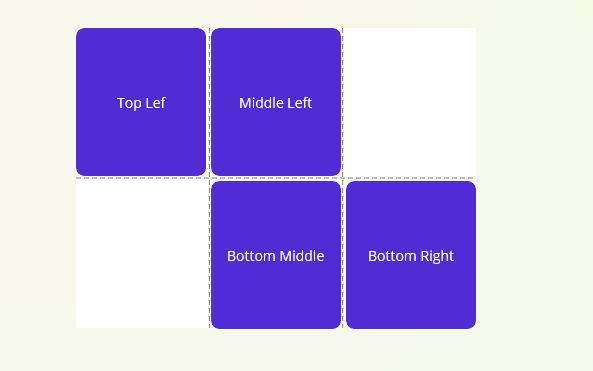
运行效果

 浙公网安备 33010602011771号