
之前已经说过,使用MauiCommunityToolkit包了。这里不再累述。
SimpleDock.xaml代码
<?xml version="1.0" encoding="utf-8" ?>
<ContentPage xmlns="http://schemas.microsoft.com/dotnet/2021/maui"
             xmlns:x="http://schemas.microsoft.com/winfx/2009/xaml"
             xmlns:tk="http://schemas.microsoft.com/dotnet/2022/maui/toolkit"
             x:Class="MauiViews.MauiDemos.Book._03.SimpleDock"
             Title="SimpleDock" HeightRequest="300" WidthRequest="300">
    <tk:DockLayout ShouldExpandLastChild="True">
        <Button Text="A Stretched Top Button" tk:DockLayout.DockPosition="Top"/>
        <Button Text="A Centered Top Button" tk:DockLayout.DockPosition="Top" HorizontalOptions="Center"/>
        <Button Text="A Left-Aligned Top Button" tk:DockLayout.DockPosition="Top" HorizontalOptions="Start"/>
        <Button Text="Bottom Button" tk:DockLayout.DockPosition="Bottom"/>
        <Button Text="Left Button" tk:DockLayout.DockPosition="Left"/>
        <Button Text="Right Button" tk:DockLayout.DockPosition="Right"/>
        <Button Text="Remaining Space"/>
    </tk:DockLayout>
</ContentPage>
对应的cs代码,默认。
namespace MauiViews.MauiDemos.Book._03;

public partial class SimpleDock : ContentPage
{
	public SimpleDock()
	{
		InitializeComponent();
	}
}
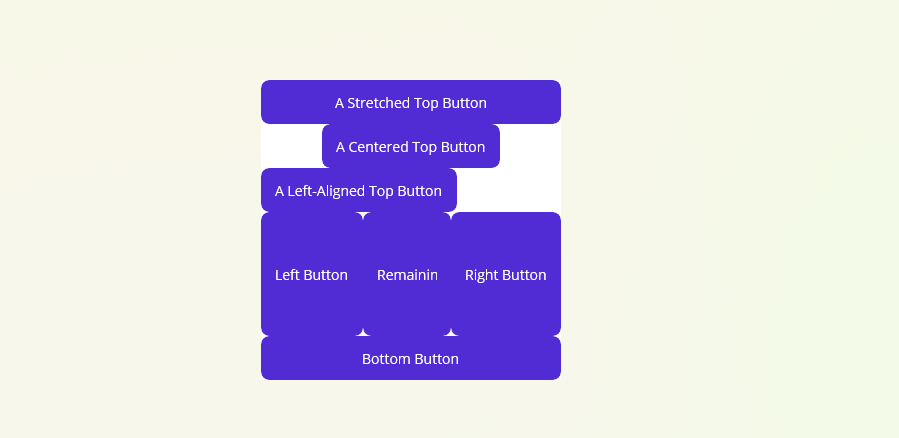
运行效果

 浙公网安备 33010602011771号