


使用Kaptcha生成验证码(四)
一、导入jar包
Kaptcha 是一个可高度配置的实用验证码生成工具。
<dependency>
    <groupId>com.github.penggle</groupId>
    <artifactId>kaptcha</artifactId>
    <version>2.3.2</version>
</dependency>
二、编写Kaptcha配置类
import com.google.code.kaptcha.Producer;
import com.google.code.kaptcha.impl.DefaultKaptcha;
import com.google.code.kaptcha.util.Config;
import org.springframework.context.annotation.Bean;
import org.springframework.context.annotation.Configuration;

import java.util.Properties;

@Configuration
public class KaptchaConfig {
    @Bean
    public Producer kaptchaProducer() {
        //配置属性
        Properties properties = new Properties();
        properties.setProperty("kaptcha.image.width", "100");
        properties.setProperty("kaptcha.image.height", "40");
        properties.setProperty("kaptcha.textproducer.font.size", "32");
        properties.setProperty("kaptcha.textproducer.font.color", "0,0,0");
        //随机字符
        properties.setProperty("kaptcha.textproducer.char.string", "0123456789ABCDEFGHIJKLMNOPQRSTUVWXYAZ");
        //字符个数
        properties.setProperty("kaptcha.textproducer.char.length", "4");
        //不设置干扰
        properties.setProperty("kaptcha.noise.impl", "com.google.code.kaptcha.impl.NoNoise");

        DefaultKaptcha kaptcha = new DefaultKaptcha();
        Config config = new Config(properties);
        kaptcha.setConfig(config);
        return kaptcha;
    }
}
三、生成随机字符串、生成图片
编写controller层代码,返回验证码图片并将验证码保存在session中,在用户登录时验证。
    @GetMapping("/kaptcha")
    public void getKaptcha(HttpServletResponse response, HttpSession session) {
        //生成验证码和验证图片
        String kaptcha = kaptchaProducer.createText();
        BufferedImage image = kaptchaProducer.createImage(kaptcha);
        //保存验证法到session
        session.setAttribute("kaptcha", kaptcha);
        //将图片返回给浏览器
        response.setContentType("image/png");
        try {
            OutputStream os = response.getOutputStream();
            ImageIO.write(image, "png", os);
        } catch (IOException e) {
            logger.error("响应验证码失败:" + e.getMessage());
        }
    }
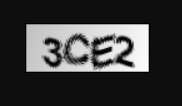
返回的验证码入下,每次访问都会生成不同的验证码。
四、前端验证码刷新
<div class="col-sm-4">
  <img th:src="@{/kaptcha}" id="kaptcha" style="width:100px;height:40px;" class="mr-2"/>
  <a href="javascript:refresh_kaptcha();" class="font-size-12 align-bottom">刷新验证码</a>
</div>
//每次点击生成新的验证码
function refresh_kaptcha() {
  //CONTEXT_PATH中定义项目路径
  //在访问路径中添加额外的动态参数,防止浏览器以为url不改变而不访问
  var path = CONTEXT_PATH + "/kaptcha?p=" + Math.random();
  $("#kaptcha").attr("src", path);
}


 浙公网安备 33010602011771号