

如何解决matplotlib模块中的中文乱码
如何解决matplotlib模块中的中文乱码
核心代码
## 设置属性防止中文乱码
mpl.rcParams['font.sans-serif'] = [u'SimHei']
mpl.rcParams['axes.unicode_minus'] = False
例子:
1.没有上面代码的
import matplotlib.pyplot as plt
import matplotlib as mpl
import numpy as np

## 设置属性防止中文乱码
# mpl.rcParams['font.sans-serif'] = [u'SimHei']
# mpl.rcParams['axes.unicode_minus'] = False

fig,ax = plt.subplots()
x = np.linspace(0,20,1000)
ax.plot(x,np.cos(x))
ax.axis('equal')
ax.annotate('最大值',xy = (6.28,1),xytext = (10,4),arrowprops = dict(facecolor = 'black',shrink = 0.05))
ax.annotate('最小值',xy = (5*np.pi,-1),xytext=(2,-6),arrowprops = dict(arrowstyle = "->",connectionstyle ="angle3,angleA = 0,angleB=-90" ))
plt.show()
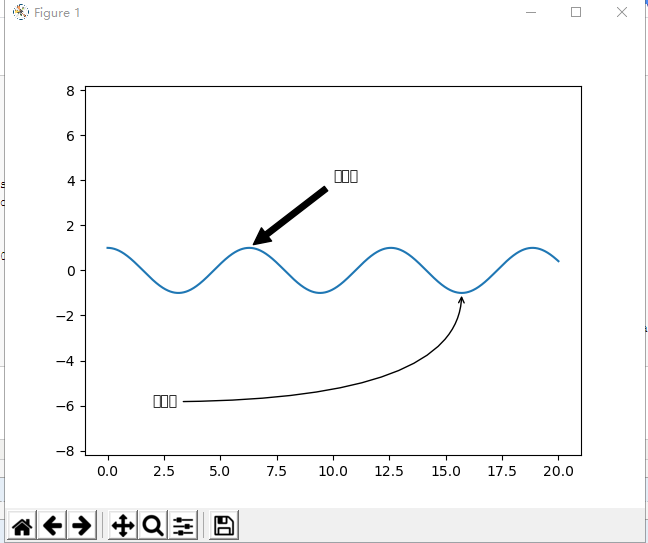
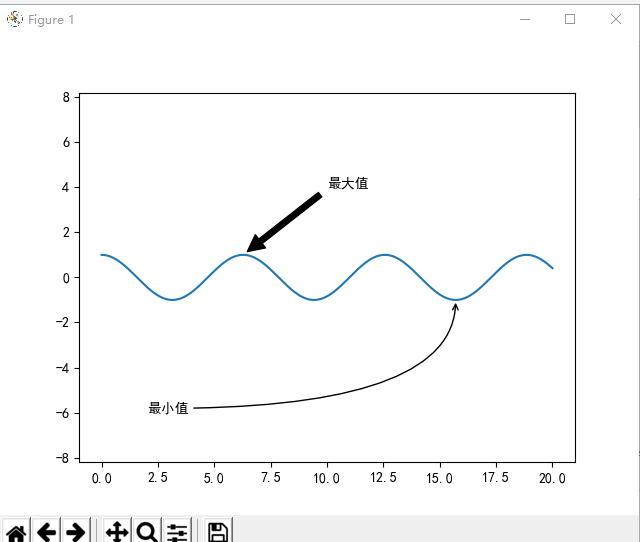
2.添加上面代码
import matplotlib.pyplot as plt
import matplotlib as mpl
import numpy as np

## 设置属性防止中文乱码
mpl.rcParams['font.sans-serif'] = [u'SimHei']
mpl.rcParams['axes.unicode_minus'] = False

fig,ax = plt.subplots()
x = np.linspace(0,20,1000)
ax.plot(x,np.cos(x))
ax.axis('equal')
ax.annotate('最大值',xy = (6.28,1),xytext = (10,4),arrowprops = dict(facecolor = 'black',shrink = 0.05))
ax.annotate('最小值',xy = (5*np.pi,-1),xytext=(2,-6),arrowprops = dict(arrowstyle = "->",connectionstyle ="angle3,angleA = 0,angleB=-90" ))
plt.show()

 浙公网安备 33010602011771号