
windows phpStudy curl file_get_contents 本地项目之间互相访问超时 _fei
windows phpStudy curl file_get_contents 本地项目之间互相访问超时
场景: windows7 phpstudy2016 php7.3 nginx, 使用curl file_get_content本地项目之间互相访问一直超时或者失败
场景再现
demo.test.com:80
文件 E:\selfweb\git_dev\test\index.php 内容如下:

<?php
$file = file_get_contents("http://demo.test.com:80/index2.php");
print_r($file);
echo "<br> php-cgi.exe -b demo.test.com:9001 -c php.ini";

-------------
 目录 E:\selfweb\git_dev\test\index2.php 内容如下
<?php
echo "我是 index2.php 从我这里拿数据";

访问 http://demo.test.com:80/index2.php    #成功
访问 http://demo.test.com:80/index.php     #失败

解决办法
#修改nginx配置,添加81端口,添加9001端口
server {
    listen       80;   #这里
    server_name  demo.test.com 192.168.1.151;
    charset utf-8;
    root  E:/selfweb/git_dev/test/;
    index index.php;

    location ~ .+\.php($|/) {
        fastcgi_pass 127.0.0.1:9000; #这里
        fastcgi_index index.php;
        include fastcgi.conf;
    }

}

server {
    listen       81; #这里
    server_name  demo.test.com;
    charset utf-8;
    root  E:/selfweb/git_dev/test/;
    index index.php;

    location ~ .+\.php($|/) {
        fastcgi_pass 127.0.0.1:9001; #这里
        fastcgi_index index.php;
        include fastcgi.conf;
    }
}

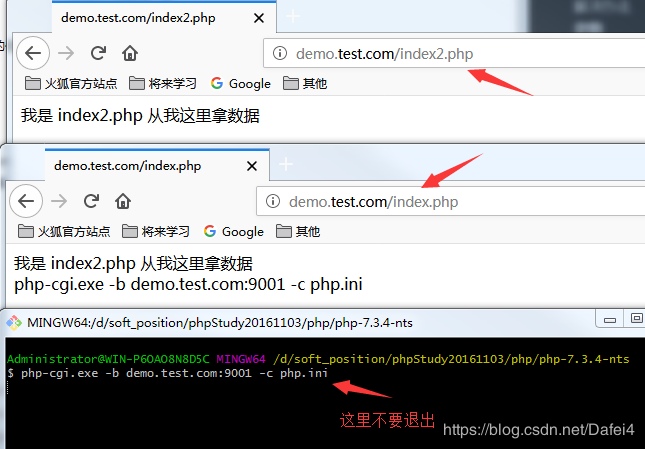
#重启phpStudy,在当前php目录下的cmd中运行命令:
php-cgi.exe -b demo.test.com:9001 -c php.ini

#修改文件
文件 E:\selfweb\git_dev\test\index.php 中端口内容如下:
<?php
$file = file_get_contents("http://demo.test.com:81/index2.php");
print_r($file);
echo "<br> php-cgi.exe -b demo.test.com:9001 -c php.ini";

#再次访问
访问 http://demo.test.com:80/index2.php    #成功
访问 http://demo.test.com:80/index.php     #成功

 浙公网安备 33010602011771号