
HTML
Hello.html
1 <!DOCTYPE html>
2 <html lang="en">       //languane is equal to English
3   <head>
4     <title>Hello!</title>
5   </head>
6   <body>
7     Hello!World!
8   </body>
9 </html>
DOM(Document Object Model):
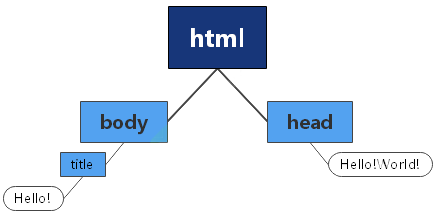
TAG:
- <!DOCTYPE> : it's a way of telling the web browser what version of HTML we're using.
- <html> : this is the beginning of the HTML content of our page.
- </html> : is the end of the HTML content of the page.
- <head></head> : the part of the web page the user sees (what a page is about).
- <title></title> : the title of the web page.
- <body></body> : the visible part of the page.
- <p></p> : define a paragraph
- <h1> </h1> : h stands for heading and the 1 stands for the largest,which down to 6,which is the smallest.
- <img src=".jpg" alt=" "> : displaying some images,self-closing and need attributes to add(alt stands for alternative text-based representation).
- <a href="goole.com">Click here</a> : href for hyperlink reference,what page I want to link to or other html file I want to display.
- <form></form> : create an HTML form for user input.
- <datalist id=" "></datalist> : define a list of options,used with <input list=" "> elements
- <select></select> : create a drop-down list
- <option value=" ">(selection </option>) : used with <datalist> or <select>
Form two parts:
<form>
    <input type="text(or radio)" placeholder="Fullname" name="name">  //one for name,user seeing in this page
    <input type="submit">                      //one for submit
</form>
Create a table:
<table>
    <thead>          //represent the heading of the table
        <th>columns</th>  //columns,first row of that table
    </thead>
    <tbody>          //main part
        <tr>                //rows
            <td>{(x,y)|x=row,y=column}</td>
        </tr>
    </tbody>
</table>
Two basic types of lists:
<ol>          //orderedlist:use have numbers
    <li>One</li>
    <li>Two</li>
</ol>
<ul>          //unorderedlist:labeled with just bullet point
    <li>One</li>
    <lii>Two</li>
</ul>

 浙公网安备 33010602011771号