
MATLAB-《10分钟学习GUI系列》-【第三课】- 底层代码实现GUI
常用对象- 1.figure对象
%画一个窗口
hf = figure(...
    'Units', 'Normalized', ...
    'Position', [0.2 0.2 0.6 0.5], ...
    'Menu', 'none', ...
    'Color', 'w');

%给窗口里添加一个坐标轴子对象,默认坐标轴横轴与纵轴长度均为1
ha = axes('Parent', hf, ...
    'Units', 'Normalized', ...
    'Position', [0.1 0.1 0.6 0.8], ...
    'Box', 'on', ...     %相当于box on命令,相当于坐标轴四周形成一个框。
    'NextPlot', 'add');  %相当于 hold on命令,

%给窗口里添加UIcontrol界面控件子对象
hb1 = uicontrol('Parent', hf, ...
    'Units', 'Normalized', ...
    'Position', [0.75 0.2 0.15 0.1], ...
    'Style', 'pushbutton', ...  %style为主要区分属性,区分控件的类型。pushbutton为一般按钮
    'String', 'sin', ...        %控件上写的的文字
    'Callback', 'plot(sin([0:0.01:6]))');%Callback为回调函数,表示点击这个控件是要执行的命令

hb2 = uicontrol('Parent', hf, ...
    'Units', 'Normalized', ...
    'Position', [0.75 0.4 0.15 0.1], ...
    'Style', 'pushbutton', ...
    'String', 'cos', ...
    'Callback', 'plot(cos([0:0.01:6]))');

hb3 = uicontrol('Parent', hf, ...
    'Units', 'Normalized', ...
    'Position', [0.75 0.6 0.15 0.1], ...
    'Style', 'pushbutton', ...
    'String', 'clear', ...
    'Callback', 'try,delete(allchild(ha));end');  %该控件的回调函数,执行命令:清除axes里的所有对象,并结束
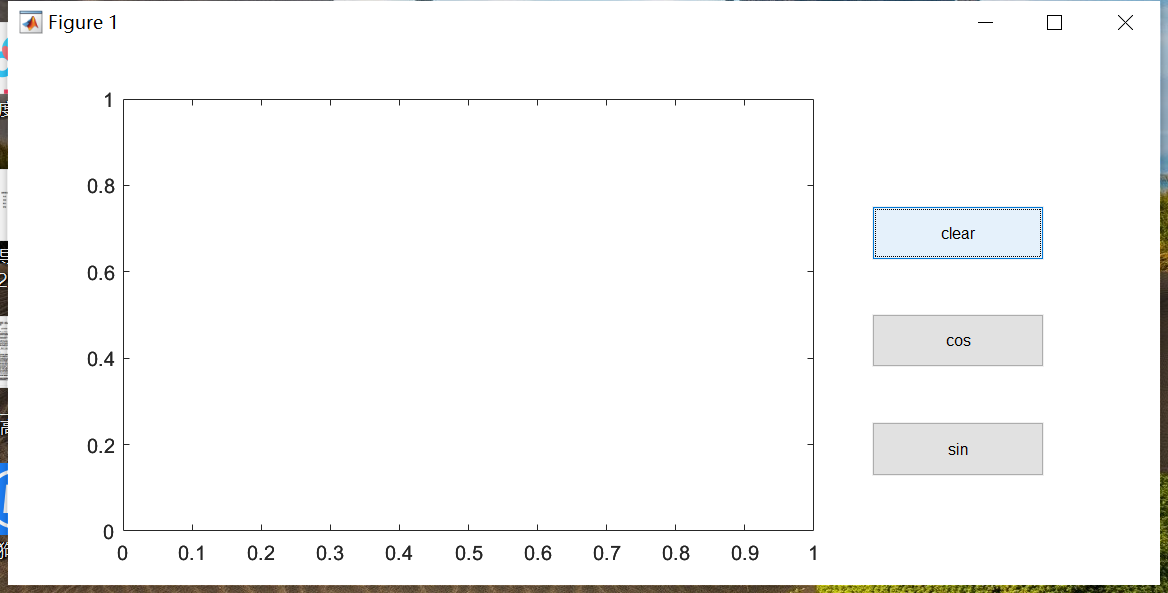
常用对象- 2.axes对象
ha = axes;
get(ha)
%box属性。即设置四边形四条边都有坐标包围的。
set(ha,'box','on');
%有些属性和figure的属性设置方法一致,就是最前面的句柄改一下即可,这里就不多介绍了。
%GridLineStyle属性。设置坐标网格线型
%LineWidth属性。设置所画图像的线宽
%Nextplot属性。
set(ha, 'NextPlot', 'add');%相当于hold on ,不覆盖原图。
set(ha, 'NextPlot', 'replace');%替代原来的对象,覆盖掉原图
plot([0:100]);
plot(sin(0:0.01:3));
我做了这么多,只是想给童年的自己做一个好榜样。

 浙公网安备 33010602011771号