Nlog简单使用笔记
https://github.com/nlog/NLog/wiki/Configuration-file
通过NuGet程序包加载NLog
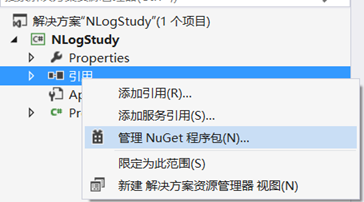
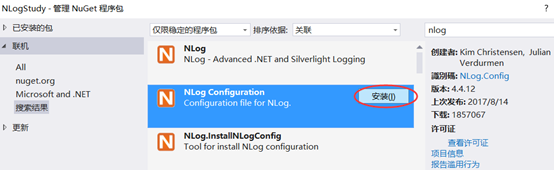
搜索nlog,选择NLogConfiguration进行安装
安装完成之后会自动加载一个配置名为NLog.config文件,即为NLog的配置文件
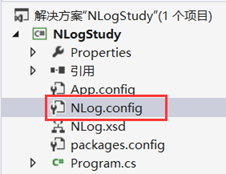
NLog能够通过自动加载配置文件的方式来进行配置,配置文件为xml格式
原版的配置文件说明:
<?xml version="1.0" encoding="utf-8" ?>
<nlog xmlns="http://www.nlog-project.org/schemas/NLog.xsd"
      xmlns:xsi="http://www.w3.org/2001/XMLSchema-instance"
      xsi:schemaLocation="http://www.nlog-project.org/schemas/NLog.xsd NLog.xsd"
      autoReload="true"
      throwExceptions="false"
      internalLogLevel="Off" internalLogFile="c:\temp\nlog-internal.log">
配置文件的根节点为<nlog/>,命名空间可供选择,命名空间:
xmlns="http://www.nlog-project.org/schemas/NLog.xsd"
xmlns:xsi="http://www.w3.org/2001/XMLSchema-instance"
开启了vs中的智能感知功能,推荐使用这些命名空间。

  <!-- optional, add some variables
  https://github.com/nlog/NLog/wiki/Configuration-file#variables
  -->
  <variable name="myvar" value="myvalue"/>
Variable定义一些常用的变量,供下面的配置更方便
  <!--
  See https://github.com/nlog/nlog/wiki/Configuration-file
  for information on customizing logging rules and outputs.
   -->
  <targets>

    <!--
    add your targets here
    See https://github.com/nlog/NLog/wiki/Targets for possible targets.
    See https://github.com/nlog/NLog/wiki/Layout-Renderers for the possible layout renderers.
    -->

    <!--
    Write events to a file with the date in the filename.
    <target xsi:type="File" name="f" fileName="${basedir}/logs/${shortdate}.log"
            layout="${longdate} ${uppercase:${level}} ${message}" />
    -->
  </targets>
target部分定义日志的输出目标,每个目标中必须定义name/type两个属性,其他的属性根据输出目标进行选择性的配置,具体的配置选项参考文章开始处的GitHub网站。
  <rules>
    <!-- add your logging rules here -->

    <!--
    Write all events with minimal level of Debug (So Debug, Info, Warn, Error and Fatal, but not Trace)  to "f"
    <logger name="*" minlevel="Debug" writeTo="f" />
    -->
  </rules>
Rules部分定义了日志的路由规则,简单说就是配置某一个或者一类日志对象的输出目标,将日志对象通过target中的name元素进行关联,这样就设置了日志的输出方式

</nlog>
配置文件中可以包含如下几种元素:
- <targets /> – defines log targets/outputs
- <rules /> – defines log routing rules
- <extensions /> – loads NLog extensions from the *.dll file
- <include />– includes external configuration file
- <variable /> – sets the value of a configuration variable
日志等级(降序):
|
Level |
Example |
|
Fatal |
Highest level: important stuff down |
|
Error |
For example application crashes / exceptions. |
|
Warn |
Incorrect behavior but the application can continue |
|
Info |
Normal behavior like mail sent, user updated profile etc. |
|
Debug |
Executed queries, user authenticated, session expired |
|
Trace |
Begin method X, end method X etc |
<targets>
    <target xsi:type="Console" name="console" layout="${longdate} ${logger} ${level} ${message}"/>
    <target xsi:type="File" name="file" fileName="${basedir}/logs/${shortdate}.log"
            layout="${longdate} ${logger} ${level} ${message}"/>
  </targets>

  <rules>
    <logger name="hello" minlevel="Debug" writeTo="file"/>
    <logger name="world" minlevel="Info" writeTo="console"/>
  </rules>
namespace NLogStudy
{
    class Program
    {
        static void Main(string[] args)
        {
            ILogger loggerHello = LogManager.GetLogger("hello");
            ILogger loggerWorld = LogManager.GetLogger("world");

            loggerHello.Debug("hello");
            loggerWorld.Debug("world");
            loggerWorld.Info("world");

        }
    }
}
如果将Nlog做成日志组件,那么需要将配置文件添加到启动项目中


 浙公网安备 33010602011771号