引入shardingsphere后报错 无效映射
ShardingSphere是通过代理 jdbc,在sql查询的时候通过解析sql,找到你想要查询的表,这意味着 它默认会认为你配置的所有的节点都是存在的,通过定时任务建表有点麻烦,干脆在路由的时候实现自动建表功能
根据这篇文章copy的时候出问题了
https://www.cnblogs.com/xcj26/articles/17671758.html
在通过调用mapper.xml文件的方法时报错:
mapper
/**
 * 常用工具 mapper
 */public interface CommonMapper extends BaseMapper {

    /**
     * 查询数据库中的所有表名
     *
     * @param schema 数据库名
     * @return 表名列表
     */
    List<String> getAllTableNameBySchema(@Param("schema") String schema);

    /**
     * 查询建表语句
     *
     * @param tableName 表名
     * @return 建表语句
     */
    CreateTableSql selectTableCreateSql(@Param("tableName") String tableName);

    /**
     * 执行SQL
     *     * @param sql 待执行SQL
     */
     void executeSql(@Param("sql") String sql);
}
mapper.xml
<?xml version="1.0" encoding="UTF-8"?>
<!DOCTYPE mapper PUBLIC "-//mybatis.org//DTD Mapper 3.0//EN" "http://mybatis.org/dtd/mybatis-3-mapper.dtd">
<mapper namespace="com.jslx.db_server.mapper.CommonMapper">

    <resultMap id="selectTableCreateSqlResultMap" type="com.jslx.db_server.entity.CreateTableSql">
        <result column="Table" property="table"/>
        <result column="Create Table" property="createTable"/>
    </resultMap>
    <select id="getAllTableNameBySchema" resultType="java.lang.String">
        SELECT TABLES.TABLE_NAME
        FROM information_schema.TABLES        WHERE TABLES.TABLE_SCHEMA = #{schema}    </select>

    <select id="selectTableCreateSql" resultMap="selectTableCreateSqlResultMap">
        SHOW CREATE TABLE ${tableName}
    </select>

    <update id="executeSql">
        ${sql}
    </update>

</mapper>
调用 selectTableCreateSql 方法时报错
org.apache.ibatis.binding.BindingException: Invalid bound statement (not found)
报错分析
一般这个报错都可以通过以下方式解决:
1、检查mybatis.xml文件namespace名称是否和Mapper接口的全限定名是否一致
2、检查Mapper接口的方法在mybatis.xml中的每个语句的id是否一致
3、检查Mapper接口方法返回值是否匹配select元素配置的ResultMap,或者只配置ResultType
在使用 shardingsphere 框架后出现这个报错,上面3条都检查了没有问题,问ai给出的排查方法就一直在兜圈子,尝试通过源码分析。
mybatis源码地址:https://github.com/mybatis/mybatis-3.git
这个报错是在 mybatis 源码的 SqlCommand 方法
public SqlCommand(Configuration configuration, Class<?> mapperInterface, Method method) {
  final String methodName = method.getName();
  final Class<?> declaringClass = method.getDeclaringClass();
  MappedStatement ms = resolveMappedStatement(mapperInterface, methodName, declaringClass, configuration);
  if (ms == null) {
    if (method.getAnnotation(Flush.class) == null) {
      throw new BindingException(
          "Invalid bound statement (not found): " + mapperInterface.getName() + "." + methodName);
    }
    name = null;
    type = SqlCommandType.FLUSH;
  } else {
    name = ms.getId();
    type = ms.getSqlCommandType();
    if (type == SqlCommandType.UNKNOWN) {
      throw new BindingException("Unknown execution method for: " + name);
    }
  }
}
继续往上追,一直追到 org.apache.ibatis.binding.MapperProxy#invoke,这里就到了 Mapper 的JDK动态代理
public class MapperProxy<T> implements InvocationHandler, Serializable {
	...
	@Override
	public Object invoke(Object proxy, Method method, Object[] args) throws Throwable {
	  try {
	    if (Object.class.equals(method.getDeclaringClass())) {
	      return method.invoke(this, args);
	    }
	    return cachedInvoker(method).invoke(proxy, method, args, sqlSession);
	  } catch (Throwable t) {
	    throw ExceptionUtil.unwrapThrowable(t);
	  }
	}

	...
}
说明实例化MapperBean(代理对象)的时候就没有把mapper.xml文件和mapper的方法绑定
再到MapperBean实例化的代码,我用的ORM框架是mybatisplus,mapper实例化的入口是在
com.baomidou.mybatisplus.autoconfigure.MybatisPlusAutoConfiguration#sqlSessionFactory
解析mapper.xml的方法是
com.baomidou.mybatisplus.extension.spring.MybatisSqlSessionFactoryBean#buildSqlSessionFactory
通过断点发现mapperLocation是null,这就导致SqlSessionFactory 不知道 XML 文件的位置,无法加载 SQL 映射
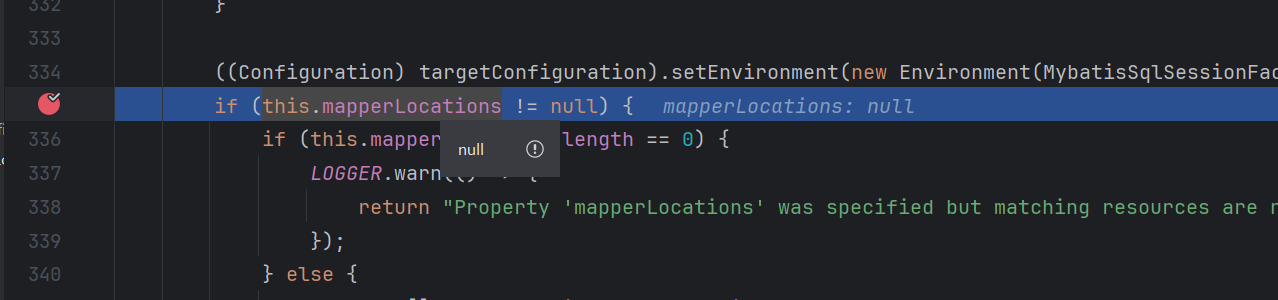
deepseek给出的解释是 ShardingSphere 会创建自己的 SqlSessionFactory,覆盖 MyBatis 的配置,给出解决方案是 手动设置 mapperLocations
@EnableTransactionManagement
@Configuration
@MapperScan("com.jslx.db_server.mapper")
public class MybatisPlusConfig {

    @Bean
    public MybatisSqlSessionFactoryBean sqlSessionFactory(DataSource dataSource) throws Exception {

        MybatisSqlSessionFactoryBean sessionFactory = new MybatisSqlSessionFactoryBean();

        sessionFactory.setDataSource(dataSource);


        // 关键1:设置数据源(ShardingSphere 包装后的数据源)
        sessionFactory.setDataSource(dataSource);

        // 关键2:手动设置 mapperLocations        Resource[] resources = new PathMatchingResourcePatternResolver()
                .getResources("classpath:mapper/**/*.xml");
        sessionFactory.setMapperLocations(resources);

        // 关键3:设置类型别名
        sessionFactory.setTypeAliasesPackage("com.jslx.db_server.entity");

        // 关键4:MyBatis 配置
        MybatisConfiguration configuration = new MybatisConfiguration();
        configuration.setMapUnderscoreToCamelCase(true);
        sessionFactory.setConfiguration(configuration);
        return sessionFactory;
    }
}
mapperLocations=null的问题解决,报错也解决
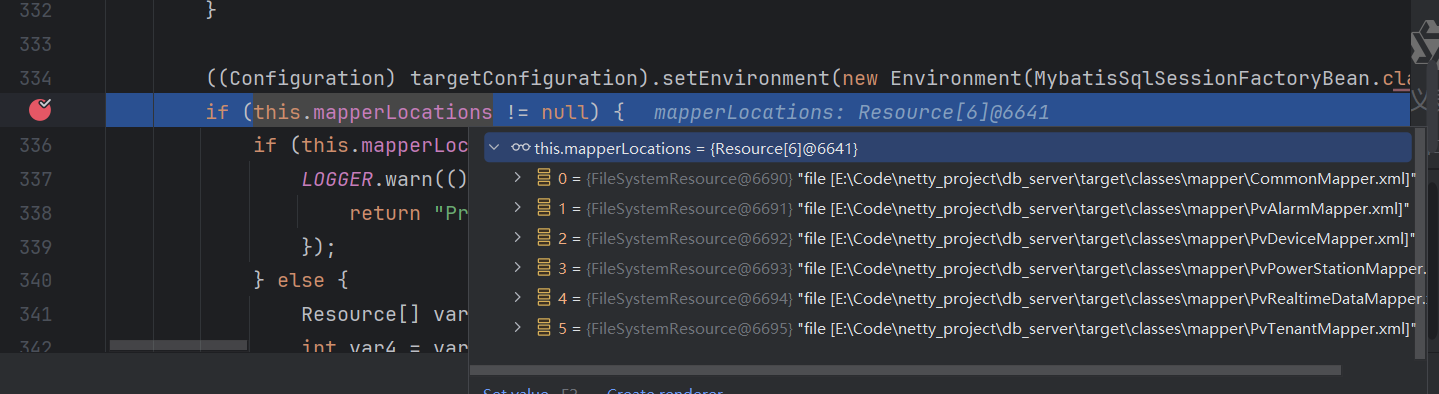
ShardingSphere 的hint指定数据源没有生效
想通过遍历数据源建表的方式,给每个数据库都创建业务表,这就要求能够指定数据源,把建表sql路由到指定数据源,网上给出的方法是 instance.setDatabaseShardingValue("ds_1000"); 测试发现sql没有到 ds_1000 数据源,而是路由到了默认数据源
private boolean createTableIfNotExists(String tableName) {

    // 生成建表SQL
    String createSQL = String.format(CREATE_TABLE_SQL_TEMPLATE, tableName);
    HintManager instance = HintManager.getInstance();

    try {
        instance.setDatabaseShardingValue("ds_1000");
        // 执行建表
        jdbcTemplate.execute(createSQL);

        log.info("成功创建表: {}", tableName);
        return true;

    } catch (Exception e) {
        log.error("创建表 {} 失败: {}", tableName, e.getMessage(), e);
        return false;
    } finally {
        instance.close();
    }
}
shardingsphere整体处理流程为解析->路由->改写->执行->归并
-
- 先从 jdbcTemplate.execute 找到和 shardingsphere 耦合的地方,也就找到了 sql 解析的地方
- 实际执行是调用 java.sql.Statement#execute(java.lang.String) 接口
- shardingsphere框架在 ShardingSphereStatement 类中实现了 java.sql.Statement#execute 接口
-
- 根据 sharedingsphere 框架的sql 日志(Actual SQL: ds_default),找到代码里设置数据源的源头
- 从 org.apache.shardingsphere.infra.executor.sql.log.SQLLogger#logNormalMode 方法第一个入参里就包含了数据源信息(executionContext.getExecutionUnits()),往上找
- org.apache.shardingsphere.infra.context.kernel.KernelProcessor#generateExecutionContext 再往上
- 到了 org.apache.shardingsphere.driver.jdbc.core.statement.ShardingSphereStatement#createExecutionContext 再往上
- org.apache.shardingsphere.driver.jdbc.core.statement.ShardingSphereStatement#createExecutionContext 再往上
- QueryContext 就是我们要找到的源头
private boolean execute0(final String sql, final ExecuteCallback callback) throws SQLException {
    try {
        QueryContext queryContext = createQueryContext(sql);
        checkSameDatabaseNameInTransaction(queryContext.getSqlStatementContext(), connection.getDatabaseName());
        trafficInstanceId = getInstanceIdAndSet(queryContext).orElse(null);
        if (null != trafficInstanceId) {
            JDBCExecutionUnit executionUnit = createTrafficExecutionUnit(trafficInstanceId, queryContext);
            return executor.getTrafficExecutor().execute(executionUnit, (statement, actualSQL) -> callback.execute(actualSQL, statement));
        }
        deciderContext = decide(queryContext,
                metaDataContexts.getMetaData().getGlobalRuleMetaData(), metaDataContexts.getMetaData().getProps(), metaDataContexts.getMetaData().getDatabase(connection.getDatabaseName()));
        if (deciderContext.isUseSQLFederation()) {
            ResultSet resultSet = executeFederationQuery(queryContext);
            return null != resultSet;
        }
        executionContext = createExecutionContext(queryContext);
        if (metaDataContexts.getMetaData().getDatabase(connection.getDatabaseName()).getRuleMetaData().getRules().stream().anyMatch(each -> each instanceof RawExecutionRule)) {
            // TODO process getStatement
            Collection<ExecuteResult> results = executor.getRawExecutor().execute(createRawExecutionContext(), executionContext.getQueryContext(), new RawSQLExecutorCallback());
            return results.iterator().next() instanceof QueryResult;
        }
        return isNeedImplicitCommitTransaction(executionContext) ? executeWithImplicitCommitTransaction(callback) : useDriverToExecute(callback);
    } finally {
        currentResultSet = null;
    }
}
-
- 打断点查看,HintValueContext.shardingDatabaseValues 是null,我们设置的是 HintManager.databaseShardingValues,再看看这2个有没有关系
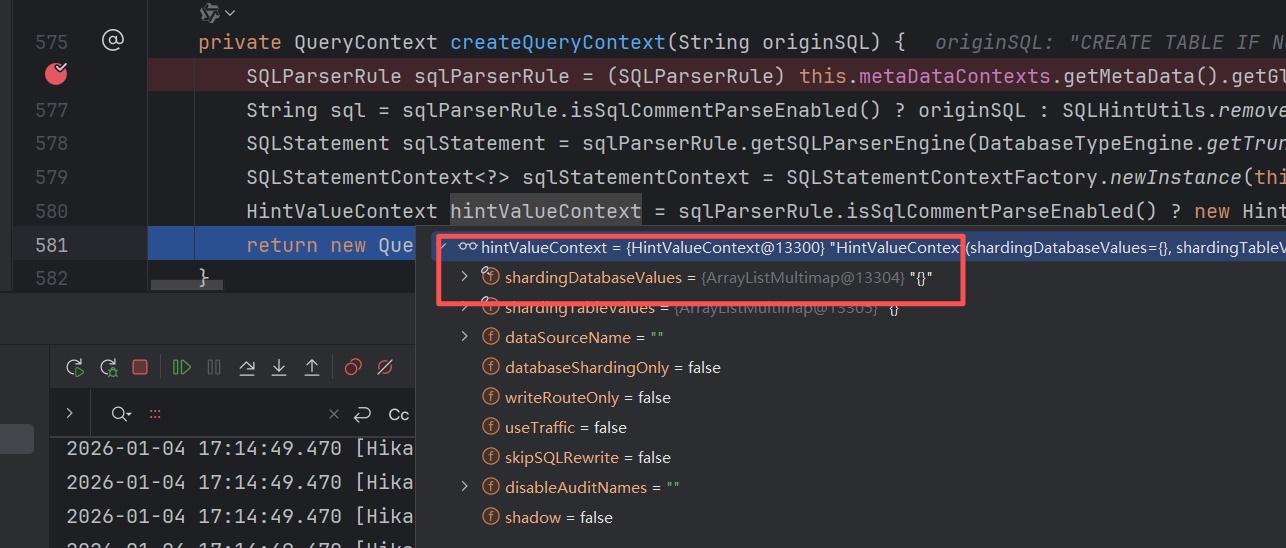
-
- 只有一个地方设置了 HintValueContext.shardingDatabaseValues,但是打断点发现这段代码没有执行,而且也没发现HintValueContext.shardingDatabaseValues 和 HintManager.databaseShardingValues 有关联,继续往下看
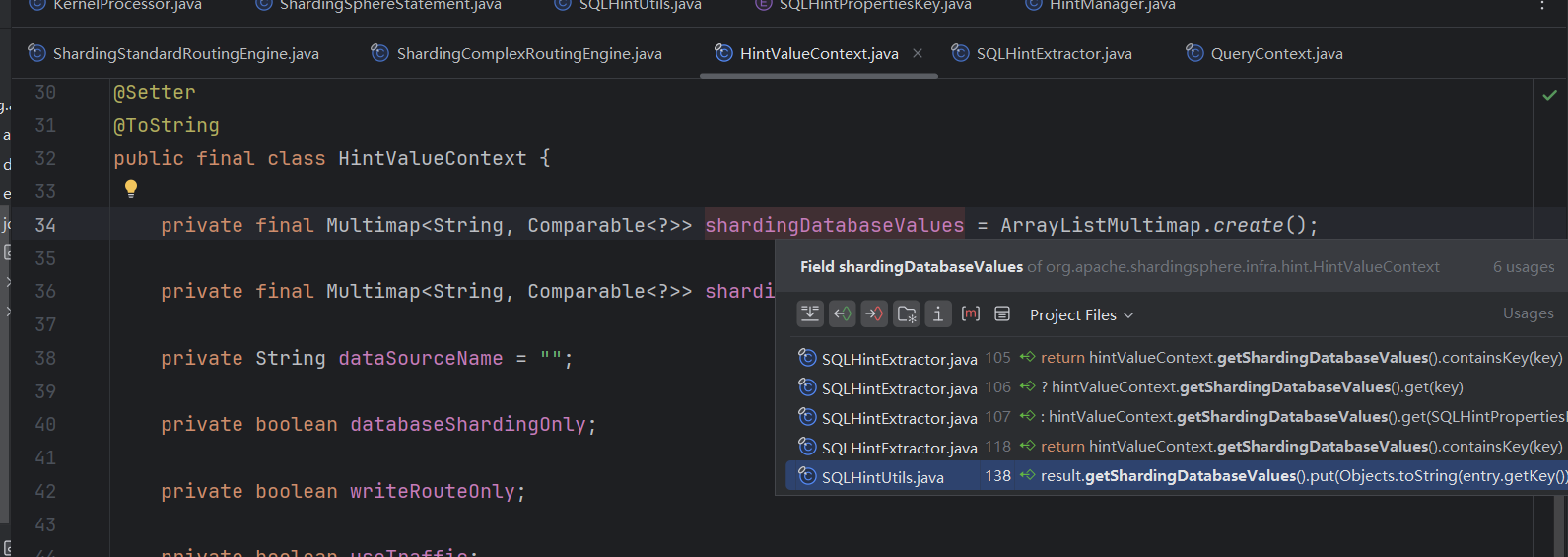
- 只有一个地方设置了 HintValueContext.shardingDatabaseValues,但是打断点发现这段代码没有执行,而且也没发现HintValueContext.shardingDatabaseValues 和 HintManager.databaseShardingValues 有关联,继续往下看
-
- 关键:直接到 org.apache.shardingsphere.infra.context.kernel.KernelProcessor#generateExecutionContext,这里是路由和重写 Sql 的地方,路由是在 org.apache.shardingsphere.infra.route.engine.impl.PartialSQLRouteExecutor#route方法
-
- 继续往下,在 创建路由上下文方法 org.apache.shardingsphere.sharding.route.engine.ShardingSQLRouter#createRouteContext 返回的结果中,routeUnits是空的
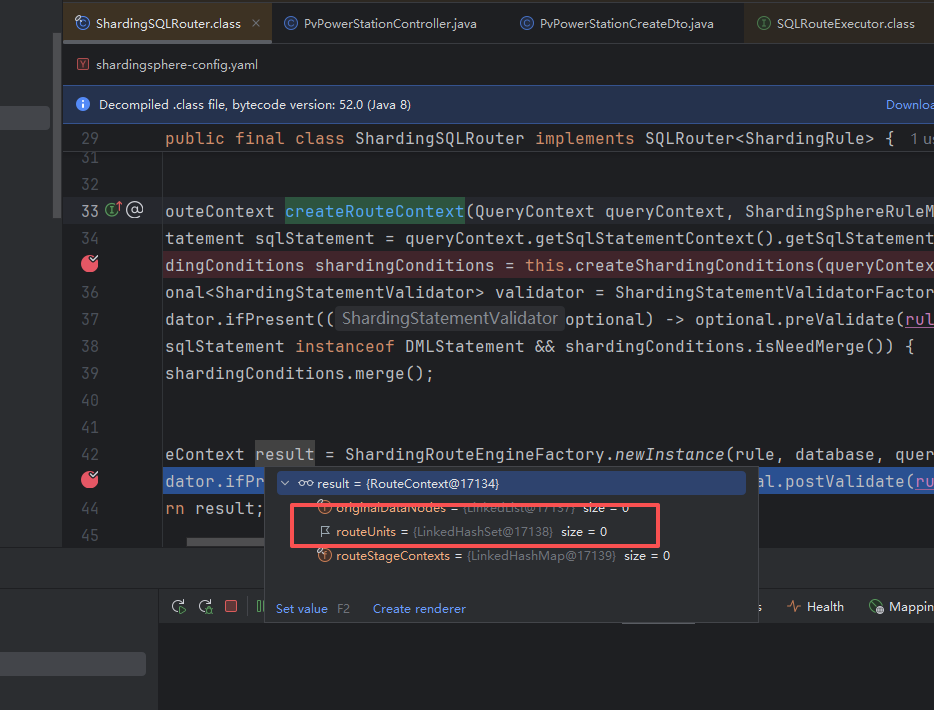
- 继续往下,在 创建路由上下文方法 org.apache.shardingsphere.sharding.route.engine.ShardingSQLRouter#createRouteContext 返回的结果中,routeUnits是空的
-
- 从 instance.setDatabaseShardingValue("ds_1000")往上追,在 org.apache.shardingsphere.sharding.route.engine.type.standard.ShardingStandardRoutingEngine#route 方法中会从instance 中获取 DatabaseShardingValue,但是建表语句的路由引擎没有走这里,走的是 ShardingIgnoreRoutingEngine,所以 instance.setDatabaseShardingValue("ds_1000"); 设置数据源不会生效
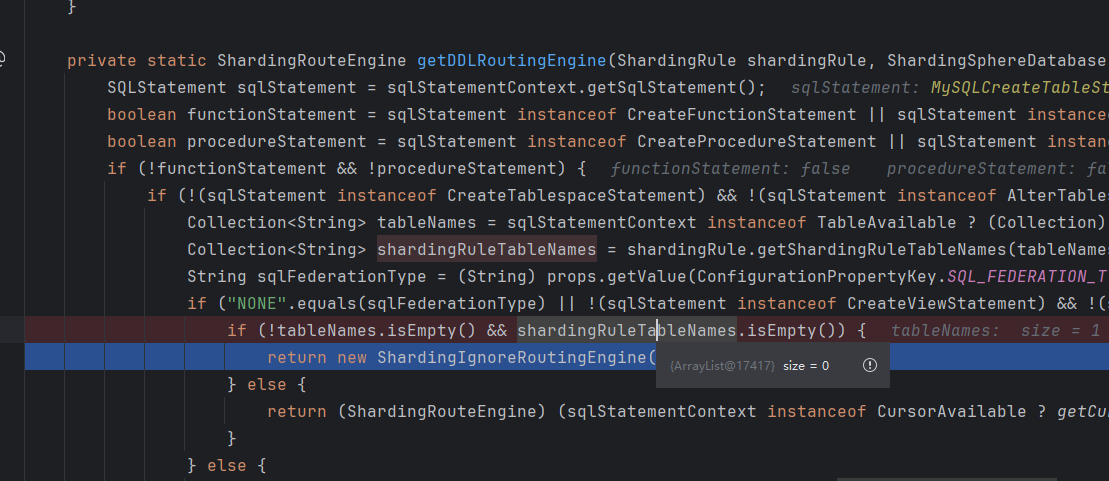
- 从 instance.setDatabaseShardingValue("ds_1000")往上追,在 org.apache.shardingsphere.sharding.route.engine.type.standard.ShardingStandardRoutingEngine#route 方法中会从instance 中获取 DatabaseShardingValue,但是建表语句的路由引擎没有走这里,走的是 ShardingIgnoreRoutingEngine,所以 instance.setDatabaseShardingValue("ds_1000"); 设置数据源不会生效
既然没法直接把建表语句路由到各个数据源,就尝试使用动态数据源的方式实现自动建表


 浙公网安备 33010602011771号