Python开发【第五篇】:模块
模块,用一砣代码实现了某个功能的代码集合。
类似于函数式编程和面向过程编程,函数式编程则完成一个功能,其他代码用来调用即可,提供了代码的重用性和代码间的耦合。而对于一个复杂的功能来,可能需要多个函数才能完成(函数又可以在不同的.py文件中),n个 .py 文件组成的代码集合就称为模块。
如:os 是系统相关的模块;file是文件操作相关的模块
模块分为三种:
- 自定义模块
- 第三方模块
- 内置模块
自定义模块
1、定义模块
情景一:

情景二:

情景三:

2、导入模块
Python之所以应用越来越广泛,在一定程度上也依赖于其为程序员提供了大量的模块以供使用,如果想要使用模块,则需要导入。导入模块有一下几种方法:
import module
from module.xx.xx import xx
from module.xx.xx import xx as rename
from module.xx.xx import *
导入模块其实就是告诉Python解释器去解释那个py文件
- 导入一个py文件,解释器解释该py文件
- 导入一个包,解释器解释该包下的 __init__.py 文件 【py2.7】
那么问题来了,导入模块时是根据那个路径作为基准来进行的呢?即:sys.path
import sys
print sys.path

结果:
['/Users/wupeiqi/PycharmProjects/calculator/p1/pp1', '/usr/local/lib/python2.7/site-packages/setuptools-15.2-py2.7.egg', '/usr/local/lib/python2.7/site-packages/distribute-0.6.28-py2.7.egg', '/usr/local/lib/python2.7/site-packages/MySQL_python-1.2.4b4-py2.7-macosx-10.10-x86_64.egg', '/usr/local/lib/python2.7/site-packages/xlutils-1.7.1-py2.7.egg', '/usr/local/lib/python2.7/site-packages/xlwt-1.0.0-py2.7.egg', '/usr/local/lib/python2.7/site-packages/xlrd-0.9.3-py2.7.egg', '/usr/local/lib/python2.7/site-packages/tornado-4.1-py2.7-macosx-10.10-x86_64.egg', '/usr/local/lib/python2.7/site-packages/backports.ssl_match_hostname-3.4.0.2-py2.7.egg', '/usr/local/lib/python2.7/site-packages/certifi-2015.4.28-py2.7.egg', '/usr/local/lib/python2.7/site-packages/pyOpenSSL-0.15.1-py2.7.egg', '/usr/local/lib/python2.7/site-packages/six-1.9.0-py2.7.egg', '/usr/local/lib/python2.7/site-packages/cryptography-0.9.1-py2.7-macosx-10.10-x86_64.egg', '/usr/local/lib/python2.7/site-packages/cffi-1.1.1-py2.7-macosx-10.10-x86_64.egg', '/usr/local/lib/python2.7/site-packages/ipaddress-1.0.7-py2.7.egg', '/usr/local/lib/python2.7/site-packages/enum34-1.0.4-py2.7.egg', '/usr/local/lib/python2.7/site-packages/pyasn1-0.1.7-py2.7.egg', '/usr/local/lib/python2.7/site-packages/idna-2.0-py2.7.egg', '/usr/local/lib/python2.7/site-packages/pycparser-2.13-py2.7.egg', '/usr/local/lib/python2.7/site-packages/Django-1.7.8-py2.7.egg', '/usr/local/lib/python2.7/site-packages/paramiko-1.10.1-py2.7.egg', '/usr/local/lib/python2.7/site-packages/gevent-1.0.2-py2.7-macosx-10.10-x86_64.egg', '/usr/local/lib/python2.7/site-packages/greenlet-0.4.7-py2.7-macosx-10.10-x86_64.egg', '/Users/wupeiqi/PycharmProjects/calculator', '/usr/local/Cellar/python/2.7.9/Frameworks/Python.framework/Versions/2.7/lib/python27.zip', '/usr/local/Cellar/python/2.7.9/Frameworks/Python.framework/Versions/2.7/lib/python2.7', '/usr/local/Cellar/python/2.7.9/Frameworks/Python.framework/Versions/2.7/lib/python2.7/plat-darwin', '/usr/local/Cellar/python/2.7.9/Frameworks/Python.framework/Versions/2.7/lib/python2.7/plat-mac', '/usr/local/Cellar/python/2.7.9/Frameworks/Python.framework/Versions/2.7/lib/python2.7/plat-mac/lib-scriptpackages', '/usr/local/Cellar/python/2.7.9/Frameworks/Python.framework/Versions/2.7/lib/python2.7/lib-tk', '/usr/local/Cellar/python/2.7.9/Frameworks/Python.framework/Versions/2.7/lib/python2.7/lib-old', '/usr/local/Cellar/python/2.7.9/Frameworks/Python.framework/Versions/2.7/lib/python2.7/lib-dynload', '/usr/local/lib/python2.7/site-packages', '/Library/Python/2.7/site-packages']
如果sys.path路径列表没有你想要的路径,可以通过 sys.path.append('路径') 添加。
import sys
import os
project_path = os.path.dirname(os.path.dirname(os.path.abspath(__file__)))
sys.path.append(project_path)
开源模块
一、下载安装
下载安装有两种方式:


yum
pip
apt-get
...
下载源码
解压源码
进入目录
编译源码    python setup.py build
安装源码    python setup.py install
注:在使用源码安装时,需要使用到gcc编译和python开发环境,所以,需要先执行:
yum install gcc
yum install python-devel
或
apt-get python-dev
安装成功后,模块会自动安装到 sys.path 中的某个目录中,如:
/usr/lib/python2.7/site-packages/
二、导入模块
同自定义模块中导入的方式
内置模块
内置模块是Python自带的功能,在使用内置模块相应的功能时,需要【先导入】再【使用】
一、sys
用于提供对Python解释器相关的操作:
sys.argv           命令行参数List,第一个元素是程序本身路径
sys.exit(n)        退出程序,正常退出时exit(0)
sys.version        获取Python解释程序的版本信息
sys.maxint         最大的Int值
sys.path           返回模块的搜索路径,初始化时使用PYTHONPATH环境变量的值
sys.platform       返回操作系统平台名称
sys.stdin          输入相关
sys.stdout         输出相关
sys.stderror       错误相关
import sys
import time


def view_bar(num, total):
    rate = float(num) / float(total)
    rate_num = int(rate * 100)
    r = '\r%d%%' % (rate_num, )
    sys.stdout.write(r)
    sys.stdout.flush()


if __name__ == '__main__':
    for i in range(0, 100):
        time.sleep(0.1)
        view_bar(i, 100)
二、os
用于提供系统级别的操作:
os.getcwd()                 获取当前工作目录,即当前python脚本工作的目录路径
os.chdir("dirname")         改变当前脚本工作目录;相当于shell下cd
os.curdir                   返回当前目录: ('.')
os.pardir                   获取当前目录的父目录字符串名:('..')
os.makedirs('dir1/dir2')    可生成多层递归目录
os.removedirs('dirname1')   若目录为空,则删除,并递归到上一级目录,如若也为空,则删除,依此类推
os.mkdir('dirname')         生成单级目录;相当于shell中mkdir dirname
os.rmdir('dirname')         删除单级空目录,若目录不为空则无法删除,报错;相当于shell中rmdir dirname
os.listdir('dirname')       列出指定目录下的所有文件和子目录,包括隐藏文件,并以列表方式打印
os.remove()                 删除一个文件
os.rename("oldname","new")  重命名文件/目录
os.stat('path/filename')    获取文件/目录信息
os.sep                      操作系统特定的路径分隔符,win下为"\\",Linux下为"/"
os.linesep                  当前平台使用的行终止符,win下为"\t\n",Linux下为"\n"
os.pathsep                  用于分割文件路径的字符串
os.name                     字符串指示当前使用平台。win->'nt'; Linux->'posix'
os.system("bash command")   运行shell命令,直接显示
os.environ                  获取系统环境变量
os.path.abspath(path)       返回path规范化的绝对路径
os.path.split(path)         将path分割成目录和文件名二元组返回
os.path.dirname(path)       返回path的目录。其实就是os.path.split(path)的第一个元素
os.path.basename(path)      返回path最后的文件名。如何path以/或\结尾,那么就会返回空值。即os.path.split(path)的第二个元素
os.path.exists(path)        如果path存在,返回True;如果path不存在,返回False
os.path.isabs(path)         如果path是绝对路径,返回True
os.path.isfile(path)        如果path是一个存在的文件,返回True。否则返回False
os.path.isdir(path)         如果path是一个存在的目录,则返回True。否则返回False
os.path.join(path1[, path2[, ...]])  将多个路径组合后返回,第一个绝对路径之前的参数将被忽略
os.path.getatime(path)      返回path所指向的文件或者目录的最后存取时间
os.path.getmtime(path)      返回path所指向的文件或者目录的最后修改时间
三、hashlib
用于加密相关的操作,代替了md5模块和sha模块,主要提供 SHA1, SHA224, SHA256, SHA384, SHA512 ,MD5 算法
import md5
hash = md5.new()
hash.update('admin')
print hash.hexdigest()
import sha

hash = sha.new()
hash.update('admin')
print hash.hexdigest()
import hashlib

# ######## md5 ########
hash = hashlib.md5()
# help(hash.update)
hash.update(bytes('admin', encoding='utf-8'))
print(hash.hexdigest())
print(hash.digest())


######## sha1 ########

hash = hashlib.sha1()
hash.update(bytes('admin', encoding='utf-8'))
print(hash.hexdigest())

# ######## sha256 ########

hash = hashlib.sha256()
hash.update(bytes('admin', encoding='utf-8'))
print(hash.hexdigest())


# ######## sha384 ########

hash = hashlib.sha384()
hash.update(bytes('admin', encoding='utf-8'))
print(hash.hexdigest())

# ######## sha512 ########

hash = hashlib.sha512()
hash.update(bytes('admin', encoding='utf-8'))
print(hash.hexdigest())
以上加密算法虽然依然非常厉害,但时候存在缺陷,即:通过撞库可以反解。所以,有必要对加密算法中添加自定义key再来做加密。
import hashlib

# ######## md5 ########

hash = hashlib.md5(bytes('898oaFs09f',encoding="utf-8"))
hash.update(bytes('admin',encoding="utf-8"))
print(hash.hexdigest())
python内置还有一个 hmac 模块,它内部对我们创建 key 和 内容 进行进一步的处理然后再加密
import hmac

h = hmac.new(bytes('898oaFs09f',encoding="utf-8"))
h.update(bytes('admin',encoding="utf-8"))
print(h.hexdigest())
四、random
import random

print(random.random())
print(random.randint(1, 2))
print(random.randrange(1, 10))
import random
checkcode = ''
for i in range(4):
    current = random.randrange(0,4)
    if current != i:
        temp = chr(random.randint(65,90))
    else:
        temp = random.randint(0,9)
    checkcode += str(temp)
print checkcode
五、re
python中re模块提供了正则表达式相关操作
字符:
. 匹配除换行符以外的任意字符
\w 匹配字母或数字或下划线或汉字
\s 匹配任意的空白符
\d 匹配数字
\b 匹配单词的开始或结束
^ 匹配字符串的开始
$ 匹配字符串的结束
次数:
* 重复零次或更多次
+ 重复一次或更多次
? 重复零次或一次
{n} 重复n次
{n,} 重复n次或更多次
{n,m} 重复n到m次
1、match(pattern, string, flags=0)
# match,从起始位置开始匹配,匹配成功返回一个对象,未匹配成功返回None


 match(pattern, string, flags=0)
 # pattern: 正则模型
 # string : 要匹配的字符串
 # falgs  : 匹配模式
     X  VERBOSE     Ignore whitespace and comments for nicer looking RE's.
     I  IGNORECASE  Perform case-insensitive matching.
     M  MULTILINE   "^" matches the beginning of lines (after a newline)
                    as well as the string.
                    "$" matches the end of lines (before a newline) as well
                    as the end of the string.
     S  DOTALL      "." matches any character at all, including the newline.

     A  ASCII       For string patterns, make \w, \W, \b, \B, \d, \D
                    match the corresponding ASCII character categories
                    (rather than the whole Unicode categories, which is the
                    default).
                    For bytes patterns, this flag is the only available
                    behaviour and needn't be specified.

     L  LOCALE      Make \w, \W, \b, \B, dependent on the current locale.
     U  UNICODE     For compatibility only. Ignored for string patterns (it
                    is the default), and forbidden for bytes patterns.
 # 无分组
        r = re.match("h\w+", origin)
        print(r.group())     # 获取匹配到的所有结果
        print(r.groups())    # 获取模型中匹配到的分组结果
        print(r.groupdict()) # 获取模型中匹配到的分组结果

        # 有分组

        # 为何要有分组?提取匹配成功的指定内容(先匹配成功全部正则,再匹配成功的局部内容提取出来)

        r = re.match("h(\w+).*(?P<name>\d)$", origin)
        print(r.group())     # 获取匹配到的所有结果
        print(r.groups())    # 获取模型中匹配到的分组结果
        print(r.groupdict()) # 获取模型中匹配到的分组中所有执行了key的组
2、search(pattern, string, flags=0)
# search,浏览整个字符串去匹配第一个,未匹配成功返回None
# search(pattern, string, flags=0)
  # 无分组

        r = re.search("a\w+", origin)
        print(r.group())     # 获取匹配到的所有结果
        print(r.groups())    # 获取模型中匹配到的分组结果
        print(r.groupdict()) # 获取模型中匹配到的分组结果

        # 有分组

        r = re.search("a(\w+).*(?P<name>\d)$", origin)
        print(r.group())     # 获取匹配到的所有结果
        print(r.groups())    # 获取模型中匹配到的分组结果
        print(r.groupdict()) # 获取模型中匹配到的分组中所有执行了key的组
3、group和groups
a = "123abc456"
print re.search("([0-9]*)([a-z]*)([0-9]*)", a).group()

print re.search("([0-9]*)([a-z]*)([0-9]*)", a).group(0)
print re.search("([0-9]*)([a-z]*)([0-9]*)", a).group(1)
print re.search("([0-9]*)([a-z]*)([0-9]*)", a).group(2)

print re.search("([0-9]*)([a-z]*)([0-9]*)", a).groups()
4、findall(pattern, string, flags=0)
# findall,获取非重复的匹配列表;如果有一个组则以列表形式返回,且每一个匹配均是字符串;如果模型中有多个组,则以列表形式返回,且每一个匹配均是元祖;
# 空的匹配也会包含在结果中
#findall(pattern, string, flags=0)
 # 无分组
        r = re.findall("a\w+",origin)
        print(r)

        # 有分组
        origin = "hello alex bcd abcd lge acd 19"
        r = re.findall("a((\w*)c)(d)", origin)
        print(r)
5、sub(pattern, repl, string, count=0, flags=0)
# sub,替换匹配成功的指定位置字符串

sub(pattern, repl, string, count=0, flags=0)
# pattern: 正则模型
# repl   : 要替换的字符串或可执行对象
# string : 要匹配的字符串
# count  : 指定匹配个数
# flags  : 匹配模式
 # 与分组无关

        origin = "hello alex bcd alex lge alex acd 19"
        r = re.sub("a\w+", "999", origin, 2)
        print(r)
相比于str.replace功能更加强大
6、split(pattern, string, maxsplit=0, flags=0)
# split,根据正则匹配分割字符串

split(pattern, string, maxsplit=0, flags=0)
# pattern: 正则模型
# string : 要匹配的字符串
# maxsplit:指定分割个数
# flags  : 匹配模式
 # 无分组
        origin = "hello alex bcd alex lge alex acd 19"
        r = re.split("alex", origin, 1)
        print(r)

        # 有分组

        origin = "hello alex bcd alex lge alex acd 19"
        r1 = re.split("(alex)", origin, 1)
        print(r1)
        r2 = re.split("(al(ex))", origin, 1)
        print(r2)
IP:
^(25[0-5]|2[0-4]\d|[0-1]?\d?\d)(\.(25[0-5]|2[0-4]\d|[0-1]?\d?\d)){3}$
手机号:
^1[3|4|5|8][0-9]\d{8}$
邮箱:
[a-zA-Z0-9_-]+@[a-zA-Z0-9_-]+(\.[a-zA-Z0-9_-]+)+
相比于str.split更加强大
实例:计算器源码
六、序列化
Python中用于序列化的两个模块
- json 用于【字符串】和 【python基本数据类型】 间进行转换
- pickle 用于【python特有的类型】 和 【python基本数据类型】间进行转换
Json模块提供了四个功能:dumps、dump、loads、load
pickle模块提供了四个功能:dumps、dump、loads、load
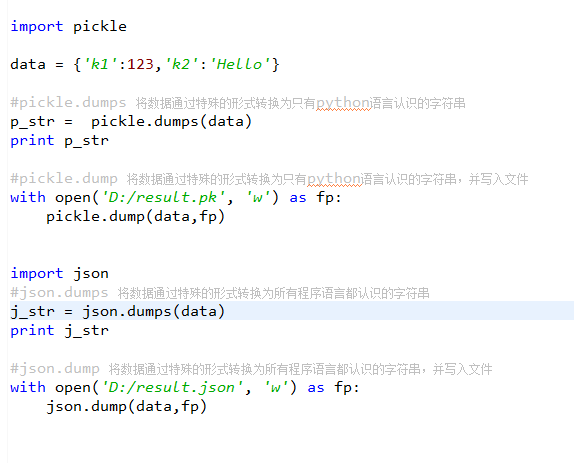
七、configparser
configparser用于处理特定格式的文件,其本质上是利用open来操作文件。
# 注释1
;  注释2

[section1] # 节点
k1 = v1    # 值
k2:v2       # 值

[section2] # 节点
k1 = v1    # 值
1、获取所有节点
import configparser

config = configparser.ConfigParser()
config.read('xxxooo', encoding='utf-8')
ret = config.sections()
print(ret)
2、获取指定节点下所有的键值对
import configparser

config = configparser.ConfigParser()
config.read('xxxooo', encoding='utf-8')
ret = config.items('section1')
print(ret)
3、获取指定节点下所有的建
import configparser

config = configparser.ConfigParser()
config.read('xxxooo', encoding='utf-8')
ret = config.options('section1')
print(ret)
4、获取指定节点下指定key的值
import configparser

config = configparser.ConfigParser()
config.read('xxxooo', encoding='utf-8')


v = config.get('section1', 'k1')
# v = config.getint('section1', 'k1')
# v = config.getfloat('section1', 'k1')
# v = config.getboolean('section1', 'k1')

print(v)
5、检查、删除、添加节点
import configparser

config = configparser.ConfigParser()
config.read('xxxooo', encoding='utf-8')


# 检查
has_sec = config.has_section('section1')
print(has_sec)

# 添加节点
config.add_section("SEC_1")
config.write(open('xxxooo', 'w'))

# 删除节点
config.remove_section("SEC_1")
config.write(open('xxxooo', 'w'))
6、检查、删除、设置指定组内的键值对
import configparser

config = configparser.ConfigParser()
config.read('xxxooo', encoding='utf-8')

# 检查
has_opt = config.has_option('section1', 'k1')
print(has_opt)

# 删除
config.remove_option('section1', 'k1')
config.write(open('xxxooo', 'w'))

# 设置
config.set('section1', 'k10', "123")
config.write(open('xxxooo', 'w'))
八、XML
XML是实现不同语言或程序之间进行数据交换的协议,XML文件格式如下:
<data>
    <country name="Liechtenstein">
        <rank updated="yes">2</rank>
        <year>2023</year>
        <gdppc>141100</gdppc>
        <neighbor direction="E" name="Austria" />
        <neighbor direction="W" name="Switzerland" />
    </country>
    <country name="Singapore">
        <rank updated="yes">5</rank>
        <year>2026</year>
        <gdppc>59900</gdppc>
        <neighbor direction="N" name="Malaysia" />
    </country>
    <country name="Panama">
        <rank updated="yes">69</rank>
        <year>2026</year>
        <gdppc>13600</gdppc>
        <neighbor direction="W" name="Costa Rica" />
        <neighbor direction="E" name="Colombia" />
    </country>
</data>
1、解析XML
from xml.etree import ElementTree as ET


# 打开文件,读取XML内容
str_xml = open('xo.xml', 'r').read()

# 将字符串解析成xml特殊对象,root代指xml文件的根节点
root = ET.XML(str_xml)
from xml.etree import ElementTree as ET

# 直接解析xml文件
tree = ET.parse("xo.xml")

# 获取xml文件的根节点
root = tree.getroot()
2、操作XML
XML格式类型是节点嵌套节点,对于每一个节点均有以下功能,以便对当前节点进行操作:
class Element:
    """An XML element.

    This class is the reference implementation of the Element interface.

    An element's length is its number of subelements.  That means if you
    want to check if an element is truly empty, you should check BOTH
    its length AND its text attribute.

    The element tag, attribute names, and attribute values can be either
    bytes or strings.

    *tag* is the element name.  *attrib* is an optional dictionary containing
    element attributes. *extra* are additional element attributes given as
    keyword arguments.

    Example form:
        <tag attrib>text<child/>...</tag>tail

    """

    当前节点的标签名
    tag = None
    """The element's name."""

    当前节点的属性

    attrib = None
    """Dictionary of the element's attributes."""

    当前节点的内容
    text = None
    """
    Text before first subelement. This is either a string or the value None.
    Note that if there is no text, this attribute may be either
    None or the empty string, depending on the parser.

    """

    tail = None
    """
    Text after this element's end tag, but before the next sibling element's
    start tag.  This is either a string or the value None.  Note that if there
    was no text, this attribute may be either None or an empty string,
    depending on the parser.

    """

    def __init__(self, tag, attrib={}, **extra):
        if not isinstance(attrib, dict):
            raise TypeError("attrib must be dict, not %s" % (
                attrib.__class__.__name__,))
        attrib = attrib.copy()
        attrib.update(extra)
        self.tag = tag
        self.attrib = attrib
        self._children = []

    def __repr__(self):
        return "<%s %r at %#x>" % (self.__class__.__name__, self.tag, id(self))

    def makeelement(self, tag, attrib):
        创建一个新节点
        """Create a new element with the same type.

        *tag* is a string containing the element name.
        *attrib* is a dictionary containing the element attributes.

        Do not call this method, use the SubElement factory function instead.

        """
        return self.__class__(tag, attrib)

    def copy(self):
        """Return copy of current element.

        This creates a shallow copy. Subelements will be shared with the
        original tree.

        """
        elem = self.makeelement(self.tag, self.attrib)
        elem.text = self.text
        elem.tail = self.tail
        elem[:] = self
        return elem

    def __len__(self):
        return len(self._children)

    def __bool__(self):
        warnings.warn(
            "The behavior of this method will change in future versions.  "
            "Use specific 'len(elem)' or 'elem is not None' test instead.",
            FutureWarning, stacklevel=2
            )
        return len(self._children) != 0 # emulate old behaviour, for now

    def __getitem__(self, index):
        return self._children[index]

    def __setitem__(self, index, element):
        # if isinstance(index, slice):
        #     for elt in element:
        #         assert iselement(elt)
        # else:
        #     assert iselement(element)
        self._children[index] = element

    def __delitem__(self, index):
        del self._children[index]

    def append(self, subelement):
        为当前节点追加一个子节点
        """Add *subelement* to the end of this element.

        The new element will appear in document order after the last existing
        subelement (or directly after the text, if it's the first subelement),
        but before the end tag for this element.

        """
        self._assert_is_element(subelement)
        self._children.append(subelement)

    def extend(self, elements):
        为当前节点扩展 n 个子节点
        """Append subelements from a sequence.

        *elements* is a sequence with zero or more elements.

        """
        for element in elements:
            self._assert_is_element(element)
        self._children.extend(elements)

    def insert(self, index, subelement):
        在当前节点的子节点中插入某个节点,即:为当前节点创建子节点,然后插入指定位置
        """Insert *subelement* at position *index*."""
        self._assert_is_element(subelement)
        self._children.insert(index, subelement)

    def _assert_is_element(self, e):
        # Need to refer to the actual Python implementation, not the
        # shadowing C implementation.
        if not isinstance(e, _Element_Py):
            raise TypeError('expected an Element, not %s' % type(e).__name__)

    def remove(self, subelement):
        在当前节点在子节点中删除某个节点
        """Remove matching subelement.

        Unlike the find methods, this method compares elements based on
        identity, NOT ON tag value or contents.  To remove subelements by
        other means, the easiest way is to use a list comprehension to
        select what elements to keep, and then use slice assignment to update
        the parent element.

        ValueError is raised if a matching element could not be found.

        """
        # assert iselement(element)
        self._children.remove(subelement)

    def getchildren(self):
        获取所有的子节点(废弃)
        """(Deprecated) Return all subelements.

        Elements are returned in document order.

        """
        warnings.warn(
            "This method will be removed in future versions.  "
            "Use 'list(elem)' or iteration over elem instead.",
            DeprecationWarning, stacklevel=2
            )
        return self._children

    def find(self, path, namespaces=None):
        获取第一个寻找到的子节点
        """Find first matching element by tag name or path.

        *path* is a string having either an element tag or an XPath,
        *namespaces* is an optional mapping from namespace prefix to full name.

        Return the first matching element, or None if no element was found.

        """
        return ElementPath.find(self, path, namespaces)

    def findtext(self, path, default=None, namespaces=None):
        获取第一个寻找到的子节点的内容
        """Find text for first matching element by tag name or path.

        *path* is a string having either an element tag or an XPath,
        *default* is the value to return if the element was not found,
        *namespaces* is an optional mapping from namespace prefix to full name.

        Return text content of first matching element, or default value if
        none was found.  Note that if an element is found having no text
        content, the empty string is returned.

        """
        return ElementPath.findtext(self, path, default, namespaces)

    def findall(self, path, namespaces=None):
        获取所有的子节点
        """Find all matching subelements by tag name or path.

        *path* is a string having either an element tag or an XPath,
        *namespaces* is an optional mapping from namespace prefix to full name.

        Returns list containing all matching elements in document order.

        """
        return ElementPath.findall(self, path, namespaces)

    def iterfind(self, path, namespaces=None):
        获取所有指定的节点,并创建一个迭代器(可以被for循环)
        """Find all matching subelements by tag name or path.

        *path* is a string having either an element tag or an XPath,
        *namespaces* is an optional mapping from namespace prefix to full name.

        Return an iterable yielding all matching elements in document order.

        """
        return ElementPath.iterfind(self, path, namespaces)

    def clear(self):
        清空节点
        """Reset element.

        This function removes all subelements, clears all attributes, and sets
        the text and tail attributes to None.

        """
        self.attrib.clear()
        self._children = []
        self.text = self.tail = None

    def get(self, key, default=None):
        获取当前节点的属性值
        """Get element attribute.

        Equivalent to attrib.get, but some implementations may handle this a
        bit more efficiently.  *key* is what attribute to look for, and
        *default* is what to return if the attribute was not found.

        Returns a string containing the attribute value, or the default if
        attribute was not found.

        """
        return self.attrib.get(key, default)

    def set(self, key, value):
        为当前节点设置属性值
        """Set element attribute.

        Equivalent to attrib[key] = value, but some implementations may handle
        this a bit more efficiently.  *key* is what attribute to set, and
        *value* is the attribute value to set it to.

        """
        self.attrib[key] = value

    def keys(self):
        获取当前节点的所有属性的 key

        """Get list of attribute names.

        Names are returned in an arbitrary order, just like an ordinary
        Python dict.  Equivalent to attrib.keys()

        """
        return self.attrib.keys()

    def items(self):
        获取当前节点的所有属性值,每个属性都是一个键值对
        """Get element attributes as a sequence.

        The attributes are returned in arbitrary order.  Equivalent to
        attrib.items().

        Return a list of (name, value) tuples.

        """
        return self.attrib.items()

    def iter(self, tag=None):
        在当前节点的子孙中根据节点名称寻找所有指定的节点,并返回一个迭代器(可以被for循环)。
        """Create tree iterator.

        The iterator loops over the element and all subelements in document
        order, returning all elements with a matching tag.

        If the tree structure is modified during iteration, new or removed
        elements may or may not be included.  To get a stable set, use the
        list() function on the iterator, and loop over the resulting list.

        *tag* is what tags to look for (default is to return all elements)

        Return an iterator containing all the matching elements.

        """
        if tag == "*":
            tag = None
        if tag is None or self.tag == tag:
            yield self
        for e in self._children:
            yield from e.iter(tag)

    # compatibility
    def getiterator(self, tag=None):
        # Change for a DeprecationWarning in 1.4
        warnings.warn(
            "This method will be removed in future versions.  "
            "Use 'elem.iter()' or 'list(elem.iter())' instead.",
            PendingDeprecationWarning, stacklevel=2
        )
        return list(self.iter(tag))

    def itertext(self):
        在当前节点的子孙中根据节点名称寻找所有指定的节点的内容,并返回一个迭代器(可以被for循环)。
        """Create text iterator.

        The iterator loops over the element and all subelements in document
        order, returning all inner text.

        """
        tag = self.tag
        if not isinstance(tag, str) and tag is not None:
            return
        if self.text:
            yield self.text
        for e in self:
            yield from e.itertext()
            if e.tail:
                yield e.tail
由于 每个节点 都具有以上的方法,并且在上一步骤中解析时均得到了root(xml文件的根节点),so 可以利用以上方法进行操作xml文件。
a. 遍历XML文档的所有内容
from xml.etree import ElementTree as ET

############ 解析方式一 ############
"""
# 打开文件,读取XML内容
str_xml = open('xo.xml', 'r').read()

# 将字符串解析成xml特殊对象,root代指xml文件的根节点
root = ET.XML(str_xml)
"""
############ 解析方式二 ############

# 直接解析xml文件
tree = ET.parse("xo.xml")

# 获取xml文件的根节点
root = tree.getroot()


### 操作

# 顶层标签
print(root.tag)


# 遍历XML文档的第二层
for child in root:
    # 第二层节点的标签名称和标签属性
    print(child.tag, child.attrib)
    # 遍历XML文档的第三层
    for i in child:
        # 第二层节点的标签名称和内容
        print(i.tag,i.text)
b、遍历XML中指定的节点
from xml.etree import ElementTree as ET

############ 解析方式一 ############
"""
# 打开文件,读取XML内容
str_xml = open('xo.xml', 'r').read()

# 将字符串解析成xml特殊对象,root代指xml文件的根节点
root = ET.XML(str_xml)
"""
############ 解析方式二 ############

# 直接解析xml文件
tree = ET.parse("xo.xml")

# 获取xml文件的根节点
root = tree.getroot()


### 操作

# 顶层标签
print(root.tag)


# 遍历XML中所有的year节点
for node in root.iter('year'):
    # 节点的标签名称和内容
    print(node.tag, node.text)
c、修改节点内容
由于修改的节点时,均是在内存中进行,其不会影响文件中的内容。所以,如果想要修改,则需要重新将内存中的内容写到文件。
from xml.etree import ElementTree as ET

############ 解析方式一 ############

# 打开文件,读取XML内容
str_xml = open('xo.xml', 'r').read()

# 将字符串解析成xml特殊对象,root代指xml文件的根节点
root = ET.XML(str_xml)

############ 操作 ############

# 顶层标签
print(root.tag)

# 循环所有的year节点
for node in root.iter('year'):
    # 将year节点中的内容自增一
    new_year = int(node.text) + 1
    node.text = str(new_year)

    # 设置属性
    node.set('name', 'alex')
    node.set('age', '18')
    # 删除属性
    del node.attrib['name']


############ 保存文件 ############
tree = ET.ElementTree(root)
tree.write("newnew.xml", encoding='utf-8')
from xml.etree import ElementTree as ET

############ 解析方式二 ############

# 直接解析xml文件
tree = ET.parse("xo.xml")

# 获取xml文件的根节点
root = tree.getroot()

############ 操作 ############

# 顶层标签
print(root.tag)

# 循环所有的year节点
for node in root.iter('year'):
    # 将year节点中的内容自增一
    new_year = int(node.text) + 1
    node.text = str(new_year)

    # 设置属性
    node.set('name', 'alex')
    node.set('age', '18')
    # 删除属性
    del node.attrib['name']


############ 保存文件 ############
tree.write("newnew.xml", encoding='utf-8')
d、删除节点
from xml.etree import ElementTree as ET

############ 解析字符串方式打开 ############

# 打开文件,读取XML内容
str_xml = open('xo.xml', 'r').read()

# 将字符串解析成xml特殊对象,root代指xml文件的根节点
root = ET.XML(str_xml)

############ 操作 ############

# 顶层标签
print(root.tag)

# 遍历data下的所有country节点
for country in root.findall('country'):
    # 获取每一个country节点下rank节点的内容
    rank = int(country.find('rank').text)

    if rank > 50:
        # 删除指定country节点
        root.remove(country)

############ 保存文件 ############
tree = ET.ElementTree(root)
tree.write("newnew.xml", encoding='utf-8')
from xml.etree import ElementTree as ET

############ 解析文件方式 ############

# 直接解析xml文件
tree = ET.parse("xo.xml")

# 获取xml文件的根节点
root = tree.getroot()

############ 操作 ############

# 顶层标签
print(root.tag)

# 遍历data下的所有country节点
for country in root.findall('country'):
    # 获取每一个country节点下rank节点的内容
    rank = int(country.find('rank').text)

    if rank > 50:
        # 删除指定country节点
        root.remove(country)

############ 保存文件 ############
tree.write("newnew.xml", encoding='utf-8')
3、创建XML文档
from xml.etree import ElementTree as ET


# 创建根节点
root = ET.Element("famliy")


# 创建节点大儿子
son1 = ET.Element('son', {'name': '儿1'})
# 创建小儿子
son2 = ET.Element('son', {"name": '儿2'})

# 在大儿子中创建两个孙子
grandson1 = ET.Element('grandson', {'name': '儿11'})
grandson2 = ET.Element('grandson', {'name': '儿12'})
son1.append(grandson1)
son1.append(grandson2)


# 把儿子添加到根节点中
root.append(son1)
root.append(son1)

tree = ET.ElementTree(root)
tree.write('oooo.xml',encoding='utf-8', short_empty_elements=False)
from xml.etree import ElementTree as ET

# 创建根节点
root = ET.Element("famliy")


# 创建大儿子
# son1 = ET.Element('son', {'name': '儿1'})
son1 = root.makeelement('son', {'name': '儿1'})
# 创建小儿子
# son2 = ET.Element('son', {"name": '儿2'})
son2 = root.makeelement('son', {"name": '儿2'})

# 在大儿子中创建两个孙子
# grandson1 = ET.Element('grandson', {'name': '儿11'})
grandson1 = son1.makeelement('grandson', {'name': '儿11'})
# grandson2 = ET.Element('grandson', {'name': '儿12'})
grandson2 = son1.makeelement('grandson', {'name': '儿12'})

son1.append(grandson1)
son1.append(grandson2)


# 把儿子添加到根节点中
root.append(son1)
root.append(son1)

tree = ET.ElementTree(root)
tree.write('oooo.xml',encoding='utf-8', short_empty_elements=False)
from xml.etree import ElementTree as ET


# 创建根节点
root = ET.Element("famliy")


# 创建节点大儿子
son1 = ET.SubElement(root, "son", attrib={'name': '儿1'})
# 创建小儿子
son2 = ET.SubElement(root, "son", attrib={"name": "儿2"})

# 在大儿子中创建一个孙子
grandson1 = ET.SubElement(son1, "age", attrib={'name': '儿11'})
grandson1.text = '孙子'


et = ET.ElementTree(root)  #生成文档对象
et.write("test.xml", encoding="utf-8", xml_declaration=True, short_empty_elements=False)
由于原生保存的XML时默认无缩进,如果想要设置缩进的话, 需要修改保存方式:
from xml.etree import ElementTree as ET
from xml.dom import minidom


def prettify(elem):
    """将节点转换成字符串,并添加缩进。
    """
    rough_string = ET.tostring(elem, 'utf-8')
    reparsed = minidom.parseString(rough_string)
    return reparsed.toprettyxml(indent="\t")

# 创建根节点
root = ET.Element("famliy")


# 创建大儿子
# son1 = ET.Element('son', {'name': '儿1'})
son1 = root.makeelement('son', {'name': '儿1'})
# 创建小儿子
# son2 = ET.Element('son', {"name": '儿2'})
son2 = root.makeelement('son', {"name": '儿2'})

# 在大儿子中创建两个孙子
# grandson1 = ET.Element('grandson', {'name': '儿11'})
grandson1 = son1.makeelement('grandson', {'name': '儿11'})
# grandson2 = ET.Element('grandson', {'name': '儿12'})
grandson2 = son1.makeelement('grandson', {'name': '儿12'})

son1.append(grandson1)
son1.append(grandson2)


# 把儿子添加到根节点中
root.append(son1)
root.append(son1)


raw_str = prettify(root)

f = open("xxxoo.xml",'w',encoding='utf-8')
f.write(raw_str)
f.close()
4、命名空间
详细介绍,猛击这里
from xml.etree import ElementTree as ET

ET.register_namespace('com',"http://www.company.com") #some name

# build a tree structure
root = ET.Element("{http://www.company.com}STUFF")
body = ET.SubElement(root, "{http://www.company.com}MORE_STUFF", attrib={"{http://www.company.com}hhh": "123"})
body.text = "STUFF EVERYWHERE!"

# wrap it in an ElementTree instance, and save as XML
tree = ET.ElementTree(root)

tree.write("page.xml",
           xml_declaration=True,
           encoding='utf-8',
           method="xml")
九、requests
Python标准库中提供了:urllib等模块以供Http请求,但是,它的 API 太渣了。它是为另一个时代、另一个互联网所创建的。它需要巨量的工作,甚至包括各种方法覆盖,来完成最简单的任务。
import urllib.request


f = urllib.request.urlopen('http://www.webxml.com.cn//webservices/qqOnlineWebService.asmx/qqCheckOnline?qqCode=424662508')
result = f.read().decode('utf-8')
import urllib.request

req = urllib.request.Request('http://www.example.com/')
req.add_header('Referer', 'http://www.python.org/')
r = urllib.request.urlopen(req)

result = f.read().decode('utf-8')
注:更多见Python官方文档:https://docs.python.org/3.5/library/urllib.request.html#module-urllib.request
Requests 是使用 Apache2 Licensed 许可证的 基于Python开发的HTTP 库,其在Python内置模块的基础上进行了高度的封装,从而使得Pythoner进行网络请求时,变得美好了许多,使用Requests可以轻而易举的完成浏览器可有的任何操作。
1、安装模块
pip3 install requests
2、使用模块
# 1、无参数实例

import requests

ret = requests.get('https://github.com/timeline.json')

print(ret.url)
print(ret.text)


# 2、有参数实例

import requests

payload = {'key1': 'value1', 'key2': 'value2'}
ret = requests.get("http://httpbin.org/get", params=payload)

print(ret.url)
print(ret.text)
# 1、基本POST实例

import requests

payload = {'key1': 'value1', 'key2': 'value2'}
ret = requests.post("http://httpbin.org/post", data=payload)

print(ret.text)


# 2、发送请求头和数据实例

import requests
import json

url = 'https://api.github.com/some/endpoint'
payload = {'some': 'data'}
headers = {'content-type': 'application/json'}

ret = requests.post(url, data=json.dumps(payload), headers=headers)

print(ret.text)
print(ret.cookies)
requests.get(url, params=None, **kwargs)
requests.post(url, data=None, json=None, **kwargs)
requests.put(url, data=None, **kwargs)
requests.head(url, **kwargs)
requests.delete(url, **kwargs)
requests.patch(url, data=None, **kwargs)
requests.options(url, **kwargs)

# 以上方法均是在此方法的基础上构建
requests.request(method, url, **kwargs)
更多requests模块相关的文档见:http://cn.python-requests.org/zh_CN/latest/
3、Http请求和XML实例
实例:检测QQ账号是否在线
import urllib
import requests
from xml.etree import ElementTree as ET

# 使用内置模块urllib发送HTTP请求,或者XML格式内容
"""
f = urllib.request.urlopen('http://www.webxml.com.cn//webservices/qqOnlineWebService.asmx/qqCheckOnline?qqCode=424662508')
result = f.read().decode('utf-8')
"""


# 使用第三方模块requests发送HTTP请求,或者XML格式内容
r = requests.get('http://www.webxml.com.cn//webservices/qqOnlineWebService.asmx/qqCheckOnline?qqCode=424662508')
result = r.text

# 解析XML格式内容
node = ET.XML(result)

# 获取内容
if node.text == "Y":
    print("在线")
else:
    print("离线")
实例:查看火车停靠信息
import urllib
import requests
from xml.etree import ElementTree as ET

# 使用内置模块urllib发送HTTP请求,或者XML格式内容
"""
f = urllib.request.urlopen('http://www.webxml.com.cn/WebServices/TrainTimeWebService.asmx/getDetailInfoByTrainCode?TrainCode=G666&UserID=')
result = f.read().decode('utf-8')
"""

# 使用第三方模块requests发送HTTP请求,或者XML格式内容
r = requests.get('http://www.webxml.com.cn/WebServices/TrainTimeWebService.asmx/getDetailInfoByTrainCode?TrainCode=G666&UserID=')
result = r.text

# 解析XML格式内容
root = ET.XML(result)
for node in root.iter('TrainDetailInfo'):
    print(node.find('TrainStation').text,node.find('StartTime').text,node.tag,node.attrib)
注:更多接口猛击这里
十、logging
用于便捷记录日志且线程安全的模块
1、单文件日志
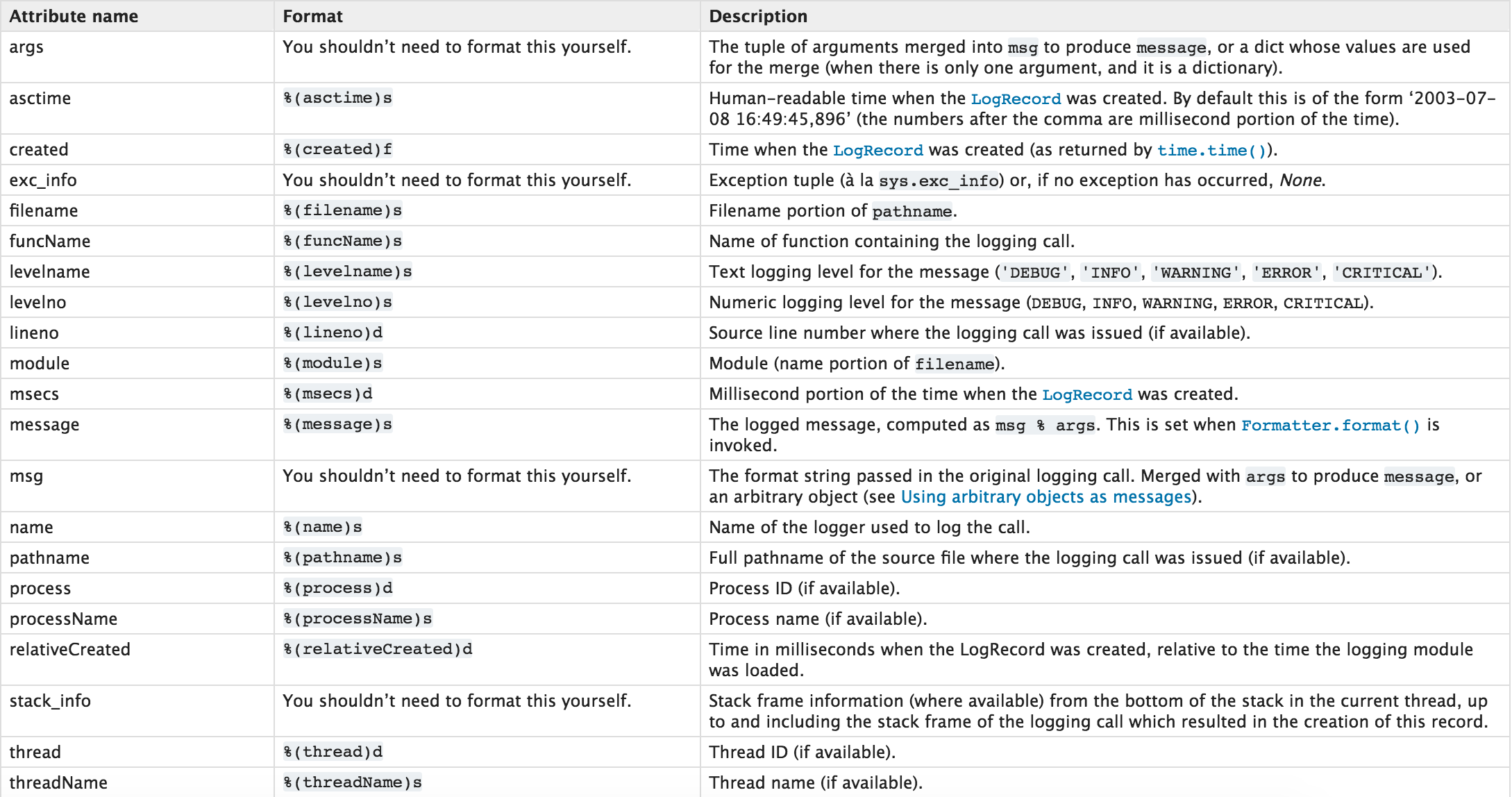
import logging


logging.basicConfig(filename='log.log',
                    format='%(asctime)s - %(name)s - %(levelname)s -%(module)s:  %(message)s',
                    datefmt='%Y-%m-%d %H:%M:%S %p',
                    level=10)

logging.debug('debug')
logging.info('info')
logging.warning('warning')
logging.error('error')
logging.critical('critical')
logging.log(10,'log')
日志等级:
CRITICAL = 50
FATAL = CRITICAL
ERROR = 40
WARNING = 30
WARN = WARNING
INFO = 20
DEBUG = 10
NOTSET = 0
注:只有【当前写等级】大于【日志等级】时,日志文件才被记录。
日志记录格式:
2、多文件日志
对于上述记录日志的功能,只能将日志记录在单文件中,如果想要设置多个日志文件,logging.basicConfig将无法完成,需要自定义文件和日志操作对象。
# 定义文件
file_1_1 = logging.FileHandler('l1_1.log', 'a', encoding='utf-8')
fmt = logging.Formatter(fmt="%(asctime)s - %(name)s - %(levelname)s -%(module)s:  %(message)s")
file_1_1.setFormatter(fmt)

file_1_2 = logging.FileHandler('l1_2.log', 'a', encoding='utf-8')
fmt = logging.Formatter()
file_1_2.setFormatter(fmt)

# 定义日志
logger1 = logging.Logger('s1', level=logging.ERROR)
logger1.addHandler(file_1_1)
logger1.addHandler(file_1_2)


# 写日志
logger1.critical('1111')
# 定义文件
file_2_1 = logging.FileHandler('l2_1.log', 'a')
fmt = logging.Formatter()
file_2_1.setFormatter(fmt)

# 定义日志
logger2 = logging.Logger('s2', level=logging.INFO)
logger2.addHandler(file_2_1)
如上述创建的两个日志对象
- 当使用【logger1】写日志时,会将相应的内容写入 l1_1.log 和 l1_2.log 文件中
- 当使用【logger2】写日志时,会将相应的内容写入 l2_1.log 文件中
十一、系统命令
可以执行shell命令的相关模块和函数有:
- os.system
- os.spawn*
- os.popen* --废弃
- popen2.* --废弃
- commands.* --废弃,3.x中被移除
import commands

result = commands.getoutput('cmd')
result = commands.getstatus('cmd')
result = commands.getstatusoutput('cmd')
以上执行shell命令的相关的模块和函数的功能均在 subprocess 模块中实现,并提供了更丰富的功能。
call
执行命令,返回状态码
ret = subprocess.call(["ls", "-l"], shell=False)
ret = subprocess.call("ls -l", shell=True)
check_call
执行命令,如果执行状态码是 0 ,则返回0,否则抛异常
subprocess.check_call(["ls", "-l"])
subprocess.check_call("exit 1", shell=True)
check_output
执行命令,如果状态码是 0 ,则返回执行结果,否则抛异常
subprocess.check_output(["echo", "Hello World!"])
subprocess.check_output("exit 1", shell=True)
subprocess.Popen(...)
用于执行复杂的系统命令
参数:
- args:shell命令,可以是字符串或者序列类型(如:list,元组)
- bufsize:指定缓冲。0 无缓冲,1
行缓冲,其他 缓冲区大小,负值 系统缓冲 - stdin, stdout, stderr:分别表示程序的标准输入、输出、错误句柄
- preexec_fn:只在Unix平台下有效,用于指定一个可执行对象(callable object),它将在子进程运行之前被调用
- close_sfs:在windows平台下,如果close_fds被设置为True,则新创建的子进程将不会继承父进程的输入、输出、错误管道。
所以不能将close_fds设置为True同时重定向子进程的标准输入、输出与错误(stdin, stdout, stderr)。 - shell:同上
- cwd:用于设置子进程的当前目录
- env:用于指定子进程的环境变量。如果env = None,子进程的环境变量将从父进程中继承。
- universal_newlines:不同系统的换行符不同,True -> 同意使用 \n
- startupinfo与createionflags只在windows下有效
将被传递给底层的CreateProcess()函数,用于设置子进程的一些属性,如:主窗口的外观,进程的优先级等等
import subprocess
ret1 = subprocess.Popen(["mkdir","t1"])
ret2 = subprocess.Popen("mkdir t2", shell=True)
终端输入的命令分为两种:
- 输入即可得到输出,如:ifconfig
- 输入进行某环境,依赖再输入,如:python
import subprocess

obj = subprocess.Popen("mkdir t3", shell=True, cwd='/home/dev',)
import subprocess

obj = subprocess.Popen(["python"], stdin=subprocess.PIPE, stdout=subprocess.PIPE, stderr=subprocess.PIPE, universal_newlines=True)
obj.stdin.write("print(1)\n")
obj.stdin.write("print(2)")
obj.stdin.close()

cmd_out = obj.stdout.read()
obj.stdout.close()
cmd_error = obj.stderr.read()
obj.stderr.close()

print(cmd_out)
print(cmd_error)
import subprocess

obj = subprocess.Popen(["python"], stdin=subprocess.PIPE, stdout=subprocess.PIPE, stderr=subprocess.PIPE, universal_newlines=True)
obj.stdin.write("print(1)\n")
obj.stdin.write("print(2)")

out_error_list = obj.communicate()
print(out_error_list)
import subprocess

obj = subprocess.Popen(["python"], stdin=subprocess.PIPE, stdout=subprocess.PIPE, stderr=subprocess.PIPE, universal_newlines=True)
out_error_list = obj.communicate('print("hello")')
print(out_error_list)
十二、shutil
高级的 文件、文件夹、压缩包 处理模块
shutil.copyfileobj(fsrc, fdst[, length])
将文件内容拷贝到另一个文件中
import shutil

shutil.copyfileobj(open('old.xml','r'), open('new.xml', 'w'))
def copyfileobj(fsrc, fdst, length=16*1024):
    """copy data from file-like object fsrc to file-like object fdst"""
    while 1:
        buf = fsrc.read(length)
        if not buf:
            break
        fdst.write(buf)
shutil.copyfile(src, dst)
拷贝文件
shutil.copyfile('f1.log', 'f2.log')
def copyfile(src, dst):
    """Copy data from src to dst"""
    if _samefile(src, dst):
        raise Error("`%s` and `%s` are the same file" % (src, dst))

    for fn in [src, dst]:
        try:
            st = os.stat(fn)
        except OSError:
            # File most likely does not exist
            pass
        else:
            # XXX What about other special files? (sockets, devices...)
            if stat.S_ISFIFO(st.st_mode):
                raise SpecialFileError("`%s` is a named pipe" % fn)

    with open(src, 'rb') as fsrc:
        with open(dst, 'wb') as fdst:
            copyfileobj(fsrc, fdst)
shutil.copymode(src, dst)
仅拷贝权限。内容、组、用户均不变
shutil.copymode('f1.log', 'f2.log')
def copymode(src, dst):
    """Copy mode bits from src to dst"""
    if hasattr(os, 'chmod'):
        st = os.stat(src)
        mode = stat.S_IMODE(st.st_mode)
        os.chmod(dst, mode)
shutil.copystat(src, dst)
仅拷贝状态的信息,包括:mode bits, atime, mtime, flags
shutil.copystat('f1.log', 'f2.log')
def copystat(src, dst):
    """Copy all stat info (mode bits, atime, mtime, flags) from src to dst"""
    st = os.stat(src)
    mode = stat.S_IMODE(st.st_mode)
    if hasattr(os, 'utime'):
        os.utime(dst, (st.st_atime, st.st_mtime))
    if hasattr(os, 'chmod'):
        os.chmod(dst, mode)
    if hasattr(os, 'chflags') and hasattr(st, 'st_flags'):
        try:
            os.chflags(dst, st.st_flags)
        except OSError, why:
            for err in 'EOPNOTSUPP', 'ENOTSUP':
                if hasattr(errno, err) and why.errno == getattr(errno, err):
                    break
            else:
                raise
shutil.copy(src, dst)
拷贝文件和权限
import shutil

shutil.copy('f1.log', 'f2.log')
def copy(src, dst):
    """Copy data and mode bits ("cp src dst").

    The destination may be a directory.

    """
    if os.path.isdir(dst):
        dst = os.path.join(dst, os.path.basename(src))
    copyfile(src, dst)
    copymode(src, dst)
shutil.copy2(src, dst)
拷贝文件和状态信息
import shutil

shutil.copy2('f1.log', 'f2.log')
def copy2(src, dst):
    """Copy data and all stat info ("cp -p src dst").

    The destination may be a directory.

    """
    if os.path.isdir(dst):
        dst = os.path.join(dst, os.path.basename(src))
    copyfile(src, dst)
    copystat(src, dst)
shutil.ignore_patterns(*patterns)
shutil.copytree(src, dst, symlinks=False, ignore=None)
递归的去拷贝文件夹
import shutil

shutil.copytree('folder1', 'folder2', ignore=shutil.ignore_patterns('*.pyc', 'tmp*'))
def ignore_patterns(*patterns):
    """Function that can be used as copytree() ignore parameter.

    Patterns is a sequence of glob-style patterns
    that are used to exclude files"""
    def _ignore_patterns(path, names):
        ignored_names = []
        for pattern in patterns:
            ignored_names.extend(fnmatch.filter(names, pattern))
        return set(ignored_names)
    return _ignore_patterns

def copytree(src, dst, symlinks=False, ignore=None):
    """Recursively copy a directory tree using copy2().

    The destination directory must not already exist.
    If exception(s) occur, an Error is raised with a list of reasons.

    If the optional symlinks flag is true, symbolic links in the
    source tree result in symbolic links in the destination tree; if
    it is false, the contents of the files pointed to by symbolic
    links are copied.

    The optional ignore argument is a callable. If given, it
    is called with the `src` parameter, which is the directory
    being visited by copytree(), and `names` which is the list of
    `src` contents, as returned by os.listdir():

        callable(src, names) -> ignored_names

    Since copytree() is called recursively, the callable will be
    called once for each directory that is copied. It returns a
    list of names relative to the `src` directory that should
    not be copied.

    XXX Consider this example code rather than the ultimate tool.

    """
    names = os.listdir(src)
    if ignore is not None:
        ignored_names = ignore(src, names)
    else:
        ignored_names = set()

    os.makedirs(dst)
    errors = []
    for name in names:
        if name in ignored_names:
            continue
        srcname = os.path.join(src, name)
        dstname = os.path.join(dst, name)
        try:
            if symlinks and os.path.islink(srcname):
                linkto = os.readlink(srcname)
                os.symlink(linkto, dstname)
            elif os.path.isdir(srcname):
                copytree(srcname, dstname, symlinks, ignore)
            else:
                # Will raise a SpecialFileError for unsupported file types
                copy2(srcname, dstname)
        # catch the Error from the recursive copytree so that we can
        # continue with other files
        except Error, err:
            errors.extend(err.args[0])
        except EnvironmentError, why:
            errors.append((srcname, dstname, str(why)))
    try:
        copystat(src, dst)
    except OSError, why:
        if WindowsError is not None and isinstance(why, WindowsError):
            # Copying file access times may fail on Windows
            pass
        else:
            errors.append((src, dst, str(why)))
    if errors:
        raise Error, errors
shutil.rmtree(path[, ignore_errors[, onerror]])
递归的去删除文件
import shutil

shutil.rmtree('folder1')
def rmtree(path, ignore_errors=False, onerror=None):
    """Recursively delete a directory tree.

    If ignore_errors is set, errors are ignored; otherwise, if onerror
    is set, it is called to handle the error with arguments (func,
    path, exc_info) where func is os.listdir, os.remove, or os.rmdir;
    path is the argument to that function that caused it to fail; and
    exc_info is a tuple returned by sys.exc_info().  If ignore_errors
    is false and onerror is None, an exception is raised.

    """
    if ignore_errors:
        def onerror(*args):
            pass
    elif onerror is None:
        def onerror(*args):
            raise
    try:
        if os.path.islink(path):
            # symlinks to directories are forbidden, see bug #1669
            raise OSError("Cannot call rmtree on a symbolic link")
    except OSError:
        onerror(os.path.islink, path, sys.exc_info())
        # can't continue even if onerror hook returns
        return
    names = []
    try:
        names = os.listdir(path)
    except os.error, err:
        onerror(os.listdir, path, sys.exc_info())
    for name in names:
        fullname = os.path.join(path, name)
        try:
            mode = os.lstat(fullname).st_mode
        except os.error:
            mode = 0
        if stat.S_ISDIR(mode):
            rmtree(fullname, ignore_errors, onerror)
        else:
            try:
                os.remove(fullname)
            except os.error, err:
                onerror(os.remove, fullname, sys.exc_info())
    try:
        os.rmdir(path)
    except os.error:
        onerror(os.rmdir, path, sys.exc_info())
shutil.move(src, dst)
递归的去移动文件,它类似mv命令,其实就是重命名。
import shutil

shutil.move('folder1', 'folder3')
def move(src, dst):
    """Recursively move a file or directory to another location. This is
    similar to the Unix "mv" command.

    If the destination is a directory or a symlink to a directory, the source
    is moved inside the directory. The destination path must not already
    exist.

    If the destination already exists but is not a directory, it may be
    overwritten depending on os.rename() semantics.

    If the destination is on our current filesystem, then rename() is used.
    Otherwise, src is copied to the destination and then removed.
    A lot more could be done here...  A look at a mv.c shows a lot of
    the issues this implementation glosses over.

    """
    real_dst = dst
    if os.path.isdir(dst):
        if _samefile(src, dst):
            # We might be on a case insensitive filesystem,
            # perform the rename anyway.
            os.rename(src, dst)
            return

        real_dst = os.path.join(dst, _basename(src))
        if os.path.exists(real_dst):
            raise Error, "Destination path '%s' already exists" % real_dst
    try:
        os.rename(src, real_dst)
    except OSError:
        if os.path.isdir(src):
            if _destinsrc(src, dst):
                raise Error, "Cannot move a directory '%s' into itself '%s'." % (src, dst)
            copytree(src, real_dst, symlinks=True)
            rmtree(src)
        else:
            copy2(src, real_dst)
            os.unlink(src)
shutil.make_archive(base_name, format,...)
创建压缩包并返回文件路径,例如:zip、tar
创建压缩包并返回文件路径,例如:zip、tar
- base_name: 压缩包的文件名,也可以是压缩包的路径。只是文件名时,则保存至当前目录,否则保存至指定路径,
如:www =>保存至当前路径
如:/Users/wupeiqi/www =>保存至/Users/wupeiqi/ - format: 压缩包种类,“zip”, “tar”, “bztar”,“gztar”
- root_dir: 要压缩的文件夹路径(默认当前目录)
- owner: 用户,默认当前用户
- group: 组,默认当前组
- logger: 用于记录日志,通常是logging.Logger对象
#将 /Users/wupeiqi/Downloads/test 下的文件打包放置当前程序目录
import shutil
ret = shutil.make_archive("wwwwwwwwww", 'gztar', root_dir='/Users/wupeiqi/Downloads/test')


#将 /Users/wupeiqi/Downloads/test 下的文件打包放置 /Users/wupeiqi/目录
import shutil
ret = shutil.make_archive("/Users/wupeiqi/wwwwwwwwww", 'gztar', root_dir='/Users/wupeiqi/Downloads/test')
def make_archive(base_name, format, root_dir=None, base_dir=None, verbose=0,
                 dry_run=0, owner=None, group=None, logger=None):
    """Create an archive file (eg. zip or tar).

    'base_name' is the name of the file to create, minus any format-specific
    extension; 'format' is the archive format: one of "zip", "tar", "bztar"
    or "gztar".

    'root_dir' is a directory that will be the root directory of the
    archive; ie. we typically chdir into 'root_dir' before creating the
    archive.  'base_dir' is the directory where we start archiving from;
    ie. 'base_dir' will be the common prefix of all files and
    directories in the archive.  'root_dir' and 'base_dir' both default
    to the current directory.  Returns the name of the archive file.

    'owner' and 'group' are used when creating a tar archive. By default,
    uses the current owner and group.
    """
    save_cwd = os.getcwd()
    if root_dir is not None:
        if logger is not None:
            logger.debug("changing into '%s'", root_dir)
        base_name = os.path.abspath(base_name)
        if not dry_run:
            os.chdir(root_dir)

    if base_dir is None:
        base_dir = os.curdir

    kwargs = {'dry_run': dry_run, 'logger': logger}

    try:
        format_info = _ARCHIVE_FORMATS[format]
    except KeyError:
        raise ValueError, "unknown archive format '%s'" % format

    func = format_info[0]
    for arg, val in format_info[1]:
        kwargs[arg] = val

    if format != 'zip':
        kwargs['owner'] = owner
        kwargs['group'] = group

    try:
        filename = func(base_name, base_dir, **kwargs)
    finally:
        if root_dir is not None:
            if logger is not None:
                logger.debug("changing back to '%s'", save_cwd)
            os.chdir(save_cwd)

    return filename
shutil 对压缩包的处理是调用 ZipFile 和 TarFile 两个模块来进行的,详细:
复制代码
import zipfile

# 压缩
z = zipfile.ZipFile('laxi.zip', 'w')
z.write('a.log')
z.write('data.data')
z.close()

# 解压
z = zipfile.ZipFile('laxi.zip', 'r')
z.extractall()
z.close()
import tarfile

# 压缩
tar = tarfile.open('your.tar','w')
tar.add('/Users/wupeiqi/PycharmProjects/bbs2.log', arcname='bbs2.log')
tar.add('/Users/wupeiqi/PycharmProjects/cmdb.log', arcname='cmdb.log')
tar.close()

# 解压
tar = tarfile.open('your.tar','r')
tar.extractall()  # 可设置解压地址
tar.close()
class ZipFile(object): """ Class with methods to open, read, write, close, list zip files. z = ZipFile(file, mode="r", compression=ZIP_STORED, allowZip64=False) file: Either the path to the file, or a file-like object. If it is a path, the file will be opened and closed by ZipFile. mode: The mode can be either read "r", write "w" or append "a". compression: ZIP_STORED (no compression) or ZIP_DEFLATED (requires zlib). allowZip64: if True ZipFile will create files with ZIP64 extensions when needed, otherwise it will raise an exception when this would be necessary. """ fp = None # Set here since __del__ checks it def __init__(self, file, mode="r", compression=ZIP_STORED, allowZip64=False): """Open the ZIP file with mode read "r", write "w" or append "a".""" if mode not in ("r", "w", "a"): raise RuntimeError('ZipFile() requires mode "r", "w", or "a"') if compression == ZIP_STORED: pass elif compression == ZIP_DEFLATED: if not zlib: raise RuntimeError,\ "Compression requires the (missing) zlib module" else: raise RuntimeError, "That compression method is not supported" self._allowZip64 = allowZip64 self._didModify = False self.debug = 0 # Level of printing: 0 through 3 self.NameToInfo = {} # Find file info given name self.filelist = [] # List of ZipInfo instances for archive self.compression = compression # Method of compression self.mode = key = mode.replace('b', '')[0] self.pwd = None self._comment = '' # Check if we were passed a file-like object if isinstance(file, basestring): self._filePassed = 0 self.filename = file modeDict = {'r' : 'rb', 'w': 'wb', 'a' : 'r+b'} try: self.fp = open(file, modeDict[mode]) except IOError: if mode == 'a': mode = key = 'w' self.fp = open(file, modeDict[mode]) else: raise else: self._filePassed = 1 self.fp = file self.filename = getattr(file, 'name', None) try: if key == 'r': self._RealGetContents() elif key == 'w': # set the modified flag so central directory gets written # even if no files are added to the archive self._didModify = True elif key == 'a': try: # See if file is a zip file self._RealGetContents() # seek to start of directory and overwrite self.fp.seek(self.start_dir, 0) except BadZipfile: # file is not a zip file, just append self.fp.seek(0, 2) # set the modified flag so central directory gets written # even if no files are added to the archive self._didModify = True else: raise RuntimeError('Mode must be "r", "w" or "a"') except: fp = self.fp self.fp = None if not self._filePassed: fp.close() raise def __enter__(self): return self def __exit__(self, type, value, traceback): self.close() def _RealGetContents(self): """Read in the table of contents for the ZIP file.""" fp = self.fp try: endrec = _EndRecData(fp) except IOError: raise BadZipfile("File is not a zip file") if not endrec: raise BadZipfile, "File is not a zip file" if self.debug > 1: print endrec size_cd = endrec[_ECD_SIZE] # bytes in central directory offset_cd = endrec[_ECD_OFFSET] # offset of central directory self._comment = endrec[_ECD_COMMENT] # archive comment # "concat" is zero, unless zip was concatenated to another file concat = endrec[_ECD_LOCATION] - size_cd - offset_cd if endrec[_ECD_SIGNATURE] == stringEndArchive64: # If Zip64 extension structures are present, account for them concat -= (sizeEndCentDir64 + sizeEndCentDir64Locator) if self.debug > 2: inferred = concat + offset_cd print "given, inferred, offset", offset_cd, inferred, concat # self.start_dir: Position of start of central directory self.start_dir = offset_cd + concat fp.seek(self.start_dir, 0) data = fp.read(size_cd) fp = cStringIO.StringIO(data) total = 0 while total < size_cd: centdir = fp.read(sizeCentralDir) if len(centdir) != sizeCentralDir: raise BadZipfile("Truncated central directory") centdir = struct.unpack(structCentralDir, centdir) if centdir[_CD_SIGNATURE] != stringCentralDir: raise BadZipfile("Bad magic number for central directory") if self.debug > 2: print centdir filename = fp.read(centdir[_CD_FILENAME_LENGTH]) # Create ZipInfo instance to store file information x = ZipInfo(filename) x.extra = fp.read(centdir[_CD_EXTRA_FIELD_LENGTH]) x.comment = fp.read(centdir[_CD_COMMENT_LENGTH]) x.header_offset = centdir[_CD_LOCAL_HEADER_OFFSET] (x.create_version, x.create_system, x.extract_version, x.reserved, x.flag_bits, x.compress_type, t, d, x.CRC, x.compress_size, x.file_size) = centdir[1:12] x.volume, x.internal_attr, x.external_attr = centdir[15:18] # Convert date/time code to (year, month, day, hour, min, sec) x._raw_time = t x.date_time = ( (d>>9)+1980, (d>>5)&0xF, d&0x1F, t>>11, (t>>5)&0x3F, (t&0x1F) * 2 ) x._decodeExtra() x.header_offset = x.header_offset + concat x.filename = x._decodeFilename() self.filelist.append(x) self.NameToInfo[x.filename] = x # update total bytes read from central directory total = (total + sizeCentralDir + centdir[_CD_FILENAME_LENGTH] + centdir[_CD_EXTRA_FIELD_LENGTH] + centdir[_CD_COMMENT_LENGTH]) if self.debug > 2: print "total", total def namelist(self): """Return a list of file names in the archive.""" l = [] for data in self.filelist: l.append(data.filename) return l def infolist(self): """Return a list of class ZipInfo instances for files in the archive.""" return self.filelist def printdir(self): """Print a table of contents for the zip file.""" print "%-46s %19s %12s" % ("File Name", "Modified ", "Size") for zinfo in self.filelist: date = "%d-%02d-%02d %02d:%02d:%02d" % zinfo.date_time[:6] print "%-46s %s %12d" % (zinfo.filename, date, zinfo.file_size) def testzip(self): """Read all the files and check the CRC.""" chunk_size = 2 ** 20 for zinfo in self.filelist: try: # Read by chunks, to avoid an OverflowError or a # MemoryError with very large embedded files. with self.open(zinfo.filename, "r") as f: while f.read(chunk_size): # Check CRC-32 pass except BadZipfile: return zinfo.filename def getinfo(self, name): """Return the instance of ZipInfo given 'name'.""" info = self.NameToInfo.get(name) if info is None: raise KeyError( 'There is no item named %r in the archive' % name) return info def setpassword(self, pwd): """Set default password for encrypted files.""" self.pwd = pwd @property def comment(self): """The comment text associated with the ZIP file.""" return self._comment @comment.setter def comment(self, comment): # check for valid comment length if len(comment) > ZIP_MAX_COMMENT: import warnings warnings.warn('Archive comment is too long; truncating to %d bytes' % ZIP_MAX_COMMENT, stacklevel=2) comment = comment[:ZIP_MAX_COMMENT] self._comment = comment self._didModify = True def read(self, name, pwd=None): """Return file bytes (as a string) for name.""" return self.open(name, "r", pwd).read() def open(self, name, mode="r", pwd=None): """Return file-like object for 'name'.""" if mode not in ("r", "U", "rU"): raise RuntimeError, 'open() requires mode "r", "U", or "rU"' if not self.fp: raise RuntimeError, \ "Attempt to read ZIP archive that was already closed" # Only open a new file for instances where we were not # given a file object in the constructor if self._filePassed: zef_file = self.fp should_close = False else: zef_file = open(self.filename, 'rb') should_close = True try: # Make sure we have an info object if isinstance(name, ZipInfo): # 'name' is already an info object zinfo = name else: # Get info object for name zinfo = self.getinfo(name) zef_file.seek(zinfo.header_offset, 0) # Skip the file header: fheader = zef_file.read(sizeFileHeader) if len(fheader) != sizeFileHeader: raise BadZipfile("Truncated file header") fheader = struct.unpack(structFileHeader, fheader) if fheader[_FH_SIGNATURE] != stringFileHeader: raise BadZipfile("Bad magic number for file header") fname = zef_file.read(fheader[_FH_FILENAME_LENGTH]) if fheader[_FH_EXTRA_FIELD_LENGTH]: zef_file.read(fheader[_FH_EXTRA_FIELD_LENGTH]) if fname != zinfo.orig_filename: raise BadZipfile, \ 'File name in directory "%s" and header "%s" differ.' % ( zinfo.orig_filename, fname) # check for encrypted flag & handle password is_encrypted = zinfo.flag_bits & 0x1 zd = None if is_encrypted: if not pwd: pwd = self.pwd if not pwd: raise RuntimeError, "File %s is encrypted, " \ "password required for extraction" % name zd = _ZipDecrypter(pwd) # The first 12 bytes in the cypher stream is an encryption header # used to strengthen the algorithm. The first 11 bytes are # completely random, while the 12th contains the MSB of the CRC, # or the MSB of the file time depending on the header type # and is used to check the correctness of the password. bytes = zef_file.read(12) h = map(zd, bytes[0:12]) if zinfo.flag_bits & 0x8: # compare against the file type from extended local headers check_byte = (zinfo._raw_time >> 8) & 0xff else: # compare against the CRC otherwise check_byte = (zinfo.CRC >> 24) & 0xff if ord(h[11]) != check_byte: raise RuntimeError("Bad password for file", name) return ZipExtFile(zef_file, mode, zinfo, zd, close_fileobj=should_close) except: if should_close: zef_file.close() raise def extract(self, member, path=None, pwd=None): """Extract a member from the archive to the current working directory, using its full name. Its file information is extracted as accurately as possible. `member' may be a filename or a ZipInfo object. You can specify a different directory using `path'. """ if not isinstance(member, ZipInfo): member = self.getinfo(member) if path is None: path = os.getcwd() return self._extract_member(member, path, pwd) def extractall(self, path=None, members=None, pwd=None): """Extract all members from the archive to the current working directory. `path' specifies a different directory to extract to. `members' is optional and must be a subset of the list returned by namelist(). """ if members is None: members = self.namelist() for zipinfo in members: self.extract(zipinfo, path, pwd) def _extract_member(self, member, targetpath, pwd): """Extract the ZipInfo object 'member' to a physical file on the path targetpath. """ # build the destination pathname, replacing # forward slashes to platform specific separators. arcname = member.filename.replace('/', os.path.sep) if os.path.altsep: arcname = arcname.replace(os.path.altsep, os.path.sep) # interpret absolute pathname as relative, remove drive letter or # UNC path, redundant separators, "." and ".." components. arcname = os.path.splitdrive(arcname)[1] arcname = os.path.sep.join(x for x in arcname.split(os.path.sep) if x not in ('', os.path.curdir, os.path.pardir)) if os.path.sep == '\\': # filter illegal characters on Windows illegal = ':<>|"?*' if isinstance(arcname, unicode): table = {ord(c): ord('_') for c in illegal} else: table = string.maketrans(illegal, '_' * len(illegal)) arcname = arcname.translate(table) # remove trailing dots arcname = (x.rstrip('.') for x in arcname.split(os.path.sep)) arcname = os.path.sep.join(x for x in arcname if x) targetpath = os.path.join(targetpath, arcname) targetpath = os.path.normpath(targetpath) # Create all upper directories if necessary. upperdirs = os.path.dirname(targetpath) if upperdirs and not os.path.exists(upperdirs): os.makedirs(upperdirs) if member.filename[-1] == '/': if not os.path.isdir(targetpath): os.mkdir(targetpath) return targetpath with self.open(member, pwd=pwd) as source, \ file(targetpath, "wb") as target: shutil.copyfileobj(source, target) return targetpath def _writecheck(self, zinfo): """Check for errors before writing a file to the archive.""" if zinfo.filename in self.NameToInfo: import warnings warnings.warn('Duplicate name: %r' % zinfo.filename, stacklevel=3) if self.mode not in ("w", "a"): raise RuntimeError, 'write() requires mode "w" or "a"' if not self.fp: raise RuntimeError, \ "Attempt to write ZIP archive that was already closed" if zinfo.compress_type == ZIP_DEFLATED and not zlib: raise RuntimeError, \ "Compression requires the (missing) zlib module" if zinfo.compress_type not in (ZIP_STORED, ZIP_DEFLATED): raise RuntimeError, \ "That compression method is not supported" if not self._allowZip64: requires_zip64 = None if len(self.filelist) >= ZIP_FILECOUNT_LIMIT: requires_zip64 = "Files count" elif zinfo.file_size > ZIP64_LIMIT: requires_zip64 = "Filesize" elif zinfo.header_offset > ZIP64_LIMIT: requires_zip64 = "Zipfile size" if requires_zip64: raise LargeZipFile(requires_zip64 + " would require ZIP64 extensions") def write(self, filename, arcname=None, compress_type=None): """Put the bytes from filename into the archive under the name arcname.""" if not self.fp: raise RuntimeError( "Attempt to write to ZIP archive that was already closed") st = os.stat(filename) isdir = stat.S_ISDIR(st.st_mode) mtime = time.localtime(st.st_mtime) date_time = mtime[0:6] # Create ZipInfo instance to store file information if arcname is None: arcname = filename arcname = os.path.normpath(os.path.splitdrive(arcname)[1]) while arcname[0] in (os.sep, os.altsep): arcname = arcname[1:] if isdir: arcname += '/' zinfo = ZipInfo(arcname, date_time) zinfo.external_attr = (st[0] & 0xFFFF) << 16L # Unix attributes if compress_type is None: zinfo.compress_type = self.compression else: zinfo.compress_type = compress_type zinfo.file_size = st.st_size zinfo.flag_bits = 0x00 zinfo.header_offset = self.fp.tell() # Start of header bytes self._writecheck(zinfo) self._didModify = True if isdir: zinfo.file_size = 0 zinfo.compress_size = 0 zinfo.CRC = 0 zinfo.external_attr |= 0x10 # MS-DOS directory flag self.filelist.append(zinfo) self.NameToInfo[zinfo.filename] = zinfo self.fp.write(zinfo.FileHeader(False)) return with open(filename, "rb") as fp: # Must overwrite CRC and sizes with correct data later zinfo.CRC = CRC = 0 zinfo.compress_size = compress_size = 0 # Compressed size can be larger than uncompressed size zip64 = self._allowZip64 and \ zinfo.file_size * 1.05 > ZIP64_LIMIT self.fp.write(zinfo.FileHeader(zip64)) if zinfo.compress_type == ZIP_DEFLATED: cmpr = zlib.compressobj(zlib.Z_DEFAULT_COMPRESSION, zlib.DEFLATED, -15) else: cmpr = None file_size = 0 while 1: buf = fp.read(1024 * 8) if not buf: break file_size = file_size + len(buf) CRC = crc32(buf, CRC) & 0xffffffff if cmpr: buf = cmpr.compress(buf) compress_size = compress_size + len(buf) self.fp.write(buf) if cmpr: buf = cmpr.flush() compress_size = compress_size + len(buf) self.fp.write(buf) zinfo.compress_size = compress_size else: zinfo.compress_size = file_size zinfo.CRC = CRC zinfo.file_size = file_size if not zip64 and self._allowZip64: if file_size > ZIP64_LIMIT: raise RuntimeError('File size has increased during compressing') if compress_size > ZIP64_LIMIT: raise RuntimeError('Compressed size larger than uncompressed size') # Seek backwards and write file header (which will now include # correct CRC and file sizes) position = self.fp.tell() # Preserve current position in file self.fp.seek(zinfo.header_offset, 0) self.fp.write(zinfo.FileHeader(zip64)) self.fp.seek(position, 0) self.filelist.append(zinfo) self.NameToInfo[zinfo.filename] = zinfo def writestr(self, zinfo_or_arcname, bytes, compress_type=None): """Write a file into the archive. The contents is the string 'bytes'. 'zinfo_or_arcname' is either a ZipInfo instance or the name of the file in the archive.""" if not isinstance(zinfo_or_arcname, ZipInfo): zinfo = ZipInfo(filename=zinfo_or_arcname, date_time=time.localtime(time.time())[:6]) zinfo.compress_type = self.compression if zinfo.filename[-1] == '/': zinfo.external_attr = 0o40775 << 16 # drwxrwxr-x zinfo.external_attr |= 0x10 # MS-DOS directory flag else: zinfo.external_attr = 0o600 << 16 # ?rw------- else: zinfo = zinfo_or_arcname if not self.fp: raise RuntimeError( "Attempt to write to ZIP archive that was already closed") if compress_type is not None: zinfo.compress_type = compress_type zinfo.file_size = len(bytes) # Uncompressed size zinfo.header_offset = self.fp.tell() # Start of header bytes self._writecheck(zinfo) self._didModify = True zinfo.CRC = crc32(bytes) & 0xffffffff # CRC-32 checksum if zinfo.compress_type == ZIP_DEFLATED: co = zlib.compressobj(zlib.Z_DEFAULT_COMPRESSION, zlib.DEFLATED, -15) bytes = co.compress(bytes) + co.flush() zinfo.compress_size = len(bytes) # Compressed size else: zinfo.compress_size = zinfo.file_size zip64 = zinfo.file_size > ZIP64_LIMIT or \ zinfo.compress_size > ZIP64_LIMIT if zip64 and not self._allowZip64: raise LargeZipFile("Filesize would require ZIP64 extensions") self.fp.write(zinfo.FileHeader(zip64)) self.fp.write(bytes) if zinfo.flag_bits & 0x08: # Write CRC and file sizes after the file data fmt = '<LQQ' if zip64 else '<LLL' self.fp.write(struct.pack(fmt, zinfo.CRC, zinfo.compress_size, zinfo.file_size)) self.fp.flush() self.filelist.append(zinfo) self.NameToInfo[zinfo.filename] = zinfo def __del__(self): """Call the "close()" method in case the user forgot.""" self.close() def close(self): """Close the file, and for mode "w" and "a" write the ending records.""" if self.fp is None: return try: if self.mode in ("w", "a") and self._didModify: # write ending records pos1 = self.fp.tell() for zinfo in self.filelist: # write central directory dt = zinfo.date_time dosdate = (dt[0] - 1980) << 9 | dt[1] << 5 | dt[2] dostime = dt[3] << 11 | dt[4] << 5 | (dt[5] // 2) extra = [] if zinfo.file_size > ZIP64_LIMIT \ or zinfo.compress_size > ZIP64_LIMIT: extra.append(zinfo.file_size) extra.append(zinfo.compress_size) file_size = 0xffffffff compress_size = 0xffffffff else: file_size = zinfo.file_size compress_size = zinfo.compress_size if zinfo.header_offset > ZIP64_LIMIT: extra.append(zinfo.header_offset) header_offset = 0xffffffffL else: header_offset = zinfo.header_offset extra_data = zinfo.extra if extra: # Append a ZIP64 field to the extra's extra_data = struct.pack( '<HH' + 'Q'*len(extra), 1, 8*len(extra), *extra) + extra_data extract_version = max(45, zinfo.extract_version) create_version = max(45, zinfo.create_version) else: extract_version = zinfo.extract_version create_version = zinfo.create_version try: filename, flag_bits = zinfo._encodeFilenameFlags() centdir = struct.pack(structCentralDir, stringCentralDir, create_version, zinfo.create_system, extract_version, zinfo.reserved, flag_bits, zinfo.compress_type, dostime, dosdate, zinfo.CRC, compress_size, file_size, len(filename), len(extra_data), len(zinfo.comment), 0, zinfo.internal_attr, zinfo.external_attr, header_offset) except DeprecationWarning: print >>sys.stderr, (structCentralDir, stringCentralDir, create_version, zinfo.create_system, extract_version, zinfo.reserved, zinfo.flag_bits, zinfo.compress_type, dostime, dosdate, zinfo.CRC, compress_size, file_size, len(zinfo.filename), len(extra_data), len(zinfo.comment), 0, zinfo.internal_attr, zinfo.external_attr, header_offset) raise self.fp.write(centdir) self.fp.write(filename) self.fp.write(extra_data) self.fp.write(zinfo.comment) pos2 = self.fp.tell() # Write end-of-zip-archive record centDirCount = len(self.filelist) centDirSize = pos2 - pos1 centDirOffset = pos1 requires_zip64 = None if centDirCount > ZIP_FILECOUNT_LIMIT: requires_zip64 = "Files count" elif centDirOffset > ZIP64_LIMIT: requires_zip64 = "Central directory offset" elif centDirSize > ZIP64_LIMIT: requires_zip64 = "Central directory size" if requires_zip64: # Need to write the ZIP64 end-of-archive records if not self._allowZip64: raise LargeZipFile(requires_zip64 + " would require ZIP64 extensions") zip64endrec = struct.pack( structEndArchive64, stringEndArchive64, 44, 45, 45, 0, 0, centDirCount, centDirCount, centDirSize, centDirOffset) self.fp.write(zip64endrec) zip64locrec = struct.pack( structEndArchive64Locator, stringEndArchive64Locator, 0, pos2, 1) self.fp.write(zip64locrec) centDirCount = min(centDirCount, 0xFFFF) centDirSize = min(centDirSize, 0xFFFFFFFF) centDirOffset = min(centDirOffset, 0xFFFFFFFF) endrec = struct.pack(structEndArchive, stringEndArchive, 0, 0, centDirCount, centDirCount, centDirSize, centDirOffset, len(self._comment)) self.fp.write(endrec) self.fp.write(self._comment) self.fp.flush() finally: fp = self.fp self.fp = None if not self._filePassed: fp.close()
class TarFile(object): """The TarFile Class provides an interface to tar archives. """ debug = 0 # May be set from 0 (no msgs) to 3 (all msgs) dereference = False # If true, add content of linked file to the # tar file, else the link. ignore_zeros = False # If true, skips empty or invalid blocks and # continues processing. errorlevel = 1 # If 0, fatal errors only appear in debug # messages (if debug >= 0). If > 0, errors # are passed to the caller as exceptions. format = DEFAULT_FORMAT # The format to use when creating an archive. encoding = ENCODING # Encoding for 8-bit character strings. errors = None # Error handler for unicode conversion. tarinfo = TarInfo # The default TarInfo class to use. fileobject = ExFileObject # The default ExFileObject class to use. def __init__(self, name=None, mode="r", fileobj=None, format=None, tarinfo=None, dereference=None, ignore_zeros=None, encoding=None, errors=None, pax_headers=None, debug=None, errorlevel=None): """Open an (uncompressed) tar archive `name'. `mode' is either 'r' to read from an existing archive, 'a' to append data to an existing file or 'w' to create a new file overwriting an existing one. `mode' defaults to 'r'. If `fileobj' is given, it is used for reading or writing data. If it can be determined, `mode' is overridden by `fileobj's mode. `fileobj' is not closed, when TarFile is closed. """ modes = {"r": "rb", "a": "r+b", "w": "wb"} if mode not in modes: raise ValueError("mode must be 'r', 'a' or 'w'") self.mode = mode self._mode = modes[mode] if not fileobj: if self.mode == "a" and not os.path.exists(name): # Create nonexistent files in append mode. self.mode = "w" self._mode = "wb" fileobj = bltn_open(name, self._mode) self._extfileobj = False else: if name is None and hasattr(fileobj, "name"): name = fileobj.name if hasattr(fileobj, "mode"): self._mode = fileobj.mode self._extfileobj = True self.name = os.path.abspath(name) if name else None self.fileobj = fileobj # Init attributes. if format is not None: self.format = format if tarinfo is not None: self.tarinfo = tarinfo if dereference is not None: self.dereference = dereference if ignore_zeros is not None: self.ignore_zeros = ignore_zeros if encoding is not None: self.encoding = encoding if errors is not None: self.errors = errors elif mode == "r": self.errors = "utf-8" else: self.errors = "strict" if pax_headers is not None and self.format == PAX_FORMAT: self.pax_headers = pax_headers else: self.pax_headers = {} if debug is not None: self.debug = debug if errorlevel is not None: self.errorlevel = errorlevel # Init datastructures. self.closed = False self.members = [] # list of members as TarInfo objects self._loaded = False # flag if all members have been read self.offset = self.fileobj.tell() # current position in the archive file self.inodes = {} # dictionary caching the inodes of # archive members already added try: if self.mode == "r": self.firstmember = None self.firstmember = self.next() if self.mode == "a": # Move to the end of the archive, # before the first empty block. while True: self.fileobj.seek(self.offset) try: tarinfo = self.tarinfo.fromtarfile(self) self.members.append(tarinfo) except EOFHeaderError: self.fileobj.seek(self.offset) break except HeaderError, e: raise ReadError(str(e)) if self.mode in "aw": self._loaded = True if self.pax_headers: buf = self.tarinfo.create_pax_global_header(self.pax_headers.copy()) self.fileobj.write(buf) self.offset += len(buf) except: if not self._extfileobj: self.fileobj.close() self.closed = True raise def _getposix(self): return self.format == USTAR_FORMAT def _setposix(self, value): import warnings warnings.warn("use the format attribute instead", DeprecationWarning, 2) if value: self.format = USTAR_FORMAT else: self.format = GNU_FORMAT posix = property(_getposix, _setposix) #-------------------------------------------------------------------------- # Below are the classmethods which act as alternate constructors to the # TarFile class. The open() method is the only one that is needed for # public use; it is the "super"-constructor and is able to select an # adequate "sub"-constructor for a particular compression using the mapping # from OPEN_METH. # # This concept allows one to subclass TarFile without losing the comfort of # the super-constructor. A sub-constructor is registered and made available # by adding it to the mapping in OPEN_METH. @classmethod def open(cls, name=None, mode="r", fileobj=None, bufsize=RECORDSIZE, **kwargs): """Open a tar archive for reading, writing or appending. Return an appropriate TarFile class. mode: 'r' or 'r:*' open for reading with transparent compression 'r:' open for reading exclusively uncompressed 'r:gz' open for reading with gzip compression 'r:bz2' open for reading with bzip2 compression 'a' or 'a:' open for appending, creating the file if necessary 'w' or 'w:' open for writing without compression 'w:gz' open for writing with gzip compression 'w:bz2' open for writing with bzip2 compression 'r|*' open a stream of tar blocks with transparent compression 'r|' open an uncompressed stream of tar blocks for reading 'r|gz' open a gzip compressed stream of tar blocks 'r|bz2' open a bzip2 compressed stream of tar blocks 'w|' open an uncompressed stream for writing 'w|gz' open a gzip compressed stream for writing 'w|bz2' open a bzip2 compressed stream for writing """ if not name and not fileobj: raise ValueError("nothing to open") if mode in ("r", "r:*"): # Find out which *open() is appropriate for opening the file. for comptype in cls.OPEN_METH: func = getattr(cls, cls.OPEN_METH[comptype]) if fileobj is not None: saved_pos = fileobj.tell() try: return func(name, "r", fileobj, **kwargs) except (ReadError, CompressionError), e: if fileobj is not None: fileobj.seek(saved_pos) continue raise ReadError("file could not be opened successfully") elif ":" in mode: filemode, comptype = mode.split(":", 1) filemode = filemode or "r" comptype = comptype or "tar" # Select the *open() function according to # given compression. if comptype in cls.OPEN_METH: func = getattr(cls, cls.OPEN_METH[comptype]) else: raise CompressionError("unknown compression type %r" % comptype) return func(name, filemode, fileobj, **kwargs) elif "|" in mode: filemode, comptype = mode.split("|", 1) filemode = filemode or "r" comptype = comptype or "tar" if filemode not in ("r", "w"): raise ValueError("mode must be 'r' or 'w'") stream = _Stream(name, filemode, comptype, fileobj, bufsize) try: t = cls(name, filemode, stream, **kwargs) except: stream.close() raise t._extfileobj = False return t elif mode in ("a", "w"): return cls.taropen(name, mode, fileobj, **kwargs) raise ValueError("undiscernible mode") @classmethod def taropen(cls, name, mode="r", fileobj=None, **kwargs): """Open uncompressed tar archive name for reading or writing. """ if mode not in ("r", "a", "w"): raise ValueError("mode must be 'r', 'a' or 'w'") return cls(name, mode, fileobj, **kwargs) @classmethod def gzopen(cls, name, mode="r", fileobj=None, compresslevel=9, **kwargs): """Open gzip compressed tar archive name for reading or writing. Appending is not allowed. """ if mode not in ("r", "w"): raise ValueError("mode must be 'r' or 'w'") try: import gzip gzip.GzipFile except (ImportError, AttributeError): raise CompressionError("gzip module is not available") try: fileobj = gzip.GzipFile(name, mode, compresslevel, fileobj) except OSError: if fileobj is not None and mode == 'r': raise ReadError("not a gzip file") raise try: t = cls.taropen(name, mode, fileobj, **kwargs) except IOError: fileobj.close() if mode == 'r': raise ReadError("not a gzip file") raise except: fileobj.close() raise t._extfileobj = False return t @classmethod def bz2open(cls, name, mode="r", fileobj=None, compresslevel=9, **kwargs): """Open bzip2 compressed tar archive name for reading or writing. Appending is not allowed. """ if mode not in ("r", "w"): raise ValueError("mode must be 'r' or 'w'.") try: import bz2 except ImportError: raise CompressionError("bz2 module is not available") if fileobj is not None: fileobj = _BZ2Proxy(fileobj, mode) else: fileobj = bz2.BZ2File(name, mode, compresslevel=compresslevel) try: t = cls.taropen(name, mode, fileobj, **kwargs) except (IOError, EOFError): fileobj.close() if mode == 'r': raise ReadError("not a bzip2 file") raise except: fileobj.close() raise t._extfileobj = False return t # All *open() methods are registered here. OPEN_METH = { "tar": "taropen", # uncompressed tar "gz": "gzopen", # gzip compressed tar "bz2": "bz2open" # bzip2 compressed tar } #-------------------------------------------------------------------------- # The public methods which TarFile provides: def close(self): """Close the TarFile. In write-mode, two finishing zero blocks are appended to the archive. """ if self.closed: return if self.mode in "aw": self.fileobj.write(NUL * (BLOCKSIZE * 2)) self.offset += (BLOCKSIZE * 2) # fill up the end with zero-blocks # (like option -b20 for tar does) blocks, remainder = divmod(self.offset, RECORDSIZE) if remainder > 0: self.fileobj.write(NUL * (RECORDSIZE - remainder)) if not self._extfileobj: self.fileobj.close() self.closed = True def getmember(self, name): """Return a TarInfo object for member `name'. If `name' can not be found in the archive, KeyError is raised. If a member occurs more than once in the archive, its last occurrence is assumed to be the most up-to-date version. """ tarinfo = self._getmember(name) if tarinfo is None: raise KeyError("filename %r not found" % name) return tarinfo def getmembers(self): """Return the members of the archive as a list of TarInfo objects. The list has the same order as the members in the archive. """ self._check() if not self._loaded: # if we want to obtain a list of self._load() # all members, we first have to # scan the whole archive. return self.members def getnames(self): """Return the members of the archive as a list of their names. It has the same order as the list returned by getmembers(). """ return [tarinfo.name for tarinfo in self.getmembers()] def gettarinfo(self, name=None, arcname=None, fileobj=None): """Create a TarInfo object for either the file `name' or the file object `fileobj' (using os.fstat on its file descriptor). You can modify some of the TarInfo's attributes before you add it using addfile(). If given, `arcname' specifies an alternative name for the file in the archive. """ self._check("aw") # When fileobj is given, replace name by # fileobj's real name. if fileobj is not None: name = fileobj.name # Building the name of the member in the archive. # Backward slashes are converted to forward slashes, # Absolute paths are turned to relative paths. if arcname is None: arcname = name drv, arcname = os.path.splitdrive(arcname) arcname = arcname.replace(os.sep, "/") arcname = arcname.lstrip("/") # Now, fill the TarInfo object with # information specific for the file. tarinfo = self.tarinfo() tarinfo.tarfile = self # Use os.stat or os.lstat, depending on platform # and if symlinks shall be resolved. if fileobj is None: if hasattr(os, "lstat") and not self.dereference: statres = os.lstat(name) else: statres = os.stat(name) else: statres = os.fstat(fileobj.fileno()) linkname = "" stmd = statres.st_mode if stat.S_ISREG(stmd): inode = (statres.st_ino, statres.st_dev) if not self.dereference and statres.st_nlink > 1 and \ inode in self.inodes and arcname != self.inodes[inode]: # Is it a hardlink to an already # archived file? type = LNKTYPE linkname = self.inodes[inode] else: # The inode is added only if its valid. # For win32 it is always 0. type = REGTYPE if inode[0]: self.inodes[inode] = arcname elif stat.S_ISDIR(stmd): type = DIRTYPE elif stat.S_ISFIFO(stmd): type = FIFOTYPE elif stat.S_ISLNK(stmd): type = SYMTYPE linkname = os.readlink(name) elif stat.S_ISCHR(stmd): type = CHRTYPE elif stat.S_ISBLK(stmd): type = BLKTYPE else: return None # Fill the TarInfo object with all # information we can get. tarinfo.name = arcname tarinfo.mode = stmd tarinfo.uid = statres.st_uid tarinfo.gid = statres.st_gid if type == REGTYPE: tarinfo.size = statres.st_size else: tarinfo.size = 0L tarinfo.mtime = statres.st_mtime tarinfo.type = type tarinfo.linkname = linkname if pwd: try: tarinfo.uname = pwd.getpwuid(tarinfo.uid)[0] except KeyError: pass if grp: try: tarinfo.gname = grp.getgrgid(tarinfo.gid)[0] except KeyError: pass if type in (CHRTYPE, BLKTYPE): if hasattr(os, "major") and hasattr(os, "minor"): tarinfo.devmajor = os.major(statres.st_rdev) tarinfo.devminor = os.minor(statres.st_rdev) return tarinfo def list(self, verbose=True): """Print a table of contents to sys.stdout. If `verbose' is False, only the names of the members are printed. If it is True, an `ls -l'-like output is produced. """ self._check() for tarinfo in self: if verbose: print filemode(tarinfo.mode), print "%s/%s" % (tarinfo.uname or tarinfo.uid, tarinfo.gname or tarinfo.gid), if tarinfo.ischr() or tarinfo.isblk(): print "%10s" % ("%d,%d" \ % (tarinfo.devmajor, tarinfo.devminor)), else: print "%10d" % tarinfo.size, print "%d-%02d-%02d %02d:%02d:%02d" \ % time.localtime(tarinfo.mtime)[:6], print tarinfo.name + ("/" if tarinfo.isdir() else ""), if verbose: if tarinfo.issym(): print "->", tarinfo.linkname, if tarinfo.islnk(): print "link to", tarinfo.linkname, print def add(self, name, arcname=None, recursive=True, exclude=None, filter=None): """Add the file `name' to the archive. `name' may be any type of file (directory, fifo, symbolic link, etc.). If given, `arcname' specifies an alternative name for the file in the archive. Directories are added recursively by default. This can be avoided by setting `recursive' to False. `exclude' is a function that should return True for each filename to be excluded. `filter' is a function that expects a TarInfo object argument and returns the changed TarInfo object, if it returns None the TarInfo object will be excluded from the archive. """ self._check("aw") if arcname is None: arcname = name # Exclude pathnames. if exclude is not None: import warnings warnings.warn("use the filter argument instead", DeprecationWarning, 2) if exclude(name): self._dbg(2, "tarfile: Excluded %r" % name) return # Skip if somebody tries to archive the archive... if self.name is not None and os.path.abspath(name) == self.name: self._dbg(2, "tarfile: Skipped %r" % name) return self._dbg(1, name) # Create a TarInfo object from the file. tarinfo = self.gettarinfo(name, arcname) if tarinfo is None: self._dbg(1, "tarfile: Unsupported type %r" % name) return # Change or exclude the TarInfo object. if filter is not None: tarinfo = filter(tarinfo) if tarinfo is None: self._dbg(2, "tarfile: Excluded %r" % name) return # Append the tar header and data to the archive. if tarinfo.isreg(): with bltn_open(name, "rb") as f: self.addfile(tarinfo, f) elif tarinfo.isdir(): self.addfile(tarinfo) if recursive: for f in os.listdir(name): self.add(os.path.join(name, f), os.path.join(arcname, f), recursive, exclude, filter) else: self.addfile(tarinfo) def addfile(self, tarinfo, fileobj=None): """Add the TarInfo object `tarinfo' to the archive. If `fileobj' is given, tarinfo.size bytes are read from it and added to the archive. You can create TarInfo objects using gettarinfo(). On Windows platforms, `fileobj' should always be opened with mode 'rb' to avoid irritation about the file size. """ self._check("aw") tarinfo = copy.copy(tarinfo) buf = tarinfo.tobuf(self.format, self.encoding, self.errors) self.fileobj.write(buf) self.offset += len(buf) # If there's data to follow, append it. if fileobj is not None: copyfileobj(fileobj, self.fileobj, tarinfo.size) blocks, remainder = divmod(tarinfo.size, BLOCKSIZE) if remainder > 0: self.fileobj.write(NUL * (BLOCKSIZE - remainder)) blocks += 1 self.offset += blocks * BLOCKSIZE self.members.append(tarinfo) def extractall(self, path=".", members=None): """Extract all members from the archive to the current working directory and set owner, modification time and permissions on directories afterwards. `path' specifies a different directory to extract to. `members' is optional and must be a subset of the list returned by getmembers(). """ directories = [] if members is None: members = self for tarinfo in members: if tarinfo.isdir(): # Extract directories with a safe mode. directories.append(tarinfo) tarinfo = copy.copy(tarinfo) tarinfo.mode = 0700 self.extract(tarinfo, path) # Reverse sort directories. directories.sort(key=operator.attrgetter('name')) directories.reverse() # Set correct owner, mtime and filemode on directories. for tarinfo in directories: dirpath = os.path.join(path, tarinfo.name) try: self.chown(tarinfo, dirpath) self.utime(tarinfo, dirpath) self.chmod(tarinfo, dirpath) except ExtractError, e: if self.errorlevel > 1: raise else: self._dbg(1, "tarfile: %s" % e) def extract(self, member, path=""): """Extract a member from the archive to the current working directory, using its full name. Its file information is extracted as accurately as possible. `member' may be a filename or a TarInfo object. You can specify a different directory using `path'. """ self._check("r") if isinstance(member, basestring): tarinfo = self.getmember(member) else: tarinfo = member # Prepare the link target for makelink(). if tarinfo.islnk(): tarinfo._link_target = os.path.join(path, tarinfo.linkname) try: self._extract_member(tarinfo, os.path.join(path, tarinfo.name)) except EnvironmentError, e: if self.errorlevel > 0: raise else: if e.filename is None: self._dbg(1, "tarfile: %s" % e.strerror) else: self._dbg(1, "tarfile: %s %r" % (e.strerror, e.filename)) except ExtractError, e: if self.errorlevel > 1: raise else: self._dbg(1, "tarfile: %s" % e) def extractfile(self, member): """Extract a member from the archive as a file object. `member' may be a filename or a TarInfo object. If `member' is a regular file, a file-like object is returned. If `member' is a link, a file-like object is constructed from the link's target. If `member' is none of the above, None is returned. The file-like object is read-only and provides the following methods: read(), readline(), readlines(), seek() and tell() """ self._check("r") if isinstance(member, basestring): tarinfo = self.getmember(member) else: tarinfo = member if tarinfo.isreg(): return self.fileobject(self, tarinfo) elif tarinfo.type not in SUPPORTED_TYPES: # If a member's type is unknown, it is treated as a # regular file. return self.fileobject(self, tarinfo) elif tarinfo.islnk() or tarinfo.issym(): if isinstance(self.fileobj, _Stream): # A small but ugly workaround for the case that someone tries # to extract a (sym)link as a file-object from a non-seekable # stream of tar blocks. raise StreamError("cannot extract (sym)link as file object") else: # A (sym)link's file object is its target's file object. return self.extractfile(self._find_link_target(tarinfo)) else: # If there's no data associated with the member (directory, chrdev, # blkdev, etc.), return None instead of a file object. return None def _extract_member(self, tarinfo, targetpath): """Extract the TarInfo object tarinfo to a physical file called targetpath. """ # Fetch the TarInfo object for the given name # and build the destination pathname, replacing # forward slashes to platform specific separators. targetpath = targetpath.rstrip("/") targetpath = targetpath.replace("/", os.sep) # Create all upper directories. upperdirs = os.path.dirname(targetpath) if upperdirs and not os.path.exists(upperdirs): # Create directories that are not part of the archive with # default permissions. os.makedirs(upperdirs) if tarinfo.islnk() or tarinfo.issym(): self._dbg(1, "%s -> %s" % (tarinfo.name, tarinfo.linkname)) else: self._dbg(1, tarinfo.name) if tarinfo.isreg(): self.makefile(tarinfo, targetpath) elif tarinfo.isdir(): self.makedir(tarinfo, targetpath) elif tarinfo.isfifo(): self.makefifo(tarinfo, targetpath) elif tarinfo.ischr() or tarinfo.isblk(): self.makedev(tarinfo, targetpath) elif tarinfo.islnk() or tarinfo.issym(): self.makelink(tarinfo, targetpath) elif tarinfo.type not in SUPPORTED_TYPES: self.makeunknown(tarinfo, targetpath) else: self.makefile(tarinfo, targetpath) self.chown(tarinfo, targetpath) if not tarinfo.issym(): self.chmod(tarinfo, targetpath) self.utime(tarinfo, targetpath) #-------------------------------------------------------------------------- # Below are the different file methods. They are called via # _extract_member() when extract() is called. They can be replaced in a # subclass to implement other functionality. def makedir(self, tarinfo, targetpath): """Make a directory called targetpath. """ try: # Use a safe mode for the directory, the real mode is set # later in _extract_member(). os.mkdir(targetpath, 0700) except EnvironmentError, e: if e.errno != errno.EEXIST: raise def makefile(self, tarinfo, targetpath): """Make a file called targetpath. """ source = self.extractfile(tarinfo) try: with bltn_open(targetpath, "wb") as target: copyfileobj(source, target) finally: source.close() def makeunknown(self, tarinfo, targetpath): """Make a file from a TarInfo object with an unknown type at targetpath. """ self.makefile(tarinfo, targetpath) self._dbg(1, "tarfile: Unknown file type %r, " \ "extracted as regular file." % tarinfo.type) def makefifo(self, tarinfo, targetpath): """Make a fifo called targetpath. """ if hasattr(os, "mkfifo"): os.mkfifo(targetpath) else: raise ExtractError("fifo not supported by system") def makedev(self, tarinfo, targetpath): """Make a character or block device called targetpath. """ if not hasattr(os, "mknod") or not hasattr(os, "makedev"): raise ExtractError("special devices not supported by system") mode = tarinfo.mode if tarinfo.isblk(): mode |= stat.S_IFBLK else: mode |= stat.S_IFCHR os.mknod(targetpath, mode, os.makedev(tarinfo.devmajor, tarinfo.devminor)) def makelink(self, tarinfo, targetpath): """Make a (symbolic) link called targetpath. If it cannot be created (platform limitation), we try to make a copy of the referenced file instead of a link. """ if hasattr(os, "symlink") and hasattr(os, "link"): # For systems that support symbolic and hard links. if tarinfo.issym(): if os.path.lexists(targetpath): os.unlink(targetpath) os.symlink(tarinfo.linkname, targetpath) else: # See extract(). if os.path.exists(tarinfo._link_target): if os.path.lexists(targetpath): os.unlink(targetpath) os.link(tarinfo._link_target, targetpath) else: self._extract_member(self._find_link_target(tarinfo), targetpath) else: try: self._extract_member(self._find_link_target(tarinfo), targetpath) except KeyError: raise ExtractError("unable to resolve link inside archive") def chown(self, tarinfo, targetpath): """Set owner of targetpath according to tarinfo. """ if pwd and hasattr(os, "geteuid") and os.geteuid() == 0: # We have to be root to do so. try: g = grp.getgrnam(tarinfo.gname)[2] except KeyError: g = tarinfo.gid try: u = pwd.getpwnam(tarinfo.uname)[2] except KeyError: u = tarinfo.uid try: if tarinfo.issym() and hasattr(os, "lchown"): os.lchown(targetpath, u, g) else: if sys.platform != "os2emx": os.chown(targetpath, u, g) except EnvironmentError, e: raise ExtractError("could not change owner") def chmod(self, tarinfo, targetpath): """Set file permissions of targetpath according to tarinfo. """ if hasattr(os, 'chmod'): try: os.chmod(targetpath, tarinfo.mode) except EnvironmentError, e: raise ExtractError("could not change mode") def utime(self, tarinfo, targetpath): """Set modification time of targetpath according to tarinfo. """ if not hasattr(os, 'utime'): return try: os.utime(targetpath, (tarinfo.mtime, tarinfo.mtime)) except EnvironmentError, e: raise ExtractError("could not change modification time") #-------------------------------------------------------------------------- def next(self): """Return the next member of the archive as a TarInfo object, when TarFile is opened for reading. Return None if there is no more available. """ self._check("ra") if self.firstmember is not None: m = self.firstmember self.firstmember = None return m # Read the next block. self.fileobj.seek(self.offset) tarinfo = None while True: try: tarinfo = self.tarinfo.fromtarfile(self) except EOFHeaderError, e: if self.ignore_zeros: self._dbg(2, "0x%X: %s" % (self.offset, e)) self.offset += BLOCKSIZE continue except InvalidHeaderError, e: if self.ignore_zeros: self._dbg(2, "0x%X: %s" % (self.offset, e)) self.offset += BLOCKSIZE continue elif self.offset == 0: raise ReadError(str(e)) except EmptyHeaderError: if self.offset == 0: raise ReadError("empty file") except TruncatedHeaderError, e: if self.offset == 0: raise ReadError(str(e)) except SubsequentHeaderError, e: raise ReadError(str(e)) break if tarinfo is not None: self.members.append(tarinfo) else: self._loaded = True return tarinfo #-------------------------------------------------------------------------- # Little helper methods: def _getmember(self, name, tarinfo=None, normalize=False): """Find an archive member by name from bottom to top. If tarinfo is given, it is used as the starting point. """ # Ensure that all members have been loaded. members = self.getmembers() # Limit the member search list up to tarinfo. if tarinfo is not None: members = members[:members.index(tarinfo)] if normalize: name = os.path.normpath(name) for member in reversed(members): if normalize: member_name = os.path.normpath(member.name) else: member_name = member.name if name == member_name: return member def _load(self): """Read through the entire archive file and look for readable members. """ while True: tarinfo = self.next() if tarinfo is None: break self._loaded = True def _check(self, mode=None): """Check if TarFile is still open, and if the operation's mode corresponds to TarFile's mode. """ if self.closed: raise IOError("%s is closed" % self.__class__.__name__) if mode is not None and self.mode not in mode: raise IOError("bad operation for mode %r" % self.mode) def _find_link_target(self, tarinfo): """Find the target member of a symlink or hardlink member in the archive. """ if tarinfo.issym(): # Always search the entire archive. linkname = "/".join(filter(None, (os.path.dirname(tarinfo.name), tarinfo.linkname))) limit = None else: # Search the archive before the link, because a hard link is # just a reference to an already archived file. linkname = tarinfo.linkname limit = tarinfo member = self._getmember(linkname, tarinfo=limit, normalize=True) if member is None: raise KeyError("linkname %r not found" % linkname) return member def __iter__(self): """Provide an iterator object. """ if self._loaded: return iter(self.members) else: return TarIter(self) def _dbg(self, level, msg): """Write debugging output to sys.stderr. """ if level <= self.debug: print >> sys.stderr, msg def __enter__(self): self._check() return self def __exit__(self, type, value, traceback): if type is None: self.close() else: # An exception occurred. We must not call close() because # it would try to write end-of-archive blocks and padding. if not self._extfileobj: self.fileobj.close() self.closed = True # class TarFile
十三、paramiko
paramiko是一个用于做远程控制的模块,使用该模块可以对远程服务器进行命令或文件操作,值得一说的是,fabric和ansible内部的远程管理就是使用的paramiko来现实。
1、下载安装
pycrypto,由于 paramiko 模块内部依赖pycrypto,所以先下载安装pycrypto
pip3 install pycrypto
pip3 install paramiko
2、模块使用
#!/usr/bin/env python
#coding:utf-8

import paramiko

ssh = paramiko.SSHClient()
ssh.set_missing_host_key_policy(paramiko.AutoAddPolicy())
ssh.connect('192.168.1.108', 22, 'alex', '123')
stdin, stdout, stderr = ssh.exec_command('df')
print stdout.read()
ssh.close();
import paramiko

private_key_path = '/home/auto/.ssh/id_rsa'
key = paramiko.RSAKey.from_private_key_file(private_key_path)

ssh = paramiko.SSHClient()
ssh.set_missing_host_key_policy(paramiko.AutoAddPolicy())
ssh.connect('主机名 ', 端口, '用户名', key)

stdin, stdout, stderr = ssh.exec_command('df')
print stdout.read()
ssh.close()
import os,sys
import paramiko

t = paramiko.Transport(('182.92.219.86',22))
t.connect(username='wupeiqi',password='123')
sftp = paramiko.SFTPClient.from_transport(t)
sftp.put('/tmp/test.py','/tmp/test.py')
t.close()


import os,sys
import paramiko

t = paramiko.Transport(('182.92.219.86',22))
t.connect(username='wupeiqi',password='123')
sftp = paramiko.SFTPClient.from_transport(t)
sftp.get('/tmp/test.py','/tmp/test2.py')
t.close()
import paramiko

pravie_key_path = '/home/auto/.ssh/id_rsa'
key = paramiko.RSAKey.from_private_key_file(pravie_key_path)

t = paramiko.Transport(('182.92.219.86',22))
t.connect(username='wupeiqi',pkey=key)

sftp = paramiko.SFTPClient.from_transport(t)
sftp.put('/tmp/test3.py','/tmp/test3.py')

t.close()

import paramiko

pravie_key_path = '/home/auto/.ssh/id_rsa'
key = paramiko.RSAKey.from_private_key_file(pravie_key_path)

t = paramiko.Transport(('182.92.219.86',22))
t.connect(username='wupeiqi',pkey=key)

sftp = paramiko.SFTPClient.from_transport(t)
sftp.get('/tmp/test3.py','/tmp/test4.py')

t.close()
十四、time
时间相关的操作,时间有三种表示方式:
- 时间戳 1970年1月1日之后的秒,即:time.time()
- 格式化的字符串 2014-11-11 11:11, 即:time.strftime('%Y-%m-%d')
- 结构化时间 元组包含了:年、日、星期等... time.struct_time 即:time.localtime()
print time.time()
print time.mktime(time.localtime())

print time.gmtime()    #可加时间戳参数
print time.localtime() #可加时间戳参数
print time.strptime('2014-11-11', '%Y-%m-%d')

print time.strftime('%Y-%m-%d') #默认当前时间
print time.strftime('%Y-%m-%d',time.localtime()) #默认当前时间
print time.asctime()
print time.asctime(time.localtime())
print time.ctime(time.time())

import datetime
'''
datetime.date:表示日期的类。常用的属性有year, month, day
datetime.time:表示时间的类。常用的属性有hour, minute, second, microsecond
datetime.datetime:表示日期时间
datetime.timedelta:表示时间间隔,即两个时间点之间的长度
timedelta([days[, seconds[, microseconds[, milliseconds[, minutes[, hours[, weeks]]]]]]])
strftime("%Y-%m-%d")
'''
import datetime
print datetime.datetime.now()
print datetime.datetime.now() - datetime.timedelta(days=5)
%Y  Year with century as a decimal number.
    %m  Month as a decimal number [01,12].
    %d  Day of the month as a decimal number [01,31].
    %H  Hour (24-hour clock) as a decimal number [00,23].
    %M  Minute as a decimal number [00,59].
    %S  Second as a decimal number [00,61].
    %z  Time zone offset from UTC.
    %a  Locale's abbreviated weekday name.
    %A  Locale's full weekday name.
    %b  Locale's abbreviated month name.
    %B  Locale's full month name.
    %c  Locale's appropriate date and time representation.
    %I  Hour (12-hour clock) as a decimal number [01,12].
    %p  Locale's equivalent of either AM or PM.
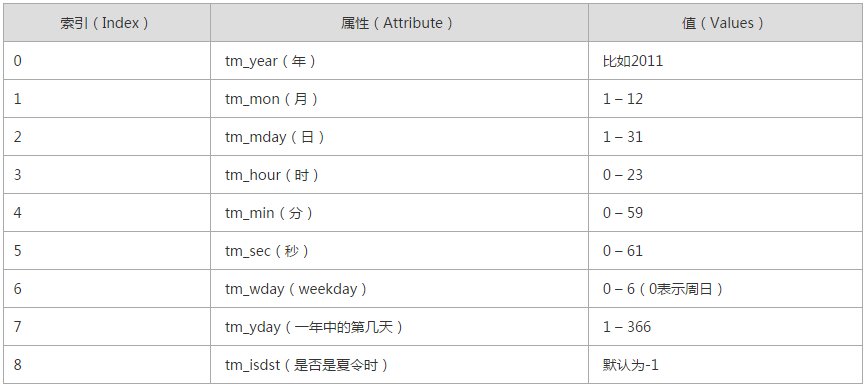
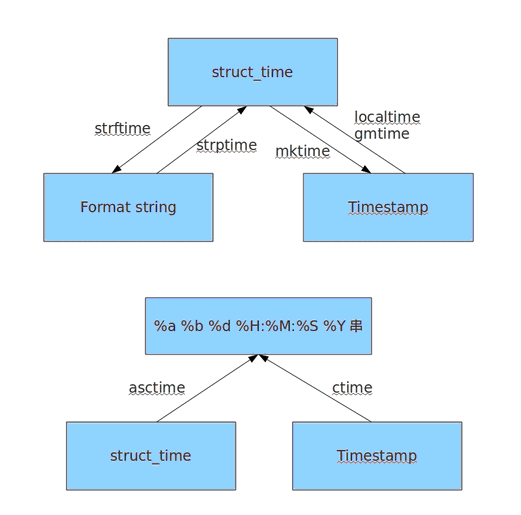
十五、random
随机数
mport random
print random.random()
print random.randint(1,2)
print random.randrange(1,10)
随机验证码实例:
import random
checkcode = ''
for i in range(4):
    current = random.randrange(0,4)
    if current != i:
        temp = chr(random.randint(65,90))
    else:
        temp = random.randint(0,9)
    checkcode += str(temp)
print checkcode
练习题:
1、通过HTTP请求和XML实现获取电视节目
API:http://www.webxml.com.cn/webservices/ChinaTVprogramWebService.asmx
2、通过HTTP请求和JSON实现获取天气状况
API:http://wthrcdn.etouch.cn/weather_mini?city=北京

 浙公网安备 33010602011771号