Python开发【第三篇】:Python基础之函数
三元运算
三元运算(三目运算),是对简单的条件语句的缩写。
# 书写格式

result = 值1 if 条件 else 值2

# 如果条件成立,那么将 “值1” 赋值给result变量,否则,将“值2”赋值给result变量
函数
一、背景
在学习函数之前,一直遵循:面向过程编程,即:根据业务逻辑从上到下实现功能,其往往用一长段代码来实现指定功能,开发过程中最常见的操作就是粘贴复制,也就是将之前实现的代码块复制到现需功能处,如下:
while True:
    if cpu利用率 > 90%:
        #发送邮件提醒
        连接邮箱服务器
        发送邮件
        关闭连接

    if 硬盘使用空间 > 90%:
        #发送邮件提醒
        连接邮箱服务器
        发送邮件
        关闭连接

    if 内存占用 > 80%:
        #发送邮件提醒
        连接邮箱服务器
        发送邮件
        关闭连接
腚眼一看上述代码,if条件语句下的内容可以被提取出来公用,如下:
def 发送邮件(内容)
    #发送邮件提醒
    连接邮箱服务器
    发送邮件
    关闭连接

while True:

    if cpu利用率 > 90%:
        发送邮件('CPU报警')

    if 硬盘使用空间 > 90%:
        发送邮件('硬盘报警')

    if 内存占用 > 80%:
对于上述的两种实现方式,第二次必然比第一次的重用性和可读性要好,其实这就是函数式编程和面向过程编程的区别:
- 函数式:将某功能代码封装到函数中,日后便无需重复编写,仅调用函数即可
- 面向对象:对函数进行分类和封装,让开发“更快更好更强...”
函数式编程最重要的是增强代码的重用性和可读性
二、定义和使用
def 函数名(参数):

    ...
    函数体
    ...
    返回值
函数的定义主要有如下要点:
- def:表示函数的关键字
- 函数名:函数的名称,日后根据函数名调用函数
- 函数体:函数中进行一系列的逻辑计算,如:发送邮件、计算出 [11,22,38,888,2]中的最大数等...
- 参数:为函数体提供数据
- 返回值:当函数执行完毕后,可以给调用者返回数据。
1、返回值
函数是一个功能块,该功能到底执行成功与否,需要通过返回值来告知调用者。
以上要点中,比较重要有参数和返回值:
def 发送短信():

    发送短信的代码...

    if 发送成功:
        return True
    else:
        return False


while True:

    # 每次执行发送短信函数,都会将返回值自动赋值给result
    # 之后,可以根据result来写日志,或重发等操作

    result = 发送短信()
    if result == False:
        记录日志,短信发送失败...
2、参数
为什么要有参数?


def CPU报警邮件()
    #发送邮件提醒
    连接邮箱服务器
    发送邮件
    关闭连接

def 硬盘报警邮件()
    #发送邮件提醒
    连接邮箱服务器
    发送邮件
    关闭连接

def 内存报警邮件()
    #发送邮件提醒
    连接邮箱服务器
    发送邮件
    关闭连接

while True:

    if cpu利用率 > 90%:
        CPU报警邮件()

    if 硬盘使用空间 > 90%:
        硬盘报警邮件()

    if 内存占用 > 80%:
        内存报警邮件()
def 发送邮件(邮件内容)

    #发送邮件提醒
    连接邮箱服务器
    发送邮件
    关闭连接


while True:

    if cpu利用率 > 90%:
        发送邮件("CPU报警了。")

    if 硬盘使用空间 > 90%:
        发送邮件("硬盘报警了。")

    if 内存占用 > 80%:
        发送邮件("内存报警了。")
函数的有三中不同的参数:
- 普通参数
- 默认参数
- 动态参数
# ######### 定义函数 #########

# name 叫做函数func的形式参数,简称:形参
def func(name):
    print name

# ######### 执行函数 #########
#  'wupeiqi' 叫做函数func的实际参数,简称:实参
func('wupeiqi')
def func(name, age = 18):

    print "%s:%s" %(name,age)

# 指定参数
func('wupeiqi', 19)
# 使用默认参数
func('alex')

注:默认参数需要放在参数列表最后
def func(*args):

    print args


# 执行方式一
func(11,33,4,4454,5)

# 执行方式二
li = [11,2,2,3,3,4,54]
func(*li)
def func(**kwargs):

    print args


# 执行方式一
func(name='wupeiqi',age=18)

# 执行方式二
li = {'name':'wupeiqi', age:18, 'gender':'male'}
func(**li)
def func(*args, **kwargs):

    print args
    print kwargs
扩展:发送邮件实例
import smtplib
from email.mime.text import MIMEText
from email.utils import formataddr


msg = MIMEText('邮件内容', 'plain', 'utf-8')
msg['From'] = formataddr(["武沛齐",'wptawy@126.com'])
msg['To'] = formataddr(["走人",'424662508@qq.com'])
msg['Subject'] = "主题"

server = smtplib.SMTP("smtp.126.com", 25)
server.login("wptawy@126.com", "邮箱密码")
server.sendmail('wptawy@126.com', ['424662508@qq.com',], msg.as_string())
server.quit()
内置函数
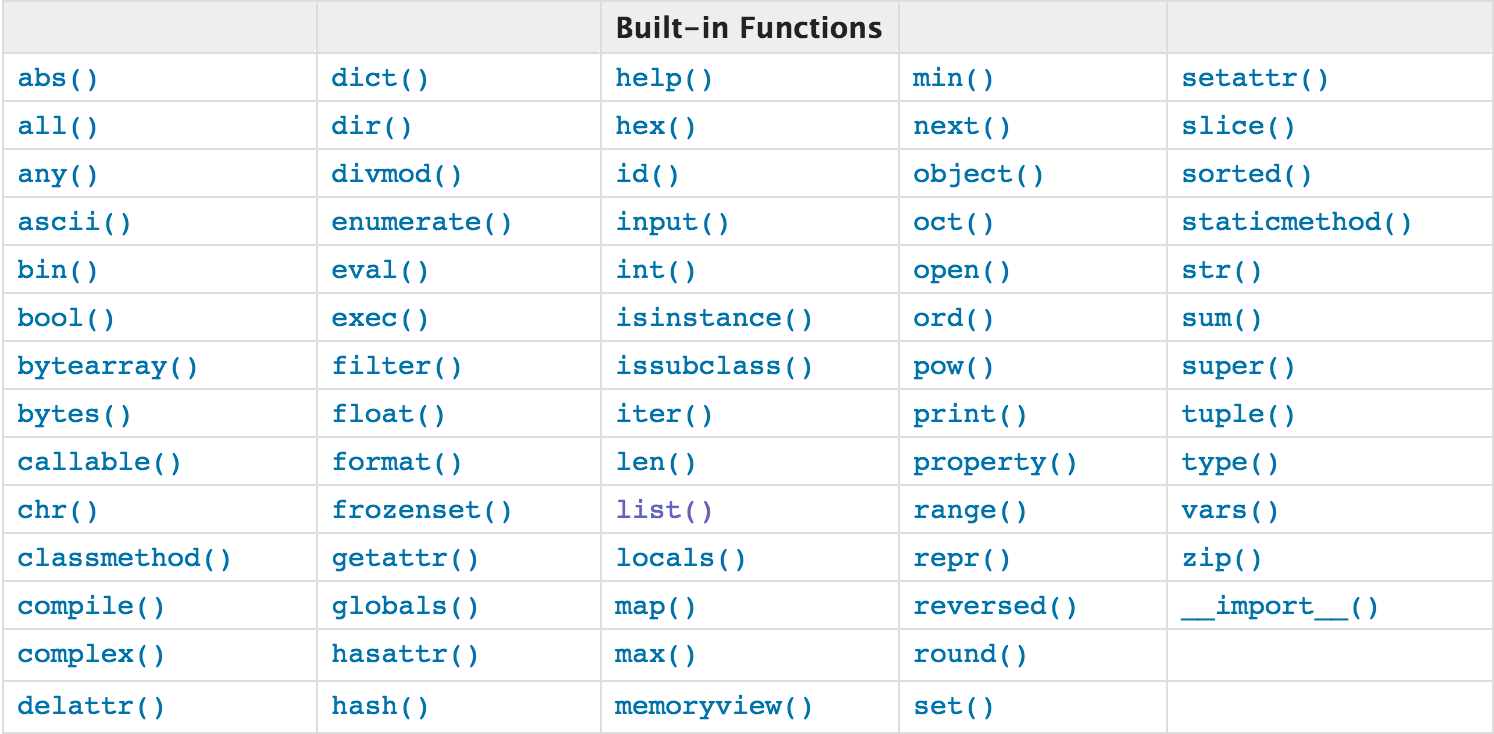
注:查看详细猛击这里
文件操作
open函数,该函数用于文件处理
操作文件时,一般需要经历如下步骤:
- 打开文件
- 操作文件
一、打开文件
文件句柄 = open('文件路径', '模式')
打开文件时,需要指定文件路径和以何等方式打开文件,打开后,即可获取该文件句柄,日后通过此文件句柄对该文件操作。
打开文件的模式有:
- r ,只读模式【默认】
- w,只写模式【不可读;不存在则创建;存在则清空内容;】
- x, 只写模式【不可读;不存在则创建,存在则报错】
- a, 追加模式【可读; 不存在则创建;存在则只追加内容;】
"+" 表示可以同时读写某个文件
- r+, 读写【可读,可写】
- w+,写读【可读,可写】
- x+ ,写读【可读,可写】
- a+, 写读【可读,可写】
"b"表示以字节的方式操作
- rb 或 r+b
- wb 或 w+b
- xb 或 w+b
- ab 或 a+b
注:以b方式打开时,读取到的内容是字节类型,写入时也需要提供字节类型
二、操作
class file(object)
    def close(self): # real signature unknown; restored from __doc__
        关闭文件
        """
        close() -> None or (perhaps) an integer.  Close the file.

        Sets data attribute .closed to True.  A closed file cannot be used for
        further I/O operations.  close() may be called more than once without
        error.  Some kinds of file objects (for example, opened by popen())
        may return an exit status upon closing.
        """

    def fileno(self): # real signature unknown; restored from __doc__
        文件描述符
         """
        fileno() -> integer "file descriptor".

        This is needed for lower-level file interfaces, such os.read().
        """
        return 0

    def flush(self): # real signature unknown; restored from __doc__
        刷新文件内部缓冲区
        """ flush() -> None.  Flush the internal I/O buffer. """
        pass


    def isatty(self): # real signature unknown; restored from __doc__
        判断文件是否是同意tty设备
        """ isatty() -> true or false.  True if the file is connected to a tty device. """
        return False


    def next(self): # real signature unknown; restored from __doc__
        获取下一行数据,不存在,则报错
        """ x.next() -> the next value, or raise StopIteration """
        pass

    def read(self, size=None): # real signature unknown; restored from __doc__
        读取指定字节数据
        """
        read([size]) -> read at most size bytes, returned as a string.

        If the size argument is negative or omitted, read until EOF is reached.
        Notice that when in non-blocking mode, less data than what was requested
        may be returned, even if no size parameter was given.
        """
        pass

    def readinto(self): # real signature unknown; restored from __doc__
        读取到缓冲区,不要用,将被遗弃
        """ readinto() -> Undocumented.  Don't use this; it may go away. """
        pass

    def readline(self, size=None): # real signature unknown; restored from __doc__
        仅读取一行数据
        """
        readline([size]) -> next line from the file, as a string.

        Retain newline.  A non-negative size argument limits the maximum
        number of bytes to return (an incomplete line may be returned then).
        Return an empty string at EOF.
        """
        pass

    def readlines(self, size=None): # real signature unknown; restored from __doc__
        读取所有数据,并根据换行保存值列表
        """
        readlines([size]) -> list of strings, each a line from the file.

        Call readline() repeatedly and return a list of the lines so read.
        The optional size argument, if given, is an approximate bound on the
        total number of bytes in the lines returned.
        """
        return []

    def seek(self, offset, whence=None): # real signature unknown; restored from __doc__
        指定文件中指针位置
        """
        seek(offset[, whence]) -> None.  Move to new file position.

        Argument offset is a byte count.  Optional argument whence defaults to
(offset from start of file, offset should be >= 0); other values are 1
        (move relative to current position, positive or negative), and 2 (move
        relative to end of file, usually negative, although many platforms allow
        seeking beyond the end of a file).  If the file is opened in text mode,
        only offsets returned by tell() are legal.  Use of other offsets causes
        undefined behavior.
        Note that not all file objects are seekable.
        """
        pass

    def tell(self): # real signature unknown; restored from __doc__
        获取当前指针位置
        """ tell() -> current file position, an integer (may be a long integer). """
        pass

    def truncate(self, size=None): # real signature unknown; restored from __doc__
        截断数据,仅保留指定之前数据
        """
        truncate([size]) -> None.  Truncate the file to at most size bytes.

        Size defaults to the current file position, as returned by tell().
        """
        pass

    def write(self, p_str): # real signature unknown; restored from __doc__
        写内容
        """
        write(str) -> None.  Write string str to file.

        Note that due to buffering, flush() or close() may be needed before
        the file on disk reflects the data written.
        """
        pass

    def writelines(self, sequence_of_strings): # real signature unknown; restored from __doc__
        将一个字符串列表写入文件
        """
        writelines(sequence_of_strings) -> None.  Write the strings to the file.

        Note that newlines are not added.  The sequence can be any iterable object
        producing strings. This is equivalent to calling write() for each string.
        """
        pass

    def xreadlines(self): # real signature unknown; restored from __doc__
        可用于逐行读取文件,非全部
        """
        xreadlines() -> returns self.

        For backward compatibility. File objects now include the performance
        optimizations previously implemented in the xreadlines module.
        """
        pass
class TextIOWrapper(_TextIOBase):
    """
    Character and line based layer over a BufferedIOBase object, buffer.

    encoding gives the name of the encoding that the stream will be
    decoded or encoded with. It defaults to locale.getpreferredencoding(False).

    errors determines the strictness of encoding and decoding (see
    help(codecs.Codec) or the documentation for codecs.register) and
    defaults to "strict".

    newline controls how line endings are handled. It can be None, '',
    '\n', '\r', and '\r\n'.  It works as follows:

    * On input, if newline is None, universal newlines mode is
      enabled. Lines in the input can end in '\n', '\r', or '\r\n', and
      these are translated into '\n' before being returned to the
      caller. If it is '', universal newline mode is enabled, but line
      endings are returned to the caller untranslated. If it has any of
      the other legal values, input lines are only terminated by the given
      string, and the line ending is returned to the caller untranslated.

    * On output, if newline is None, any '\n' characters written are
      translated to the system default line separator, os.linesep. If
      newline is '' or '\n', no translation takes place. If newline is any
      of the other legal values, any '\n' characters written are translated
      to the given string.

    If line_buffering is True, a call to flush is implied when a call to
    write contains a newline character.
    """
    def close(self, *args, **kwargs): # real signature unknown
        关闭文件
        pass

    def fileno(self, *args, **kwargs): # real signature unknown
        文件描述符
        pass

    def flush(self, *args, **kwargs): # real signature unknown
        刷新文件内部缓冲区
        pass

    def isatty(self, *args, **kwargs): # real signature unknown
        判断文件是否是同意tty设备
        pass

    def read(self, *args, **kwargs): # real signature unknown
        读取指定字节数据
        pass

    def readable(self, *args, **kwargs): # real signature unknown
        是否可读
        pass

    def readline(self, *args, **kwargs): # real signature unknown
        仅读取一行数据
        pass

    def seek(self, *args, **kwargs): # real signature unknown
        指定文件中指针位置
        pass

    def seekable(self, *args, **kwargs): # real signature unknown
        指针是否可操作
        pass

    def tell(self, *args, **kwargs): # real signature unknown
        获取指针位置
        pass

    def truncate(self, *args, **kwargs): # real signature unknown
        截断数据,仅保留指定之前数据
        pass

    def writable(self, *args, **kwargs): # real signature unknown
        是否可写
        pass

    def write(self, *args, **kwargs): # real signature unknown
        写内容
        pass

    def __getstate__(self, *args, **kwargs): # real signature unknown
        pass

    def __init__(self, *args, **kwargs): # real signature unknown
        pass

    @staticmethod # known case of __new__
    def __new__(*args, **kwargs): # real signature unknown
        """ Create and return a new object.  See help(type) for accurate signature. """
        pass

    def __next__(self, *args, **kwargs): # real signature unknown
        """ Implement next(self). """
        pass

    def __repr__(self, *args, **kwargs): # real signature unknown
        """ Return repr(self). """
        pass

    buffer = property(lambda self: object(), lambda self, v: None, lambda self: None)  # default

    closed = property(lambda self: object(), lambda self, v: None, lambda self: None)  # default

    encoding = property(lambda self: object(), lambda self, v: None, lambda self: None)  # default

    errors = property(lambda self: object(), lambda self, v: None, lambda self: None)  # default

    line_buffering = property(lambda self: object(), lambda self, v: None, lambda self: None)  # default

    name = property(lambda self: object(), lambda self, v: None, lambda self: None)  # default

    newlines = property(lambda self: object(), lambda self, v: None, lambda self: None)  # default

    _CHUNK_SIZE = property(lambda self: object(), lambda self, v: None, lambda self: None)  # default

    _finalizing = property(lambda self: object(), lambda self, v: None, lambda self: None)  # default
三、with
为了避免打开文件后忘记关闭,可以通过管理上下文,即:
with open('log','r') as f:

    ...
如此方式,当with代码块执行完毕时,内部会自动关闭并释放文件资源。
在Python 2.7 及以后,with又支持同时对多个文件的上下文进行管理,即:
with open('log1') as obj1, open('log2') as obj2:
    pass
四、那么问题来了...
1、如何在线上环境优雅的修改配置文件?
global
        log 127.0.0.1 local2
        daemon
        maxconn 256
        log 127.0.0.1 local2 info
defaults
        log global
        mode http
        timeout connect 5000ms
        timeout client 50000ms
        timeout server 50000ms
        option  dontlognull

listen stats :8888
        stats enable
        stats uri       /admin
        stats auth      admin:1234

frontend oldboy.org
        bind 0.0.0.0:80
        option httplog
        option httpclose
        option  forwardfor
        log global
        acl www hdr_reg(host) -i www.oldboy.org
        use_backend www.oldboy.org if www

backend www.oldboy.org
        server 100.1.7.9 100.1.7.9 weight 20 maxconn 3000
1、查
    输入:www.oldboy.org
    获取当前backend下的所有记录

2、新建
    输入:
        arg = {
            'bakend': 'www.oldboy.org',
            'record':{
                'server': '100.1.7.9',
                'weight': 20,
                'maxconn': 30
            }
        }

3、删除
    输入:
        arg = {
            'bakend': 'www.oldboy.org',
            'record':{
                'server': '100.1.7.9',
                'weight': 20,
                'maxconn': 30
            }
        }
#!/usr/bin/env python
# -*- coding:utf-8 -*-
import json
import os


def fetch(backend):
    backend_title = 'backend %s' % backend
    record_list = []
    with open('ha') as obj:
        flag = False
        for line in obj:
            line = line.strip()
            if line == backend_title:
                flag = True
                continue
            if flag and line.startswith('backend'):
                flag = False
                break

            if flag and line:
                record_list.append(line)

    return record_list


def add(dict_info):
    backend = dict_info.get('backend')
    record_list = fetch(backend)
    backend_title = "backend %s" % backend
    current_record = "server %s %s weight %d maxconn %d" % (dict_info['record']['server'], dict_info['record']['server'], dict_info['record']['weight'], dict_info['record']['maxconn'])
    if not record_list:
        record_list.append(backend_title)
        record_list.append(current_record)
        with open('ha') as read_file, open('ha.new', 'w') as write_file:
            flag = False
            for line in read_file:
                write_file.write(line)
            for i in record_list:
                if i.startswith('backend'):
                    write_file.write(i+'\n')
                else:
                    write_file.write("%s%s\n" % (8*" ", i))
    else:
        record_list.insert(0, backend_title)
        if current_record not in record_list:
            record_list.append(current_record)

        with open('ha') as read_file, open('ha.new', 'w') as write_file:
            flag = False
            has_write = False
            for line in read_file:
                line_strip = line.strip()
                if line_strip == backend_title:
                    flag = True
                    continue
                if flag and line_strip.startswith('backend'):
                    flag = False
                if not flag:
                    write_file.write(line)
                else:
                    if not has_write:
                        for i in record_list:
                            if i.startswith('backend'):
                                write_file.write(i+'\n')
                            else:
                                write_file.write("%s%s\n" % (8*" ", i))
                    has_write = True
    os.rename('ha','ha.bak')
    os.rename('ha.new','ha')


def remove(dict_info):
    backend = dict_info.get('backend')
    record_list = fetch(backend)
    backend_title = "backend %s" % backend
    current_record = "server %s %s weight %d maxconn %d" % (dict_info['record']['server'], dict_info['record']['server'], dict_info['record']['weight'], dict_info['record']['maxconn'])
    if not record_list:
        return
    else:
        if current_record not in record_list:
            return
        else:
            del record_list[record_list.index(current_record)]
            if len(record_list) > 0:
                record_list.insert(0, backend_title)
        with open('ha') as read_file, open('ha.new', 'w') as write_file:
            flag = False
            has_write = False
            for line in read_file:
                line_strip = line.strip()
                if line_strip == backend_title:
                    flag = True
                    continue
                if flag and line_strip.startswith('backend'):
                    flag = False
                if not flag:
                    write_file.write(line)
                else:
                    if not has_write:
                        for i in record_list:
                            if i.startswith('backend'):
                                write_file.write(i+'\n')
                            else:
                                write_file.write("%s%s\n" % (8*" ", i))
                    has_write = True
    os.rename('ha','ha.bak')
    os.rename('ha.new','ha')

if __name__ == '__main__':
    """
    print '1、获取;2、添加;3、删除'
    num = raw_input('请输入序号:')
    data = raw_input('请输入内容:')
    if num == '1':
        fetch(data)
    else:
        dict_data = json.loads(data)
        if num == '2':
            add(dict_data)
        elif num == '3':
            remove(dict_data)
        else:
            pass
    """
    #data = "www.oldboy.org"
    #fetch(data)
    #data = '{"backend": "tettst.oldboy.org","record":{"server": "100.1.7.90","weight": 20,"maxconn": 30}}'
    #dict_data = json.loads(data)
    #add(dict_data)
    #remove(dict_data)
2、文件处理中xreadlines的内部是如何实现的呢?
自定义函数
一、背景
在学习函数之前,一直遵循:面向过程编程,即:根据业务逻辑从上到下实现功能,其往往用一长段代码来实现指定功能,开发过程中最常见的操作就是粘贴复制,也就是将之前实现的代码块复制到现需功能处,如下
while True:
    if cpu利用率 > 90%:
        #发送邮件提醒
        连接邮箱服务器
        发送邮件
        关闭连接

    if 硬盘使用空间 > 90%:
        #发送邮件提醒
        连接邮箱服务器
        发送邮件
        关闭连接

    if 内存占用 > 80%:
        #发送邮件提醒
        连接邮箱服务器
        发送邮件
        关闭连接
腚眼一看上述代码,if条件语句下的内容可以被提取出来公用,如下:
def 发送邮件(内容)
    #发送邮件提醒
    连接邮箱服务器
    发送邮件
    关闭连接

while True:

    if cpu利用率 > 90%:
        发送邮件('CPU报警')

    if 硬盘使用空间 > 90%:
        发送邮件('硬盘报警')

    if 内存占用 > 80%:
对于上述的两种实现方式,第二次必然比第一次的重用性和可读性要好,其实这就是函数式编程和面向过程编程的区别:
- 函数式:将某功能代码封装到函数中,日后便无需重复编写,仅调用函数即可
- 面向对象:对函数进行分类和封装,让开发“更快更好更强...”
函数式编程最重要的是增强代码的重用性和可读性
二、 函数的定义和使用
def 函数名(参数):

    ...
    函数体
    ...
函数的定义主要有如下要点:
- def:表示函数的关键字
- 函数名:函数的名称,日后根据函数名调用函数
- 函数体:函数中进行一系列的逻辑计算,如:发送邮件、计算出 [11,22,38,888,2]中的最大数等...
- 参数:为函数体提供数据
- 返回值:当函数执行完毕后,可以给调用者返回数据。
以上要点中,比较重要有参数和返回值:
1、返回值
函数是一个功能块,该功能到底执行成功与否,需要通过返回值来告知调用者。
def 发送短信():

    发送短信的代码...

    if 发送成功:
        return True
    else:
        return False


while True:

    # 每次执行发送短信函数,都会将返回值自动赋值给result
    # 之后,可以根据result来写日志,或重发等操作

    result = 发送短信()
    if result == False:
        记录日志,短信发送失败...
2、参数
为什么要有参数?
def CPU报警邮件()
    #发送邮件提醒
    连接邮箱服务器
    发送邮件
    关闭连接

def 硬盘报警邮件()
    #发送邮件提醒
    连接邮箱服务器
    发送邮件
    关闭连接

def 内存报警邮件()
    #发送邮件提醒
    连接邮箱服务器
    发送邮件
    关闭连接

while True:

    if cpu利用率 > 90%:
        CPU报警邮件()

    if 硬盘使用空间 > 90%:
        硬盘报警邮件()

    if 内存占用 > 80%:
        内存报警邮件()
def 发送邮件(邮件内容)

    #发送邮件提醒
    连接邮箱服务器
    发送邮件
    关闭连接


while True:

    if cpu利用率 > 90%:
        发送邮件("CPU报警了。")

    if 硬盘使用空间 > 90%:
        发送邮件("硬盘报警了。")

    if 内存占用 > 80%:
        发送邮件("内存报警了。")
函数的有三中不同的参数:
- 普通参数
- 默认参数
- 动态参数
# ######### 定义函数 #########

# name 叫做函数func的形式参数,简称:形参
def func(name):
    print name

# ######### 执行函数 #########
#  'wupeiqi' 叫做函数func的实际参数,简称:实参
func('wupeiqi')
def func(name, age = 18):

    print "%s:%s" %(name,age)

# 指定参数
func('wupeiqi', 19)
# 使用默认参数
func('alex')

注:默认参数需要放在参数列表最后
def func(*args):

    print args


# 执行方式一
func(11,33,4,4454,5)

# 执行方式二
li = [11,2,2,3,3,4,54]
func(*li)
def func(**kwargs):

    print args


# 执行方式一
func(name='wupeiqi',age=18)

# 执行方式二
li = {'name':'wupeiqi', age:18, 'gender':'male'}
func(**li)
def func(*args, **kwargs):

    print args
    print kwargs
扩展:发送邮件实例
import smtplib
from email.mime.text import MIMEText
from email.utils import formataddr


msg = MIMEText('邮件内容', 'plain', 'utf-8')
msg['From'] = formataddr(["武沛齐",'wptawy@126.com'])
msg['To'] = formataddr(["走人",'424662508@qq.com'])
msg['Subject'] = "主题"

server = smtplib.SMTP("smtp.126.com", 25)
server.login("wptawy@126.com", "邮箱密码")
server.sendmail('wptawy@126.com', ['424662508@qq.com',], msg.as_st
lambda表达式
学习条件运算时,对于简单的 if else 语句,可以使用三元运算来表示,即:
# 普通条件语句
if 1 == 1:
    name = 'wupeiqi'
else:
    name = 'alex'

# 三元运算
name = 'wupeiqi' if 1 == 1 else 'alex'
对于简单的函数,也存在一种简便的表示方式,即:lambda表达式
# ###################### 普通函数 ######################
# 定义函数(普通方式)
def func(arg):
    return arg + 1

# 执行函数
result = func(123)

# ###################### lambda ######################

# 定义函数(lambda表达式)
my_lambda = lambda arg : arg + 1

# 执行函数
result = my_lambda(123)
内置函数 二
一、map
遍历序列,对序列中每个元素进行操作,最终获取新的序列。

li = [11, 22, 33]

new_list = map(lambda a: a + 100, li)
li = [11, 22, 33]
sl = [1, 2, 3]
new_list = map(lambda a, b: a + b, li, sl)
二、filter
对于序列中的元素进行筛选,最终获取符合条件的序列

li = [11, 22, 33]

new_list = filter(lambda arg: arg > 22, li)

#filter第一个参数为空,将获取原来序列
三、reduce
对于序列内所有元素进行累计操作


li = [11, 22, 33]

result = reduce(lambda arg1, arg2: arg1 + arg2, li)

# reduce的第一个参数,函数必须要有两个参数
# reduce的第二个参数,要循环的序列
# reduce的第三个参数,初始值
yield生成器
1、对比range 和 xrange 的区别
>>> print range(10)
[0, 1, 2, 3, 4, 5, 6, 7, 8, 9]
>>> print xrange(10)
xrange(10)
如上代码所示,range会在内存中创建所有指定的数字,而xrange不会立即创建,只有在迭代循环时,才去创建每个数组。
def nrange(num):
    temp = -1
    while True:
        temp = temp + 1
        if temp >= num:
            return
        else:
            yield temp
2、文件操作的 read 和 xreadlinex 的的区别
read会读取所有内容到内存
xreadlines则只有在循环迭代时才获取
def NReadlines():
    with open('log','r') as f:
        while True:
            line = f.next()
            if line:
                yield line
            else:
                return

for i in NReadlines():
    print i
def NReadlines():
    with open('log','r') as f:
        seek = 0
        while True:
            f.seek(seek)
            data = f.readline()
            if data:
                seek = f.tell()
                yield data
            else:
                return

for item in NReadlines():
    print item
装饰器
装饰器是函数,只不过该函数可以具有特殊的含义,装饰器用来装饰函数或类,使用装饰器可以在函数执行前和执行后添加相应操作。
def wrapper(func):
    def result():
        print 'before'
        func()
        print 'after'
    return result

@wrapper
def foo():
    print 'foo'
mport functools


def wrapper(func):
    @functools.wraps(func)
    def wrapper():
        print 'before'
        func()
        print 'after'
    return wrapper

@wrapper
def foo():
    print 'foo'
#!/usr/bin/env python
#coding:utf-8

def Before(request,kargs):
    print 'before'

def After(request,kargs):
    print 'after'


def Filter(before_func,after_func):
    def outer(main_func):
        def wrapper(request,kargs):

            before_result = before_func(request,kargs)
            if(before_result != None):
                return before_result;

            main_result = main_func(request,kargs)
            if(main_result != None):
                return main_result;

            after_result = after_func(request,kargs)
            if(after_result != None):
                return after_result;

        return wrapper
    return outer

@Filter(Before, After)
def Index(request,kargs):
    print 'index'


if __name__ == '__main__':
    Index(1,2)
冒泡算法
需求:请按照从小到大对列表 [13, 22, 6, 99, 11] 进行排序
思路:相邻两个值进行比较,将较大的值放在右侧,依次比较!
li = [13, 22, 6, 99, 11]

for m in range(4):     # 等价于 #for m in range(len(li)-1):
    if li[m]> li[m+1]:
        temp = li[m+1]
        li[m+1] = li[m]
        li[m] = temp
li = [13, 22, 6, 99, 11]

for m in range(4):     # 等价于 #for m in range(len(li)-1):
    if li[m]> li[m+1]:
        temp = li[m+1]
        li[m+1] = li[m]
        li[m] = temp

for m in range(3):     # 等价于 #for m in range(len(li)-2):
    if li[m]> li[m+1]:
        temp = li[m+1]
        li[m+1] = li[m]
        li[m] = temp

for m in range(2):     # 等价于 #for m in range(len(li)-3):
    if li[m]> li[m+1]:
        temp = li[m+1]
        li[m+1] = li[m]
        li[m] = temp

for m in range(1):     # 等价于 #for m in range(len(li)-4):
    if li[m]> li[m+1]:
        temp = li[m+1]
        li[m+1] = li[m]
        li[m] = temp
print li
li = [13, 22, 6, 99, 11]

for i in range(1,5):
    for m in range(len(li)-i):
        if li[m] > li[m+1]:
            temp = li[m+1]
            li[m+1] = li[m]
            li[m] = temp
递归
利用函数编写如下数列:
斐波那契数列指的是这样一个数列 0, 1, 1, 2, 3, 5, 8, 13, 21, 34, 55, 89, 144, 233,377,610,987,1597,2584,4181,6765,10946,17711,28657,46368...
def func(arg1,arg2):
    if arg1 == 0:
        print arg1, arg2
    arg3 = arg1 + arg2
    print arg3
    func(arg2, arg3)

func(0,1)
练习题
1、简述普通参数、指定参数、默认参数、动态参数的区别
2、写函数,计算传入字符串中【数字】、【字母】、【空格] 以及 【其他】的个数
3、写函数,判断用户传入的对象(字符串、列表、元组)长度是否大于5。
4、写函数,检查用户传入的对象(字符串、列表、元组)的每一个元素是否含有空内容。
5、写函数,检查传入列表的长度,如果大于2,那么仅保留前两个长度的内容,并将新内容返回给调用者。
6、写函数,检查获取传入列表或元组对象的所有奇数位索引对应的元素,并将其作为新列表返回给调用者。
7、写函数,检查传入字典的每一个value的长度,如果大于2,那么仅保留前两个长度的内容,并将新内容返回给调用者。
dic = {"k1": "v1v1", "k2": [11,22,33,44]}

PS:字典中的value只能是字符串或列表
8、写函数,利用递归获取斐波那契数列中的第 10 个数,并将该值返回给调用者。

 浙公网安备 33010602011771号