

ES7-ES10的新特性
ES7
1. 数组查找与元素是否存在
let arr = [0, 1, 2, 3, 4, 5, 6]
console.log(arr.includes(4))
2. 乘方的新写法
// es7之前
console.log(Math.pow(2, 3))
// es7
console.log(2 ** 3)
ES8
1. async, await 。await接收的是一个Promise对象,如果传入的不是Promise对象,会自动将他转为Promise对象。
async用途是保证内部的所有await方法顺序执行
    async function step1() {
       return new Promise(resolve => {
            setTimeout(function () {
                resolve("步骤1完成")
            }, 1000)
        })
    }
    async function step2() {
        return new Promise(resolve => {
            setTimeout(function () {
                resolve("步骤2完成")
            }, 1000)
        })
    }
    async function doAll() {
        console.log(await step1())
        console.log(await step2())
        console.log("全部完成")
    }
    doAll()
2. 字符串补白
padStart,padEnd
    for (let i = 1; i < 20; i++) {
        console.log(i.toString().padStart(2, "0"))
    }
3. 获取Object的数据描述符
const score = {
        "andy": 100,
        "jack": 95,
        "tom": 90
    }
    // 指定tom不能被遍历
    Object.defineProperty(score, "tom", {
        enumerable: false   // 是否可以被遍历
    })
    console.log(Object.getOwnPropertyDescriptors(score))
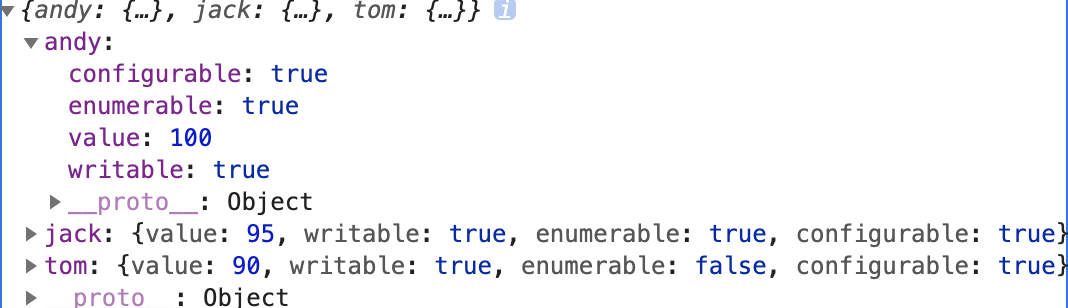
可以看出对象数据的描述符有三种。
ES9
1. 遍历异步操作集合,for await of
    function Gen(time) {
        return new Promise((resolve, reject) => {
            setTimeout(function () {
                resolve(time)
            },time)
        })
    }

    async function test() {
        let arr = [Gen(2000), Gen(500), Gen(1000)]
        for await (let f of arr) {
            console.log(Date.now(), f)
        }
    }
    test()
const obj = {
        count: 0,
        Gen(time) {
            return new Promise(resolve => {
                setTimeout(function () {
                    resolve({done: false, value: time})
                }, time)
            })
        },
        [Symbol.asyncIterator]() {
            let that = this
            return {
                next() {
                    that.count++
                    if (that.count < 4) {
                        return that.Gen(Math.random() * 1000)
                    } else {
                        return {done: true, value: ""}
                    }
                }
            }
        }
    }

    async function test() {
        for await (let item of obj) {
            console.log(Date.now(), item)
        }
    }
    test()
2. Promise的兜底操作 finally
    const Gen = time => {
        return new Promise(resolve => {
            setTimeout(function () {
                resolve({done: false, value: time})
            }, time)
        })
    }
    Gen(2000)
        .then(value => console.log(value))
        .catch(err => console.log(err))
        .finally(() => {
            console.log("完成")
        })
3. Object的rest和spread方法
...表示把对象的所有属性放入另外一个对象中,注意是深拷贝
    const input = {
        a: 1,
        b: 2
    }
    const output = {
        ...input,
        c: 3
    }
    console.log(output)
    const input = {
        a: 1,
        b: 2,
        c: 3,
        d: 4,
        e: 5
    }
    const {a, b, ...rest} = input
    console.log(rest)
4. 正则表达式doAll, 命名分组捕获,后行断言
// s:让.可以匹配换行符
// u:让.可以匹配中文
const re = /foo.bar/s
console.log(re.test("foo\nbar"))
console.log(re.dotAll)
console.log(re.flags)
// 通过?<>的形式来提取命名
    const t = '2020-01-01'.match(/(?<year>\d{4})-(?<month>\d{2})-(?<day>\d{2})/)
    console.log(t.groups.year)
    console.log(t.groups.month)
    console.log(t.groups.day)
    // 先行断言,判断hello后面是否跟着 \sworld
    let test = "hello world"
    console.log(test.match(/hello(?=\sworld)/))

    // 后行断言,判断world前面是否是 hello\s
    console.log(test.match(/(?<=hello\s)world/))
练习题:
1. 把“$foo %foo foo”前面为$的foo替换成bar
let test = "$foo %foo foo"
    test = test.replace(/(?<=\$)foo/, "bar")
    console.log(test)
2. 请提取“$1 is worth about ¥123”字符中美元的数字
let test = "$3 is worth about ¥123"
    const res = /(?<=\$)(?<money>\d)/.exec(test)
    console.log(res.groups.money)
ES10
1. 数组的扁平化 flat和flatmap
let arr = [1, 2, 3]
console.log(arr.flatMap(item => item * 2))
2. 字符串去掉空格 trimStart,trim,trimEnd,trimLeft,trimRight
let str = "  foo   "
    console.log(str.trimStart().trimEnd())
3. replace使用函数
    let str = `"foo" and "bar" and "my"`
    const matches = []
    str.replace(/"([^"]*)"/g, function (all, first) {
        matches.push(first)
    })
    console.log(matches)
4. 字符串的matchAll方法
    let str = `"foo" and "bar" and "my"`
    const matches = []
    for (const match of str.matchAll(/"([^"]*)"/g)) {
        matches.push(match[1])
    }
    console.log(matches)
5. Object的fromEntries方法,把数组转化为对象
    const arr = [["foo", 1], ["bar", 2]]
    const obj = Object.fromEntries(arr)
    console.log(obj.foo)
    // 筛选出obj中key的长度为3的项
    const obj = {
        "abc": 1,
        "def": 2,
        "ghsjk": 3
    }
    let res = Object.fromEntries(
        Object.entries(obj).filter(([key, val]) => key.length == 3)
    )
    console.log(res)
6. try catch可以不加(e)
try {

    } catch {

    }
7. 增加了BigInt类型 ,用于处理2的53次方以上的数据类型
console.log(typeof 11n)

 浙公网安备 33010602011771号