

微信小程序隐私授权
微信小程序开发时,需要用到微信接口则需要处理隐私授权

微信小程序用户隐私保护:https://developers.weixin.qq.com/miniprogram/dev/framework/user-privacy/
微信小程序用户隐私保护从基础库 2.32.3 开始支持,可查看基础库版本分布进行兼容处理,处理方式可查看:https://www.cnblogs.com/czhowe/p/17843630.html
具体操作
1.登录微信小程序后台,设置->服务内容声明更新用户隐私保护指引
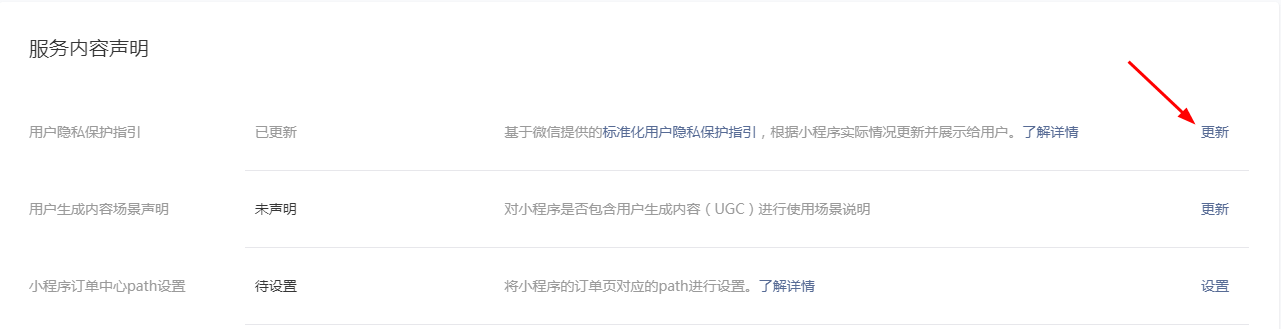
2.开启用户隐私授权功能
加入"__usePrivacyCheck__": true 去开启用户隐私授权
原生微信小程序:在app.json中加入"__usePrivacyCheck__": true
{
    "pages": [],
     "__usePrivacyCheck__": true,
}
uniapp项目:在manifest.json中的mp-weixin加入"__usePrivacyCheck__": true
 "mp-weixin" : {
        "appid" : "",
        "optimization" : {
            "subPackages" : true
        },
        "usingComponents" : true,
        "__usePrivacyCheck__" : true,
        "requiredPrivateInfos" : [ "chooseAddress", "getLocation" ],
  },
3.创建用户隐私授权弹窗组件
(1)uniapp组件authorize.vue
<template>
    <view>
        <u-popup :show="isShow" mode="center" z-index="999999999999999" customStyle="width:80%;height:auto;"
            :round="10">
            <view class="main-info padding-10">
                <view class="p-auth-title" v-if="pTitle">{{pTitle?pTitle:'用户隐私指引提示'}}</view>
                <view class="p-auth-cont">
                    <view class="p-auth-text" v-if="pContent">{{pContent}}</view>
                    <view class="p-auth-text" v-else>在你使用【{{miniName}}】服务之前,请仔细阅读<text style="color: #008EEE;"
                            @click="openPrivacy">《用户隐私保护指引》</text>。当您点击同意时,即表示你已理解并同意该条款内容,该条款将对您产生法律约束力。</view>
                </view>
                <view class="info-row padding-10 cont_center">
                    <button id="disagree-btn" class="p-auth-btn margin-r20" v-if="pShowCancel"
                        @click="handleDisagree">{{pCancelText}}</button>
                    <button id="agree-btn" class="p-auth-btn p-btn-sub" open-type="agreePrivacyAuthorization"
                        @click="handleAgree">{{pConfirmText}}</button>
                    <!-- <button id="agree-btn" class="p-auth-btn p-btn-sub" open-type="agreePrivacyAuthorization" bindagreeprivacyauthorization="handleAgree">{{pConfirmText}}</button> -->
                </view>
            </view>
        </u-popup>
    </view>
</template>

<script>
    import common from '@/utils/common';

    let privacyHandler;
    let privacyResolves = new Set();
    let closeOtherPagePopUpHooks = new Set();
    // #ifdef MP-WEIXIN
    if (wx.onNeedPrivacyAuthorization) {
        wx.onNeedPrivacyAuthorization(resolve => {
            if (typeof privacyHandler === 'function') {
                console.log('显示隐私授权')
                privacyHandler(resolve)
            }
        })
    }
    // #endif
    const closeOtherPagePopUp = (closePopUp) => {
        closeOtherPagePopUpHooks.forEach(hook => {
            if (closePopUp !== hook) {
                hook()
            }
        })
    }

    export default {
        name: 'authorize',
        options: {
            styleIsolation: 'apply-shared'
        },
        props: {
            show: {
                type: Boolean,
                default: false
            },
            datum: {
                type: Object,
                default: null,
            },
        },
        watch: {
            show(nVal, oVal) { //是否显示弹窗
                this.isShow = nVal;
                if (nVal) {

                }
            },
            datum(nVal, oVal) { //提示弹窗对象
                if (nVal) {
                    this.init(nVal);
                }
            },
        },
        data() {
            return {
                isShow: false, //是否显示
                miniName: '互生福利', //小程序名称
                pTitle: '用户隐私保护提示', //弹窗标题
                pContent: null, //提示内容
                pShowCancel: true, //是否显示取消按钮
                pCancelText: '拒绝', //取消按钮文字
                pCancelColor: '#53BE6B', //取消按钮字体颜色
                pConfirmText: '同意', //确定按钮文字
                pConfirmColor: '#FFFFFF', //确定按钮字体颜色

            }
        },
        created() {
            if (this.datum) {
                this.init(this.datum);
            }
            // #ifdef MP-WEIXIN
            if (wx.getPrivacySetting) {
                wx.getPrivacySetting({
                    success: res => {
                        console.log("是否需要授权:", res.needAuthorization, "隐私协议的名称为:", res.privacyContractName)
                        if (res.needAuthorization) {
                            this.popUp()
                        } else {
                            // this.triggerEvent("agree")
                            console.log('不显示')
                        }
                    },
                    fail: () => {},
                    complete: () => {},
                })
            }
            const closePopUp = () => {
                this.disPopUp()
            }
            privacyHandler = resolve => {
                privacyResolves.add(resolve)
                this.popUp()
                // 额外逻辑:当前页面的隐私弹窗弹起的时候,关掉其他页面的隐私弹窗
                closeOtherPagePopUp(closePopUp)
            }
            closeOtherPagePopUpHooks.add(closePopUp)
            this.closePopUp = closePopUp;
            // #endif
        },
        destroyed() {
            closeOtherPagePopUpHooks.delete(this.closePopUp);
        },
        methods: {
            init(nVal) {
                console.log(nVal)
                if (nVal) {
                    if (!common.isEmpty(nVal.title)) {
                        this.pTitle = nVal.title;
                    }
                    if (!common.isEmpty(nVal.content)) {
                        this.pContent = nVal.content;
                    }
                    this.pShowCancel = nVal.showCancel ? nVal.showCancel : true;
                    if (!common.isEmpty(nVal.cancelText)) {
                        this.pCancelText = nVal.cancelText;
                    }
                    if (!common.isEmpty(nVal.cancelColor)) {
                        this.pCancelColor = nVal.cancelColor;
                    }
                    if (!common.isEmpty(nVal.confirmText)) {
                        this.pConfirmText = nVal.confirmText;
                    }
                    if (!common.isEmpty(nVal.confirmColor)) {
                        this.pConfirmColor = nVal.confirmColor;
                    }

                }
            },
            handleAgree(e) { //同意授权
                this.disPopUp()
                // 这里演示了同时调用多个wx隐私接口时要如何处理:让隐私弹窗保持单例,点击一次同意按钮即可让所有pending中的wx隐私接口继续执行 (看page/index/index中的 wx.getClipboardData 和 wx.startCompass)
                privacyResolves.forEach(resolve => {
                    resolve({
                        event: 'agree',
                        buttonId: 'agree-btn'
                    })
                })
                privacyResolves.clear()
            },
            handleDisagree(e) { //拒绝授权
                this.disPopUp()
                privacyResolves.forEach(resolve => {
                    resolve({
                        event: 'disagree',
                    })
                })
                privacyResolves.clear()
            },
            popUp() {
                console.log('显示隐私授权弹窗')
                if (this.isShow === false) {
                    this.isShow = true;
                }
            },
            disPopUp() {
                console.log('隐藏隐私授权弹窗')
                if (this.isShow === true) {
                    this.isShow = false;
                }
            },
            openPrivacy() { //打开隐私保护指引
                // #ifdef MP-WEIXIN
                wx.openPrivacyContract({
                    success: res => {
                        console.log('打开隐私保护指引 success', res)
                    },
                    fail: res => {
                        console.error('打开失败', res)
                    }
                })
                // #endif
            },
        }
    }
</script>

<style>
    .p-auth-title {
        line-height: 60rpx;
        text-align: center;
        font-size: 34rpx;
        font-weight: 800;
    }

    .p-auth-cont {
        overflow: hidden;
        padding: 30rpx 20rpx;
    }

    .p-auth-text {
        line-height: 40rpx;
        font-size: 30rpx;
        /* text-align: justify; */
        text-align: center;
        color: #333;
        word-break: break-all;
    }

    .p-auth-btn {
        width: 50%;
        line-height: 80rpx;
        text-align: center;
        font-size: 32rpx;
        background: #F2F2F2;
        color: #53BE6B;
        border-radius: 16rpx;
    }

    .p-btn-sub {
        background: #53BE6B;
        color: #fff;
    }
</style>
(2)原生微信小程序组件
//authorize.wxml
<van-popup show="{{ isShow }}" round="true" z-index="99999999999999" customStyle="width:80%;height:auto;" position="center">
    <view class="main-info padding-10">
        <view class="p-auth-title" wx:if="{{pTitle}}">{{pTitle?pTitle:'用户隐私保护提示'}}</view>
        <view class="p-auth-cont">
            <view class="p-auth-text" wx:if="{{pContent}}">{{pContent}}</view>
            <view class="p-auth-text" wx:else>在你使用【{{miniName}}】服务之前,请仔细阅读<text style="color: #008EEE;" catchtap="openPrivacy">《用户隐私保护指引》</text>。当您点击同意时,即表示你已理解并同意该条款内容,该条款将对您产生法律约束力。</view>
        </view>
        <view class="info-row padding-10 cont_center">
            <button id="disagree-btn" class="p-auth-btn margin-r20" wx:if="{{pShowCancel}}" catchtap="handleDisagree">{{pCancelText}}</button>
            <button id="agree-btn" class="p-auth-btn p-btn-sub" open-type="agreePrivacyAuthorization" bindagreeprivacyauthorization="handleAgree">{{pConfirmText}}</button>
        </view>
    </view>
</van-popup>
//authorize.js
const common = require('../../utils/common.js');
/*
    使用:
    1.直接引入组件即可
    <authorize id="authorize"></authorize>


    2.通过字段控制
    <authorize id="authorize" show="{{isShow}}" bind:onSuccess="onSuccess" bind:onClose="getClosePopup"></authorize>
    show="": 是否显示
    datum={
        miniName:'',//小程序名称
        title:'',//弹窗标题
        content:'',//显示内容
        showCancel:true,//是否显示取消/拒绝按钮
        cancelText:'',//取消按钮文字
        cancelColor:'',//取消按钮文字颜色
        confirmText:'',//确定按钮文字
        confirmColor:'',//确定按钮文字颜色
    }  : 显示在自定义内容
    onSuccess:点击同意按钮回调
    onClose:点击拒绝按钮回调
*/

let privacyHandler
let privacyResolves = new Set()
let closeOtherPagePopUpHooks = new Set()

if (wx.onNeedPrivacyAuthorization) {
    wx.onNeedPrivacyAuthorization(resolve => {
        if (typeof privacyHandler === 'function') {
            console.log('显示隐私授权')
            privacyHandler(resolve)
        }
    })
}

const closeOtherPagePopUp = (closePopUp) => {
    closeOtherPagePopUpHooks.forEach(hook => {
        if (closePopUp !== hook) {
            hook()
        }
    })
}

Component({
    properties: {
        show: { //消息数据
            type: Boolean,
            value: false,
            observer: function (nVal, oVal) {
                this.setData({
                    isShow: nVal
                })
                if (nVal) {
                    this.setData({
                        isType: 1
                    })
                    this.init(this.data.datum)
                }
            }
        },
        datum: { //消息数据
            type: Object,
            value: null,
            observer: function (nVal, oVal) {
                if (nVal) {
                    this.init(nVal)
                }
            }
        },
    },
    data: {
        isShow: false, //是否显示弹窗
        isType: null, //显示弹窗类型 :1-通过show字段显示,2-通过show()显示
        miniName: '互生企业', //小程序名称
        pTitle: '用户隐私保护提示', //弹窗标题
        pContent: null, //提示内容
        pShowCancel: true, //是否显示取消按钮
        pCancelText: '拒绝', //取消按钮文字
        pCancelColor: '#53BE6B', //取消按钮字体颜色
        pConfirmText: '同意', //确定按钮文字
        pConfirmColor: '#FFFFFF', //确定按钮字体颜色
    },
    ready() {},
    lifetimes: {
        attached: function () {
            if (wx.getPrivacySetting) {
                wx.getPrivacySetting({
                    success: res => {
                        console.log("是否需要授权:", res.needAuthorization, "隐私协议的名称为:", res.privacyContractName)
                        if (res.needAuthorization) {
                            this.popUp()
                        } else {
                            //   this.triggerEvent("agree")
                        }
                    },
                    fail: () => {},
                    complete: () => {},
                })
            }
            const closePopUp = () => {
                this.disPopUp()
            }
            privacyHandler = resolve => {
                privacyResolves.add(resolve)
                this.popUp()
                // 额外逻辑:当前页面的隐私弹窗弹起的时候,关掉其他页面的隐私弹窗
                closeOtherPagePopUp(closePopUp)
            }
            closeOtherPagePopUpHooks.add(closePopUp)
            this.closePopUp = closePopUp
        },
        detached: function () {
            closeOtherPagePopUpHooks.delete(this.closePopUp)
        }
    },
    methods: {
        init(nVal) {
            // console.log(this.data.isShow, nVal)
            if (this.data.isShow && nVal) {
                if (!common.isEmpty(nVal.miniName)) {
                    this.setData({
                        miniName: nVal.miniName
                    })
                }
                if (!common.isEmpty(nVal.title)) {
                    this.setData({
                        pTitle: nVal.title
                    })
                }
                if (!common.isEmpty(nVal.content)) {
                    this.setData({
                        pContent: nVal.content
                    })
                }
                var pShowCancel = nVal.showCancel ? nVal.showCancel : true;
                this.setData({
                    pShowCancel: pShowCancel
                })
                if (!common.isEmpty(nVal.cancelText)) {
                    this.setData({
                        pCancelText: nVal.cancelText
                    })
                }
                if (!common.isEmpty(nVal.cancelColor)) {
                    this.setData({
                        pCancelColor: nVal.cancelColor
                    })
                }
                if (!common.isEmpty(nVal.confirmText)) {
                    this.setData({
                        pConfirmText: nVal.confirmText
                    })
                }
                if (!common.isEmpty(nVal.confirmColor)) {
                    this.setData({
                        pConfirmColor: nVal.confirmColor
                    })
                }
            }
        },
        handleAgree(e) { //同意授权
            this.disPopUp()
            // 这里演示了同时调用多个wx隐私接口时要如何处理:让隐私弹窗保持单例,点击一次同意按钮即可让所有pending中的wx隐私接口继续执行 (看page/index/index中的 wx.getClipboardData 和 wx.startCompass)
            privacyResolves.forEach(resolve => {
                resolve({
                    event: 'agree',
                    buttonId: 'agree-btn'
                })
            })
            privacyResolves.clear()
        },
        handleDisagree(e) { //拒绝授权
            this.disPopUp()
            privacyResolves.forEach(resolve => {
                resolve({
                    event: 'disagree',
                })
            })
            privacyResolves.clear()
        },
        popUp() {
            console.log('显示隐私授权弹窗')
            if (this.data.isShow === false) {
                this.setData({
                    isShow: true
                })
            }
        },
        disPopUp() {
            console.log('隐藏隐私授权弹窗')
            if (this.data.isShow === true) {
                this.setData({
                    isShow: false
                })
            }
        },
        openPrivacy() { //打开隐私保护指引
            wx.openPrivacyContract({
                success: res => {
                    console.log('打开隐私保护指引 success', res)
                },
                fail: res => {
                    console.error('打开失败', res)
                }
            })
        },
        pageScrollHeight() {
            //计算上下拉刷新高度
            var systemInfo = getSystemInfo();
            var height = systemInfo.screenHeight * 0.8;
            this.scrollHeight = height;
        }
    },
})
//authorize.wxss
@import "/style/common-style.wxss";

.p-auth-title {
    line-height: 60rpx;
    text-align: center;
    font-size: 34rpx;
    font-weight: 800;
}

.p-auth-cont {
    overflow: hidden;
    padding: 30rpx 20rpx;
}

.p-auth-text {
    line-height: 50rpx;
    font-size: 30rpx;
    text-align: justify;
    /* text-align: center; */
    color: #333;
    word-break: break-all;
}

.p-auth-btn {
    width: 50%;
    line-height: 80rpx;
    text-align: center;
    font-size: 32rpx;
    background: #F2F2F2;
    color: #53BE6B;
    border-radius: 16rpx;
}

.p-btn-sub {
    background: #53BE6B;
    color: #fff;
}
4.使用
(1)uniapp
<template>
    <view >
        <authorize ref="authorize" name="用户隐私授权设置"></authorize>
    </view>
</template>
<script>
    import authorize from '@/components/custom/authorize';
    export default {
        components: {
            authorize
        },
        data() {
            return {}
      },
     onLoad(options) {},
        methods: {},
  }
</script>
(2)原生微信小程序
//index.wxml
<!-- 处理用户隐私保护指引 -->
<authorize id="authorize"></authorize>


//index.json
{
    "usingComponents": {
        "authorize":"/components/comm/authorize"
    }
}

 浙公网安备 33010602011771号