
miragejs 学习
miragejs
- install npm install miragejs --save-dev 一定是这个其他简写方式好像不行
- 创建初始化文件
```
import { Server } from "miragejs"
export default function ({ environment = 'development'} = {} ){
return new Server({
environment,
models: {
reminder: Model, //配置模型,然后下面可以使用schema
},
routes(){
//get
this.get('/api/tasks',()=>({
tasks:[
{id:0, text:'feed the cat'},
{id:1, text:'wash the dishes'}
]
}))
// post
this.post("/api/reminders", (schema, request) => {
let attrs = JSON.parse(request.requestBody)
console.log(attrs)
debugger
})
}
})
}
- 调用文件
import createServer from './../src/mirage/server.js'
createServer();
fetch('/api/tasks').then(res=>{
return res.json();
}).then(data=>{
console.log(data)
})
```
- seed 设置初始数据
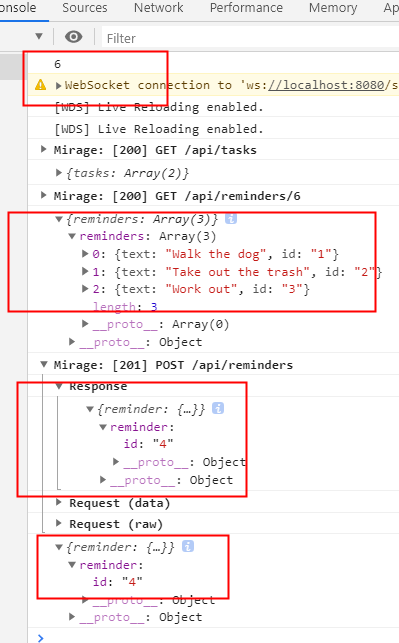
seeds(server) { server.create("reminder", { text: "Walk the dog" }) server.create("reminder", { text: "Take out the trash" }) server.create("reminder", { text: "Work out" }) },
- 动态路由
this.get("/api/reminders/:id", (schema, request) => { debugger; console.log(request.params.id) return schema.reminders.all() })
- more
- 待续
- reference link
- https://css-tricks.com/dont-wait-mock-the-api/
- https://miragejs.com/tutorial/intro/
- https://miragejs.com/docs/getting-started/introduction/

 浙公网安备 33010602011771号