微信小程序-瀑布流实现的几种方式

第一种:推荐固定条数的数据(刷新需要整体数据刷新的那种)

编辑 编辑
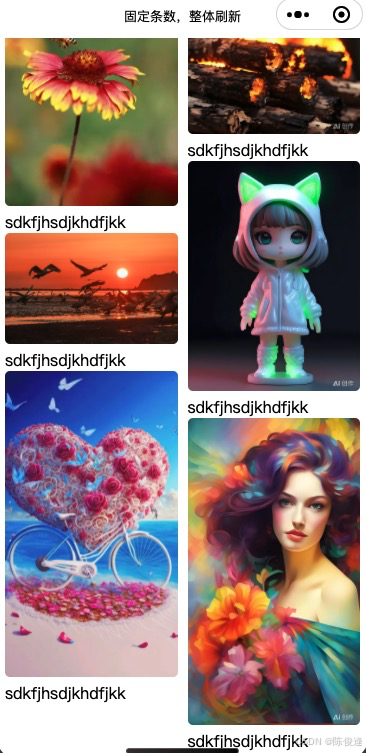
wxss

.gallery {
  padding: 20rpx;
  /*定义列数*/
  column-count: 2; 
  /*列间距*/
  column-gap: 20rpx;
}
.item {
  break-inside: avoid;
}
/*图片本身*/
.item image {
  border-radius: 10rpx;
  width: 100%;
}

js

Page({
  data: {
    images: [
      'https://img0.baidu.com/it/u=1799694557,1475747482&fm=253&fmt=auto&app=138&f=JPEG?w=500&h=750',
      'http://gips1.baidu.com/it/u=436886321,1020119268&fm=3028&app=3028&f=JPEG&fmt=auto?w=1280&h=960',
      'https://img2.baidu.com/it/u=1337068678,3064275007&fm=253&fmt=auto&app=120&f=JPEG?w=500&h=750',
      'https://inews.gtimg.com/om_bt/Os3eJ8u3SgB3Kd-zrRRhgfR5hUvdwcVPKUTNO6O7sZfUwAA/641',
      'https://img1.baidu.com/it/u=2062152131,1998701002&fm=253&fmt=auto&app=138&f=JPEG?w=800&h=1421',
      'http://gips2.baidu.com/it/u=1674525583,3037683813&fm=3028&app=3028&f=JPEG&fmt=auto?w=1024&h=1024',
      'http://gips3.baidu.com/it/u=100751361,1567855012&fm=3028&app=3028&f=JPEG&fmt=auto?w=960&h=1280',
      'http://gips0.baidu.com/it/u=1690853528,2506870245&fm=3028&app=3028&f=JPEG&fmt=auto?w=1024&h=1024',
      'http://gips0.baidu.com/it/u=3602773692,1512483864&fm=3028&app=3028&f=JPEG&fmt=auto?w=960&h=1280',
      'https://gips3.baidu.com/it/u=3732737575,1337431568&fm=3028&app=3028&f=JPEG&fmt=auto&q=100&size=f1440_2560',
    ]
  },
})

wxml

<view class="gallery">
  <view class="item" wx:for="{{images}}">
      <image src="{{item}}" mode="widthFix" bindtap="click"/>
      <text>sdkfjhsdjkhdfjkk</text>
  </view>
</view>


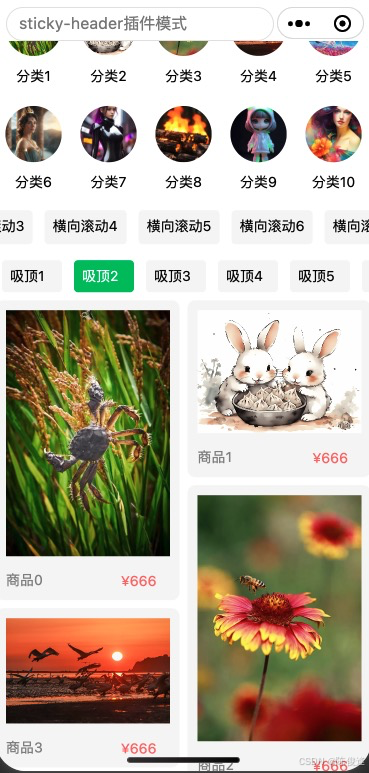
第二种:将渲染引擎调整成skyline

"renderer": "skyline",
  "rendererOptions": {
    "skyline": {
      "defaultDisplayBlock": true,
      "defaultContentBox": true,
      "disableABTest": true,
      "sdkVersionEnd": "3.0.1"
    }
  },

 编辑

 编辑编辑 
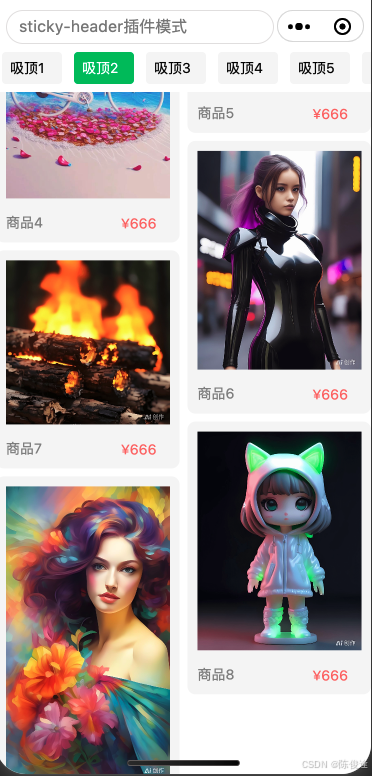
wxml

<!-- index.wxml -->
<scroll-view type="custom" scroll-y show-scrollbar="{{false}}" scroll-into-view="{{intoView}}" class="scroll-view" bindscrolltolower="bindSrollToLower" style="margin-top: {{menuTop}}px;">

    <sticky-section push-pinned-header="{{false}}">
        <sticky-header>
            <view class="sticky-header">
                <view class="search" style="height: {{menuHeight}}px;line-height: {{menuHeight}}px; margin-right: {{menuLeft}}px;">
                    <input placeholder="sticky-header插件模式" />
                </view>
            </view>
        </sticky-header>
        <grid-view type="aligned" cross-axis-count="5">
            <view wx:for="{{images}}" class="top-list">
                <image src="{{item}}" mode="aspectFill"></image>
                <text>分类{{index+1}}</text>
            </view>
        </grid-view>
    </sticky-section>

    <scroll-view scroll-x class="sticky-header-child" type="list" style="width: 100%; height: 100rpx;">
        <view class="mini-head">横向滚动1</view>
        <view class="mini-head current">横向滚动2</view>
        <view class="mini-head">横向滚动3</view>
        <view class="mini-head">横向滚动4</view>
        <view class="mini-head">横向滚动5</view>
        <view class="mini-head">横向滚动6</view>
        <view class="mini-head">横向滚动7</view>
        <view class="mini-head">横向滚动8</view>
    </scroll-view>
    
    <sticky-section push-pinned-header="{{false}}">
    
        <sticky-header>
            <view class="sticky-header">
                <view class="sticky-header-child">
                    <view class="mini-head">吸顶1</view>
                    <view class="mini-head current">吸顶2</view>
                    <view class="mini-head">吸顶3</view>
                    <view class="mini-head">吸顶4</view>
                    <view class="mini-head">吸顶5</view>
                    <view class="mini-head">吸顶6</view>
                </view>
            </view>
        </sticky-header>

        <grid-view type="masonry" 
            cross-axis-count="{{crossAxisCount}}" 
            cross-axis-gap="{{crossAxisGap}}" 
            main-axis-gap="{{mainAxisGap}}">
            <view wx:for="{{images}}" class="grid-box">

                <image src="{{item}}" mode="widthFix"></image>

                <view class="content-box">
                    <view class="product-text">
                        <view class="left">
                            <text>商品{{index}}</text>
                        </view>
                        <view class="right">
                            <text>¥666</text>
                        </view>
                    </view>
                </view>
            </view>
        </grid-view>

    </sticky-section>

</scroll-view>

wxss

/* index.wxss */
.scroll-view {
  width: 100%;
  height: 100%;
}

.search {
  border: rgb(228, 226, 226) solid 1px;
  border-radius: 20px;
  margin: 0 10px;
  line-height: 30px;
  height: 30px;
}

.search input {
  padding: 0 10px;
  line-height: 30px;
  height: 30px;
}


.top-list {
  display: flex;
  text-align: center;
  justify-content: center;
  align-items: center;
  padding-top: 10px;
  flex-direction: column;
}


.top-list image {
  width: 15vw;
  height: 15vw;
  border-radius: 50%;
}

.top-list text {
  padding: 10px 0;
  font-size: 14px;
}


.sticky-header {
  background-color: #fff;
}


.sticky-header-child {
  display: flex;
  flex-direction: row;
  flex-wrap: nowrap;
  overflow: auto;
}

.mini-head {
  flex: 0 0 120rpx;
}

.mini-head {
  display: flex;
  background-color: #f5f5f5;
  margin: 8px 6px;
  padding: 6px 8px;
  border-radius: 4px;
  font-size: 14px;
}

.current {
  background-color: #07c160;
  color: #fff;
}

.grid-box {
  padding: 10px;
  border-radius: 8px;
  background-color: #f5f5f5;
}

.grid-box image {
  width: 100%;
}

.content-box {
  padding-top: 10px;
}

.product-text {
  display: flex;
  flex-direction: row;
  padding-top: 4px;
  align-items: center;
}

.product-text view {
  display: flex;
  color: #888;
  font-size: 14px;
  flex-direction: row;
  align-items: center;
}

.product-text .left {
  width: 70%;
}


.product-text .right {
  text-align: right;
  color: rgb(248, 104, 104);
  font-size: 14px;
}

js 


Page({  
  data: {  
    images: [  
      'https://img0.baidu.com/it/u=1799694557,1475747482&fm=253&fmt=auto&app=138&f=JPEG?w=500&h=750',
      'http://gips1.baidu.com/it/u=436886321,1020119268&fm=3028&app=3028&f=JPEG&fmt=auto?w=1280&h=960',
      'https://img2.baidu.com/it/u=1337068678,3064275007&fm=253&fmt=auto&app=120&f=JPEG?w=500&h=750',
      'https://inews.gtimg.com/om_bt/Os3eJ8u3SgB3Kd-zrRRhgfR5hUvdwcVPKUTNO6O7sZfUwAA/641',
      'https://img1.baidu.com/it/u=2062152131,1998701002&fm=253&fmt=auto&app=138&f=JPEG?w=800&h=1421',
      'http://gips2.baidu.com/it/u=1674525583,3037683813&fm=3028&app=3028&f=JPEG&fmt=auto?w=1024&h=1024',
      'http://gips3.baidu.com/it/u=100751361,1567855012&fm=3028&app=3028&f=JPEG&fmt=auto?w=960&h=1280',
      'http://gips0.baidu.com/it/u=1690853528,2506870245&fm=3028&app=3028&f=JPEG&fmt=auto?w=1024&h=1024',
      'http://gips0.baidu.com/it/u=3602773692,1512483864&fm=3028&app=3028&f=JPEG&fmt=auto?w=960&h=1280',
      'https://gips3.baidu.com/it/u=3732737575,1337431568&fm=3028&app=3028&f=JPEG&fmt=auto&q=100&size=f1440_2560',
      // 更多图片数据...  
    ],
    crossAxisCount: 2,
    crossAxisGap: 8,
    mainAxisGap: 8,

    // 顶部布局参数
    menuTop: 0,
    menuHeight:0,
    menuLeft:0
  },  
  onLoad() {  
    const res = wx.getMenuButtonBoundingClientRect();
    this.setData({
        menuTop: res.top,
        menuHeight: res.height,
        menuLeft: res.width + 10
    })
  },
  bindSrollToLower() {
    this.setData({
      images: this.data.images.concat(getNewList())
    })
  },
  getNewList() {
    return this.data.images;
  }
});

json

{
  "usingComponents": {},
  "navigationStyle": "custom",
  "disableScroll": true
}


第三种是:将区域一个界面指定区域划分成两份(这种可以动态加载)

左区域:存储商品(或其他)

右区域:存储商品(或其他)


较为简单,这里就不再阐述(要是需要博主写的,私信或评论区留言喔)

 大概是如下,使得做区域以及右区域内的布局不相互影响

编辑


欢迎评论留言

博主承接毕设设计-自定义UI-价格美丽


微信:daytimeornight

posted @ 2024-11-20 17:01  小陈说说  阅读(961)  评论(0)    收藏  举报