

2023数据采集与融合技术实践作业二
第二次作业
一、作业内容
• 作业①:
– 要求:在中国气象网(http://www.weather.com.cn)给定城市集的 7
日天气预报,并保存在数据库。
– 输出信息:Gitee 文件夹链接
| 序号 | 地区 | 日期 | 天气信息 | 温度 |
|---|---|---|---|---|
| 1 | 北京 | 9日(今天) | 晴间多云。。。 | 26°c |
| 2 | ... |
代码:
from bs4 import BeautifulSoup
from bs4 import UnicodeDammit
import urllib.request
import sqlite3
import pandas as pd
# 数据库类
class WeatherDB:
    # 打开数据库
    def openDB(self):
        self.con=sqlite3.connect("weathers.db")
        self.cursor=self.con.cursor()
        try:
            self.cursor.execute("create table weathers (wCity varchar(16),"
                                "wDate varchar(16),"
                                "wWeather varchar(64),"
                                "wTemp varchar(32),"
                                "constraint pk_weather primary key (wCity,wDate))")
        except:
            self.cursor.execute("delete from weathers")

    # 关闭数据库
    def closeDB(self):
        self.con.commit()
        self.con.close()

    # 插入数据
    def insert(self, city, date, weather, temp):
        try:
            self.cursor.execute("insert into weathers "
                                "(wCity,wDate,wWeather,wTemp) values (?,?,?,?)",
                                (city, date, weather, temp))
        except Exception as err:
            print(err)

    # 显示数据库
    def show(self):
        self.cursor.execute("select * from weathers")
        rows = self.cursor.fetchall()
        print("{:4}\t{:8}\t{:16}\t{:20}\t{:20}".format("序号", "地区", "日期", "天气信息", "温度"))
        i = 1
        stss=[]
        for row in rows:
            # print(row)
            stss.append([i,row[0], row[1], row[2], row[3]])
            print("{:4}\t{:8}\t{:16}\t{:20}\t{:20}".format(i,row[0], row[1], row[2], row[3]))
            i+=1
        # print(stss)
        return stss
# 天气预报类
class WeatherForecast:

    def __init__(self):
        self.headers = {
            "User-Agent": "Mozilla/5.0 (Windows; U; Windows NT 6.0 x64; en-US; rv:1.9pre) Gecko/2008072421 Minefield/3.0.2pre"}
        self.cityCode = {"北京": "101010100", "厦门": "101230201", "福州": "101230101"}

    # 预报城市天气
    def forecastCity(self, city):
        if city not in self.cityCode.keys():
            print(city + " code cannot be found")
            return

        url = "http://www.weather.com.cn/weather/" + self.cityCode[city] + ".shtml"

        try:
            req = urllib.request.Request(url, headers=self.headers)
            data = urllib.request.urlopen(req)
            data = data.read()
            dammit = UnicodeDammit(data, ["utf-8", "gbk"])
            data = dammit.unicode_markup
            soup = BeautifulSoup(data, "lxml")
            lis = soup.select("ul[class='t clearfix'] li")
            for li in lis:
                try:
                    date = li.select('h1')[0].text
                    weather = li.select('p[class="wea"]')[0].text
                    temp = li.select("p[class='tem']")[0].text.strip()
                    # print(city, date, weather, temp)
                    self.db.insert(city, date, weather, temp)
                except Exception as err:
                    print(err)

        except Exception as err:
            print(err)


    # 预报城市列表
    def process(self, cities):
        self.db = WeatherDB()
        self.db.openDB()

        for city in cities:
            self.forecastCity(city)
        stss=self.db.show()
        self.db.closeDB()
        return stss


def main():
    ws = WeatherForecast()
    stss=ws.process(["北京", "厦门", "福州"])
    # 提取主要数据/提取全部数据
    df = pd.DataFrame(stss)
    columns = {0: "序号", 1: "地区", 2: "日期", 3: "天气信息", 4:"温度"}
    df.rename(columns=columns, inplace=True)
    # print(df)
    # 保存为csv格式的文件(没有打开db的软件)
    df.to_csv('天气.csv', encoding='utf-8-sig', index=False)
    print("completed")


if __name__ == '__main__':
    main()
结果:
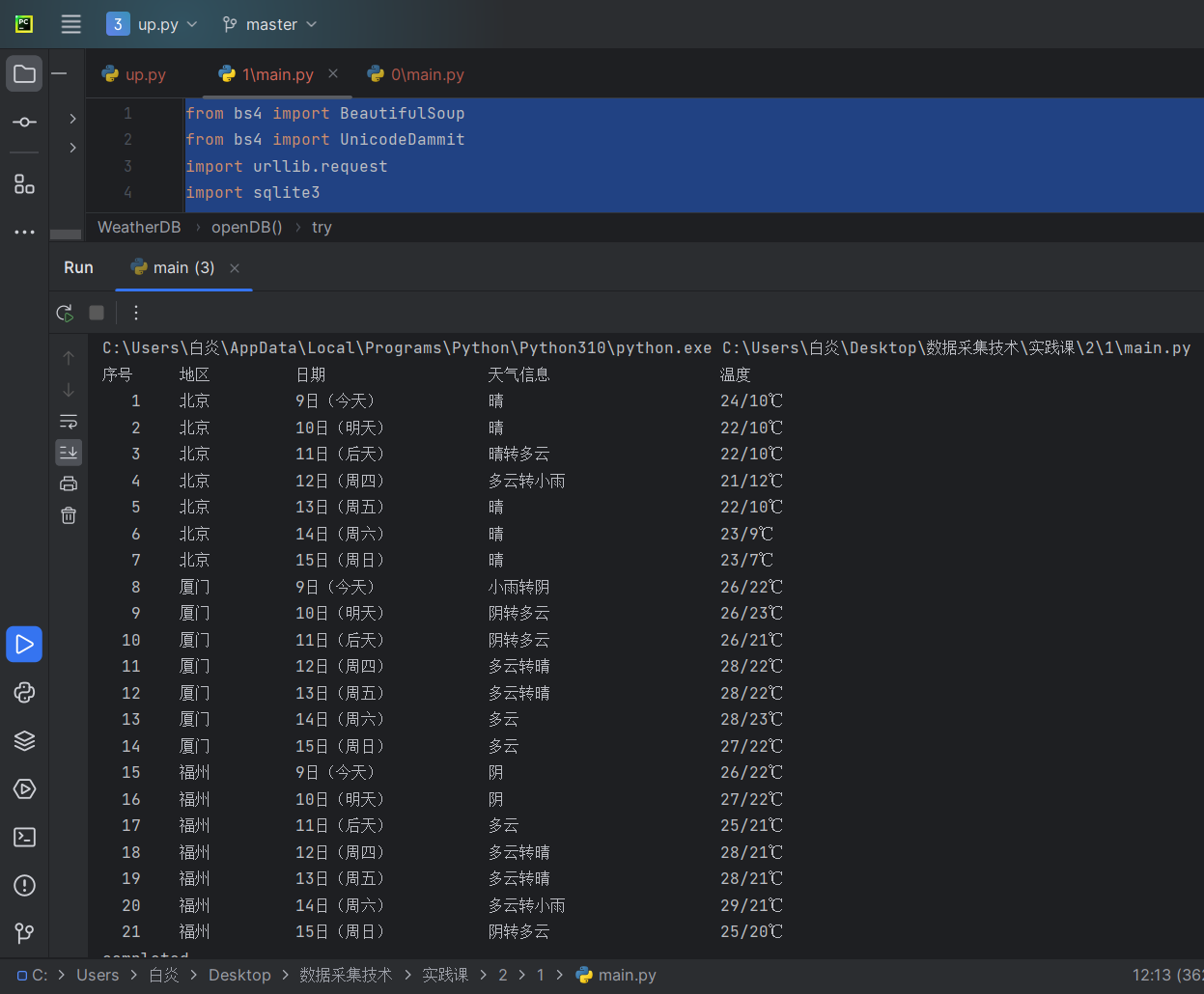
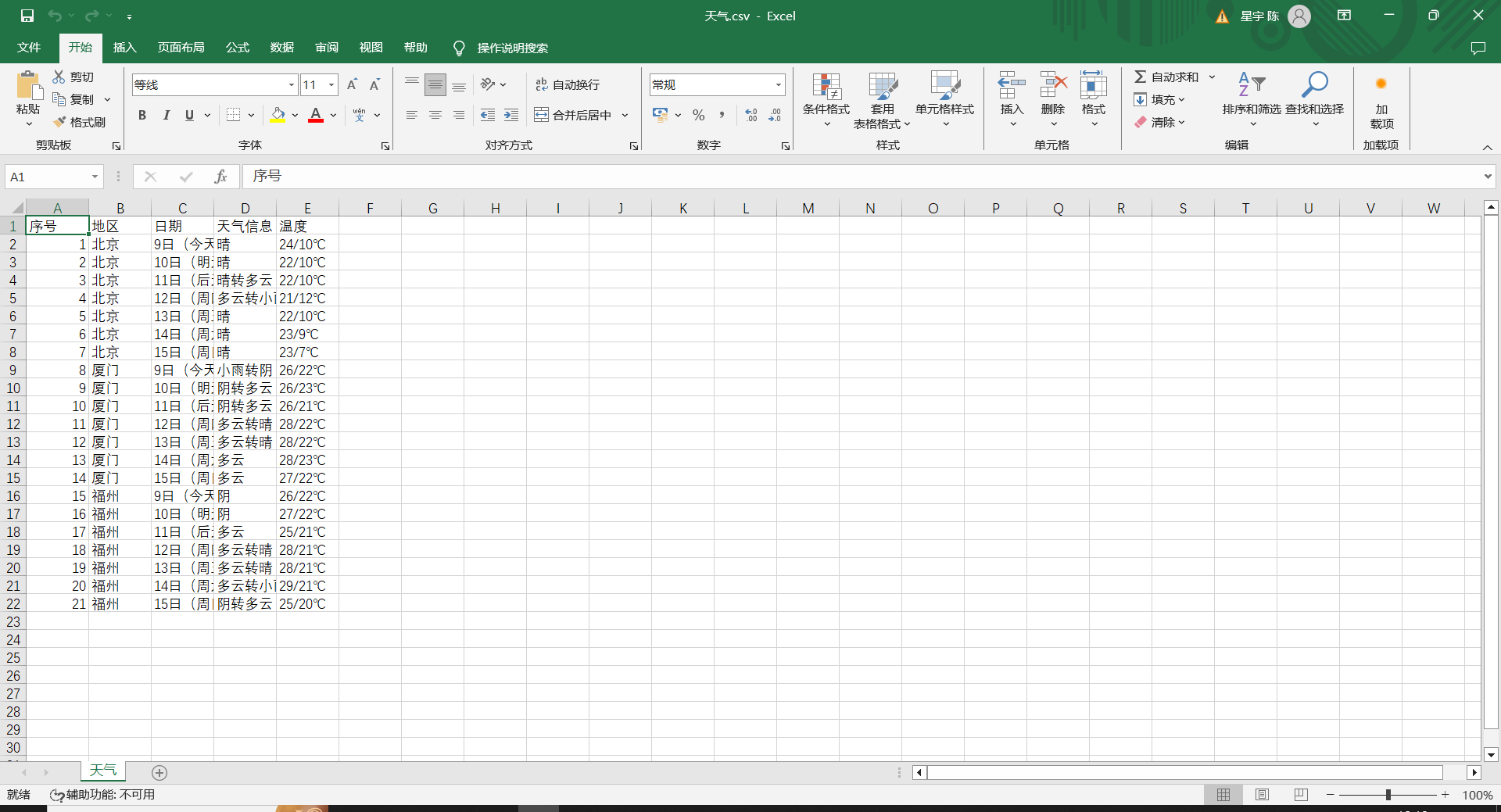
心得:大概又学了一次dtatframe这样
作业②
– 要求:用 requests 和 BeautifulSoup 库方法定向爬取股票相关信息,并
存储在数据库中。
– 候选网站:东方财富网:https://www.eastmoney.com/
新浪股票:http://finance.sina.com.cn/stock/
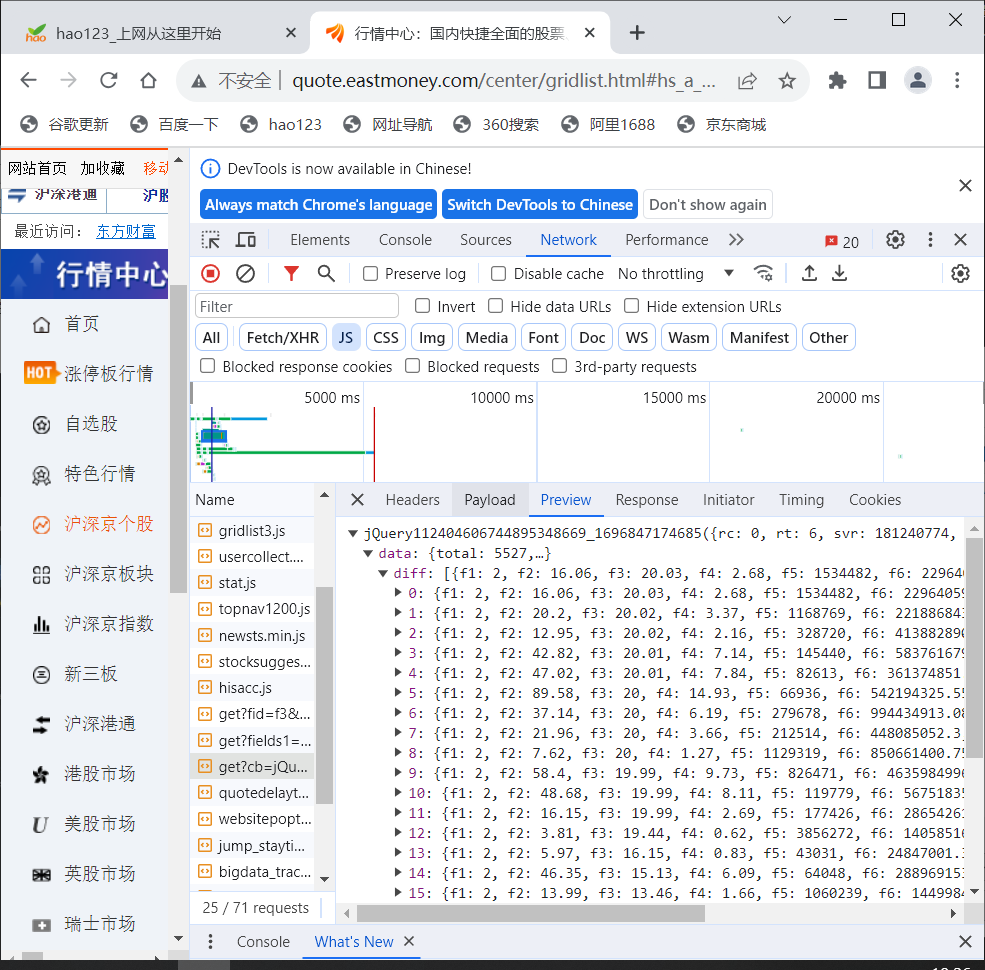
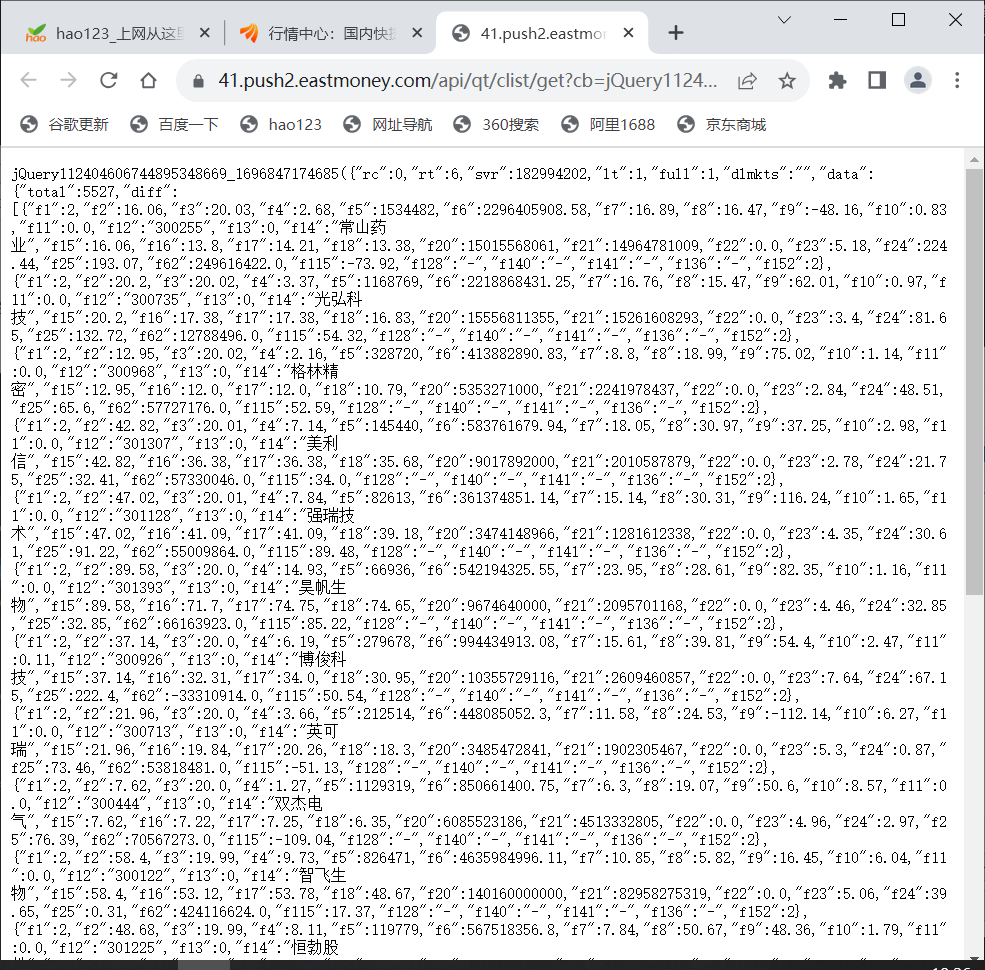
– 技巧:在谷歌浏览器中进入 F12 调试模式进行抓包,查找股票列表加载使用的 url,并分析 api 返回的值,并根据所要求的参数可适当更改api 的请求参数。根据 URL 可观察请求的参数 f1、f2 可获取不同的数值,根据情况可删减请求的参数。
参考链接:https://zhuanlan.zhihu.com/p/50099084
– 输出信息:Gitee 文件夹链接
按照教程找到的js文件进行抓包
代码:
import re
import sqlite3
import requests
import pandas as pd

# 股票数据库
class stockDB:
    # 开启
    def openDB(self):
        self.con = sqlite3.connect("stocks.db")
        self.cursor = self.con.cursor()
        try:
            self.cursor.execute("create table stocks (Num varchar(16),"
                                " Code varchar(16),names varchar(16),"
                                "Price varchar(16),"
                                "Quote_change varchar(16),"
                                "Updownnumber varchar(16),"
                                "Volume varchar(16),"
                                "Turnover varchar(16),"
                                "Swing varchar(16),"
                                "Highest varchar(16),"
                                "Lowest varchar(16),"
                                "Today varchar(16),"
                                "Yesday varchar(16))")
        except:
            self.cursor.execute("delete from stocks")

    # 关闭
    def closeDB(self):
        self.con.commit()
        self.con.close()

    # 插入数据
    def insert(self,Num,Code,names,Price,Quote_change,Updownnumber,Volume,Turnover,Swing,Highest,Lowest,Today,Yesday):
        try:
            self.cursor.execute("insert into stocks(Num,Code,names,Price,Quote_change,Updownnumber,Volume,Turnover,Swing,Highest,Lowest,Today,Yesday)"
                                " values (?,?,?,?,?,?,?,?,?,?,?,?,?)",
                                (Num,Code,names,Price,Quote_change,Updownnumber,Volume,Turnover,Swing,Highest,Lowest,Today,Yesday))
        except Exception as err:
            print(err)

    def show(self):
        self.cursor.execute("select * from stocks")
        rows = self.cursor.fetchall()
        # print("{:4}\t{:8}\t{:8}\t{:8}\t{:8}\t{:8}\t{:8}\t{:16}\t{:8}\t{:8}\t{:8}\t{:8}\t{:8}".format('序号','代码','名称','最新价','涨跌幅(%)','跌涨额(¥)','成交量(手)','成交额(¥)','振幅(%)','最高','最低','今开','昨收'))
        for row in rows:
            print("{:4}\t{:8}\t{:8}\t{:8}\t{:8}\t{:8}\t{:8}\t{:16}\t{:8}\t{:8}\t{:8}\t{:8}\t{:8}".format(row[0],row[1],row[2],row[3],row[4],row[5],row[6],row[7],row[8],row[9],row[10],row[11],row[12]))


def get_stock(url,count):
    json_page = requests.get(url).content.decode(encoding='utf-8')
    # print(json_page)
    pat1 = "\"diff\":\[\{.*\}\]"
    table = re.compile(pat1,re.S).findall(json_page) # re.S表示将字符串作为一个整体,不会出现换行符
    #提取出的只有一个
    pat2 = "\},\{"
    stocks = re.split(pat2,table[0])
    sts=[]
    for stock in stocks:
        # print(stock)
        pat3 = ","
        infs = re.split(pat3,stock)
        pat = ":"
        name = re.split(pat,infs[13])
        price = re.split(pat,infs[1])
        code = re.split(pat,infs[11])
        Quote_change = re.split(pat,infs[2])  # 涨跌幅
        Ups_and_downs = re.split(pat,infs[3])  # 涨跌额
        Volume = re.split(pat,infs[4])  #成交量
        Turnover = re.split(pat,infs[5])  #成交额
        Increase = re.split(pat,infs[6])  #振幅
        Max = re.split(pat,infs[7]) #最高
        Min = re.split(pat,infs[8]) #最低
        TodayStr = re.split(pat,infs[9])  #今开
        YDF = re.split(pat,infs[10])    #昨收

        st=[count,code[1],name[1],price[1],Quote_change[1],Ups_and_downs[1],Volume[1],Turnover[1],Increase[1],Max[1],Min[1],TodayStr[1],YDF[1]]
        sts.append(st) #列表后插入新值
        insertDB.openDB()
        insertDB.insert(count,code[1],name[1],price[1],Quote_change[1],Ups_and_downs[1],Volume[1],Turnover[1],Increase[1],Max[1],Min[1],TodayStr[1],YDF[1])
        # print("{:4}\t{:8}\t{:8}\t{:8}\t{:8}\t{:8}\t{:8}\t{:16}\t{:8}\t{:8}\t{:8}\t{:8}\t{:8}".format(count,code[1],name[1],price[1],Quote_change[1],Ups_and_downs[1],Volume[1],Turnover[1],Increase[1],Max[1],Min[1],TodayStr[1],YDF[1]))
        count += 1

        insertDB.show()  # 显示数据库内容
        insertDB.closeDB()
    return count,sts

def main():
    url_head = 'http://88.push2.eastmoney.com/api/qt/clist/get?cb=jQuery112407291657687027506_1696662230139&pn='
    url_tail = '&pz=20&po=1&np=1&ut=bd1d9ddb04089700cf9c27f6f7426281&fltt=2&invt=2&wbp2u=|0|0|0|web&fid=f3&fs=m:0+t:6,m:0+t:80,m:1+t:2,m:1+t:23,m:0+t:81+s:2048&fields=f1,f2,f3,f4,f5,f6,f7,f8,f9,f10,f12,f13,f14,f15,f16,f17,f18,f20,f21,f23,f24,f25,f22,f11,f62,f128,f136,f115,f152&_=1696662230140'
    stss = []
    global insertDB
    insertDB= stockDB()
    count = 1

    pages = int(input("请输入要爬取到的页数:"))
    print("{:4}\t{:8}\t{:8}\t{:8}\t{:8}\t{:8}\t{:8}\t{:16}\t{:8}\t{:8}\t{:8}\t{:8}\t{:8}".format('序号', '代码', '名称',
                                                                                                 '最新价', '涨跌幅(%)',
                                                                                                 '跌涨额(¥)',
                                                                                                 '成交量(手)',
                                                                                                 '成交额(¥)', '振幅(%)',
                                                                                                 '最高', '最低', '今开',
                                                                                                 '昨收'))

    for i in range(1,pages+1):
        count,sts = get_stock(url_head+str(i)+url_tail,count)
        stss.extend(sts) #合并列表

    # 提取主要数据/提取全部数据
    df = pd.DataFrame(stss)
    columns = {0: '序号', 1: '代码', 2: '名称', 3: '最新价', 4: '涨跌幅(%)', 5: '跌涨额(¥)', 6: '成交量(手)', 7: '成交额(¥)', 8: '振幅(%)', 9: '最高', 10: '最低', 11: '今开', 12: '昨收'}
    df.rename(columns=columns, inplace=True)
    df.to_csv('股票.csv', encoding='utf-8-sig', index=False)  # 保存为csv格式的文件(没有打开db的软件)

    # print(df)
    # print(sts)


if __name__ == '__main__':
    main()

心得:抓包要是网站格式写得好好像更好提取信息。
• 作业③:
– 要求:爬取中国大学 2021 主榜
(https://www.shanghairanking.cn/rankings/bcur/2021)所有院校信息,并存储在数据库中,同时将浏览器 F12 调试分析的过程录制 Gif 加入至博客中。
– 技巧:分析该网站的发包情况,分析获取数据的 api
– 输出信息:Gitee 文件夹链接
浏览器 F12 调试分析的过程
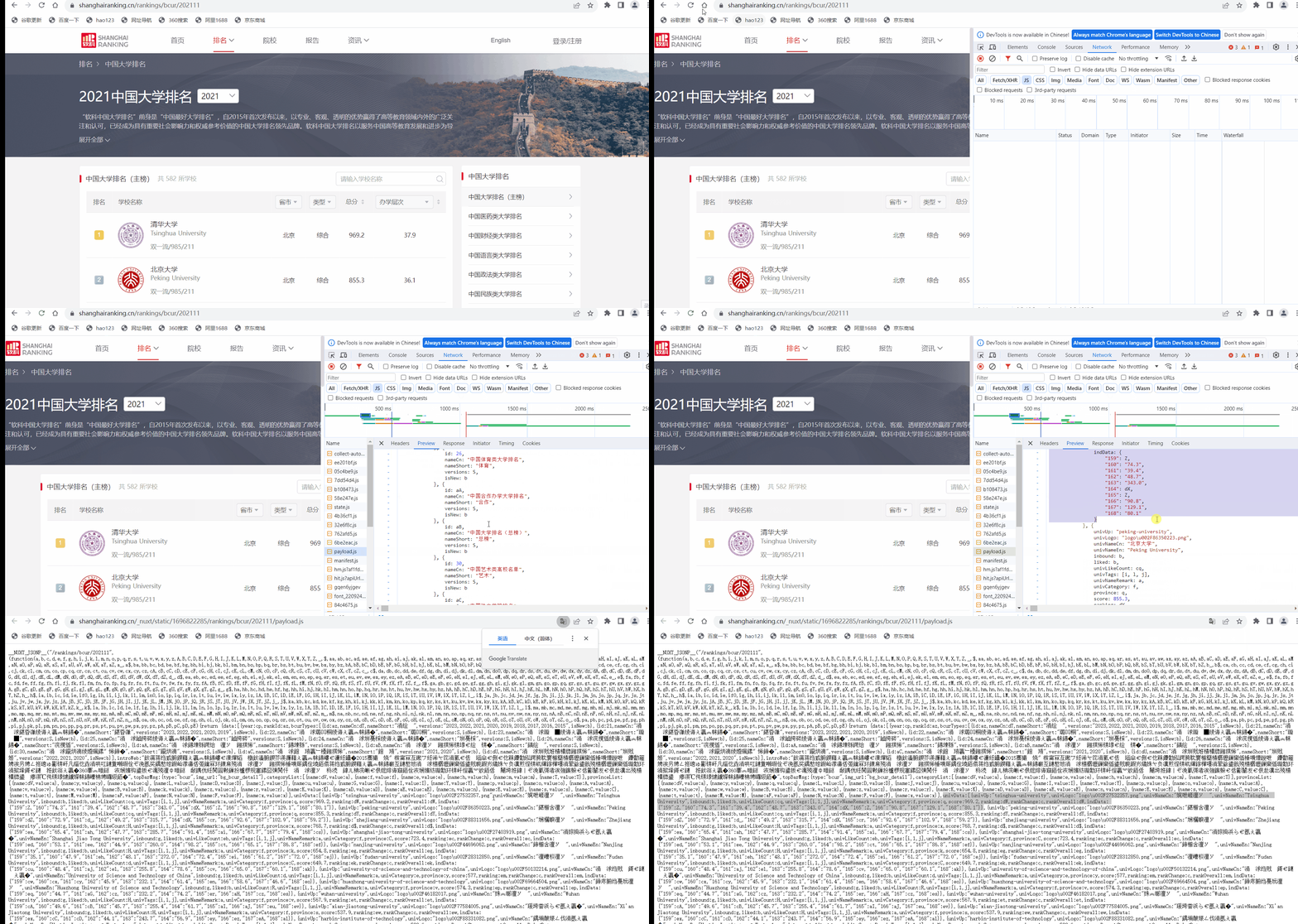
发现乱码于是:
r.encoding = 'utf-8'
想先把有学校信息的这一串先抓下来
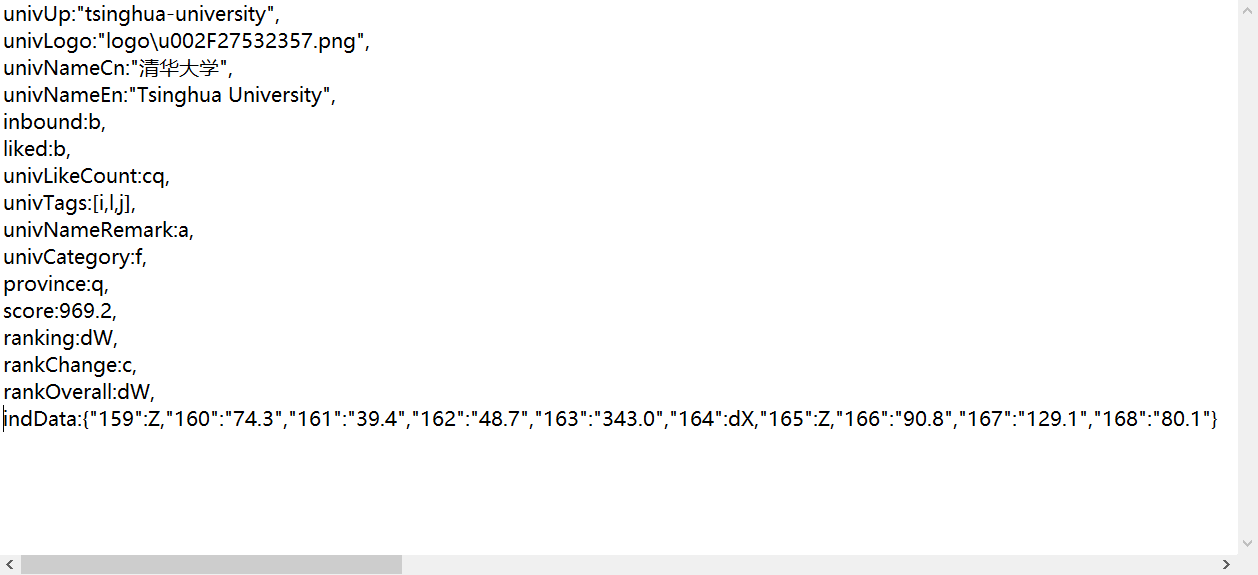
然后再截成一条条列表
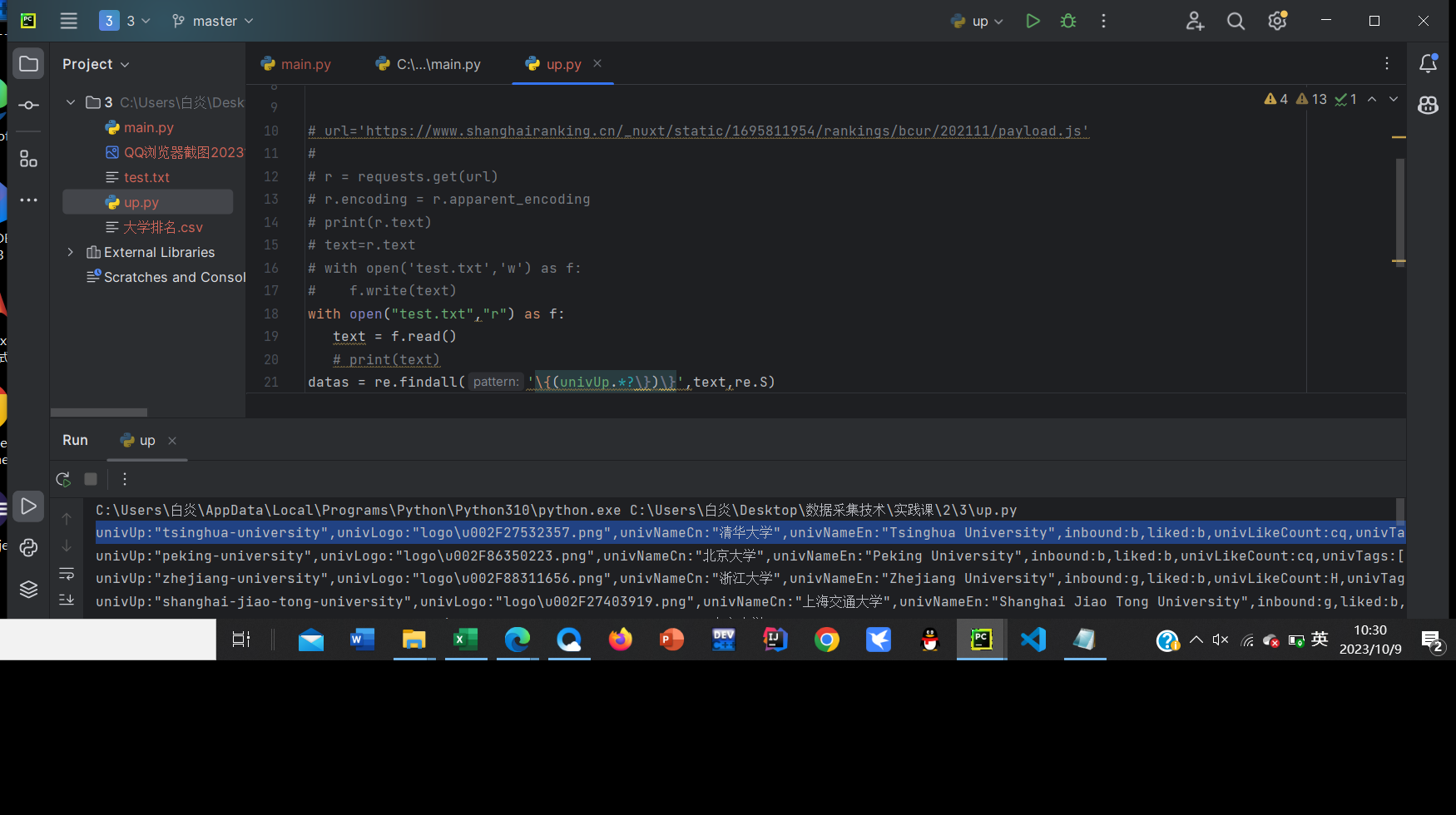
保存之后发现:
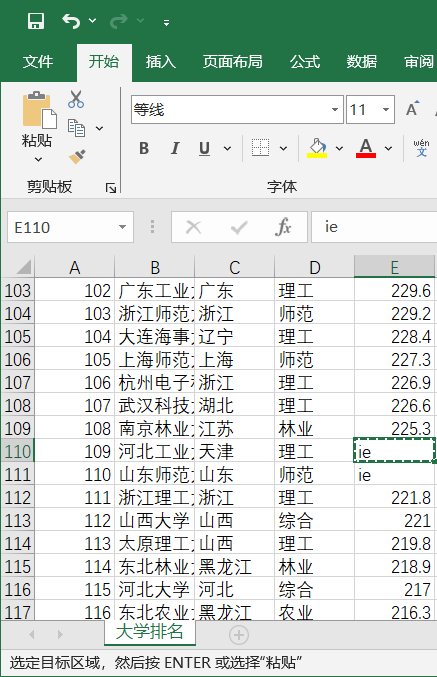
原因是有些学校因为总分相同所以采用了类似前面省份和类型的映射,采用笨方法解决
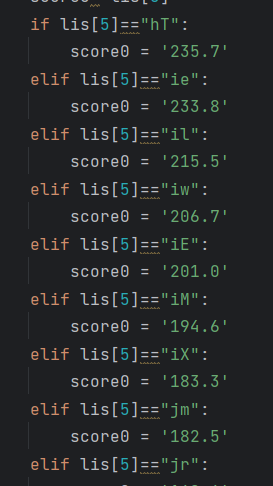 )
)
解决后:
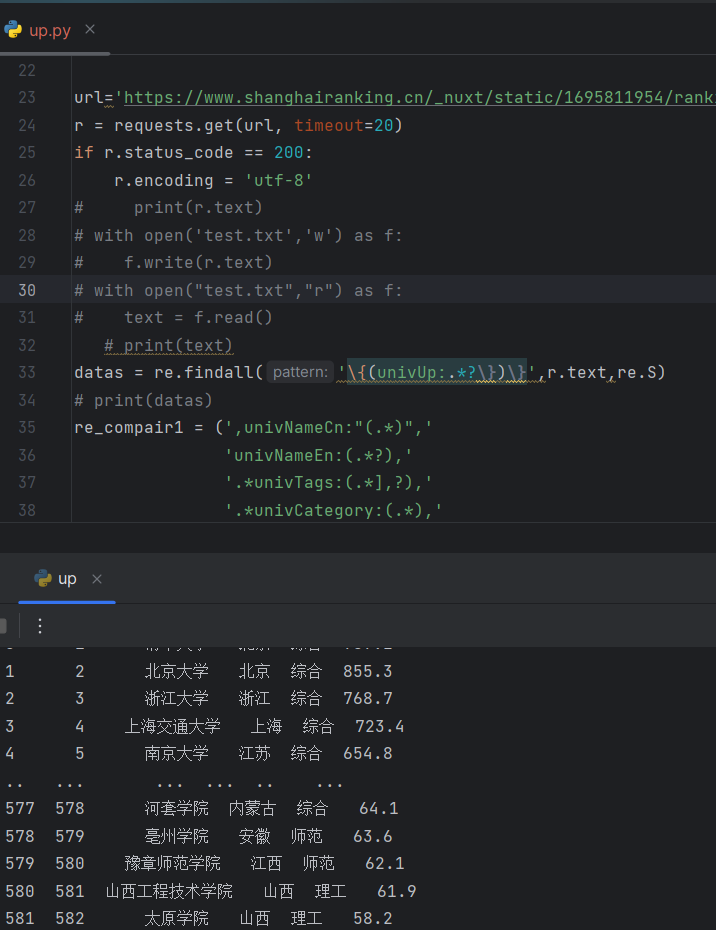
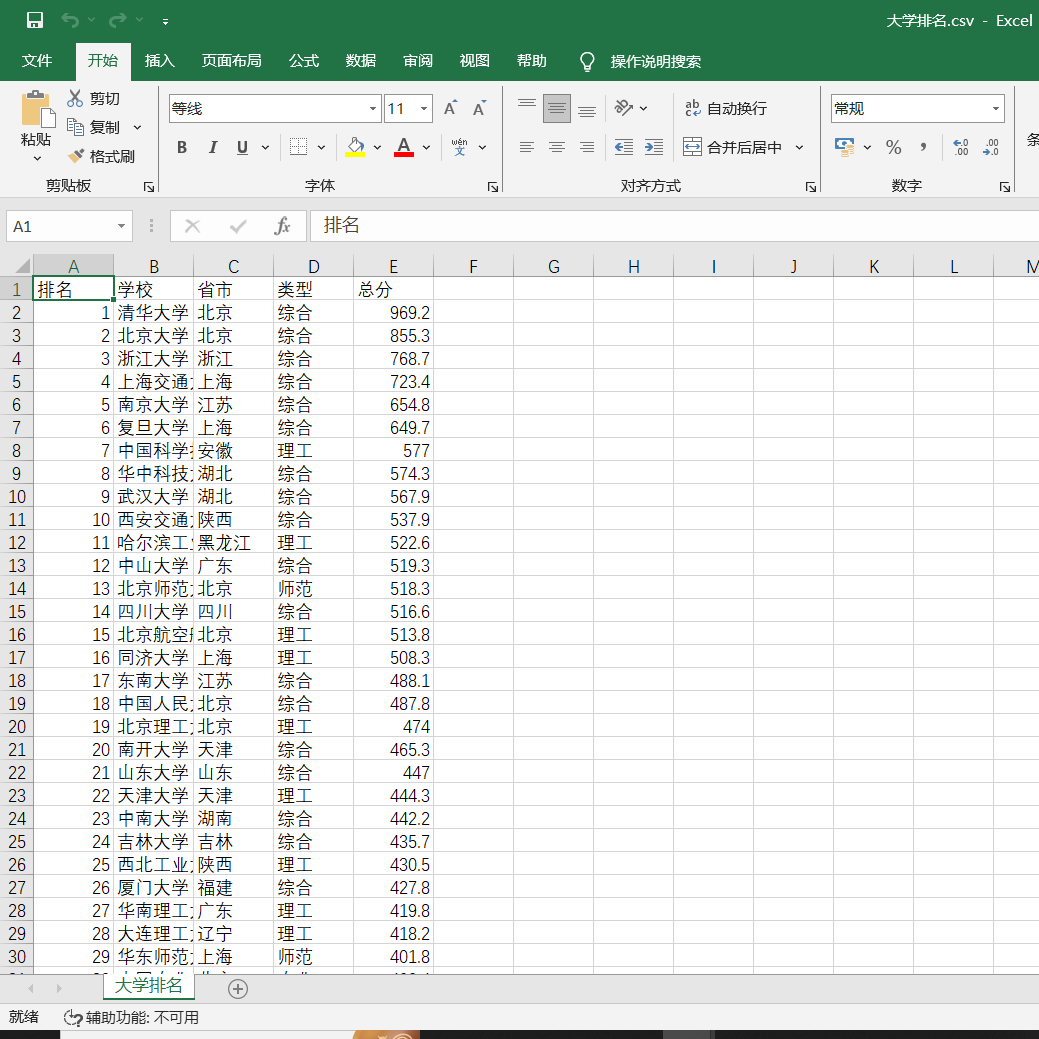
代码:
#!/usr/bin/env python
# -*- coding:utf-8 -*-
# author:lyj time:2023/10/8.
import requests
import pandas as pd
import re

province_mapping = {
    'q': '青海','x': '西藏','C': '上海', 'k': '江苏', 'o': '河南','q': '北京',
    'p': '河北','n': '山东','r': '辽宁','s': '陕西','t': '四川','u': '广东',
    'v': '湖北','w': '湖南','x': '浙江','y': '安徽','z': '江西','A': '黑龙江',
    'B': '吉林','D': '福建','E': '山西','F': '云南','G': '广西','I': '贵州',
    'J': '甘肃','K': '内蒙古','L': '重庆','M': '天津','N': '新疆','Y': '海南',
    'aD':'香港','aE': '澳门','aF': '台湾','aG': '南海诸岛', 'aH': '钓鱼岛',
    'aD':'宁夏'
}

category_mapping = {
    'f': '综合','e': '理工','h': '师范','m': '农业','T': '林业',
}


url='https://www.shanghairanking.cn/_nuxt/static/1695811954/rankings/bcur/202111/payload.js'
r = requests.get(url, timeout=20)
if r.status_code == 200:
    r.encoding = 'utf-8'
#     print(r.text)
# with open('test.txt','w') as f:
#    f.write(r.text)
# with open("test.txt","r") as f:
#    text = f.read()
   # print(text)
datas = re.findall('\{(univUp:.*?\})\}',r.text,re.S)
# print(datas)
re_compair1 = (',univNameCn:"(.*)",'
               'univNameEn:(.*?),'
               '.*univTags:(.*],?),'
               '.*univCategory:(.*),'
               'province:(.*),'
               'score:(.*),'
               'ranking:(.*?),'
               '.*')
dds = []
lst = []
# print("{:4}\t{:16}\t{:4}\t{:8}\t{:8}".format("排名", "学校", "省市", "类型", "总分"))
i=1
# 解析数据
for one_data in datas:
    dd = re.findall(re_compair1,one_data,re.S)
    # print(dd)
    for d in dd:
        lis = list(d)
        # print(lis)
        name= lis[0]
        # print(name)
        score0= lis[5]
        if lis[5]=="hT":
            score0 = '235.7'
        elif lis[5]=="ie":
            score0 = '233.8'
        elif lis[5]=="il":
            score0 = '215.5'
        elif lis[5]=="iw":
            score0 = '206.7'
        elif lis[5]=="iE":
            score0 = '201.0'
        elif lis[5]=="iM":
            score0 = '194.6'
        elif lis[5]=="iX":
            score0 = '183.3'
        elif lis[5]=="jm":
            score0 = '182.5'
        elif lis[5]=="jr":
            score0 = '169.6'
        elif lis[5]=="js":
            score0 = '167.0'
        elif lis[5]=="ju":
            score0 = '165.5'
        elif lis[5]=="jJ":
            score0 = '160.5'
        elif lis[5]=="j$":
            score0 = '153.3'
        elif lis[5]=="kd":
            score0 = '150.8'
        elif lis[5]=="kf":
            score0 = '149.9'
        elif lis[5]=="kF":
            score0 = '139.7'
        elif lis[5]=="kM":
            score0 = '137.0'
        elif lis[5]=="dO":
            score0 ='130.6'
        elif lis[5]=="lg":
            score0 = '130.2'
        elif lis[5]=="ln":
            score0 = '128.4'
        elif lis[5]=="lr":
            score0 = '125.9'
        elif lis[5] == "lu":
            score0 = '124.9'
        elif lis[5] == "lI":
            score0='120.9'
        elif lis[5] == "lJ":
            score0='120.8'
        elif lis[5] == "lO":
            score0 = '119.9'
        elif lis[5] == "lP":
            score0 = '119.7'
        elif lis[5] == "l$":
            score0 = '115.4'
        elif lis[5] == "mj":
            score0 = '112.6'
        elif lis[5] == "mo":
            score0 = '111.0'
        elif lis[5] == "mu":
            score0 = '109.4'
        elif lis[5] == "mz":
            score0 = '107.6'
        elif lis[5] == "mC":
            score0 = '107.1'
        elif lis[5] == "dP":
            score0 = '105.5'
        elif lis[5] == "mN":
            score0 = '104.7'
        elif lis[5] == "mZ":
            score0 = '101.2'
        elif lis[5] == "m_":
            score0 = '101.1'
        elif lis[5] == "m$":
            score0 = '100.9'
        elif lis[5] == "nb":
            score0 = '100.3'
        elif lis[5] == "nh":
            score0 = '99.0'
        elif lis[5] == "no":
            score0 = '97.6'
        elif lis[5] == "nt":
            score0 = '96.5'
        elif lis[5] == "nx":
            score0 = '95.8'
        elif lis[5] == "nz":
            score0 = '95.2'
        elif lis[5] == "nD":
            score0 = '94.8'
        elif lis[5] == "nG":
            score0 = '94.3'
        elif lis[5] == "nJ":
            score0 = '93.6'
        elif lis[5] == "ax":
            score0 = '93.5'
        elif lis[5] == "nM":
            score0 = '92.3'
        elif lis[5] == "nO":
            score0 = '91.7'
        elif lis[5] == "nV":
            score0 = '90.7'
        elif lis[5] == "nW":
            score0 = '90.6'
        elif lis[5] == "nZ":
            score0 = '90.2'
        elif lis[5] == "ay":
            score0 = '89.4'
        elif lis[5] == "ob":
            score0 = '89.3'
        elif lis[5] == "oh":
            score0 = '87.4'
        elif lis[5] == "ol":
            score0 = '86.8'
        elif lis[5] == "op":
            score0 = '86.2'
        elif lis[5] == "os":
            score0 = '85.8'
        elif lis[5] == "ox":
            score0 = '84.6'
        elif lis[5] == "cm":
            score0 = '83.4'
        elif lis[5] == "oC":
            score0 = '82.8'
        elif lis[5] == "oS":
            score0 = '78.1'

        score=eval(score0)
        # print(score)
        Category = category_mapping.get(lis[3])
        # print(Category)
        province = province_mapping.get(lis[4])
        # print(province)
        # print(type(province))
        # print("{:^4}\t{:8}\t{:<4}\t{:8}\t{:4}".format(i,lis[0],province,Category,score))
        lst=[i,lis[0],province,Category,score]
        dds.append(lst)
        i+=1

# print(dds)
df = pd.DataFrame(dds,columns=['排名','学校','省市','类型','总分'])

df.to_csv('大学排名.csv', encoding='utf-8-sig',index=False)  # 保存为csv格式的文件
print(df)
心得:在之前的项目上尝试新的实现方式,感觉很新奇。同时也提醒我时刻关注解码。

 浙公网安备 33010602011771号