
2023数据采集与融合技术实践作业一
作业①:
实验要求
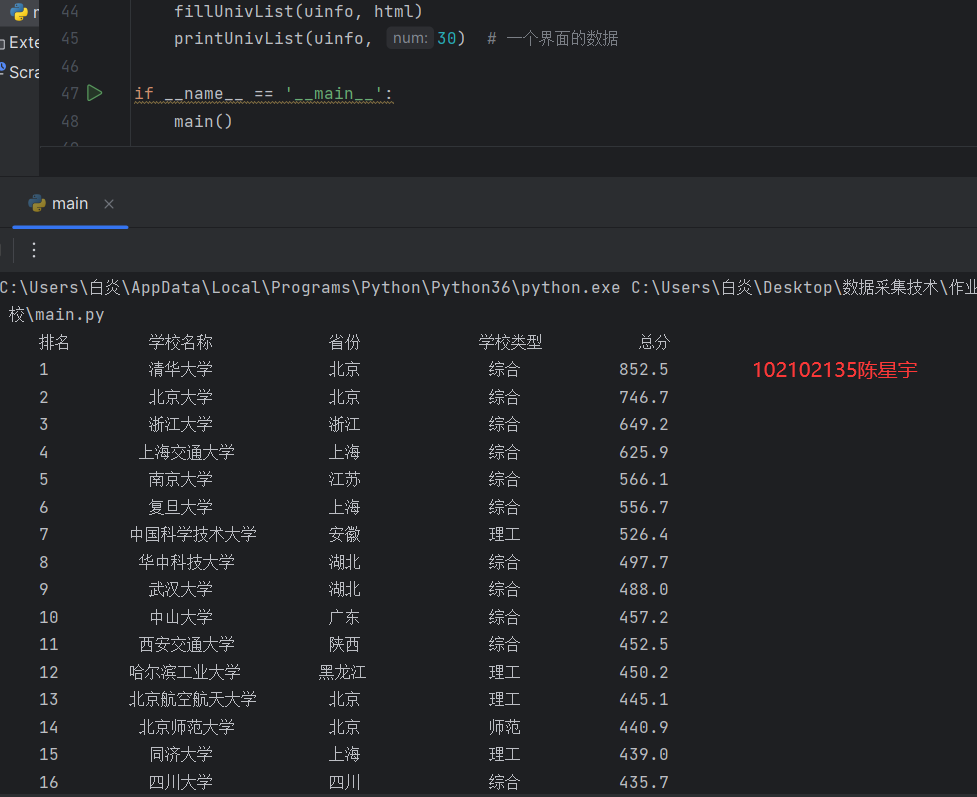
o 要求:用requests和BeautifulSoup库方法定向爬取给定网址(http://www.shanghairanking.cn/rankings/bcur/2020 )的数据,屏幕打印爬取的大学排名信息。
输出信息:
| 排名 | 学校名称 | 省市 | 学校类型 | 总分 |
|---|---|---|---|---|
| 1 | 清华大学 | 北京 | 综合 | 852.5 |
| 2 | .... |
代码
import requests
import urllib.request
from bs4 import BeautifulSoup
import bs4

def getHTMLText(url):   #从网络上获取大学基本信息(这段可以作为模板背)
    headers={
        'User - Agent':'Mozilla / 5.0 (Windows NT 10.0;Win64;x64) AppleWebKit /'
                       ' 537.36(KHTML, likeGecko) Chrome /'
                       ' 116.0.0.0 Safari / '
                       '537.36Edg / 116.0.1938.81'}
    try:
        res = requests.get(url=url, timeout=30, headers=headers)  # 使用requests库爬取
        res.raise_for_status()  # 产生异常信息
        res.encoding = res.apparent_encoding  # 修改编码
        return res.text  # 返回网页编码
    except Exception as err:
        print(err)

    try:
        req = urllib.request.Request(url)
        # 打开URL网站的网址,读出二进制数据,二进制数据转为字符串
        data = urllib.request.urlopen(req).read.decode()
        return data
    except Exception as err:
        print(err)


def fillUnivList(ulist, html):  #网页内容中信息匹配到合适的数据结构
    soup = BeautifulSoup(html, "html.parser")
    for tr in soup.find('tbody').children:
        #过滤非标签信息
        if isinstance(tr, bs4.element.Tag):
            #所有a标签存为一个列表类型a
            a = tr('a')
            # 所有tds标签存为一个列表类型a
            tds = tr('td')
            #trip()函数移除字符串头尾指定的字符(默认为空格或者换行)
            ulist.append([tds[0].text.strip(), a[0].string.strip(), tds[2].text.strip(),
                          tds[3].text.strip(), tds[4].text.strip()])
def printUnivList(ulist1, num): #大概是格式化输出中文
    tplt = "{0:^10}\t{1:^10}\t{2:^12}\t{3:^12}\t{4:^10}"
    print(tplt.format("排名", "学校名称", "省份", "学校类型", "总分"))
    for i in range(num):
        u = ulist1[i]
        print(tplt.format(u[0], u[1], u[2], u[3], u[4]))


def main():
    uinfo = []
    url ="https://www.shanghairanking.cn/rankings/bcur/2020"
    html = getHTMLText(url)
    fillUnivList(uinfo, html)
    printUnivList(uinfo, 50)  # 一个界面的数据

if __name__ == '__main__':
    main()
心得体会
初步了解爬虫,但是对爬虫翻页还需要理解
作业②:
实验要求
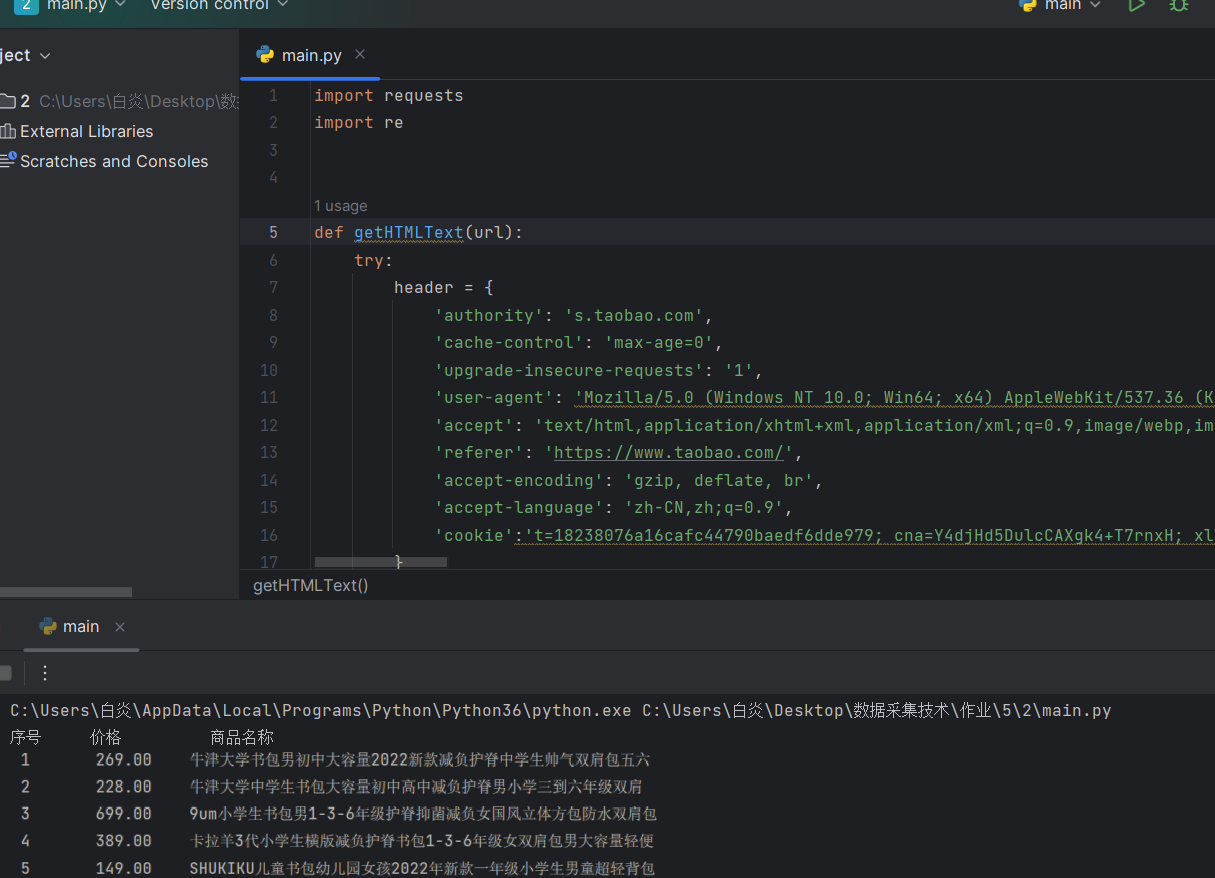
o 要求:用requests和re库方法设计某个商城(自已选择)商品比价定向爬虫,爬取该商城,以关键词“书包”搜索页面的数据,爬取商品名称和价格。
输出信息:
| 序号 | 价格 | 商品名 |
|---|---|---|
| 1 | ¥39.00 | 小学生书包男女1-3-5年级儿童书包6-12周岁护脊减负双肩包 |
| 2 | ... |
代码
import requests
import re


def getHTMLText(url):
    try:
        header = {
            'authority': 's.taobao.com',
            'cache-control': 'max-age=0',
            'upgrade-insecure-requests': '1',
            'user-agent': 'Mozilla/5.0 (Windows NT 10.0; Win64; x64) AppleWebKit/537.36 (KHTML, like Gecko) Chrome/69.0.3497.81 Safari/537.36',
            'accept': 'text/html,application/xhtml+xml,application/xml;q=0.9,image/webp,image/apng,*/*;q=0.8',
            'referer': 'https://www.taobao.com/',
            'accept-encoding': 'gzip, deflate, br',
            'accept-language': 'zh-CN,zh;q=0.9',
            'cookie':'cna=5W57G+FTk1kCAW5XU5/VdDF7; miid=271101371422264071; cookie2=1d17b8ddf12911d5e8204277b114f614; t=1c2d38d0f0d6d648d71193038ac4d4d5; sgcookie=E100lCaaipbgP8gGKu0ZzjBat5UNy%2BzOvog3QM68yLXKm3sgsaUsbN%2Fk49a9XPSAGDnpNPHaxjYLa8cen5HUtrqUe%2BS%2BoPZpMthcU3RJ5FlZbhWtQub2xO4CpNAwxd8%2FLZQ4; uc3=lg2=UIHiLt3xD8xYTw%3D%3D&vt3=F8dCsGXO36TcXcfptrU%3D&id2=UUphzpYpo1tASCrUiA%3D%3D&nk2=F5RCYRtHdZ8Qxuc%3D; csg=83f3a498; lgc=tb740759684; uc4=id4=0%40U2grFbWywof0DsNvk2PqkqQwKYiADljx&nk4=0%40FY4Jj1Rey3mUnfTeqXBzmRPrET6iOg%3D%3D; tracknick=tb740759684; _cc_=URm48syIZQ%3D%3D; sg=414; useNativeIM=false; wwUserTip=false; thw=cn; mt=ci=-1_0; _tb_token_=ead8363b538fe; _m_h5_tk=a030b5a75b1e026993f30a607f45c624_1695293122666; _m_h5_tk_enc=d7866e70c410f96cb164cc6a36d04ad4; uc1=cookie14=Uoe9aORPU1CcwQ%3D%3D; isg=BAQE4oDMPfxgAY_oSJhg0c7FwIL2HSiHd0jr3R6lvE-SSaUTRihUF07rjeGR1mDf; tfstk=dRbJp0Zg7-2k8Kzy9DE0YcglbbgLSaCrET5s-pvoAtBA11kkApqPpHBh3H_kr_XxaZBt-42z46gp-ewgIP4Ga_YeRRqB4Pfryo7xhR4gS_5y8ewgI7W8FK60g3e11K_oGP6DdB5WH2CPkQt-4_9xR2_xS3BZ9NbObmkGE7i7MSnEY3O4dKkoG; l=fBNH3ZKcT0CjDT5DBOfaFurza77OSLAYYuPzaNbMi9fPODCB5-NOW1hMlw86C3GVF6yeR3-vfP3_BeYBqQAonxvtIosM_CkmndLHR35..'}

        r = requests.get(url, timeout=30, headers=header)
        r.raise_for_status()
        r.encoding = r.apparent_encoding整体的编码方式
        return r.text
    except:
        return ""


# 解析页面(关键)
def parsePage(ilt, html):
    try:
        plt = re.findall(r'\"view_price\"\:\"[\d\.]*\"', html)  # \表示引入了一个“以及:
        tlt = re.findall(r'\"raw_title\"\:\".*?\"', html)  # ???
        for i in range(len(plt)):
            price = eval(plt[i].split(':')[1])
            title = eval(tlt[i].split(':')[1])
            ilt.append([price, title])
    except:
        print("")


def printGoodsList(ilt):
    tplt = "{:4}\t{:8}\t{:16}"
    print(tplt.format("序号", "价格", "商品名称"))
    count = 0
    for g in ilt:
        count = count + 1
        print(tplt.format(count, g[0], g[1]))


def main():
    goods = '书包'
    depth = 4
    start_url = 'https://s.taobao.com/search?q=' + goods
    infolist = []
    for i in range(depth):
        try:
            url = start_url + '&s=' + str(44 * i)
            html = getHTMLText(url)
            parsePage(infolist, html)
        except:
            continue
    printGoodsList(infolist)


main()
心得体会
就跑通了一次qaq,但是还是不太理解,还需要多看看
作业③:
实验要求
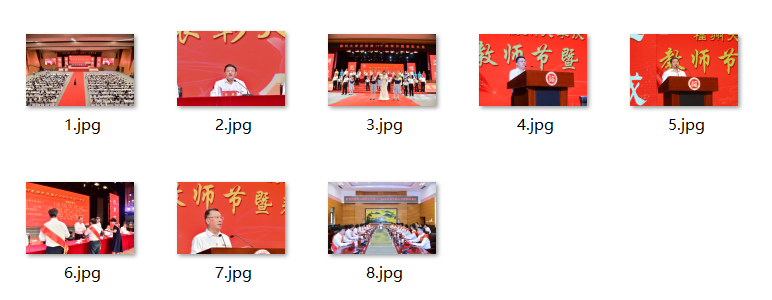
o 要求:爬取一个给定网页( https://xcb.fzu.edu.cn/info/1071/4481.htm)或者自选网页的所有JPEG和JPG格式文件
o 输出信息:将自选网页内的所有JPEG和JPG文件保存在一个文件夹中
代码
import requests
from bs4 import BeautifulSoup
import urllib.request

#获取网站数据
url = requests.get('https://xcb.fzu.edu.cn/info/1071/4481.htm')
#url.encoding = 'utf-8‘
html = url.text
#解析网页
soup = BeautifulSoup(html,'html.parser')
#获取所有的img标签
movie = soup.find_all('img')
#获取src路径
x=1
for i in movie:
	imgsrc = 'https://xcb.fzu.edu.cn/'+ i.get('src')
	print(imgsrc)
	filename ='D:/mooc/'
	urllib.request.urlretrieve(imgsrc,filename + str(x) +'.jpg')
	x+=1
心得体会
这个作业比较简单,正在思考使用正则表达式实现的方法。

 浙公网安备 33010602011771号