
IO流基础
1.1 文件
1.1.1 文件的概念
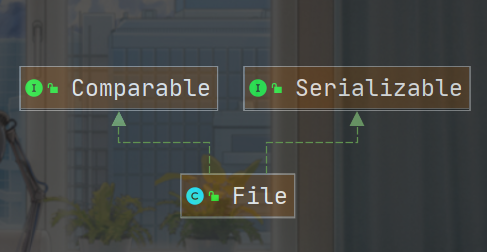
File类继承关系图
文件流
- 文件在程序中是以流的形式来操作的
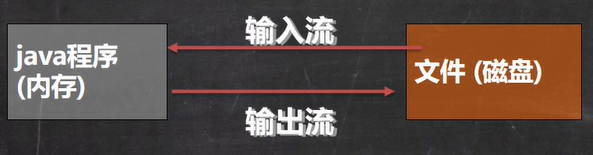
- 流:数据在数据源(文件)和程序(内存)之间经历的路径
- 输入流:数据从数据源(文件)到程序(内存)的路径
- 输出流:数据从程序(内存)到数据源(文件)的路径
1.1.2 文件的操作
1.1.2.1 创建文件
- new File(String pathname)//根据路径构建一个File对象
- new File(File parent,String child)//根据父目录文件+子路径构建
- new File(String parent,String child)//根据父目录+子路径构建
第一种
//1.在E盘创建一个File1.txt文件
public static void main(String[] args) {
    String Path="E:\\File1.txt";  //路径需要加转义字符\
    File file = new File(Path);  //只是在内存中创建了file这个对象,还没有写入磁盘
    try {
        //创建文件
        file.createNewFile();  //执行该方法后才将该file对象写入到磁盘中称为一个文件
        System.out.println("文件创建成功");
    } catch (IOException e) {
        e.printStackTrace();
    }
}
第二种
//2.在E盘创建一个File2.txt文件
public static void main(String[] args) {
    File file = new File("E:\\");
    String fileName="File2.txt";
    File file1 = new File(file, fileName);
    try {
        file1.createNewFile();
        System.out.println("文件创建成功");
    } catch (IOException e) {
        e.printStackTrace();
    }
}
第三种
//3.在E盘创建一个File3.txt文件
public static void main(String[] args) {
    String path="E:\\";
    String fileName="File3.txt";
    File file = new File(path, fileName);
    try {
        file.createNewFile();
        System.out.println("文件创建成功");
    } catch (IOException e) {
        e.printStackTrace();
    }
}
1.1.2.2 获取文件的信息
public class FileInformation {
    public static void main(String[] args) throws IOException {
        //getName、getAbsolutePath、getParent、length、exists、isFile、isDirectory
        File file = new File("E:\\file.txt");
        file.createNewFile();
        System.out.println("文件名"+file.getName());
        System.out.println("绝对路径"+file.getAbsoluteFile());
        System.out.println("父路径"+file.getParent());
        System.out.println("文件字节大小"+file.length());  //对于汉字,不同编码所占字节大小不同
        System.out.println("文件是否存在"+file.exists());
        System.out.println("是否是文件"+file.isFile());
        System.out.println("是否是文件夹"+file.isDirectory());
    }
}
1.1.3 目录的操作
- file.mkdir 创建单级目录
- file.mkdirs 创建多级目录
判断E:\\file.txt是否存在,如果存在就删除它
- 删除文件不用考虑该文件是否为空文件
@Test
public void demo1() throws IOException {
    File file = new File("E:\\file.txt");
    if (!file.exists()){
        System.out.println("该文件不存在");
    }else {
        if (!file.delete()){
            System.out.println("删除失败");
        }else {
            System.out.println("删除成功");
        }
    }
}
判断 E:\\file2是否存在,存在就删除,否则提示不存在
- 如果要删除的文件夹中存在文件,需要删除文件后才能删除文件夹
@Test
public void test2(){
    File file = new File("E:\\file2");
    if (!file.exists()){
        System.out.println("该文件夹不存在");
    }else {
        if (!file.delete()){
            System.out.println("删除失败");
        }else {
            System.out.println("删除成功");
        }
    }
}
判断E:\\file3\\aa\\bb\\cc目录是否存在,如果存在就提示已经存在,否则就创建
@Test
public void demo3(){
    File file = new File("E:\\file3\\aa\\bb\\cc");
    if (!file.exists()){
        if (!file.mkdirs()){
            System.out.println("目录创建失败");
        }else {
            System.out.println("目录创建成功");
        }
    }else {
        System.out.println("目录已存在");
    }
}
1.2 IO流原理及流的分类
1.2.1 IO流原理
- I/O是Input/Output的缩写,I/O技术是非常实用的技术,用于处理数据传输如读/写文件,网络通讯等。
- Java程序中,对于数据的输入/输出操作以”流(stream)”的方式进行。
- java.io包下提供了各种“流”类和接口,用以获取不同种类的数据,并通过方法输入或输出数据
输入input
- 读取外部数据(磁盘、光盘等存储设备的数据)到程序(内存)中。
输出output
- 将程序(内存)数据输出到磁盘、光盘等存储设备中。
//InputStream 和OutputStream 都是抽象类,不能直接使用,只能使用该类的实现子类创建对象。
public abstract class InputStream implements Closeable{}
1.2.2 IO流分类
- 按操作数据单位不同分为:字节流(8 bit)二进制文件,字符流(按字符)文本文件
- 按数据流的流向不同分为:输入流,输出流
- 按流的角色的不同分为:节点流,处理流/包装流
| (抽象基类) | 字节流 | 字符流 |
|---|---|---|
| 输入流 | lnputStream | Reader |
| 输出流 | OutputStream | Writer |
- Java的IO流共涉及40多个类,实际上非常规则,都是从如上4个抽象基类派生的。
- 由这四个类派生出来的子类名称都是以其父类名作为子类名后缀。
1.3 节点流和处理流
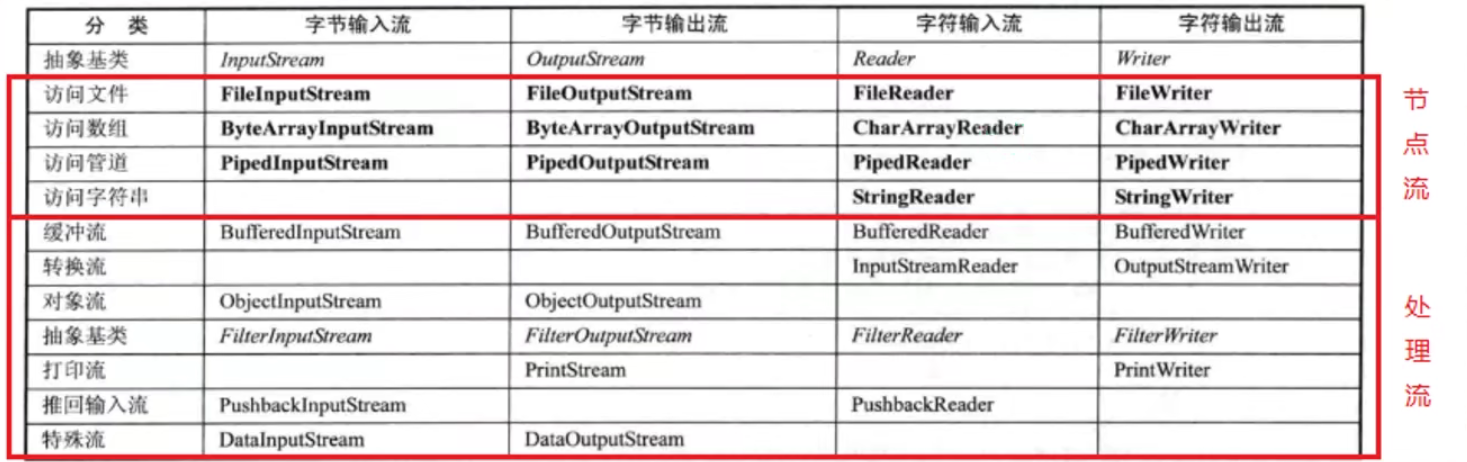
- 节点流可以从一个特定的数据源读写数据,如FileReader、FileWriter 、FileInputStream、FileOutputStream。
- 处理流(也叫包装流)是“连接”在已存在的流(节点流或处理流)之上,为程序提供更为强大的读写功能,如BufferedReader、BufferedWriter、 BufferedInputStream、BufferedOutputStream。
节点流和处理流的区别和联系:
- 节点流是底层流/低级流,直接跟数据源相接。
- 处理流(包装流)包装节点流,既可以消除不同节点流的实现差异,也可以提供更方便的方法来完成输入输出。[源码理解]
- 处理流(也叫包装流)对节点流进行包装,使用了修饰器设计模式,不会直接与数据源相连[模拟修饰器设计模式]
处理流的功能主要体现在以下两个方面:
- 性能的提高:主要以增加缓冲的方式来提高输入输出的效率。
- 操作的便捷:处理流可能提供了一系列便捷的方法来一次输入输出大批量的数据,使用更加灵活方便
1.4 输入流
1.4.1 字节输入流 InputStream
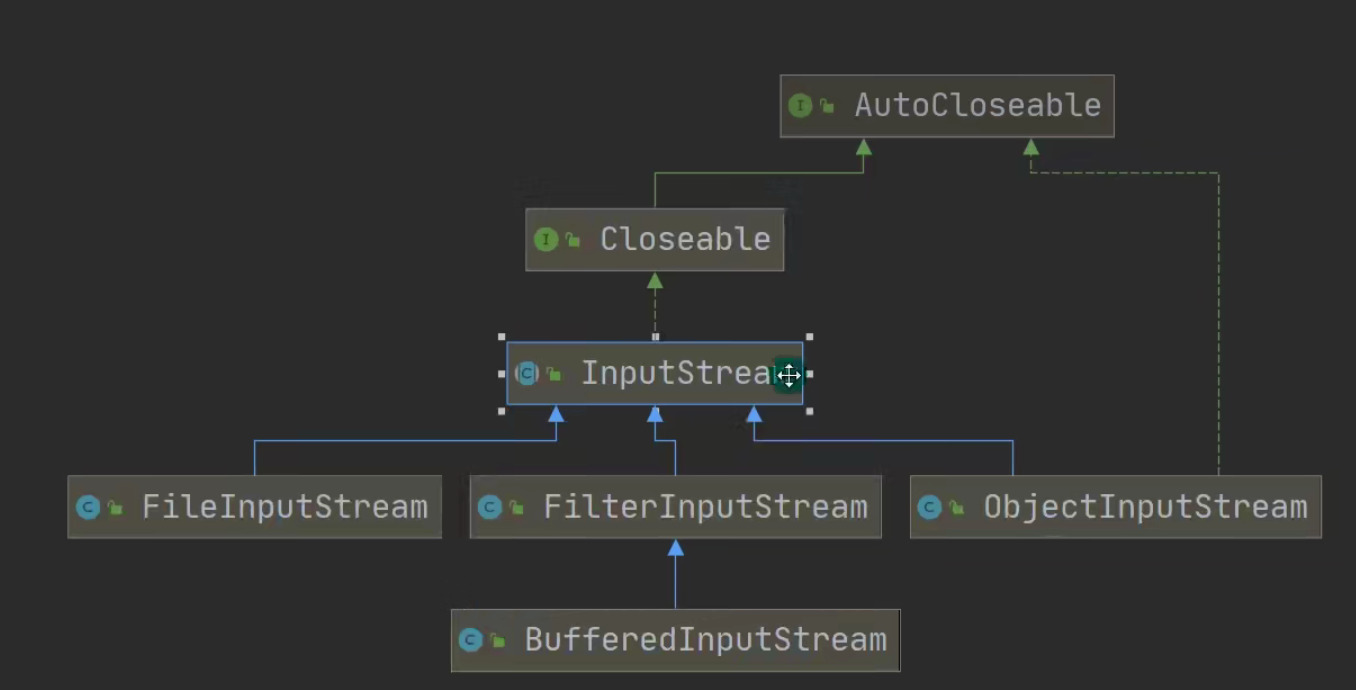
- InputStream抽象类是所有类字节输入流的超类
1.4.1.1 FileInputStream
- 常用方法,一次读取一个字节缓存区的数据到内存,提高效率。
public int read(byte[] b) throws IOException
- 从该输入流读取最多b.length字节的数据到字节数组。 此方法将阻塞,直到某些输入可用。
- 该方法的返回值表示实际读取buff缓冲区中的字符数。如果缓冲区内无字符,则返回-1。
//使用一个数组缓存读取
public static void test2(){
    String path ="E:\\hello.txt";
    int len =0;
    //一次读取1024个字节
    byte[] buff=new byte[1024];
    FileInputStream fis=null;
    try {
        fis = new FileInputStream(path);
        //len表示的实际读取字符的长度
        while((len=fis.read(buff))!=-1){
            System.out.print(new String(buff,0,len));
        }
    } catch (IOException e) {
        e.printStackTrace();
    }finally {
        //关闭流
        try {
            fis.close();
        } catch (IOException e) {
            e.printStackTrace();
        }
    }
}
1.4.1.2 BufferedInputStream
1.4.1.3 ObjectInputStream
1.4.2 字符输入流 Reader
1.4.2.1 FileReader
- 关系图
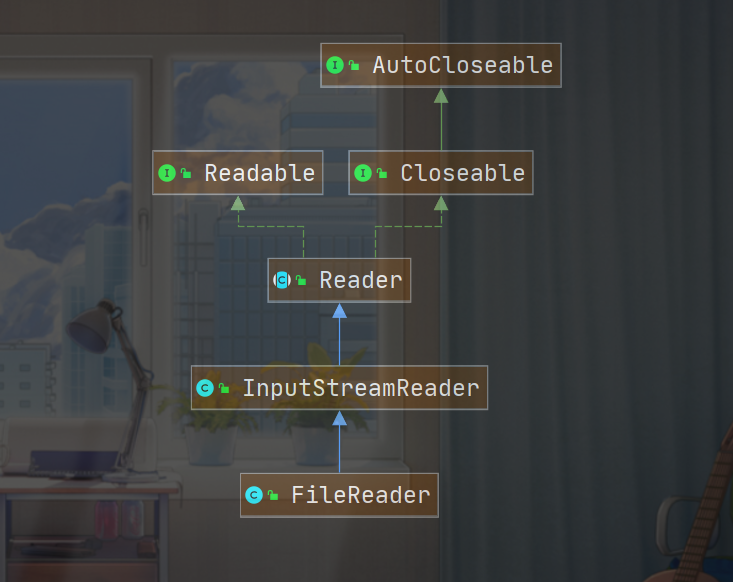
- 读取字符文件
public static void main(String[] args) {
    FileReader fileReader =null;
    try {
        fileReader = new FileReader("E:\\a.txt");
        char[] chars = new char[5];
        int len =0;
        while((len=fileReader.read(chars))!=-1){
            System.out.println(new String(chars,0,len));
        }

    } catch (IOException e) {
        e.printStackTrace();
    }finally {
        try {
            fileReader.close();
        } catch (IOException e) {
            e.printStackTrace();
        }
    }
}
1.4.2.2 BufferedReader
1.4.2.3 InputStreamReader
1.5 输出流
1.5.1 字节输出流 OutputStream
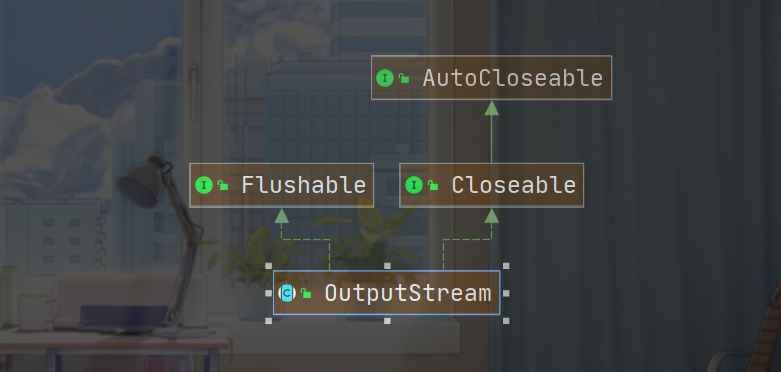
1.5.1.1 FileOutputStream
- 常用构造器
FileOutputStream(String name, boolean append),第二个参数为true,表示追加写入。 - 常用方法
public void write(byte[] b) throws IOException,一次写入一个字符数组中的数据。
public static void main(String[] args) {
    //在E:\\a.txt写入数据。如果不存在该文件则新建。

    String Path="E:\\a.txt";
    FileOutputStream fos=null;
    try {
        //第二个参数为true说明向文件末尾追加写入,默认是false,覆盖数据。
        fos = new FileOutputStream(Path, true);
        //写入一个字符串,将字符串转换为字节数组后写入
        String msg="Hello,World";
        fos.write(msg.getBytes());

    } catch (IOException e) {
        e.printStackTrace();
    }finally {
        try {
            fos.close();
        } catch (IOException e) {
            e.printStackTrace();
        }
    }
}
1.5.1.2 BufferedOutputStream
1.5.1.3 ObjectOutputStream
1.5.2 字符输入流 Writer
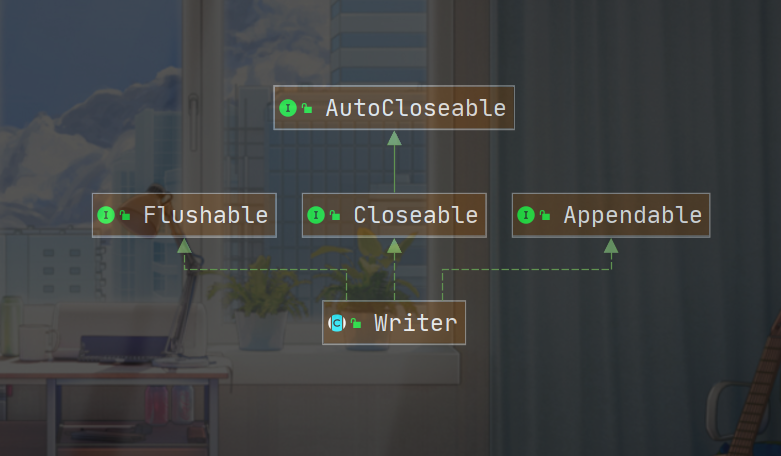
1.5.2.1 FileWriter
- 对于FileWriter类,一定要关闭或者flush才能真正写入数据。
public static void main(String[] args) {
    FileWriter fileWriter =null;
    try {
        fileWriter = new FileWriter("E:\\b.txt",true);
        fileWriter.write("风雨漂泊一生何处能落脚");
    } catch (IOException e) {
        e.printStackTrace();
    }finally {
        try {
            //对于FileWriter类,一定要关闭或者flush才能真正写入数据
            fileWriter.close();
        } catch (IOException e) {
            e.printStackTrace();
        }
    }
}
1.5.2.2 BufferedWriter
1.5.2.3 OutputStreamWriter
1.6 properties类
1.7 实际操作
1.7.1 实现文件拷贝
- 图片、音频、视频等二进制文件需要使用FileInputStream和FileOutputStream。
将E盘的一张图片复制到D盘中
- 边读边写,写入数据需要使用
fos.write(bytes,0,len); - 和io流相关的对象都是先开后关。后开先关。
public static void main(String[] args) {
    String path1 ="E:\\a.jpg";
    String path2="D:\\a.jpg";
    FileInputStream fis =null;
    FileOutputStream fos = null;
    try {
        fis = new FileInputStream(path1);
        fos = new FileOutputStream(path2);
        int len =0;
        byte[] bytes = new byte[1024];
        while ((len=fis.read(bytes))!=-1){
            //写入数据
            fos.write(bytes,0,len);
        }
        System.out.println("复制成功");
    } catch (IOException e) {
        e.printStackTrace();
    }finally {
        try {
            fos.close();
        } catch (IOException e) {
            e.printStackTrace();
        }
        try {
            fis.close();
        } catch (IOException e) {
            e.printStackTrace();
        }
    }
}

 浙公网安备 33010602011771号