
Flink SQL数据类型
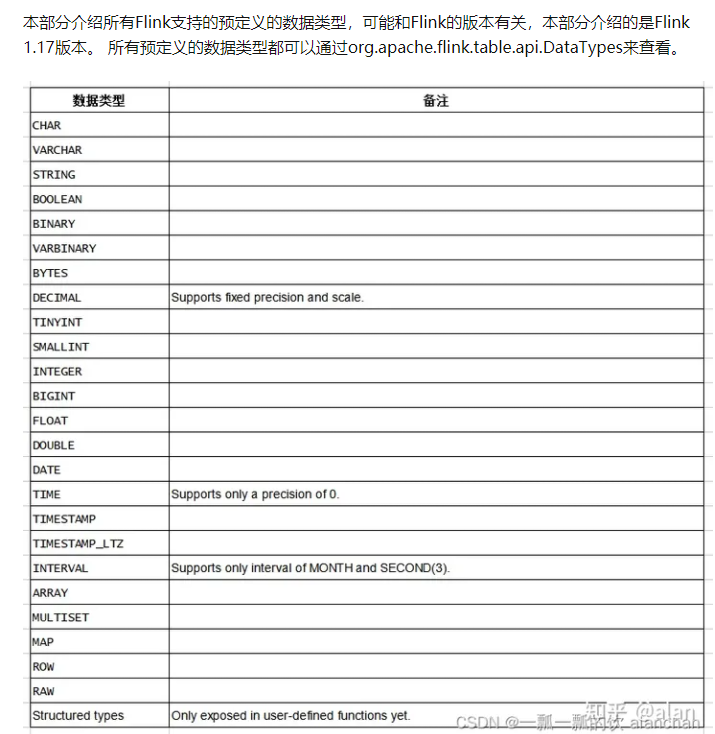
Flink SQL数据类型
https://www.51cto.com/article/708745.html
https://zhuanlan.zhihu.com/p/647202213
https://zhuanlan.zhihu.com/p/531005375
jose4j是 Java 中流行的 JWT 库之一,具有完整的功能。
https://www.jdon.com/61821.html
数据互转
mvn clean scala:compile compile package

val ssENV = StreamExecutionEnvironment.getExecutionEnvironment

val ssSettings = EnvironmentSettings.newInstance().useBlinkPlanner()
                .inStreamingMode().build()

val ssTableEnv = StreamTableEnvironment.create(ssENV, ssSettings)
//获取DataStream
import org.apache.flink.api.scala._
val stream = ssENV.fromCollection(Array((1, "java"), (2, "tom"), (3, "mac")))
import org.apache.flink.table.api._
ssTableEnv.createTemporaryView("myTable",stream,fields = 'id,'name)
ssTableEnv.sqlQuery("select * from myTable where id>1") .execute().print()

val ssENV = StreamExecutionEnvironment.getExecutionEnvironment

val ssSettings = EnvironmentSettings.newInstance().useBlinkPlanner()
.inStreamingMode().build()

val ssTableEnv = StreamTableEnvironment.create(ssENV, ssSettings)

//获取DataStream
import org.apache.flink.api.scala._
val stream = ssENV.fromCollection(Array((1, "java"), (2, "tom"), (3, "mac")))

import org.apache.flink.table.api._
val table = ssTableEnv.fromDataStream(stream, fields = 'id,'name)
table.select($"id", $"name").filter($"id" > 1).execute().print()


def main(args: Array[String]): Unit = {
    val ssEnv = StreamExecutionEnvironment.getExecutionEnvironment
    val ssSettings = EnvironmentSettings.newInstance().useBlinkPlanner().inStreamingMode().build()
    val ssTableEnv = StreamTableEnvironment.create(ssEnv, ssSettings)

    ssTableEnv.executeSql("" +
      "create table myTable(\n" +
      "id int,\n" +
      "name string\n" +
      ") with (\n" +
      "'connector.type' = 'filesystem',\n" +
      "'connector.path' = 'D:\\bigdata\\source',\n" +
      "'format.type' = 'csv'\n" +
      ")")

    val table = ssTableEnv.from("myTable")

    import org.apache.flink.api.scala._
    //如果只有新增(追加)操作,可以使用toAppendStream
    val appStream = ssTableEnv.toAppendStream[Row](table)
    appStream.map(row=>(row.getField(0).toString.toInt,row.getField(1).toString)).print()

    //如果有增加操作,还有删除操作,则使用toRetractStream
    val retStream = ssTableEnv.toRetractStream[Row](table)
    retStream.map(tup=>{
      val flag = tup._1
      val row = tup._2
      val id = row.getField(0).toString.toInt
      val name = row.getField(1).toString
      (flag,id,name)
    }).print()
    //注意:将table对象转换为DataStream之后,就需要调用StreamExecutionEnvironment
    ssEnv.execute("TableToDataStreamScala")

  }


  rsDS.map(ele=>JSON.toJSONString(ele,new Array[SerializeFilter](0))).sinkTo(kfk.getKafkaSink3("dwd_city_mx",kfkServer))
https://blog.uusite.com/cloud/deploy/218.html
官方 Demo 站点:https://app.diagrams.net/
官方文档地址:https://www.diagrams.net/doc/
官方 GitHub 地址:https://github.com/jgraph/drawio
DockerHub 地址:https://hub.docker.com/r/jgraph/drawio
Flink Metrics监控 pushgateway搭建
Flink Metrics 简介
Flink Metrics 是 Flink 集群运行中的各项指标,包含机器系统指标,比如:CPU、内存、线程、JVM、网络、IO、GC 以及任务运行组件(JM、TM、Slot、作业、算子)等相关指标。
Flink 一共提供了四种监控指标:分别为 Counter、Gauge、Histogram、Meter。
Flink 主动方式共提供了 8 种 Report。
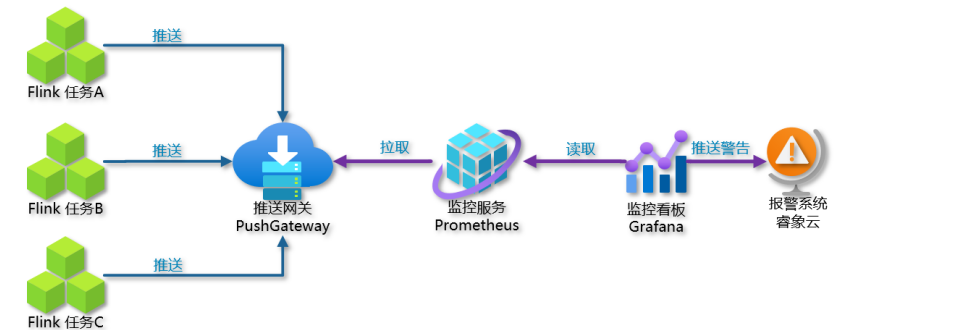
使用 PrometheusPushGatewayReporter 方式 通过 prometheus + pushgateway + grafana 组件搭建 Flink On Yarn 可视化监控。
当 用户 使用 Flink 通过 session 模式向 yarn 集群提交一个 job 后,Flink 会通过 PrometheusPushGatewayReporter 将 metrics push 到 pushgateway 的 9091 端口上,然后使用外部系统 prometheus 从 pushgateway 进行 pull 操作,将指标采集过来,通过 Grafana可视化工具展示出来。
Pushgateway 是一个独立的服务,Pushgateway 位于应用程序发送指标和 Prometheus 服务器之间。
Pushgateway 接收指标,然后将其作为目标被 Prometheus 服务器拉取。可以将其看作代理服务,或者与 blackbox exporter 的行为相反,它接收度量,而不是探测它们。
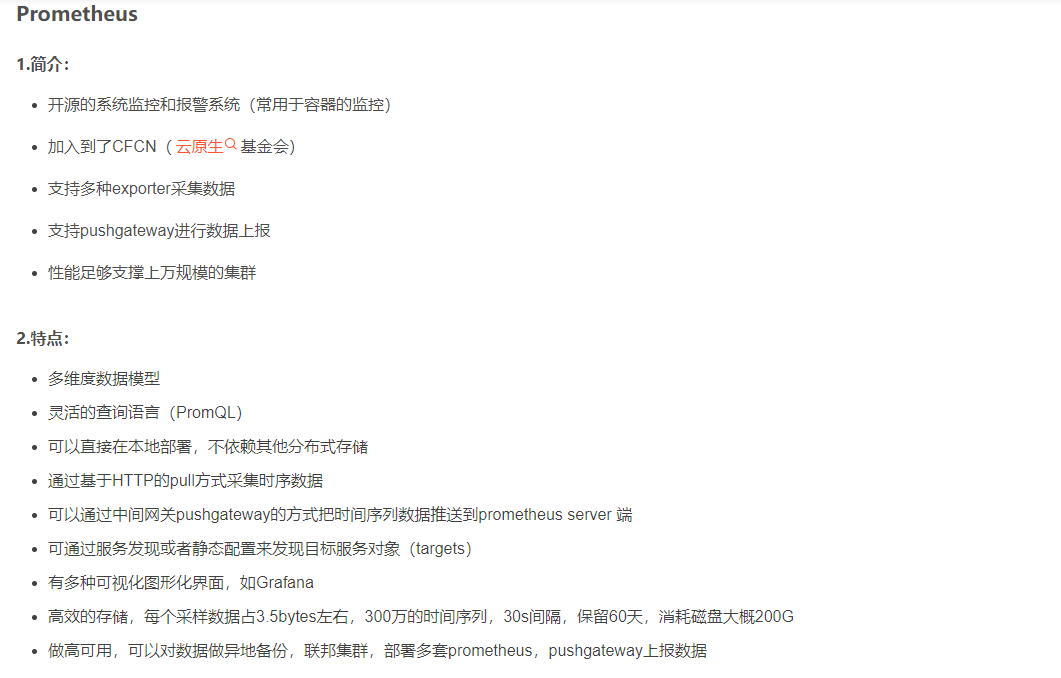
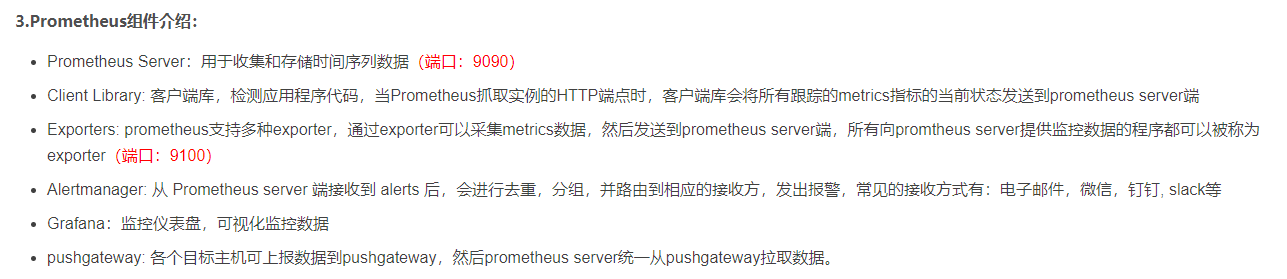
Prometheus(普罗米修斯)是一个最初在 SoundCloud 上构建的监控系统
Grafana 是一个跨平台的开源的度量分析和可视化工具,可以通过将采集的数据查询然后可视化的展示
https://blog.csdn.net/Mogeko1/article/details/128804832
https://blog.csdn.net/bluedraam_pp/article/details/129188099
ThreadLocalRandom.current().nextInt(100) 是 Java 中用于生成指定范围内随机整数的方法。具体来说,ThreadLocalRandom 是 Java 7 中引入的用于生成随机数的工具类,它提供了一种线程安全的方式来生成随机数。current() 方法返回当前线程的 ThreadLocalRandom 实例,然后调用 nextInt(100) 方法生成一个大于等于 0 且小于 100 的随机整数。
这种方法相比于 Random 类的实例方法,更适合在并发环境下使用,因为它使用了线程本地变量,避免了多线程竞争的情况。
通义灵码
https://baijiahao.baidu.com/s?id=1781783456529994603&wfr=spider&for=pc
通义灵码,是一款基于通义大模型的智能编码辅助工具,提供行级/函数级实时续写、自然语言生成代码、单元测试生成、代码注释生成、代码解释、研发智能问答、异常报错排查等能力,并针对阿里云 SDK/API 的使用场景调优,为开发者带来高效、流畅的编码体验。支持 Java、Python、Go、C/C++、JavaScript、TypeScript、PHP、Ruby、Rust、Scala 等主流编程语言。
https://baijiahao.baidu.com/s?id=1781262645914370200&wfr=spider&for=pc
Flink发布监控全流程

classloader.check-leaked-classloader: false

restart-strategy: fixed-delay
restart-strategy.fixed-delay.attempts: 3
restart-strategy.fixed-delay.delay: 30s
execution.checkpointing.interval: 1min
execution.checkpointing.externsalized-checkpoint-retention: RETAIN_ON_CANCELLATION
state.checkpoints.dir: hdfs:///hadoop31:9000/flink/checkpoints
state.backend: filesystem


##### 与Prometheus集成配置 #####
metrics.reporter.promgateway.class: org.apache.flink.metrics.prometheus.PrometheusPushGatewayReporter
# PushGateway的主机名与端口号
metrics.reporter.promgateway.host: master
metrics.reporter.promgateway.port: 9091
## Flink metric在前端展示的标签(前缀)与随机后缀
metrics.reporter.promgateway.jobName: flink-metrics-ppg
#如果jobName启动二次,那么第二次的时候会有一个随机的名字
metrics.reporter.promgateway.randomJobNameSuffix: true
metrics.reporter.promgateway.deleteOnShutdown: false
#这里表示多久推一次数据
metrics.reporter.promgateway.interval: 15 SECONDS
pushGetWay不会自动的删除过期的数据,Promethus默认保存15天的数据,自己会对每一次拉去过来的数据加上一个时间戳
https://blog.csdn.net/S1124654/article/details/126159497
https://blog.csdn.net/m0_73770890/article/details/128395675
Prometheus
Zabbix
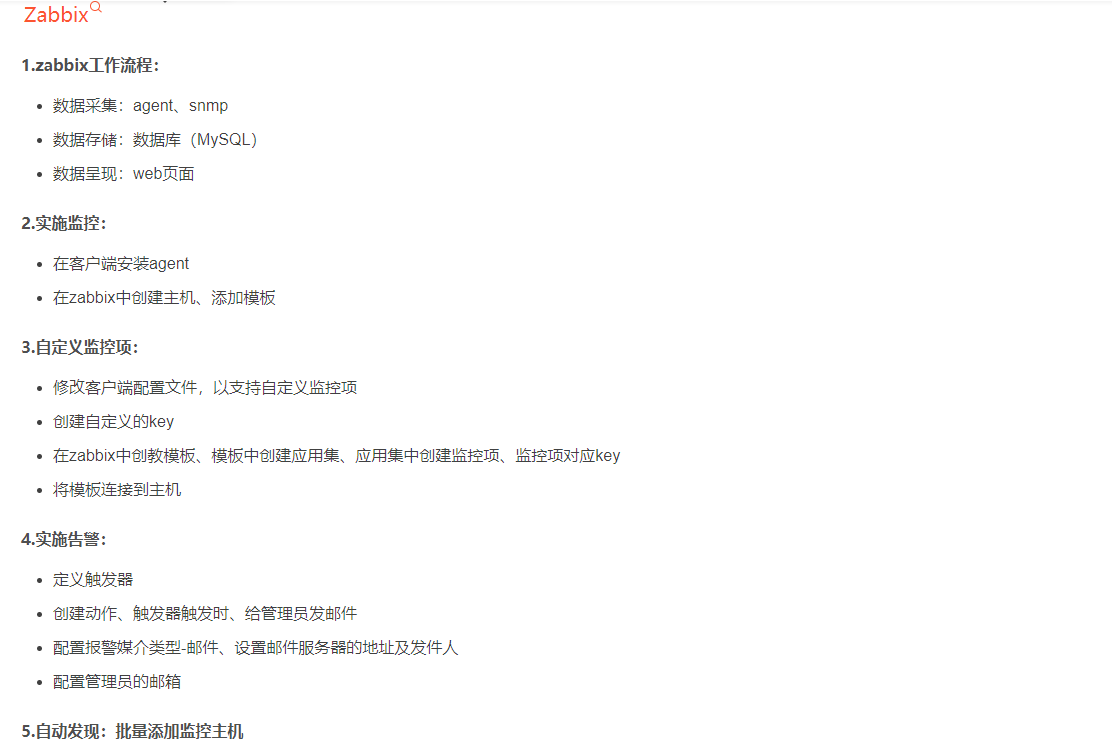
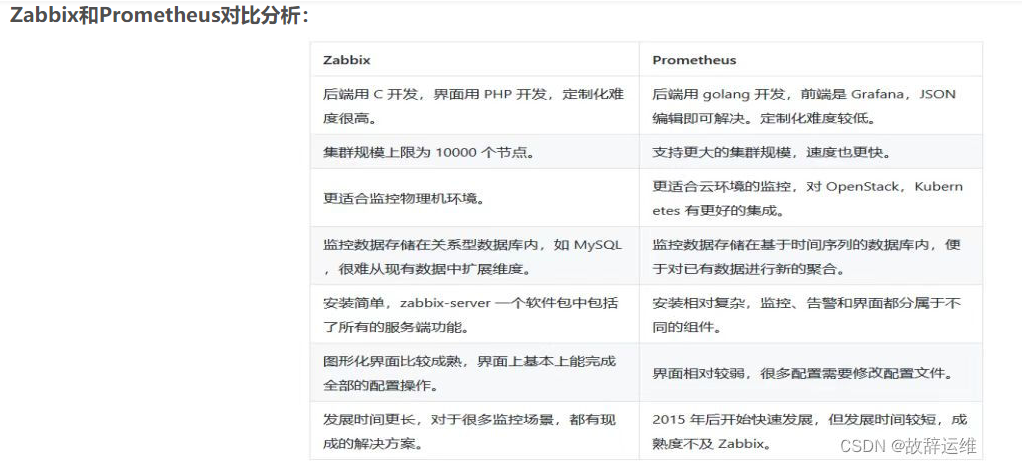
https://www.cnblogs.com/elfin/p/17602407.html
https://zhuanlan.zhihu.com/p/582191878
https://zhuanlan.zhihu.com/p/88257307
https://blog.csdn.net/qq_36306519/article/details/130703357
https://developer.aliyun.com/article/768343
https://www.zabbix.com/documentation/6.4/en/manual/web_interface/frontend_sections/dashboards
https://www.zabbix.com/documentation/5.0/en/manual
https://www.zabbix.com/documentation/5.0/zh/manual
https://www.cnblogs.com/yanqivip/p/16044676.html
https://www.jianshu.com/p/3004fbce4d37
https://blog.csdn.net/weixin_43702146/article/details/128493293
https://www.zabbix.com/cn/download_agents
https://www.zabbix.com/documentation/3.4/zh/manual/appendix/install/windows_agent?do=login
https://blog.csdn.net/weixin_51839445/article/details/121492360
https://blog.csdn.net/tngci/article/details/129459572
https://blog.csdn.net/qq_59647823/article/details/133138340
https://www.cnblogs.com/cherishthepresent/p/17274179.html
https://www.codenong.com/js645197a4307a/
https://codeantenna.com/a/OZ0HXXPAcG
只有适合业务本身的方案才是好方案。许多时候并不一定追寻最新的前沿技术,只有在充分了解自身业务的本质需求的前提下,才能挑选出最适合的解决方案,其次在稳定性的基础下适当向功能性方面拓展。

 浙公网安备 33010602011771号