妙算获得相机图像(一)
一. 根据专门的读取相机包获得图像
1.从下边的GitHub地址下载相关程序文件
GitHub地址:https://github.com/dji-sdk/Manifold-Cam
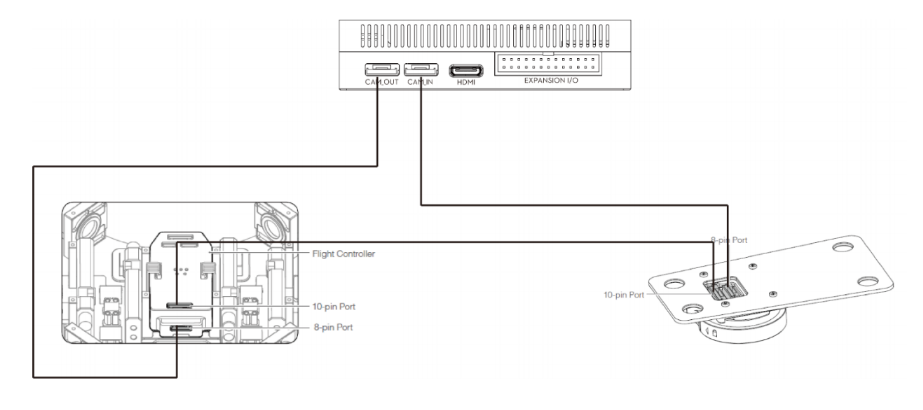
2.按照上图进行硬件连接
如果之前没有连接妙算和云台,现在将连接云台的8-pin线连入妙算的CAM_IN口,用另外一根8-pin连接妙算的CAM_OUT口和云台的8-pin接口。
3.编译文件
分别执行:
$ sudo make install //install the libdcam.so to /usr/lib, you need to install the library first
$ make //compile to the obj file 'test'
4.运行获得图像
$ sudo ./test [-dgt]
Usage:
-d --display display video stream
-g --getbuffer get NV12 format buffer
-t --transfer transfer video datas to RC
其中-d和-g不能同时使用,而且上述命令在远程桌面下不能使用。
5.若要在远程界面下调用该命令,参考以下命令:
-
(Optional) Disable lightdm for stability:
in /etc/init/lightdm.conf line 12:
Modify runlevel [!06] to runlevel [!026]
-
Add xinit& to a startup script, such as:
echo -e '#!/bin/bash\nxinit&' > /home/ubuntu/pre_x3
chmod a+x /home/ubuntu/pre_x3
And add /home/ubuntu/pre_x3 into /etc/rc.local. The ubuntu here is the current user, you may need to change it into yours. -
Add export DISPLAY=:0 to your .bashrc or remember to set this environment variable to THE USER WHO WILL RUN THE CODE
-
(Maybe a reboot at first) Run the ./test with paramters you want.

 浙公网安备 33010602011771号