失败重跑rerunfailures
前言:
当执行用例的时候,用例执行失败,但失败的原因可能是一些外部的原因,如网络的不稳定等等,这个时候我们需要失败后重跑一定次数。
pytest的插件pytest-rerunfailures可以达到我们想要的效果。
一、插件安装
要使用失败重跑功能,需要安装插件pytest-rerunfailures
pip3 install pytest-rerunfailures -i http://pypi.douban.com/simple/ --trusted-host pypi.douban.com
注意:安装此插件的环境前提:
1.Python3.5或更高版本
2.pytest.50或更高版本
二、命令行重跑
命令行重跑,会对所收集的用例执行失败时重跑制定次数。
在命令行中加入命令选项 --reruns 次数 --reruns-delay 延迟时间。
import random


class TestRerun:
    def test_r_1(self):
        print("this is test_r_1")
        a = random.randint(0, 5)
        assert a == 3

    def test_r_2(self):
        print("this is test_r_2")
        b = random.randint(0, 5)
        assert b == 2
在命令行中输入命令:pytest -s --reruns 5 --reruns-delay 2,意思是失败的用例最多重跑5次,每次重跑的延迟时间为2秒。
执行结果:
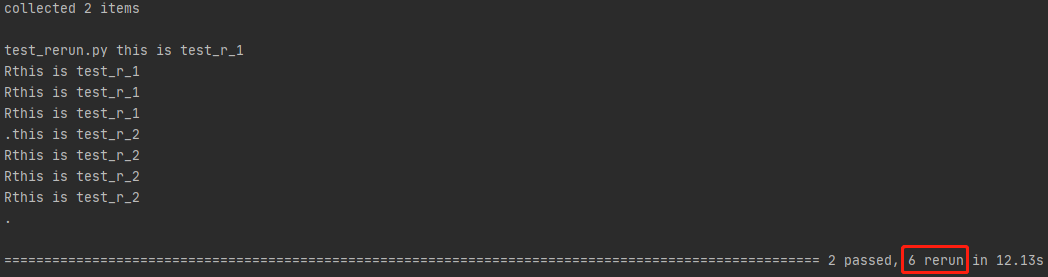
可以看到,用例执行失败后将会被重现执行,直到次数执行完或执行成功。
三、指定用例执行失败重跑
有时候,我们只需要对一些不够稳定的测试用例执行失败重跑。
这时候,可以使用@pytest.mark.flaky(reruns=次数,reruns_delay=延迟时间)装饰器来装饰用例。
import random
import pytest


class TestRerun:
    @pytest.mark.flaky(reruns=5)
    def test_r_1(self):
        print("this is test_r_1")
        a = random.randint(0, 5)
        assert a == 3

    def test_r_2(self):
        print("this is test_r_2")
        b = random.randint(0, 5)
        assert b == 2
执行命令:pytest -s
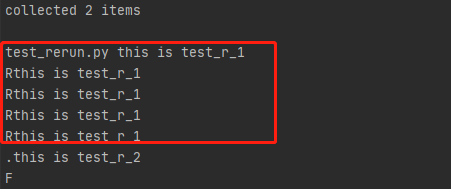
从执行结果,我们可以看出,当命令行中没有reruns选项与reruns-delay选项,则只会针对被@pytest.mark.flaky(reruns=次数, reruns_delay=延迟时间)装饰
的用例重跑。
如果在命令行中有 --reruns 重跑次数 --reruns-delay 延迟时间,则还是会对所有用例进行失败重跑,
只不过被@pytest.mark.flaky(reruns=次数, reruns_delay=延迟时间)的用例会执行自己的重跑次数与延迟时间。
注意:用例重跑的时候,同样会执行setup与teardown操作。

 浙公网安备 33010602011771号