
定时自动备份【TFTP服务器搭建】
一、准备
在 centos 7 上安装部署TFTP服务器。(我使用版本:CentOS Linux release 7.9.2009 (Core))
二、安装过程
1,安装TFTP服务器
yum install xinetd tftp tftp-server
2、修改tftp主配置文件
cp /etc/xinetd.d/tftp{,.bak}
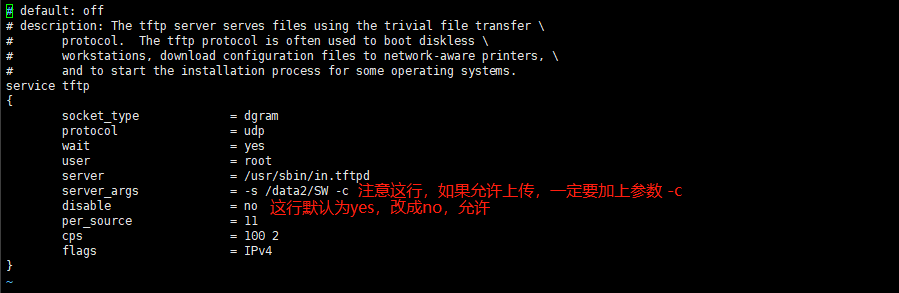
vi /etc/xinetd.d/tftp
server_args = -s /var/lib/tftpboot -c # 注意这行,如果允许上传,一定要加上参数 -c
disable = no # 这行默认为yes,改成no,允许
3、启动tftp服务
netstat -ntlup |grep 69
netstat -a |grep tftp
备注:到此就安装完成了
如果没能上传文件成功,那很可能是tftp的主目录没有写权限【chmod 0777 /var/lib/tftpboot】,
再或者关闭防火墙、添加端口也行
打开端口
firewall-cmd --permanent --zone=public --add-port=69/udp
删除端口
firewall-cmd --zone= public --remove-port=80/tcp --permanent
重新加载
firewall-cmd --reload
查看打开的端口
firewall-cmd --zone=public --list-ports
tftp用的是udp的69端口

 浙公网安备 33010602011771号