
Shell编程案例
在Windows下写shel脚本,windows的回车换行跟linux回车不一样,在 windows下编辑shell文件,默认输入的回车是"\r\n" ,导致在 linux下执行shell脚本时报这个 \r的错。使用sed -i 's/\r//' build.sh后再执行(就是将windows下的中文回车行换成英文回车行),即 sed -i 's/\r//' build.sh && bash build.sh
[root@docker01 ~]# sed -i.bak '1i\ews' ren.txt 将ren.txt备份后继续在ren.txt插入一行内容

1、菜单选择
输出下面菜单
1.install MySQL
2.install Tomcat
3.exit
当用户选择对应的数字就开始安装对应的服务(可echo输出替代),需要对用户输入的数字进行判断是否为整数(用条件测试表达式实现)。
a、if语句实现
#! /bin/bash
cat <<EOF
1.install MySQL
2.install Tomcat
3.exit
EOF
read -t 15 -p "Please input an integer :" num
#check weather integer or not
expr 1 + $num &>/dev/null
if [ $? -ne 0 ]
    then
        echo "Usage:$0 {1|2|3}"
    exit 1
fi
if [ $num -eq 1 ]
    then
        echo "install MySQL ……"

elif [ $num -eq 2 ]
    then
        echo "install Tomcat ……"
elif [ $num -eq 3 ]
    then
        echo "bye."
        exit
else
    echo "Usage:$0 {1|2|3}"
    exit 1
fi

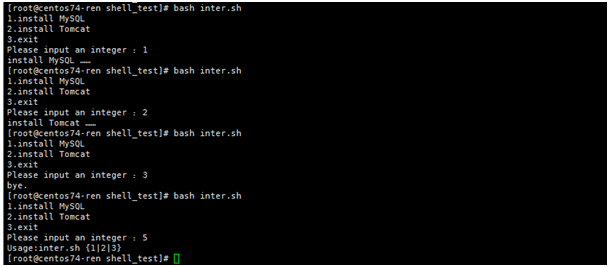
b、case语句实现
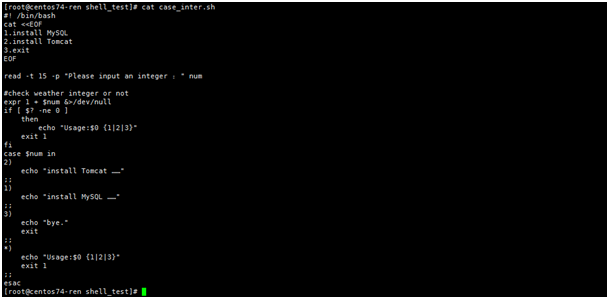
[root@centos74-ren shell_test]# cat case_inter.sh
#! /bin/bash
cat <<EOF
1.install MySQL
2.install Tomcat
3.exit
EOF
read -t 15 -p "Please input an integer :" num
#check weather integer or not
expr 1 + $num &>/dev/null
if [ $? -ne 0 ]
    then
        echo "Usage:$0 {1|2|3}"
    exit 1
fi
case $num in
2)
    echo "install Tomcat ……"
;;
1)
    echo "install MySQL ……"
;;
3)
    echo "bye."
    exit
;;
*)
    echo "Usage:$0 {1|2|3}"
    exit 1
;;
esac
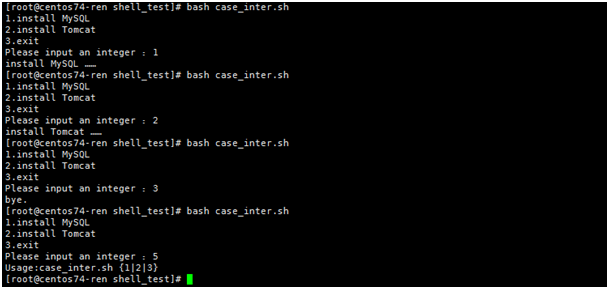
2、使用read读入方式比较两个整数大小(用条件表达式实现)
先判断两个读入的数据是否是整数,通过expr判断,当两者都是整数时候,expr $a+$b +2 &>/dev/null;echo $?返回是0.说明是整数

[root@centos74-ren shell_test]# cat inter_c.sh
#! /bin/bash
read -t 15 -p "Please input two integer :" a b
#check weather integer or not
expr 1 + $a + $b  &>/dev/null
if [ $? -ne 0 ]
    then
        echo "Please input two integer :"
        exit 1
fi
if [ $a -gt $b ]
    then
        echo "$a > $b"
elif [ $a -eq $b ]
    then
        echo "$a = $b"
else
        echo "$a < $b"
fi

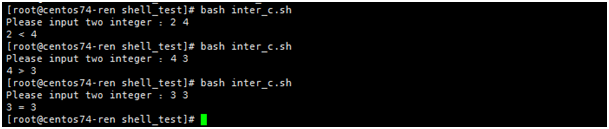
3、判断系统根分区剩余空间的大小,如果低于1000MB就提示不足,否则提示充足
#! /bin/bash
m=`df -m / | awk 'NR==2{print $4 }'`
if [ $m -lt 1000 ]
    then
        echo "the disk space is not enough!!!"
else
        echo "the disk space is enough"
fi

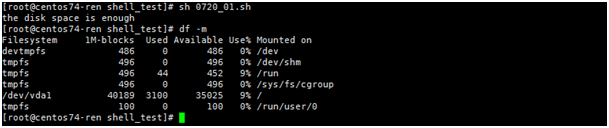
可以将条件修改$m -lt 40000,再看下效果

4、 使用变量定义、read读入及脚本传参方式实现比较2个整数的大小
定义变量:就是直接在脚本中写好变量,且赋值,直接比较
#! /bin/bash
a=2
b=3
if [ $a -gt $b ]
    then
        echo "$a>$b"
elif [ $a -lt $b ]
    then
        echo "$a<$b"
else
        echo "$a=$b"
fi
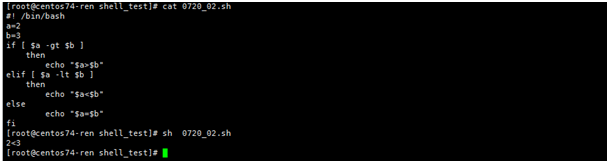
read读入,就是交互式,手动输入要比较的大小,输入的必须是整数
#! /bin/bash
read -p "please input two integer: " a b
if [ -z "$b" ]
    then
        echo "must two integer args:"
        exit 1
fi
expr $a + $b + 10 &>/dev/null
if [ $? -ne 0 ]
    then
        echo "please input two integer:"
        exit 2
fi
if [ $a -gt $b ]
    then
        echo "$a>$b"
elif [ $a -lt $b ]
    then
        echo "$a<$b"
else
        echo "$a=$b"
fi
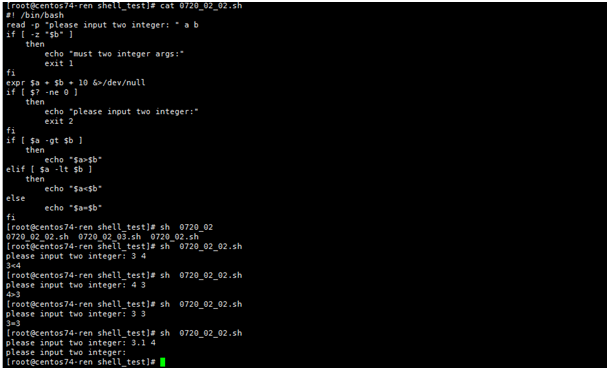
脚本传参,就是在执行脚本的过程中,将要比较的值写进去
[root@centos74-ren shell_test]# cat 0720_02_03.sh
#! /bin/bash
#read -p "please input two integer: " a b
a=$1
b=$2
if [ -z "$b" ]
    then
        echo "must two args:"
        exit 1
fi
expr $a + $b +1 &>/dev/null
if [ $? -ne 0 ]
    then
        echo "please input two integer:"
        exit 2
fi
if [ $a -gt $b ]
    then
        echo "$a>$b"
elif [ $a -lt $b ]
    then
        echo "$a<$b"
else
        echo "$a=$b"
fi
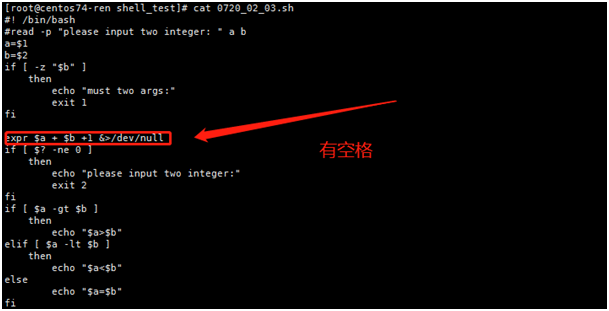
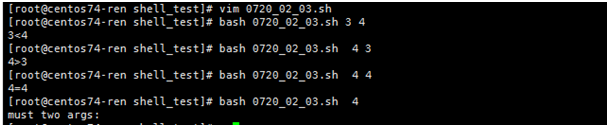
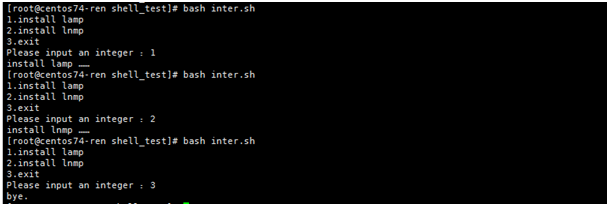
5、打印一个菜单如下,当用户选择对应的数字时,就执行对应项的应用,最好对用户的输入进行是否为整数判断
1.install lamp
2.install lnmp
3.exit
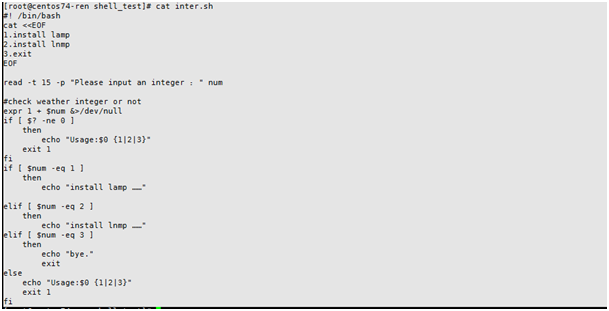
[root@centos74-ren shell_test]# cat inter.sh
#! /bin/bash
cat <<EOF
1.install lamp
2.install lnmp
3.exit
EOF
read -t 15 -p "Please input an integer :" num
#check weather integer or not
expr 1 + $num &>/dev/null
if [ $? -ne 0 ]
    then
        echo "Usage:$0 {1|2|3}"
    exit 1
fi
if [ $num -eq 1 ]
    then
        echo "install lamp ……"

elif [ $num -eq 2 ]
    then
        echo "install lnmp ……"
elif [ $num -eq 3 ]
    then
        echo "bye."
        exit
else
    echo "Usage:$0 {1|2|3}"
    exit 1
fi
6、通过脚本传参的方式,检查Web网站URL是否正常
[root@centos74-ren shell_test]# cat check_web.sh
#! /bin/bash
Url_Check() {
wget --spider -T 10 -q -o /dev/null $1
if [ $? -eq 0 ]
    then
        echo "$1 is ok !"
        return 0
else
        echo "$1 is not ok !!!"
        return 2
fi
}
Url_Check $1

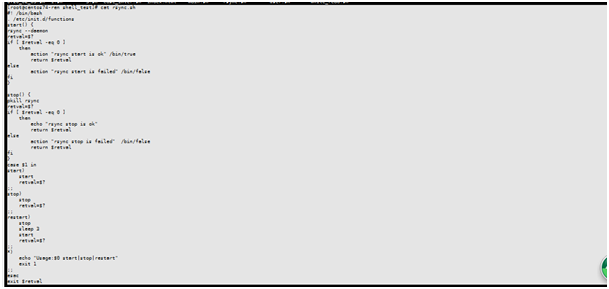
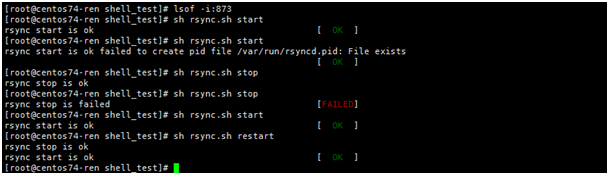
7、利用case语句开发Rsync服务启动停止脚本,并能通过chkconfig实现开机自启动
[root@centos74-ren shell_test]# cat rsync.sh
#! /bin/bash
. /etc/init.d/functions
start() {
rsync --daemon
retval=$?
if [ $retval -eq 0 ]
    then
        action "rsync start is ok" /bin/true
        return $retval
else
        action "rsync start is failed" /bin/false
fi
}

stop() {
pkill rsync
retval=$?
if [ $retval -eq 0 ]
    then
        echo "rsync stop is ok"
        return $retval
else
        action "rsync stop is failed"  /bin/false
        return $retval
fi
}
case $1 in
start)
    start
    retval=$?
;;
stop)
    stop
    retval=$?
;;
restart)
    stop
    sleep 3
    start
    retval=$?
;;
*)
    echo "Usage:$0 start|stop|restart"
    exit 1
;;
esac
exit $retval
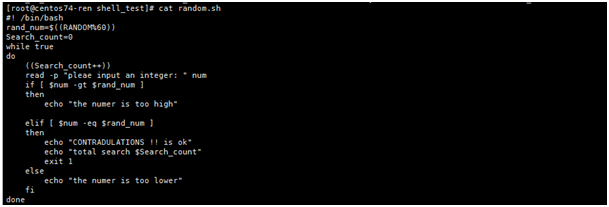
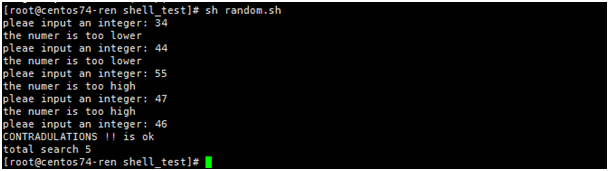
8、猜数字游戏。首先让系统随机生成一个数字,给这个数字定一个范围(1-60),让用户输入猜的数字,对输入进行判断,如果不符合要求,就给予高或低的提示,猜对后则给出猜对用的次数,请用while语句实现
[root@centos74-ren shell_test]# cat random.sh
#! /bin/bash
rand_num=$((RANDOM%60))
Search_count=0
while true
do
    ((Search_count++))
    read -p "pleae input an integer: " num
    if [ $num -gt $rand_num ]
    then
        echo "the numer is too high"

    elif [ $num -eq $rand_num ]
    then
        echo "CONTRADULATIONS !! is ok"
        echo "total search $Search_count"
        exit 1
    else
        echo "the numer is too lower"
    fi
done
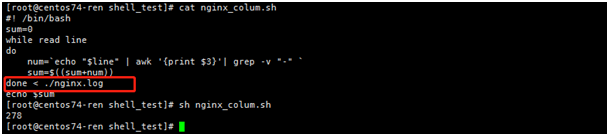
9、分析nginx访问日志(自备),把日志中每行的访问字节数对应字段数字相加,计算出总的访问量。给出实现程序,请用while循环实现
读取每行的行数时,最好别用管道符,因为管道符相当于开了新的子shell,内外无法互相传参,通过done重定向读取
[root@centos74-ren shell_test]# cat nginx_colum.sh
#! /bin/bash
sum=0
while read line
do
    num=`echo "$line" | awk '{print $3}'| grep -v "-" `
    sum=$((sum+num))
done < ./nginx.log
echo $sum
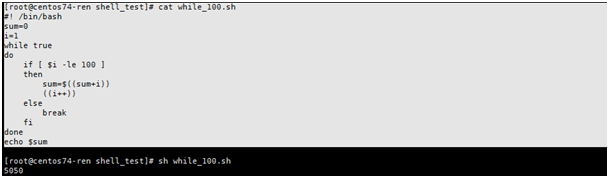
10、计算从1加到100之和(要求用for和while,至少给出两种方法)
[root@centos74-ren shell_test]# cat while_100.sh
#! /bin/bash
sum=0
i=1
while true
do
    if [ $i -le 100 ]
    then
        sum=$((sum+i))
        ((i++))
    else
        break
    fi
done
echo $sum
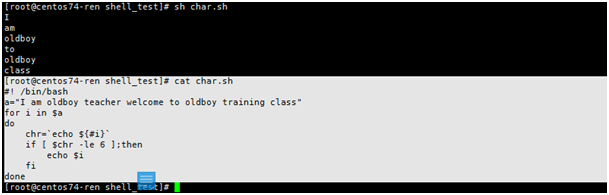
11、利用bash for循环打印下面这句话中字母数不大于6的单词(某企业面试真题)。I am oldboy teacher welcome to oldboy training class
[root@centos74-ren shell_test]# cat char.sh
#! /bin/bash
a="I am oldboy teacher welcome to oldboy training class"
for i in $a
do
    chr=`echo ${#i}`
    if [ $chr -le 6 ];then
        echo $i
    fi
done
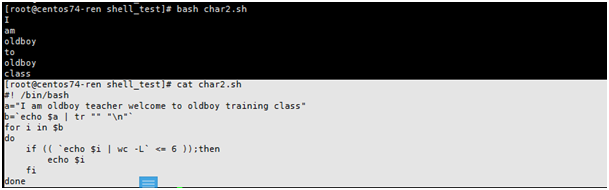
[root@centos74-ren shell_test]# cat char2.sh
#! /bin/bash
a="I am oldboy teacher welcome to oldboy training class"
b=`echo $a | tr "" "\n"`
for i in $b
do
    if (( `echo $i | wc -L` <= 6 ));then
        echo $i
    fi
done
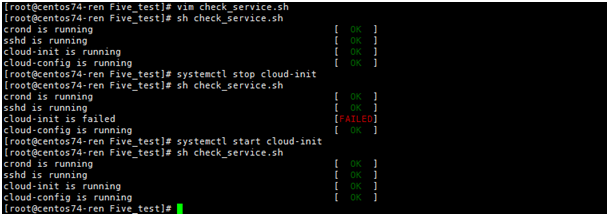
12、服务监测
#! /bin/bash
. /etc/init.d/functions
Service_Name=(crond sshd cloud-init cloud-config)
for i in ${Service_Name[@]}
do
    Service=`systemctl status $i | grep Active | awk '{print $3}' | cut -d "(" -f2 | cut -d ")" -f1 `
if [ "$Service" == "running" -o "$Service" == "exited" ];then
    action "$i is running" /bin/true
else
    action "$i is failed" /bin/false
    systemctl start $i
fi
done
服务监测结果:
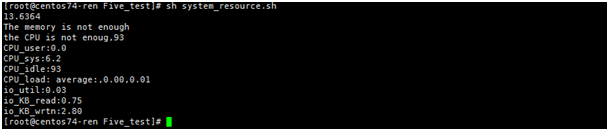
13、系统资源监控--内存、cpu、io、NIC
#! /bin/bash
#####Memory Resource Monitor#####
mem_rate=`free -m | awk 'NR==2{print ($3/$2)*100}'`
if [  `echo "$mem_rate >= 10" | bc` -eq 1 ];then
    echo $mem_rate
    echo "The memory is not enough"
else
    echo "The memory has enough space"
fi
###CPU Resource Monitor####
cpu_user=`top -b -n 1 | grep Cpu | awk '{print $2 }'`
cpu_system=`top -b -n 1 | grep Cpu | awk '{print $4 }'`
cpu_idle=`top -b -n 1 | grep Cpu | awk '{print $8 }' | cut -f 1 -d "."`
cpu_load_1min=`uptime | awk '{print $10 }' | cut -d , -f 1`
cpu_load_5min=`uptime | awk '{print $11 }' | cut -d , -f 1`
cpu_load_15min=`uptime | awk '{print $12 }' | cut -d , -f 1`

if [ `echo "$cpu_idle <= 99.7" | bc` -eq 1 ];then
    echo "the CPU is not enoug,$cpu_idle"
else
    echo "the CPU has enough space $cpu_idle"
fi
echo "CPU_user:$cpu_user"
echo "CPU_sys:$cpu_system"
echo "CPU_idle:$cpu_idle"
echo "CPU_load: $cpu_load_1min,$cpu_load_5min,$cpu_load_15min"
#####IO Monitor#####
io_util=`iostat -kxd | awk 'NR==4{print $NF}'`
io_KB_read=`iostat -kd | awk 'NR==4{print $3}'`
io_KB_wrtn=`iostat -kd | awk 'NR==4{print $4}'`

echo "io_util:$io_util"
echo "io_KB_read:$io_KB_read"
echo "io_KB_wrtn:$io_KB_wrtn"
执行结果:
date="`date '+%Y-%m-%d %H:%M:%S'`"
ip="www.baidu.com"
nic="eth0"
lost_rate=`ping -c 8 -w 8 $ip | grep 'packet loss' |awk -F'packet loss' '{ print $1 }'| awk '{ print $NF }' | sed 's/%//g'`
if [ $lost_rate -eq 0 ]
then
    echo "network_ok $date $ip $nic"
else
    echo "network_error $date $ip $nic"
    systemctl restart NetworkManager
fi
sleep 10
eth=eth0
#while [ "1" ]
#do
  STATUS="fine"
  RXpre=$(cat /proc/net/dev | grep $eth | tr : " " | awk '{print $2}')
  TXpre=$(cat /proc/net/dev | grep $eth | tr : " " | awk '{print $10}')
  sleep 1
  RXnext=$(cat /proc/net/dev | grep $eth | tr : " " | awk '{print $2}')
  TXnext=$(cat /proc/net/dev | grep $eth | tr : " " | awk '{print $10}')
  clear
  RX=$((${RXnext}-${RXpre}))
  TX=$((${TXnext}-${TXpre}))
  if [[ $RX -lt 1024 ]];then
    RX="${RX}B/s"
  elif [[ $RX -gt 1048576 ]];then
    RX=$(echo $RX | awk '{print $1/1048576 "MB/s"}')
    $STATUS="busy"
  else
    RX=$(echo $RX | awk '{print $1/1024 "KB/s"}')
  fi
  if [[ $TX -lt 1024 ]];then
    TX="${TX}B/s"
    elif [[ $TX -gt 1048576 ]];then
    TX=$(echo $TX | awk '{print $1/1048576 "MB/s"}')
  else
    TX=$(echo $TX | awk '{print $1/1024 "KB/s"}')
  fi
echo -e "==================================="
echo -e "Date:   `date +%F`"
echo -e "Time:   `date +%k:%M:%S`"
echo -e "Port:   $1"
echo -e "Status: $STATUS"
echo -e  " \t     RX \tTX"
echo "------------------------------"
echo -e "$eth \t $RX   $TX "
echo "------------------------------"
#done
网卡执行监控结果:

14、日志分析脚本
分析nginx访问日志(自备),把日志中每行的访问字节数对应字段数字相加,计算出总的访问量。我们取每行的第三个数据相加
#! /bin/bash
sum=0
while read line
do
    num=`echo "$line" | awk '{print $3}'| grep -v "-" `
    sum=$((sum+num))
done < ./nginx.log
echo $sum
[root@centos74-ren shell_test]# cat nginx.log
12 23 45
23 34 34
2w we 33
22 33 44
23 44 45
q w 33
3 2 -
e 3 44
[root@centos74-ren shell_test]#
[root@centos74-ren shell_test]# sh nginx_colum.sh
278
[root@centos74-ren shell_test]#
15、定时任务以及备份
#! /bin/bash
[ -d /backup ] || mkdir -p /backup/
[ -d /service_backup ] || mkdir -p  /service_backup/
Date=`date +%Y%m%d-%H%M-%w-%T`
cd /service_backup/
tar -cvf ${Date}.tar.gz /root/*.sh  --force-loca
#Locale backup
rsync -a /service_backup/*.tar.gz /backup/
md5sum /backup/${Date}.tar.gz >> /backup/${Date}.md5


#Remote backup
rsync /backup/* rsync_backup@192.168.0.18::backup --password-file=/etc/rsync.passwd


# For details see man 4 crontabs
# Example of job definition:
# .---------------- minute (0 - 59)
# |  .------------- hour (0 - 23)
# |  |  .---------- day of month (1 - 31)
# |  |  |  .------- month (#1 - 12) OR jan,feb,mar,apr ...
# |  |  |  |  .---- day of week (0 - 6) (Sunday=0 or 7) OR sun,mon,tue,wed,thu,fri,sat
# |  |  |  |  |
# *  *  *  *  * user-name  command to be executed
*/5  *  *  *  *   root  /bin/sh backup.sh
执行结果验证:


16、查询一个文件的字符串是不是在另一个文件中
要查var_result.txt中的字符串是不是在par.yml文件中,如果在的话就把该字符串写到var_check_result.txt
[root@k8s-master ~]# cat check_var.sh
#! /bin/bash
while read line
do
    var=`echo "$line" `
    files=`cat /root/par.yml |grep "$var" `
    if [ $? -eq 0 ]
    then
        echo "$var" >> var_check_result.txt
    else
        echo "file is not exist"
    fi
done < ./var_result.txt
var_result.txt中的每个字符串占一行
[root@csren ~]#while read line; do ssh -q `echo $line | awk '{print $1}'` hostname;done<csren1 ##while循环只能ssh连接一个server,去看主机名
shell中for循环的默认分隔符是:空格、tab、\n
需求是只以\n作为分隔符
shell for循环以\n作为分割符,
compute-1 eth4
compute-2 eth5
compute-3 eth11
compute-4 eth7
需要在本机去ping上面四台主机分别对应的网卡是不通
[root@csren ~]# cat csren.sh  ##for可以实现遍历看网卡状态
#!/bin/bash
IFS=$'\n\n'   ##这样为了读取整行内容
for i in `cat csren1`;
do
    echo $i
    ssh -q `echo $i | awk '{print $1}'` ifconfig `echo $i | awk '{print $2}'` | grep -i up
done

[root@csren ~]# cat csren.sh  ##while循环只能ssh连接一个server,去看网卡状态
#!/bin/bash
while read line;  #读取整行内容
do
     ssh -q `echo $line | awk '{print $1}'` ifconfig `echo $line | awk '{print $2}'` | grep -i up
done< csren1

 浙公网安备 33010602011771号