[转] Excel导出功能 ----- 转自: http://blog.csdn.net/yuebinghaoyuan/article/details/6704818
对于大批量的数据,导出Excel的办法如下。
(1)使用DataTable导出Excel
其中使用StringWriter类:将信息写入字符串。其命名空间为:System.IO
具体的原理是:
首先读取DataTable中的列名,然后循环读取DataTable行值。
然后设置导出的编码,导出的类型。
最后输出StringWriter对象即可。
这种导出是将文件直接以文件流的形式输出到浏览器。
- private StringWriter GetStringWriter(DataTable dt)
- {
- StringWriter sw = new StringWriter();
- //读列名
- foreach (DataColumn dc in dt.Columns)
- sw.Write(dc.ColumnName + "\t");
- //读列值
- //重新的一行
- sw.Write(sw.NewLine);
- if (dt != null)
- {
- foreach (DataRow dr in dt.Rows)
- {
- for (int i = 0; i < dt.Columns.Count; i++)
- {
- sw.Write(dr[i].ToString() + "\t");
- }
- sw.Write(sw.NewLine);
- }
- }
- sw.Close();
- return sw;
- }
- protected void ExcelImport(DataTable dt, string ExportFileName)
- {
- StringWriter sw = GetStringWriter(dt);
- //当前编码
- HttpContext.Current.Response.ContentEncoding = System.Text.Encoding.GetEncoding("GB2312");
- //把输出的文件名进行编码
- string fileName = HttpUtility.UrlEncode (ExportFileName, System.Text.Encoding.UTF8);
- //文件名
- string str = "attachment;filename=" + fileName + ".xls";
- //把文件头输出,此文件头激活文件下载框
- HttpContext.Current.Response.AppendHeader("Content-Disposition", str);//http报头文件
- HttpContext.Current.Response.ContentType = "application/ms-excel";
- this.Page.EnableViewState = false;
- Response.Write(sw);
- Response.End();
- }
- protected void Button1_Click(object sender, EventArgs e)
- {
- DataTable dt = new SelectCourseManager().SelectByCollegeAndProperty(ddlCourseProperty.Text, ddlCollege.SelectedValue);
- if (dt.Rows.Count == 0)
- Page.ClientScript.RegisterStartupScript(Page.GetType(), "message", "<script language='javascriopt' defer>alert('没有数据,不需要导出哈');</script>");
- else
- {
- //导出Excel
- ExcelImport(dt, "课程");
- }
- }
在导出Excel的时候,最关键的是编码问题,不同的形式导出Excel编码形式不同,否则,导出的Excel文件中文显示乱码。在DataTable导出Excel的时候,当前输出的编码样式是简体中文GB2312
HttpContext.Current.Response.ContentEncoding = System.Text.Encoding.GetEncoding("GB2312");
而其导出的文件名是:UTF8编码
string fileName = HttpUtility.UrlEncode (ExportFileName, System.Text.Encoding.UTF8);
版权声明:本文为博主原创文章,未经博主允许不得转载。
对于大量的数据,导出Excel的方式。
上篇博客介绍了导出Excel一种方式:通过DataTable
这篇博客,介绍另一中导出Excel方式-通过DataGrid.
导出Excel的过程:
虽然这次是通过DataGrid导出Excel,但是不是从界面上DataGrid控件导出Excel。因为这次实际项目中的需求是把查询到的信息导出Excel,界面上的DataGrid控件只显示一部分,也就是正如上篇博客中提到控件实现了分页,所以不可以直接从界面控件导出。
但是实现的过程一样,只不过,这次DataGrid是动态生成的。
此导出过程用到StringWriter类(将文本信息写入字符串),HtmlTextWriter类:将标记字符和文本写入到 ASP.NET 服务器控件输出流。(命名空间:System.Web.UI)
Control.RenderControl (HtmlTextWriter) ——将服务器控件的内容输出到所提供的 HtmlTextWriter 对象中。
然后respose输出StringWriter对象。
- /// <summary>
- /// 导出Excel
- /// </summary>
- /// <param name="dt"></param>
- /// <param name="ExportFileName"></param>
- protected void ExcelExport(DataTable dt, string ExportFileName)
- {
- DataGrid dgExcel = new DataGrid();
- dgExcel.DataSource = dt;
- dgExcel.DataBind();
- HttpContext.Current.Response.Charset = "GB2312";
- string fileName = HttpUtility.UrlEncode(ExportFileName, System.Text.Encoding.UTF8);
- string str="attachment;filename="+fileName+".xls";
- HttpContext .Current .Response .ContentEncoding =System.Text.Encoding .UTF7;
- HttpContext.Current.Response .ContentType ="application/ms-excel";
- HttpContext .Current .Response .AppendHeader ("content-disposition",str);
- StringWriter sw = new StringWriter();
- HtmlTextWriter htmTextWriter = new HtmlTextWriter(sw);
- dgExcel .RenderControl(htmTextWriter );
- Response .Write(sw);
- Response .End();
- }
- /// <summary>
- /// 导出excel按钮
- /// </summary>
- /// <param name="sender"></param>
- /// <param name="e"></param>
- protected void btnExport_Click(object sender, EventArgs e)
- {
- DataTable dt = new SelectClassRoomManager().SelectClassRoomByTypeBuildNo(ddlClassType.SelectedValue, ddlBuildingID.SelectedValue);
- if (dt.Rows.Count == 0)
- Response.Write("<script>alert('没有数据,没有必要导出啊哈');</script>");
- else
- {
- //导出excel
- ExcelExport(dt, "教室");
- }
- }
其中用DataGrid导出Excel的时候,其导出的文件名编码:
string fileName = HttpUtility.UrlEncode(ExportFileName, System.Text.Encoding.UTF8);
其导出的当前文件编码:
HttpContext .Current .Response .ContentEncoding =System.Text.Encoding .UTF7;
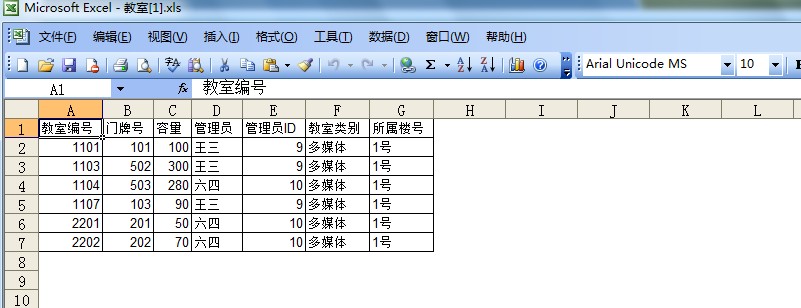
但是这两种导出的Excel的文件不同,内容是一样的,但是其格式不同,使用上篇博客DataTable导出Excel,是真正的excel,而使用DataGrid导出的Excel,貌似有点类似记事本。还是贴的图,大家看看吧。
DataTable导出的Excel 如下:

而DataGrid导出的Excel如下:
asp.net导出Excel文件之方法比较
web导出Excel也不是什么新鲜的话题了,到网上一查,结果一大堆。可是要挑选一个好的、合适的方法也不容易。再加上自己也没有真正的做过这方面的导出工作,到底选那种方法好呢?最近一个一个方法地试了一边,小结出来给大家做个参考。
测试题目:通过一个模板,导出Excel文件。(模板结构较复杂,有公式、样式、合并行等)
(一)、首先想到的是用服务器端的Excel软件com来生成目标Excel。
这个是网上找到介绍最多的方法。这方法不多说了,有需要的可以到网上找,这里简单讲讲。这种方法就是调用服务器端的Excel软件,来读取模板,填写模板的。就是后台启动Excel来处理的,在进程管理器里可以查看到它的进程。
方法缺点:服务器端要装Excel软件,处理效率低,容易产生进程无法回收。
优点:Excel处理功能丰富,多样,可以完成一切的Excel文件处理。
下面是在网上找到的一个利用Excel com处理Excel文件的类,自己整理了一下,代码:
using System;
using System.Reflection;
namespace MyExcelClass{
/// <summary>
/// ExcelClass 的摘要说明。
/// </summary>
public class ExcelClass
{
/// <summary>
/// 构建ExcelClass类
/// </summary>
public ExcelClass()
{
this.m_objExcel=new Excel.Application();
}
/// <summary>
/// 构建ExcelClass类
/// </summary>
/// <param name="objExcel">Excel.Application</param>
public ExcelClass(Excel.Application objExcel)
{
this.m_objExcel=objExcel;
}
/// <summary>
/// 列标号
/// </summary>
private string AList="ABCDEFGHIJKLMNOPQRSTUVWXYZ";
/// <summary>
/// 获取描述区域的字符
/// </summary>
/// <param name="x"></param>
/// <param name="y"></param>
/// <returns></returns>
public string GetAix(int x,int y)
{
char [] AChars=AList.ToCharArray();
if(x>=26){return "";}
string s="";
s=s+AChars[x-1].ToString();
s=s+y.ToString();
return s;
}
/// <summary>
/// 给单元格赋值1
/// </summary>
/// <param name="x">行号</param>
/// <param name="y">列号</param>
/// <param name="align">对齐(CENTER、LEFT、RIGHT)</param>
/// <param name="text">值</param>
public void setValue(int y,int x,string align,string text)
{
Excel.Range range=sheet.get_Range(this.GetAix(x,y),miss);
range.set_Value(miss,text);
if(align.ToUpper()=="CENTER")
{
range.HorizontalAlignment=Excel.XlHAlign.xlHAlignCenter;
}
if(align.ToUpper()=="LEFT")
{
range.HorizontalAlignment=Excel.XlHAlign.xlHAlignLeft;
}
if(align.ToUpper()=="RIGHT")
{
range.HorizontalAlignment=Excel.XlHAlign.xlHAlignRight;
}
}
/// <summary>
/// 给单元格赋值2
/// </summary>
/// <param name="x">行号</param>
/// <param name="y">列号</param>
/// <param name="text">值</param>
public void setValue(int y,int x,string text)
{
Excel.Range range=sheet.get_Range(this.GetAix(x,y),miss);
range.set_Value(miss,text);
}
/// <summary>
/// 给单元格赋值3
/// </summary>
/// <param name="x">行号</param>
/// <param name="y">列号</param>
/// <param name="text">值</param>
/// <param name="font">字符格式</param>
/// <param name="color">颜色</param>
public void setValue(int y,int x,string text,System.Drawing.Font font,System.Drawing.Color color)
{
this.setValue(x,y,text);
Excel.Range range=sheet.get_Range(this.GetAix(x,y),miss);
range.Font.Size=font.Size;
range.Font.Bold=font.Bold;
range.Font.Color=color;
range.Font.Name=font.Name;
range.Font.Italic=font.Italic;
range.Font.Underline=font.Underline;
}
/// <summary>
/// 插入新行
/// </summary>
/// <param name="y">模板行号</param>
public void insertRow(int y)
{
Excel.Range range=sheet.get_Range(GetAix(1,y),GetAix(25,y));
range.Copy(miss);
range.Insert(Excel.XlDirection.xlDown,miss);
range.get_Range(GetAix(1,y),GetAix(25,y));
range.Select();
sheet.Paste(miss,miss);
}
/// <summary>
/// 把剪切内容粘贴到当前区域
/// </summary>
public void past()
{
string s="a,b,c,d,e,f,g";
sheet.Paste(sheet.get_Range(this.GetAix(10,10),miss),s);
}
/// <summary>
/// 设置边框
/// </summary>
/// <param name="x1"></param>
/// <param name="y1"></param>
/// <param name="x2"></param>
/// <param name="y2"></param>
/// <param name="Width"></param>
public void setBorder(int x1,int y1,int x2,int y2,int Width)
{
Excel.Range range=sheet.get_Range(this.GetAix(x1,y1),this.GetAix(x2,y2));
range.Borders.Weight=Width;
}
public void mergeCell(int x1,int y1,int x2,int y2)
{
Excel.Range range=sheet.get_Range(this.GetAix(x1,y1),this.GetAix(x2,y2));
range.Merge(true);
}
public Excel.Range getRange(int x1,int y1,int x2,int y2)
{
Excel.Range range=sheet.get_Range(this.GetAix(x1,y1),this.GetAix(x2,y2));
return range;
}
private object miss=Missing.Value; //忽略的参数OLENULL
private Excel.Application m_objExcel;//Excel应用程序实例
private Excel.Workbooks m_objBooks;//工作表集合
private Excel.Workbook m_objBook;//当前操作的工作表
private Excel.Worksheet sheet;//当前操作的表格
public Excel.Worksheet CurrentSheet
{
get
{
return sheet;
}
set
{
this.sheet=value;
}
}
public Excel.Workbooks CurrentWorkBooks
{
get
{
return this.m_objBooks;
}
set
{
this.m_objBooks=value;
}
}
public Excel.Workbook CurrentWorkBook
{
get
{
return this.m_objBook;
}
set
{
this.m_objBook=value;
}
}
/// <summary>
/// 打开Excel文件
/// </summary>
/// <param name="filename">路径</param>
public void OpenExcelFile(string filename)
{
UserControl(false);
m_objExcel.Workbooks.Open( filename,miss,miss,miss,miss,miss,miss,miss,
miss,miss,miss,miss,miss,miss,miss);
m_objBooks = (Excel.Workbooks)m_objExcel.Workbooks;
m_objBook = m_objExcel.ActiveWorkbook;
sheet = (Excel.Worksheet)m_objBook.ActiveSheet;
}
public void UserControl(bool usercontrol)
{
if(m_objExcel==null){return ;}
m_objExcel.UserControl=usercontrol;
m_objExcel.DisplayAlerts=usercontrol;
m_objExcel.Visible = usercontrol;
}
public void CreateExceFile()
{
UserControl(false);
m_objBooks = (Excel.Workbooks)m_objExcel.Workbooks;
m_objBook = (Excel.Workbook)(m_objBooks.Add(miss));
sheet = (Excel.Worksheet)m_objBook.ActiveSheet;
}
public void SaveAs(string FileName)
{
m_objBook.SaveAs(FileName, miss, miss, miss, miss,
miss, Excel.XlSaveAsAccessMode.xlNoChange,
Excel.XlSaveConflictResolution.xlLocalSessionChanges,
miss,miss, miss, miss);
//m_objBook.Close(false, miss, miss);
}
public void ReleaseExcel()
{
m_objExcel.Quit();
System.Runtime.InteropServices.Marshal.ReleaseComObject((object)m_objExcel);
System.Runtime.InteropServices.Marshal.ReleaseComObject((object)m_objBooks);
System.Runtime.InteropServices.Marshal.ReleaseComObject((object)m_objBook);
System.Runtime.InteropServices.Marshal.ReleaseComObject((object)sheet);
m_objExcel=null;
m_objBooks=null;
m_objBook=null;
sheet=null;
GC.Collect();
}
/////////////////////////////////
public bool KillAllExcelApp()
{
try
{
if(m_objExcel != null) // isRunning是判断xlApp是怎么启动的flag.
{
m_objExcel.Quit();
System.Runtime.InteropServices.Marshal.ReleaseComObject(m_objExcel);
//释放COM组件,其实就是将其引用计数减1
//System.Diagnostics.Process theProc;
foreach(System.Diagnostics.Process theProc in System.Diagnostics.Process.GetProcessesByName("EXCEL"))
{
//先关闭图形窗口。如果关闭失败...有的时候在状态里看不到图形窗口的excel了,
//但是在进程里仍然有EXCEL.EXE的进程存在,那么就需要杀掉它:p
if( theProc.CloseMainWindow() == false )
{
theProc.Kill();
}
}
m_objExcel = null;
return true;
}
}
catch
{
return false;
}
return true;
}
/////////////////////////////////////////////
}
}
当然,使用的时候要先在工程引入Excel com,我用的是11版本。
(二)、利用MSOWC,即是微软的 office web component。
安装office就有安装到这个组件。文件和编程参考在系统盘的Program Files\Common Files\Microsoft Shared\下有Office10或者Office11版本。文件夹中还有帮助文件和例子。
网上找的一段导出Excel的简短例子:
//请在项目中引用OWC11(COM组件)
OWC11.SpreadsheetClass xlsheet =new OWC11.SpreadsheetClass();
//合并单元格
xlsheet.get_Range(xlsheet.Cells[1,1],xlsheet.Cells[1,14]).set_MergeCells(true);
xlsheet.ActiveSheet.Cells[1,1] ="一级帐表";
//字体加粗
xlsheet.get_Range(xlsheet.Cells[1,1],xlsheet.Cells[1,14]).Font.set_Bold(true);
//单元格文本水平居中对齐
xlsheet.get_Range(xlsheet.Cells[1,1],xlsheet.Cells[1,14]).set_HorizontalAlignment(OWC11.XlHAlign.xlHAlignCenter );
//设置字体大小
xlsheet.get_Range(xlsheet.Cells[1,1],xlsheet.Cells[1,14]).Font.set_Size(14);
//设置列宽
xlsheet.get_Range(xlsheet.Cells[1,3],xlsheet.Cells[1,3]).set_ColumnWidth(50);
//画边框线
xlsheet.get_Range(xlsheet.Cells[1,1],xlsheet.Cells[10,15]).Borders.set_LineStyle(OWC11.XlLineStyle.xlContinuous );
//写入数据 (这里可根据需要由DS生成)
for (int row=2;row<10;row ) //注意写入数据时,必须从第一行开始写EXCEL里没有第"0"行
{
for(int i = 0 ;i< 15 ;i )
{
xlsheet.ActiveSheet.Cells[row, i 1] =123.456;
}
}
try
{
//将数字格式化为金额(要格式化的单元格内的值必须为数值型)
xlsheet.get_Range(xlsheet.Cells[2,1],xlsheet.Cells[10,15]).set_NumberFormat("¥#,##0.00");
xlsheet.Export("D:\\ExportToExcel\\TestOWC.xls",OWC11.SheetExportActionEnum.ssExportActionNone,OWC11.SheetExportFormat.ssExportXMLSpreadsheet);
Response.Write("Export OK");
}
catch
{
}
这个方法我没有比较全面的试用过。用的时候,好像没有找到它打开Excel文件的方法,不知道是没有还是我没留心找。我在试用的时候,是用它来设计Excel表的,要画边框,设置样式等,好像很繁。
(三)、导出XML类型的Excel文件。其实是一个XML文件。
这个方法好啊,用起来放心。因为asp.net里面提供了很多丰富易用的xml类,xml处理起来明了,简单。我把原来的Excel文件保存为xml文件,用做模板。接着就是读写Xml文件了。想这么读就怎么读,想怎么写就怎么写,查找记录、改变属性值方便。
优点:不用安装Excel等软件,处理灵活,效率高。
缺点:Excel2000版本不支持xml,不知道其他版本支不支持。我用的是2003版本。
(四)、用htm文件。
还好Excel2000支持htm,可以把Excel内容保存到htm中。其实就是旧版本的xml吗。当然,样式和公式也可以用。我正打算用这个方法来做。(还没有去全面试用,不过自己对html还是很熟的,处理起来应该没问题。)
优缺点先不说,不过它代替xml在低版本的Excel中兼容。
(五)、网上也有说用text做中介的。
可是这种文件表示不了样式,公式等等,格式也很死板。
(六)、ado.net
容易出错,而且操作也不灵活,插入等经常遇到问题,而且不能删除行。比较适用于结构单一的Excel表。
////连接
Provider=Microsoft.Jet.OLEDB.4.0;Data Source=c:\dd.xls; Extended Properties="Excel 8.0;HDR=YES;"
HDR表示是否把第一行当作表头。如果为"NO"则系统或自动给行命名为F1,F2,F3.....等
///////获取默认的Excel表
DataTable dt = conn.GetOleDbSchemaTable(OleDbSchemaGuid.Tables, null);
tableName = dt.Rows[0][2].ToString().Trim();
///更新数据
update [titles$] set F1='dd'
///插入数据
INSERT INTO DataTable values(1,'e2')
///查询数据
select * from [Sheet1$] where F1=5
更多可以查看MSDN读取 Excel 和 MSDN写入Excel
(六)、也有方法在客户端导出Excel。就是用脚本。
脚本导出:
function run(mytb)
{
var mysheet=new ActiveXObject("OWC.Spreadsheet");
with(mysheet)
{
DataType = "HTMLData";
HTMLData =mytb.outerHTML;
try{
ActiveSheet.Export("c:\\dxx.xls", 0);
alert('汇出完毕');
};
catch (e){
alert('导出Excel表失败,请确定已安装Excel2000(或更高版本),并且没打开同名xls文件');
};
}
}
=============================
补充:
最近在导出DataGrid/GridView数据行到Excel的时候,如果文件名为中文的话,就会出现乱码。晕了一个下午,终于找到解决方法,现记载如下:
 Response.Clear();
2
Response.Buffer = true;3
Response.Charset = "gb2312";4
Response.ContentEncoding = System.Text.Encoding.GetEncoding("GB2312");5
Response.AppendHeader("content-disposition","attachment;filename=\"" + System.Web.HttpUtility.UrlEncode("中文名称",System.Text.Encoding.UTF8) + ".xls\"");6
Response.ContentType = "Application/ms-excel";if (e.Row.RowType == DataControlRowType.DataRow)
{
e.Row.Cells[2].Attributes.Add("style", "vnd.ms-excel.numberformat:@");//身份证号列
e.Item.Cells[3].Attributes.Add("style","vnd.ms-excel.numberformat:¥#,###.00");//金额
}


 浙公网安备 33010602011771号