


JS之评价页面点亮星星进行评价
效果如下:
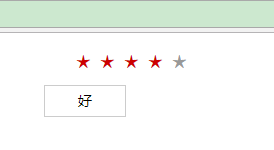
代码如下
<!DOCTYPE html>
<html>
<head>
<meta charset="utf-8">
    <title></title>
<style type="text/css">

</style>
</head>
<body>

<script type="text/javascript">

</script><!doctype html>
<html>
<head>
 <meta charset="gbk">
 <title>切换</title>
 <style>
.wrapper{width:300px; margin:10px auto; font:14px/1.5 arial;}
/*tab*/
#star{overflow:hidden;}
#star li{
float:left;
width:20px;
height:20px;
margin:2px;
display:inline;
color:#999;
font:bold 18px arial;
cursor:pointer
}
#star .act{
color:#c00
}
#star_word{
width:80px;
height:30px;
line-height:30px;
border:1px solid #ccc;
margin:10px;
text-align:center;
display:none
}
</style>
<script>
window.onload = function(){
  var star = document.getElementById("star");
        var starliArr = star.getElementsByTagName("li");
        var starword = document.getElementById("star_word");
        var word = [ '不满意',  '基本满意', '非常满意'];
        //用for循环对li进行遍历
        for (var i = 0; i < starliArr.length; i++) {
            starliArr[i].index = i;
            starliArr[i].onclick = function () {
                starword.style.display = "block";
                starword.innerHTML = word[this.index];
                //先把星星的属性清空
                for (var j = 0; j < starliArr.length; j++) {
                    starliArr[j].className = '';
                }
                //点亮星星
                for (var j = 0; j <= this.index; j++) {
                    starliArr[j].className = 'act';
                }
            }
        }
}
</script>
</head>
<body>
<div class="wrapper">
<!-- 打分结果  -->
<!-- <span id="result"></span> -->
<ul id="star">
<li>★</li>
<li>★</li>
<li>★</li>
<li>★</li>
<li>★</li>
</ul>
<div id="star_word">一般</div>
</div>
</body>
</html>
</body>
</html>

 浙公网安备 33010602011771号