
flask程序以docker形式发布
docker镜像制作
- flask项目结构如下图所示
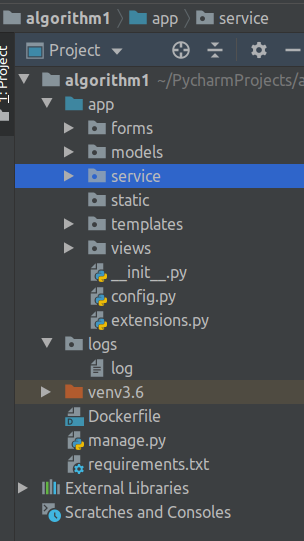
- 在venv环境下执行命令
pip freeze > requirements.txt,将项目依赖的第三方包写入文件 - 进入flask项目主目录创建Dockerfile文件,并写入一下内容
FROM centos-with-python #该镜像为整合python3和centos7后的自定义镜像
MAINTAINER username #作者信息

# We copy just the requirements.txt first to leverage Docker cache
COPY ./requirements.txt /app/requirements.txt

WORKDIR /app

RUN pip install -i https://pypi.tuna.tsinghua.edu.cn/simple -r requirements.txt

ADD . /app
EXPOSE 5000
CMD python manage.py runserver --host 0.0.0.0
- 在项目主目录中执行
docker build -t algorithm1 .制作docker镜像,镜像被命名为algorithm1
root@ThinkPad-X280:~# docker images
REPOSITORY           TAG                 IMAGE ID            CREATED             SIZE
algorithm1           latest              e9238b1b60ac        About an hour ago   1.42GB
centos-with-python   latest              e96f7cfd1865        3 days ago          1.09GB
python               3                   a2aeea3dfc32        10 days ago         932MB
ubuntu               16.04               5f2bf26e3524        3 weeks ago         123MB
ubuntu               latest              775349758637        3 weeks ago         64.2MB
centos               7.6.1810            f1cb7c7d58b7        8 months ago        202MB
python               2.7.15              afc94ac1e19b        8 months ago        925MB
docker镜像管理
- 镜像查看
root@ThinkPad-X280:~# docker images
REPOSITORY           TAG                 IMAGE ID            CREATED             SIZE
algorithm1           latest              e9238b1b60ac        About an hour ago   1.42GB
centos-with-python   latest              e96f7cfd1865        3 days ago          1.09GB
python               3                   a2aeea3dfc32        10 days ago         932MB
ubuntu               16.04               5f2bf26e3524        3 weeks ago         123MB
ubuntu               latest              775349758637        3 weeks ago         64.2MB
centos               7.6.1810            f1cb7c7d58b7        8 months ago        202MB
python               2.7.15              afc94ac1e19b        8 months ago        925MB
- 容器创建
root@ThinkPad-X280:~# docker create -i algorithm1
ad82e763f581b70c0127bdebb9e92e719ff397e513922a98d451934faa989c1e
- 查看已有容器
root@ThinkPad-X280:/home/zhangcc/Downloads# docker ps -a
CONTAINER ID        IMAGE               COMMAND                  CREATED             STATUS              PORTS                    NAMES
ad82e763f581        algorithm1          "/bin/sh -c 'python …"   8 minutes ago       Created                                      interesting_dirac
071a79a1f46a        algorithm1          "/bin/sh -c 'python …"   2 hours ago         Up 2 hours          0.0.0.0:5000->5000/tcp   infallible_roentgen
- 启动指定容器
docker start ad82e763f581
- 直接创建并启动容器(交互式)
docker run -dit -p 5000:5000 algorithm1
- 日志
docker镜像在ubuntu中的默认日志位置为
/var/lib/docker/containers中,该文件夹下每个容器以id为目录名形成一个子文件夹,日志文件位于.-json.log中。
交互式日期访问命令为
docker attach c74b0718f426,推出时为防止容器进程终端,勿使用ctr+c,请使用ctr+q或ctr+p.
- docker镜像导入导出
导出:docker save algorithm1 > ./photovoltaic.tar#algorithm1为镜像的名称
导入:cat ./photovoltaic.tar |docker import - alg-pho:1#导入后的镜像名可自定义
 posted on

 浙公网安备 33010602011771号