
自定义样式(style)与主题(theme)
Android提供了许多可视的组件。通过自定义样式和主题,可以避免用这些组件开发的应用看上去千篇一律。
样式和主题都是通过预定义一系列属性值来形成统一的显示风格。区别是,样式只能应用于某种类型的View;而主题刚好相反,它不能应用于特定的View,而只能作用于一个或多个Activity,或是整个应用。
以下结合具体例子说明如何定义样式和主题:
1.定义样式和主题
在工程中res/values/下添加styles.xml
- <?xml version="1.0" encoding="utf-8"?>
- <resources>
- <!-- 定义my_style_1,没有指定parent,用系统缺省的 -->
- <style name="my_style_1">
- <!-- 定义与指定View相关的若干属性 -->
- <item name="android:hint">load from style 1</item>
- </style>
- <!-- 定义my_style_2,用自定义的my_style_1作为parent -->
- <style name="my_style_2" parent="@style/my_style_1">
- <!-- 定义与指定View相关的若干属性 -->
- <item name="android:textSize">30sp</item>
- <item name="android:textColor">#FFFF0000</item>
- <item name="android:hint">load from style 2</item>
- </style>
- <!-- 定义my_style_3,用android的EditText作为parent -->
- <style name="my_style_3" parent="@android:style/Widget.EditText">
- <!-- 定义与指定View相关的若干属性 -->
- <item name="android:hint">"load from style 3"</item>
- <item name="android:textStyle">bold|italic</item>
- <item name="android:typeface">monospace</item>>
- <item name="android:background">@drawable/mybackground</item>
- </style>
- <!-- 定义MyTheme,用android的Theme作为parent -->
- <style name="MyTheme" parent="@android:style/Theme">
- <item name="android:textSize">20sp</item>
- <item name="android:textColor">#FF0000FF</item>
- <item name="android:hint">"load from style 3"</item>
- <item name="android:textStyle">bold|italic</item>
- <item name="android:typeface">monospace</item>>
- <item name="android:background">@drawable/gallery_selected_pressed</item>
- <item name="myStyle">@style/my_style_3</item>
- </style>
- </resources>
主题和样式的定义方法类似,都是在<style>下添加N个<item>。
<style>下有两个有用的属性:
name - 以后引用时会用到;
parent - 可选,一些在自定义的style中没有指定的属性会继承parent style中的值。parent可以是android预定义的resource,也可以是自己定义的style。
<item>下定义需要改变的属性值。Android中能使用的属性可以在<sdk>/docs/reference/android/R.styleable.html中查到;也可以用自己定义的属性值;
2.使用主题
a)从AndroidManifest中指定,可以选择Application应用级:
- <application android:theme="@style/MyTheme">
或是Activity级:
- <activity android:theme="@style/MyTheme">
b)从Java代码中指定:
- public void onCreate(Bundle savedInstanceState) {
- super.onCreate(savedInstanceState);
- setTheme(R.style.MyTheme);
- setContentView(R.layout.main);
- }
注意:setTheme必须在setContentView(),addContentView()或inflate()等实例化View的函数之前调用!
3.使用样式
a)从layout的xml文件中指定:
- <EditText android:id="@+id/EditText03"
- style="@style/my_style_3"
- android:layout_width="fill_parent"
- android:layout_height="wrap_content">
- </EditText>
b)从Java代码中指定:
- public void onCreate(Bundle savedInstanceState) {
- super.onCreate(savedInstanceState);
- setTheme(R.style.MyTheme);
- setContentView(R.layout.main);
- LinearLayout ll = (LinearLayout)findViewById(R.id.llMain);
- EditText et = new EditText(this, null, R.attr.myStyle);
- ll.addView(et);
- }
一.概述
通过继承机制,可以利用已有的style来定义新的style。所定义的新的style型不仅拥有新定义的item,而且还同时拥有旧的item。我们称已存在的用来派生新的style为父style。由新定义的style,又称为子style。 比如:
- <style name="pickprof_guide_text">
- <item name="android:textSize">16.0sp</item>
- <item name="android:textColor">#ff333333</item>
- </style>
- <style name="pickprof_guide_text_small" parent="@style/pickprof_guide_text">
- <item name="android:textSize">13.0sp</item>
- </style>
二、两种继承方式
方式一:通过parent属性用来继承android已经定义好的style。例如:
- <style name="XDialog" parent="android:Theme.Dialog">
- <item name="android:windowBackground">@drawable/pop_frame</item>
- </style>
- <!-- Base style for animations. This style specifies no animations. -->
- <style name="Animation" />
- <!-- Standard animations for a non-full-screen window or activity. -->
- <style name="Animation.Dialog">
- <item name="windowEnterAnimation">@anim/dialog_enter</item>
- <item name="windowExitAnimation">@anim/dialog_exit</item>
- </style>
======================================
就目前的互联网发展来看,已经有越来越多互联网企业都在Android平台上部署其客户端,并且为了提升用户体验,这些客户端都做得布局合理而且美观。本文所要介绍的Android的Style设计就是提升用户体验的关键之一。Android上的Style分为了两个方面:
1.Theme是针对窗体级别的,改变窗体样式;
2.Style是针对窗体元素级别的,改变指定控件或者Layout的样式。
Android系统的themes.xml和style.xml(位于/base/core/res/res/values/)包含了很多系统定义好的style,建议在里面挑个合适的,然后再继承修改。以下的这段代码属性是在Themes中比较常见的,源自Android系统本身的themes.xml:
|
1
2
3
4
5
6
7
8
9
10
11
|
<!-- Window attributes --><item name="windowBackground">@android:drawable/screen_background_dark</item><item name="windowFrame">@null</item><item name="windowNoTitle">false</item><item name="windowFullscreen">false</item><item name="windowIsFloating">false</item><item name="windowContentOverlay">@android:drawable/title_bar_shadow</item><item name="windowTitleStyle">@android:style/WindowTitle</item><item name="windowTitleSize">25dip</item><item name="windowTitleBackgroundStyle">@android:style/WindowTitleBackground</item><item name="android:windowAnimationStyle">@android:style/Animation.Activity</item> |
至于控件的Style设计就范围大多了,看看Eclipse的Android控件属性编辑器[Properties]就大概知道有哪些条目,而Android内置的style.xml也只是定义每个控件的默认样式而已。不过控件的style不建议大改,耐看的style更能让用户长时间使用软件。另外,控件的Style在很多情况下都用到9.png,学习9.png就必须到/base/core/res/res/drawable-hdpi里面看看,里面有很多系统内置的9.png。
注意:为了研究Android的Style和Theme,强烈建议下载Android的base.git!
先来看看本文程序的效果,如下图所示:
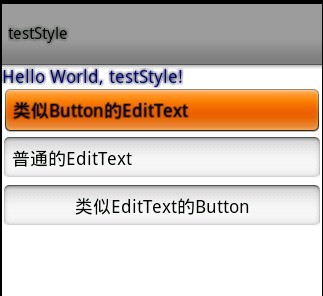
本文程序的themes.xml代码如下,自定义了WindowTitle,:
|
1
2
3
4
5
6
7
8
9
10
11
12
13
14
15
|
<?xml version="1.0" encoding="UTF-8"?><resources> <!--继承Android内置的Theme.Light,位于/base/core/res/res/values/themes.xml --> <style name="Theme" parent="android:Theme.Light"> <item name="android:windowFullscreen">true</item> <item name="android:windowTitleSize">60dip</item> <item name="android:windowTitleStyle">@style/WindowTitle</item> </style> <style name="WindowTitle" parent="android:WindowTitle"> <item name="android:singleLine">true</item> <item name="android:shadowColor">#BB000000</item> <item name="android:shadowRadius">2.75</item> </style></resources> |
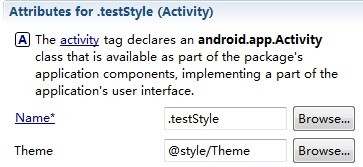
要为Activity使用theme,要么使用代码 setTheme(R.style.Theme),要么在Application Manifest里面设置如下:
本文程序的styles.xml代码如下,background默认使用的是9.png,xml定义在/base/core/res/res/drawable/之下:
|
1
2
3
4
5
6
7
8
9
10
11
12
13
14
15
16
17
18
19
20
21
|
<?xml version="1.0" encoding="UTF-8"?><resources> <style name="TextView"> <item name="android:textSize">18sp</item> <item name="android:textColor">#008</item> <item name="android:shadowColor">@android:color/black</item> <item name="android:shadowRadius">2.0</item> </style> <style name="EditText"> <item name="android:shadowColor">@android:color/black</item> <item name="android:shadowRadius">1.0</item> <item name="android:background">@android:drawable/btn_default</item> <item name="android:textAppearance">?android:attr/textAppearanceMedium</item> </style> <style name="Button"> <item name="android:background">@android:drawable/edit_text</item> <item name="android:textAppearance">?android:attr/textAppearanceMedium</item> </style></resources> |
main.xml代码如下:
|
1
2
3
4
5
6
7
8
9
10
11
12
13
14
15
|
<?xml version="1.0" encoding="utf-8"?> android:orientation="vertical" android:layout_width="fill_parent" android:layout_height="fill_parent"> <TextView android:layout_width="fill_parent" android:layout_height="wrap_content" android:text="@string/hello" style="@style/TextView" /> <EditText android:id="@+id/EditText01" android:layout_height="wrap_content" style="@style/EditText" android:layout_width="fill_parent" android:text="类似Button的EditText"></EditText> <EditText android:id="@+id/EditText02" android:layout_height="wrap_content" android:layout_width="fill_parent" android:text="普通的EditText"></EditText> <Button android:id="@+id/Button01" android:layout_height="wrap_content" style="@style/Button" android:layout_width="fill_parent" android:text="类似EditText的Button"></Button></LinearLayout> |

 浙公网安备 33010602011771号