
0 首先考虑清楚你安装的环境。本人的环境是
0.1.已经安装了操作系统,显然根据标题 Ubuntu 8.10,为了,更加详细的显示操作系统的信息执行 unam -a得到如下显示
Linux XXXX 2.6.24-21-generic #1 SMP Tue Oct 21 23:09:30 UTC 2008 x86_64 GNU/Linux
(XXXX是为了保密,所以就隐藏了,我想大家关注的是2.6.24和x86_64)
0.2.不想把自己已经安装操作系统的HD加入到Raid卡的管理之中去。指向用Raid卡来管理几张HD,组成Array,这样的好处就是我可以不动那个已经安好OS的HD啦。
0.3不要看Adaptec那个 SAS RAID Controler Quick start Guide.这个是安装一个bootable的Array,什么意思呢,就是说你的OS是安装在Array上,显然和我的0.1是矛盾的,这个问题搞的我花了一点时间才想通。
0.4 总不能握自己创造一个安装步骤吧,当然是不能的,所以得参考Adaptec_RAID_Controller_IUG这个文档了,可是问题这样一个文档,那么多页,怎么确定哪种安装方式是你的服务器所匹配的呢。仔细考虑0.1,0.2,0.3得出的结论是Installing on an Existing Operating System。
If your controller has an external connector, you can connect external disk drives as well
(or instead).
2 Install the controller driver (see page 54).
3 Install Adaptec Storage Manager and begin to manage your data storage (see page 59).
这样安装这个安装思路,我们开始一步一步的安装。下面是相信的步骤并准备配以图片来说说明。
1.Install and connect your controller and internal disk drives
这里面要区分的概念是Internal和external disk Driver。by 我的理解,internal就是直接通过cable线接到Raid卡上的HD,下面的图是个不错的东西,就按这样的方式来接。
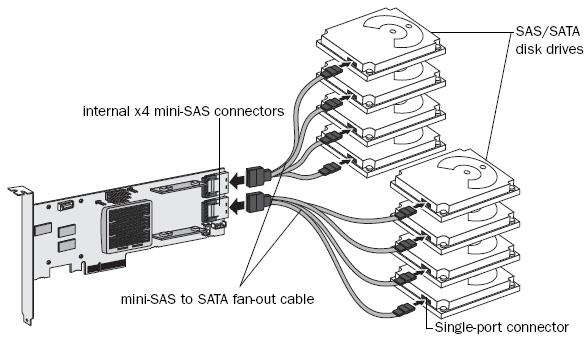
这样装好之后呢,就把Raid插入到PC机对应的插槽中,我使用的5805是PCIEx8的,当然是插到主板上对应的solt上得了,插好之后呢的拧螺丝吧,硬盘的固定就不说了吧。还有就是这个时候PC应该是关机的吧。一切OK之后,我们的工作已经完成了1/3了。相信这一步大家都没有问题的。
2 Install the controller driver
这个步骤我看了userguide半天,愣是没有搞明白这个写文档的人的安装思路。还得用什么floopy disk.都什么年代来,还能找到软驱和软盘,好歹写个USB更能唬人啊。所以就可以直接略过,上面的提示有一个(see page 54).自然的去看看啦。不看废话了,我的OS不在support的list中,好就好在Adaptec提供了linux下的源码可以自己编译一个Driver Ko给insmod进去。
2.1去官方下载一个linux src的tgz包,我用的是aacraid-dkms-1.1.5-24900.tgz。然后再本地的目录中解压,会得到两个文件。aacraid-1.1.5-24900.src.rpm和readme.txt,按照readme.txt中的指示。依次做如下操作:
 代码
代码
#mkdir aacraid
#mv aacraid_source.tgz aacraid
#cd aacraid
#tar xzvf aacraid_source.tgz
#rm aacraid_source.tgz
#make -C /lib/modules/`uname -r`/build M=$PWD modules
如果没有错误,你就可以看见在当前目录下生成了aacraid.ko,就可以继续执行如下的命令啦。
#sudo insmod ./aacraid.ko
#lsmod |grep "aacraid"
看看有没有正确的insmod进去。
到此,第二步安装完成。
3.Install Adaptec Storage Manager and begin to manage your data storage (see page 59).
同样的,这个安装比较简单了。
3.1去官方下载asm_linux_x64_v6_40_18530.rpm,64位还是32位呢,这是个问题,注意看0.1就知道为什么是64了。
3.2sudo rpm --install StorMan-6.10.x86_64.rpm
很不幸,这一步出错了。信息如下
代码
error: Failed dependencies:
/bin/sh is needed by StorMan-6.10-18451.x86_64
/usr/bin/perl is needed by StorMan-6.10-18451.x86_64
libX11.so.6()(64bit) is needed by StorMan-6.10-18451.x86_64
libXext.so.6()(64bit) is needed by StorMan-6.10-18451.x86_64
libc.so.6()(64bit) is needed by StorMan-6.10-18451.x86_64
libc.so.6(GLIBC_2.2.5)(64bit) is needed by StorMan-6.10-18451.x86_64
libc.so.6(GLIBC_2.3)(64bit) is needed by StorMan-6.10-18451.x86_64
libgcc_s.so.1()(64bit) is needed by StorMan-6.10-18451.x86_64
libgcc_s.so.1(GCC_3.0)(64bit) is needed by StorMan-6.10-18451.x86_64
libgcc_s.so.1(GCC_3.3)(64bit) is needed by StorMan-6.10-18451.x86_64
libm.so.6()(64bit) is needed by StorMan-6.10-18451.x86_64
perl(strict) is needed by StorMan-6.10-18451.x86_64
忽略之,记得在官网的博客中看到相关的信息,先安装上再说,try一下总可以把,不要在此HALT住,那就太郁闷了。说实话我还真不信我们天天都在使用的server上没有C库,笑死人了。查一下果然都有。所以更加可以堂而皇之的忽略,采用流氓手段来安装。
sudo rpm -ivh --nodeps asm_linux_x64_v6_40_18530.rpm
这下总可以了吧,果然出现了
 代码
代码
Adaptec Storage Manager
Version 6.40
1:StorMan ########################################### [100%]
starting Adaptec Storage Manager agent ...
cut: fields and positions are numbered from 1
Try `cut --help' for more information.
cut: fields and positions are numbered from 1
Try `cut --help' for more information.
/var/tmp/rpm-tmp.70519: 14: chkconfig: not found
Installation completed successfully.
看见Successfully总是一件美妙的事情啊。但是不放心啊,总的看看有没有什么进程在跑吧
ps -ef | grep StorAgnt.sh
发现了root 23160 1 0 15:43 pts/0 00:00:00 sh /usr/StorMan/StorAgnt.sh更是确定了这个东西确实被安装上了。
可是这个只是Agent,那么full function 的monitor呢?
人家上面的代码不是说了吗 The application can be started by running: /usr/StorMan/StorMan.sh
所以直接跑到服务器的显示器上去执行,(为什么不在本地呢?我是putty上了的。当然也可以VNC了)
sudo /usr/StorMan/StorMan.sh
果然看见了ASM的界面,先收工吧。安装已经顺利的完成了,可是使用才是真正的问题啊,所以下周挂上四个HD,搞一个Raid 5,看看如何。
4 Adaptec Storage Manager 使用
4.1 login in
这里面有两种方式可以提供Local和remote,其实所谓的Loacl和remote是相对的概念,我们核心的问题管理Raid卡。借用ASM UG中的图来说明该如何做。
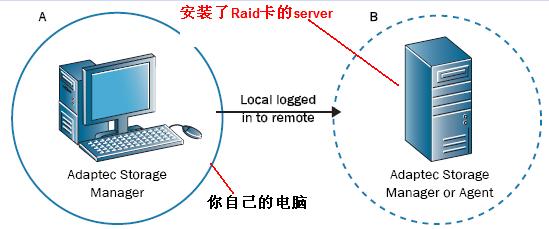
要求你的PC和你所想管理的server上都要安装ASM。下面将演示如何通过你自己的电脑来实现远程管理server的电脑上的Raid卡。(当然你可以直接在server上启动ASM来实现管理)。
To log in to a remote system:
1 In the Enterprise View, select either Direct Attached Storage or the Local System.
2 From the Actions menu, select Add managed system.
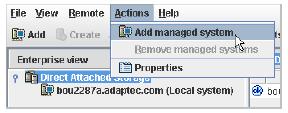
接着呢选择 The Add Managed System window opens.
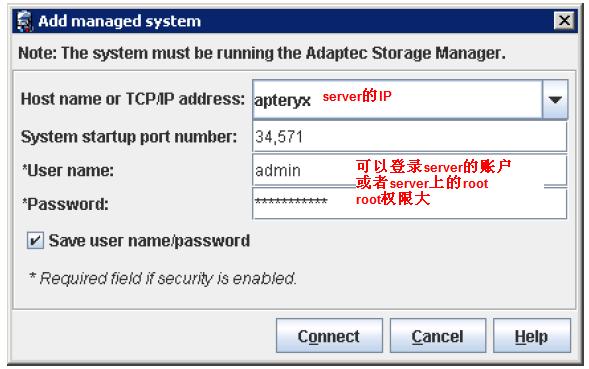
填好之后当然是点击Connect啦。然后选择出现的Raid卡,(我记录的不是第一次的,所以可能不太一样,仔细的读UG)
下面我们来做disable Alarm。选择Action 中的Alarm actions 中的disable就可以了,这样出现了错误就不会一直的叫个不停了。但是不太好是当然的,我们可以采用其他的方式来实现status重大状态的通知,就是采用mail的方式。

 浙公网安备 33010602011771号