
SpringSecurity笔记
#Part1 Spring Security快速入门
官方文档:https://docs.spring.io/spring-security/reference/index.html
功能:
- 身份认证(authentication)
身份认证是验证谁正在访问系统资源,判断用户是否为合法用户。认证用户的常见方式是要求用户输入用户名和密码。 - 授权(authorization)
用户进行身份认证后,系统会控制谁能访问哪些资源,这个过程叫做授权。用户无法访问没有权限的资源。 - 防御常见攻击(protection against common attacks)
- CSRF
- HTTP Headers
- HTTP Requests
一、身份认证
1. 🌕项目案例
官方代码示例:https://github.com/spring-projects/spring-security-samples/tree/main
§1.1 创建SpringBoot项目

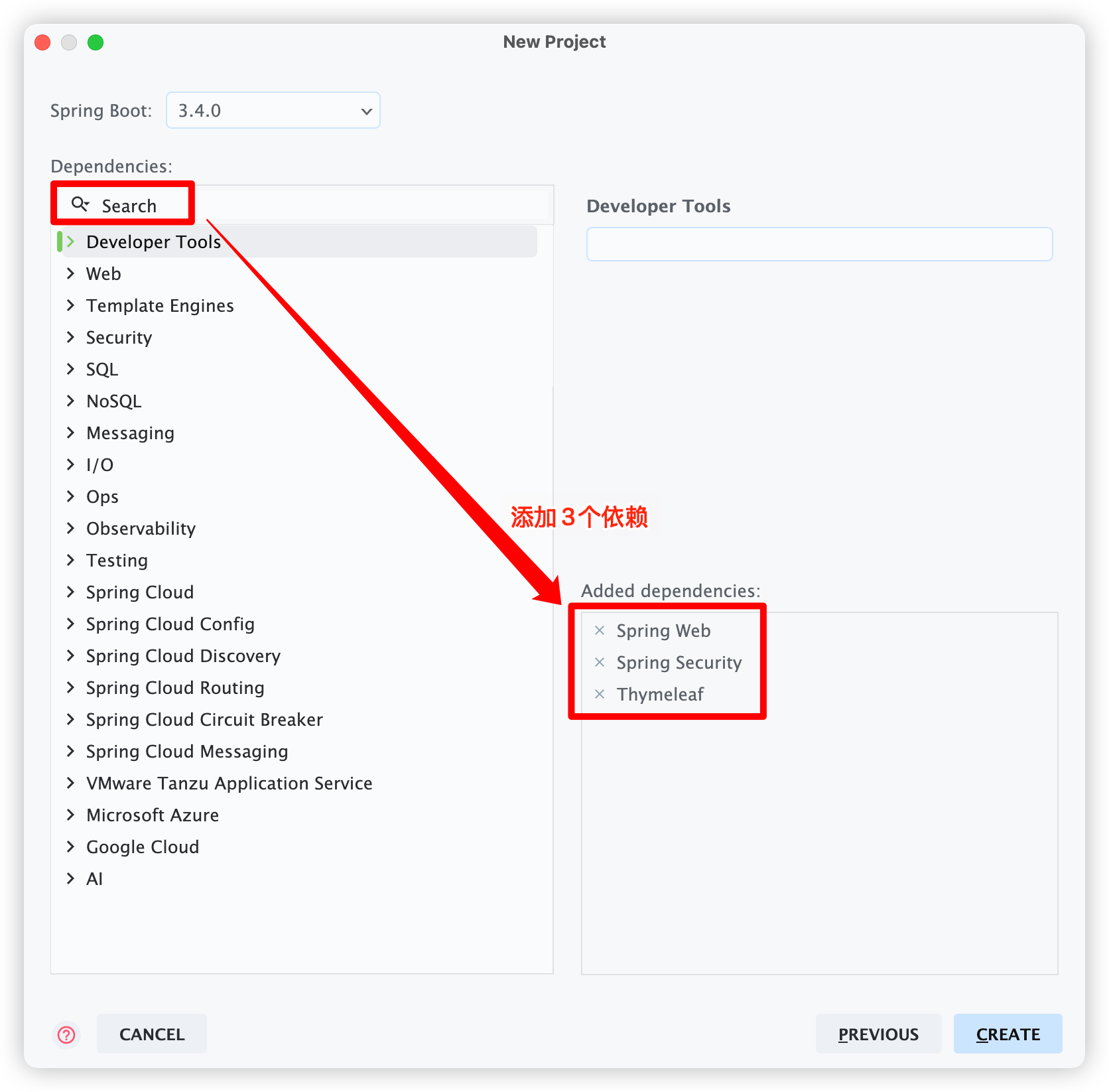
§1.2 创建Controller
创建 controller包 中的 IndexController类。
@Controller
public class IndexController {
    @GetMapping("/")
    public String index() {
        return "index";
    }
}
§1.3 创建index.html
在 src/main/resources/templates目录 中创建 index.html。
<html xmlns:th="https://www.thymeleaf.org">
<head>
    <title>Hello Security!</title>
</head>
<body>
<h1>Hello Security</h1>
<a th:href="@{/logout}">Log Out</a>
</body>
</html>
@{/logout}的作用:
通过使用
@{/logout},Thymeleaf将自动处理生成正确的URL,以适应当前的上下文路径。这样,无论应用程序部署在哪个上下文路径下,生成的URL都能正确地指向注销功能。例如:如果我们在 src/main/resources/application.properties 配置文件中添加如下内容,修改项目的根路径为
http://localhost:8080/demo。server.servlet.context-path=/demo那么
<a th:href="@{/logout}">Log Out</a>这种写法可以自动处理url为正确的相对路径,即http://localhost:8080/demo/logout。如果用普通的写法
<a href="/logout">Log Out</a>,就不会自动处理url为正确的相对路径,即http://localhost:8080/logout。
§1.4 启动项目
运行生成的 SpringSecurityTestApplication启动类,在浏览器中访问:
http://localhost:8080
浏览器会自动跳转到登录页面:

默认用户名为user,密码在启动后控制台中会随机生成初始密码。
点击“Sign in”进行登录,浏览器就跳转到了 index.html 页面。

点击 Log Out 连接:

2. Spring Security默认做了什么
- 保护应用程序URL,要求对应用程序的任何交互进行身份验证。
- 程序启动时生成一个默认用户“user”。
- 生成一个默认的随机密码,并将此密码记录在控制台上。
- 生成默认的登录表单和注销页面。
- 提供基于表单的登录和注销流程。
- 对于Web请求,重定向到登录页面;
- 对于服务请求,返回401未经授权。
- 处理跨站请求伪造(CSRF)攻击。
- 处理会话劫持攻击。
- 写入Strict-Transport-Security以确保HTTPS。
- 写入X-Content-Type-Options以处理嗅探攻击。
- 写入Cache Control头来保护经过身份验证的资源。
- 写入X-Frame-Options以处理点击劫持攻击。
二、SpringSecurity的底层原理
官方文档:https://docs.spring.io/spring-security/reference/servlet/architecture.html
1. Filter
下图展示了处理一个Http请求时,过滤器和Servlet的工作流程:

SpringSecurity 底层由 Servlet 的过滤器实现,因此我们可以在过滤器中对请求进行修改或增强。
2. DelegatingFilterProxy
DelegatingFilterProxy 是 SpringSecurity 提供的一个 Filter 实现,可以在 Servlet 容器和 Spring 容器之间建立桥梁。
通过使用 DelegatingFilterProxy,这样就可以将Servlet容器中的 Filter 实例放在 Spring 容器中管理。

DelegatingFilterProxy 将传统的注册在 Spring 中的过滤器加载到 Servlet 的生命周期中:
- 首先,Filter 以 Bean 对象的方式注册在 Spring 的容器中。
- DelegatingFilterProxy 在 Spring 环境中加载这个 Bean 对象。
- DelegatingFilterProxy 本身也是一个 Filter,被注册在 Servlet 的 FilterChain 中,那么这个 Bean Filter 就能被 DelegatingFilterProxy 调用,从而工作在整个 Servlet 容器中的 FilterChain 中。
- 这个过程就是委托 DelegatingFilterProxy 将 Bean Filter 注册在整个 Servlet 的生命周期中。
3. FilterChainProxy
复杂的业务中不可能只有一个过滤器。因此FilterChainProxy是Spring Security提供的一个特殊的Filter,它允许通过SecurityFilterChain将过滤器的工作委托给多个Bean Filter实例。
DelegatingFilterProxy 管理了 FilterChainProxy 类,然后 FilterChainProxy 类管理了 SecurityFilterChain。

4. SecurityFilterChain
SecurityFilterChain 被 FilterChainProxy 调用,负责查找当前的请求需要执行的Security Filter列表。

5. Multiple SecurityFilterChain
可以有多个SecurityFilterChain的配置,FilterChainProxy决定使用哪个SecurityFilterChain。
如果请求的URL是/api/messages/,它首先匹配SecurityFilterChain0的模式/api/\*\*,因此只调用SecurityFilterChain 0。
假设没有其他SecurityFilterChain实例匹配,那么将调用SecurityFilterChain n。

三、程序的启动和运行
1. DefaultSecurityFilterChain
DefaultSecurityFilterChain 类实现了 SecurityFilterChain 接口,加载了默认的16个Filter。

2. SecurityProperties
默认情况下Spring Security将初始的用户名和密码存在了SecurityProperties类中。
这个类中有一个静态内部类User,配置了默认的用户名(name = "user")和密码(password = uuid)
public class SecurityProperties {
    public static class User {
        private String name = "user";
        private String password = UUID.randomUUID().toString();
        // ......
    }
    // ......
}
我们也可以将用户名、密码配置在SpringBoot的配置文件中:在src/main/resources/application.properties 中配置自定义用户名和密码。
spring.security.user.name=user
spring.security.user.password=123
#Part2 Spring Security自定义配置
一、基于内存的用户认证
1. 创建自定义配置
实际开发的过程中,我们需要应用程序更加灵活,可以在SpringSecurity中创建自定义配置文件。
官方文档:https://docs.spring.io/spring-security/reference/servlet/configuration/java.html
UserDetailsService用来管理用户信息,InMemoryUserDetailsManager是UserDetailsService的一个实现,用来管理基于内存的用户信息。
创建 config包 中的 WebSecurityConfig类。
@Configuration
//@EnableWebSecurity	// 开启SpringSecurity的自定义配置,SpringBoot项目中可以省略
public class WebSecurityConfig {

    @Bean
    public UserDetailsService userDetailsService() {
        // 创建基于内存的用户信息管理器
        InMemoryUserDetailsManager manager = new InMemoryUserDetailsManager();
        // 使用manager管理UserDetails对象
        manager.createUser(
	        // 创建UserDetails对象,用于管理用户名、用户密码、用户角色、用户权限等内容
            User
            .withDefaultPasswordEncoder()
            .username("user") 	// 自定义用户名
            .password("pwd123") // 自定义密码
            .roles("USER") 		// 自定义角色
            .build()
        );
        return manager;
    }
}
[!NOTE]
使用这种方式定义用户对象后,用户对象是存在于内存中的,且 application.properties 文件中
spring.security.user.xxx配置的内容将被覆盖。
2. 基于内存的用户认证流程
程序启动时:
- 创建
InMemoryUserDetailsManager对象。 - 创建
User对象,封装用户名密码。 - 使用InMemoryUserDetailsManager将User存入内存。
校验用户时:
- SpringSecurity自动使用
InMemoryUserDetailsManager的loadUserByUsername()方法从内存中获取User对象。 - 在
UsernamePasswordAuthenticationFilter过滤器中的attemptAuthentication()方法中将用户输入的用户名密码和从内存中获取到的用户信息进行比较,进行用户认证。
二、🌕基于数据库的用户认证
1. 创建基于数据库的数据源
§1.1 SQL数据创建
创建三个数据库表并插入测试数据。
-- 创建数据库
CREATE DATABASE `security-demo`;
USE `security-demo`;

-- 创建用户表
CREATE TABLE `user`(
	`id` INT NOT NULL AUTO_INCREMENT PRIMARY KEY,
	`username` VARCHAR(50) DEFAULT NULL ,
	`password` VARCHAR(500) DEFAULT NULL,
	`enabled` BOOLEAN NOT NULL
);
-- 唯一索引
CREATE UNIQUE INDEX `user_username_uindex` ON `user`(`username`);

-- 插入用户数据(加密前的密码是 "abc" )
INSERT INTO `user` (`username`, `password`, `enabled`) VALUES
('admin', '{bcrypt}$2a$10$GRLdNijSQMUvl/au9ofL.eDwmoohzzS7.rmNSJZ.0FxO/BTk76klW', TRUE),
('Helen', '{bcrypt}$2a$10$GRLdNijSQMUvl/au9ofL.eDwmoohzzS7.rmNSJZ.0FxO/BTk76klW', TRUE),
('Tom', '{bcrypt}$2a$10$GRLdNijSQMUvl/au9ofL.eDwmoohzzS7.rmNSJZ.0FxO/BTk76klW', TRUE);
§1.2 引入依赖
<!--MySQL-->
<dependency>
    <groupId>mysql</groupId>
    <artifactId>mysql-connector-java</artifactId>
    <version>8.0.30</version>
</dependency>

<!--MyBatis Plus-->
<dependency>
   <groupId>com.github.yulichang</groupId>
   <artifactId>mybatis-plus-spring-boot3-starter</artifactId>
   <version>3.5.8-001</version>
</dependency>

<!--MyBatis-->
<dependency>
    <groupId>org.mybatis</groupId>
    <artifactId>mybatis-spring</artifactId>
    <version>3.0.3</version>
</dependency>

<!--Lombok-->
<dependency>
    <groupId>org.projectlombok</groupId>
    <artifactId>lombok</artifactId>
</dependency>
§1.3 配置数据源
修改 src/main/resources/application.properties 文件。
#MySQL数据源
spring.datasource.driver-class-name=com.mysql.cj.jdbc.Driver
spring.datasource.url=jdbc:mysql://localhost:3306/security-demo
spring.datasource.username=root
spring.datasource.password=123456
#SQL日志
mybatis-plus.configuration.log-impl=org.apache.ibatis.logging.stdout.StdOutImpl
§1.4 实体类
创建 entity包 中的 User类。
@Data
public class User {
    @TableId(value = "id", type = IdType.AUTO)
    private Integer id;			// 主键自增id
    private String username;	// 用户名
    private String password;	// 密码
    private Boolean enabled;	// 用户是否启用
}
§1.5 持久层Mapper
创建 mapper包 中的 UserMapper接口。
@Mapper
public interface UserMapper extends BaseMapper<User> {

}
创建 src/main/resources/mapper目录 中的 UserMapper.xml文件。
<?xml version="1.0" encoding="UTF-8"?>
<!DOCTYPE mapper PUBLIC "-//mybatis.org//DTD Mapper 3.0//EN" "http://mybatis.org/dtd/mybatis-3-mapper.dtd">
<mapper namespace="com.example.springsecuritytest.mapper.UserMapper">

</mapper>
§1.6 业务层Service
创建 service包 中的 UserService接口。
public interface UserService extends IService<User> {

}
创建 service/impl包 中的 UserServiceImpl实现类。
@Service
public class UserServiceImpl extends ServiceImpl<UserMapper, User> implements UserService {

}
§1.7 表述层Controller
创建 controller包 中的 UserController类。
@RestController
@RequestMapping("/user")
public class UserController {

    @Resource
    public UserService userService;

    @GetMapping("/list")
    public List<User> getList(){
        return userService.list();
    }
}
2. 基于数据库的用户认证流程
程序启动时:
- 创建
DBUserDetailsManager类,实现接口UserDetailsManager,UserDetailsPasswordService。 - 在应用程序中初始化这个类的对象。
校验用户时:
- SpringSecurity自动使用
DBUserDetailsManager的loadUserByUsername方法从数据库中获取User对象。 - 在
UsernamePasswordAuthenticationFilter过滤器中的attemptAuthentication方法中将用户输入的用户名密码和从数据库中获取到的用户信息进行比较,进行用户认证。
§2.1 创建用户信息管理器
在 config包 中创建 DBUserDetailsManager类。
@Component
public class DBUserDetailsManager implements UserDetailsManager, UserDetailsPasswordService {

    @Resource
    private UserMapper userMapper;

    /**
     * 从数据库中获取用户信息
     */
    @Override
    public UserDetails loadUserByUsername(String username) throws UsernameNotFoundException {
        // 通过查询条件查询User对象
        QueryWrapper<User> queryWrapper = new QueryWrapper<>();
        queryWrapper.eq("username", username);
        User user = userMapper.selectOne(queryWrapper);

        // 如果没有查询到User
        if (user == null) {
            throw new UsernameNotFoundException(username);
        }
        // 如果查询到了数据库中的User对象,就组装成SpringSecurity中的User对象
        else {
            // 权限列表
            Collection<GrantedAuthority> authorities = new ArrayList<>();

            return new org.springframework.security.core.userdetails.User(
                    user.getUsername(),		// username字段
                    user.getPassword(),		// password字段
                    user.getEnabled(), 		// enabled字段,用户是否启用
                    true, 					// 用户账号是否未过期
                    true, 					// 用户凭证是否未过期
                    true, 					// 用户是否未被锁定
                    authorities				// 权限列表
            );
        }
    }

    @Override
    public UserDetails updatePassword(UserDetails user, String newPassword) {
        return null;
    }

    @Override
    public void createUser(UserDetails user) {

    }

    @Override
    public void updateUser(UserDetails user) {

    }

    @Override
    public void deleteUser(String username) {

    }

    @Override
    public void changePassword(String oldPassword, String newPassword) {

    }

    @Override
    public boolean userExists(String username) {
        return false;
    }
}
§2.2 修改配置类
修改 config包 中的 WebSecurityConfig类。
[!NOTE]
若直接在 DBUserDetailsManager类 上添加
@Component注解,这部分内容可以省略。
@Configuration
public class WebSecurityConfig {

    @Bean
    public UserDetailsService userDetailsService() {
        // 创建基于数据库的用户信息管理器
		DBUserDetailsManager manager = new DBUserDetailsManager();
        return manager;
    }
}
§2.3 测试
运行启动类,在浏览器中访问:
http://localhost:8080
在登录页面中输入数据库中的用户名和密码进行登录。
三、🌕基于数据库添加用户的功能
1. SpringSecurity的默认配置
1.1 默认配置
配置类(WebSecurityConfig类)会默认实现以下的方法,在代码中写或不写都会实现。
@Configuration
public class WebSecurityConfig {
	@Bean
    public SecurityFilterChain filterChain(HttpSecurity http) throws Exception {
        // authorizeHttpRequests():开启授权保护
        // - anyRequest():对所有请求开启授权保护
        // - authenticated():已认证请求会自动被授权
        http
            .authorizeHttpRequests(authorize -> authorize
                .anyRequest().authenticated()
            )
            .formLogin(Customizer.withDefaults())	// 使用表单授权方式
            .httpBasic(Customizer.withDefaults());	// 使用基本授权方式(通过浏览器的弹窗输入用户名和密码)
        return http.build();
    }
}
1.2 添加跨域
跨域全称是跨域资源共享(Cross-Origin Resources Sharing,CORS),它是浏览器的保护机制,只允许网页请求统一域名下的服务,同一域名指协议、域名、端口号都要保持一致,如果有一项不同,那么就是跨域请求。在前后端分离的项目中,需要解决跨域的问题。
在SpringSecurity中解决跨域很简单,在配置类(WebSecurityConfig类)中添加如下配置即可。
@Configuration
public class WebSecurityConfig {
	@Bean
    public SecurityFilterChain filterChain(HttpSecurity http) throws Exception {
        http
            .authorizeHttpRequests(authorize -> authorize
                .anyRequest().authenticated()
            )
            .formLogin(Customizer.withDefaults())
            .httpBasic(Customizer.withDefaults());

        // 跨域
        http.cors(withDefaults());
        return http.build();
    }
}
2. 添加用户功能的实现
§2.1 Controller
修改 controller包 中的 UserController类,增加添加用户的方法。
@RestController
@RequestMapping("/user")
public class UserController {

    @Resource
    public UserService userService;

    // ......

    @PostMapping("/add")
    public void add(@RequestBody User user){
        userService.saveUserDetails(user);
    }
}
§2.2 Service
修改 service包 中的 UserService接口,增加添加用户的方法。
public interface UserService extends IService<User> {
	void saveUserDetails(User user);
}
修改 service/impl包 中的 UserServiceImpl实现类,增加添加用户的方法。
@Service
public class UserServiceImpl extends ServiceImpl<UserMapper, User> implements UserService {

    @Resource
    private DBUserDetailsManager dbUserDetailsManager;

    @Override
    public void saveUserDetails(User user) {
        UserDetails userDetails = org.springframework.security.core.userdetails.User
                .withDefaultPasswordEncoder()	// 使用默认的密码加密算法
                .username(user.getUsername()) 	// 自定义用户名
                .password(user.getPassword()) 	// 自定义密码
                .build();
        dbUserDetailsManager.createUser(userDetails);
    }
}
§2.3 修改用户信息管理器
修改 config包 中的 DBUserDetailsManager类,重写实现的 createUser() 方法。
@Component
public class DBUserDetailsManager implements UserDetailsManager, UserDetailsPasswordService {

    @Resource
    private UserMapper userMapper;

    // ......

    @Override
    public void createUser(UserDetails user) {
        User user = new User();
        user.setUsername(userDetails.getUsername());
        user.setPassword(userDetails.getPassword());
        user.setEnabled(userDetails.getEnabled());
        userMapper.insert(user);
    }
}
§2.4 Swagger测试
在 pom.xml 中添加Swagger依赖用于测试。
<!--swagger测试-->
<dependency>
    <groupId>com.github.xiaoymin</groupId>
    <artifactId>knife4j-openapi3-jakarta-spring-boot-starter</artifactId>
    <version>4.1.0</version>
</dependency>
Swagger测试地址:http://localhost:8080/doc.html

此时会返回错误:
{
    "status": 403,
    "error": "Forbidden",
}
这是因为SpringSecurity默认开启了csrf攻击防御的功能。
§2.5 关闭csrf攻击防御
默认情况下SpringSecurity开启了csrf攻击防御的功能,那么所有的POST请求,在登录页面中都会生成一个隐藏的 _csrf 字段,如下:

因此,测试的POST请求参数中必须有一个隐藏的_csrf字段,但是其value是前端页面随机生成的,所以测试时只能暂时关闭csrf防御:
修改 config包 中的 WebSecurityConfig类 中的 filterChain() 方法。
@Configuration
public class WebSecurityConfig {
    @Bean
    public SecurityFilterChain filterChain(HttpSecurity http) throws Exception {
        http
            .authorizeHttpRequests(authorize -> authorize
                .anyRequest().authenticated()
            )
            .formLogin(Customizer.withDefaults())
            .httpBasic(Customizer.withDefaults());

        //跨域
        http.cors(withDefaults());

        // 关闭csrf攻击防御
        http.csrf((csrf) -> {
            csrf.disable();
        });

        return http.build();
    }
}
四、密码加密算法
官方文档:https://docs.spring.io/spring-security/reference/features/authentication/password-storage.html
1. 密码加密方式
1.1 明文密码
最初,密码以明文形式存储在数据库中。但是恶意用户可能会通过SQL注入等手段获取到明文密码,或者程序员将数据库数据泄露的情况也可能发生。
1.2 Hash算法
Spring Security的PasswordEncoder接口用于对密码进行单向转换,从而将密码安全地存储。
对密码单向转换需要用到哈希算法,例如MD5、SHA-256、SHA-512等,哈希算法是单向的,只能加密,不能解密。
因此,数据库中存储的是单向转换后的密码,Spring Security在进行用户身份验证时需要将用户输入的密码先进行单向转换,然后再与数据库的密码进行比较。
因此,如果发生数据泄露,只有密码的单向哈希会被暴露。由于哈希是单向的,并且在给定哈希的情况下只能通过暴力破解的方式猜测密码。
1.3 彩虹表
恶意用户创建称为彩虹表的查找表。
彩虹表就是一个庞大的、针对各种可能的字母组合预先生成的哈希值集合,有了它可以快速破解各类密码。越是复杂的密码,需要的彩虹表就越大,主流的彩虹表都是100G以上,目前主要的算法有LM, NTLM, MD5, SHA1, MYSQLSHA1, HALFLMCHALL, NTLMCHALL, ORACLE-SYSTEM, MD5-HALF。
1.4 加盐密码
为了减轻彩虹表的效果,开发人员开始使用加盐密码。不再只使用密码作为哈希函数的输入,而是为每个用户的密码生成随机字节(称为盐)。盐和用户的密码将一起经过哈希函数运算,生成一个唯一的哈希。盐将以明文形式与用户的密码一起存储。然后,当用户尝试进行身份验证时,盐和用户输入的密码一起经过哈希函数运算,再与存储的密码进行比较。唯一的盐意味着彩虹表不再有效,因为对于每个盐和密码的组合,哈希都是不同的。
1.5 自适应单向函数
随着硬件的不断发展,加盐哈希也不再安全。原因是,计算机可以每秒执行数十亿次哈希计算。这意味着我们可以轻松地破解每个密码。
现在,开发人员开始使用自适应单向函数来存储密码。使用自适应单向函数验证密码时,故意占用资源(故意使用大量的CPU、内存或其他资源)。
自适应单向函数允许配置一个“工作因子”,随着硬件的改进而增加。我们建议将“工作因子”调整到系统中验证密码需要约一秒钟的时间,这种权衡是为了让攻击者难以破解密码。
自适应单向函数包括bcrypt(SpringSecurity默认)、PBKDF2、scrypt和argon2。
(1) BCryptPasswordEncoder
使用广泛支持的bcrypt算法来对密码进行哈希。为了增加对密码破解的抵抗力,bcrypt故意设计得较慢。和其他自适应单向函数一样,应该调整其参数,使其在您的系统上验证一个密码大约需要1秒的时间。BCryptPasswordEncoder的默认实现使用强度10。建议您在自己的系统上调整和测试强度参数,以便验证密码时大约需要1秒的时间。
(2) Argon2PasswordEncoder
使用Argon2算法对密码进行哈希处理。Argon2是密码哈希比赛的获胜者。为了防止在自定义硬件上进行密码破解,Argon2是一种故意缓慢的算法,需要大量内存。与其他自适应单向函数一样,它应该在您的系统上调整为大约1秒来验证一个密码。当前的Argon2PasswordEncoder实现需要使用BouncyCastle库。
(3) Pbkdf2PasswordEncoder
使用PBKDF2算法对密码进行哈希处理。为了防止密码破解,PBKDF2是一种故意缓慢的算法。与其他自适应单向函数一样,它应该在您的系统上调整为大约1秒来验证一个密码。当需要FIPS认证时,这种算法是一个很好的选择。
FIPS认证 是由美国国家标准和技术研究所(NIST)和加拿大通信安全机构(CSE)联合开展的,旨在规范密码模块的设计、实现、使用及销毁过程涉及的技术与流程。
(4) SCryptPasswordEncoder
使用scrypt算法对密码进行哈希处理。为了防止在自定义硬件上进行密码破解,scrypt是一种故意缓慢的算法,需要大量内存。与其他自适应单向函数一样,它应该在您的系统上调整为大约1秒来验证一个密码。
2. ☀️密码加密实现
在测试类中编写一个测试方法。
@Test
void testPassword() {
    // 参数为工作因子:默认值是10,最小值是4,最大值是31,值越大运算速度越慢
    PasswordEncoder encoder = new BCryptPasswordEncoder(4);
    // 明文:"password123"
    // 密文:result,即使明文密码相同,每次生成的密文也不一致
    String result = encoder.encode("password123");
    System.out.println(result);

    // 密码校验
    Assert.isTrue(encoder.matches("password", result), "密码不一致");
}
3. DelegatingPasswordEncoder
数据库中存储的密码形如:{bcrypt}$2a$10$GRLdNijSQMUvl/au9ofL.eDwmoohzzS7.rmNSJZ.0FxO/BTk76klW
通过如下源码可以知道:可以通过{bcrypt}前缀动态获取和密码的形式类型一致的PasswordEncoder对象。
目的:方便随时做密码策略的升级,兼容数据库中的老版本密码策略生成的密码。

五、🌕自定义登录页面
§1. 创建登录Controller
在 controller包 中创建 LoginController类。
@Controller
public class LoginController {

    @GetMapping("/login")
    public String login() {
        return "login";	// 找名为login的视图解析器
    }
}
§2. 创建登录页面
在 src/main/resources/templates目录 中创建 login.html文件。
<!DOCTYPE html>
<html xmlns:th="https://www.thymeleaf.org">
<head>
    <title>登录</title>
</head>
<body>
<h1>登录</h1>
<!--登录失败的返回地址的参数中存在error参数时显示(在配置类中可以修改)-->
<div th:if="${param.error}">
    错误的用户名和密码.</div>

<!--method必须为"post"-->
<!--th:action="@{/login}" ,
1. 使用动态参数,表单中会自动生成_csrf隐藏字段,用于防止csrf攻击
2. login: 和登录页面动态地保持一致即可,SpringSecurity自动进行登录认证-->
<form th:action="@{/login}" method="post">
    <div>
        <!--name默认必须为"username",在配置类中可以修改-->
        <input type="text" name="username" placeholder="用户名"/>
    </div>
    <div>
        <!--name默认必须为"password",在配置类中可以修改-->
        <input type="password" name="password" placeholder="密码"/>
    </div>
    <input type="submit" value="登录" />
</form>
</body>
</html>
§3. 修改配置类
修改 config包 中的 WebSecurityConfig类 中的 filterChain() 方法。
@Configuration
public class WebSecurityConfig {
	@Bean
    public SecurityFilterChain filterChain(HttpSecurity http) throws Exception {
        http
            // 对所有请求开启授权保护
            .authorizeHttpRequests(authorize -> authorize
                .anyRequest().authenticated()
            )

            // 使用表单授权方式
            .formLogin( form -> {
                form
                    .loginPage("/login").permitAll() 	// 登录页面无需授权即可访问,否则会递归重定向
                    .usernameParameter("username") 		// 自定义表单用户名name参数,默认是username
                    .passwordParameter("password") 		// 自定义表单密码name参数,默认是password
                    .failureUrl("/login?error"); 		// 登录失败的返回地址,默认是/login?error
            });

        // 跨域
        http.cors(withDefaults());

        // 关闭csrf攻击防御
        http.csrf((csrf) -> {
            csrf.disable();
        });

        return http.build();
    }
}
#Part3 前后端分离
一、用户认证流程
1. 底层实现原理
- 登录成功后调用:
AuthenticationSuccessHandler - 登录失败后调用:
AuthenticationFailureHandler

2. 引入fastjson依赖
<dependency>
    <groupId>com.alibaba.fastjson2</groupId>
    <artifactId>fastjson2</artifactId>
    <version>2.0.37</version>
</dependency>
二、🌕认证响应
§1. 成功结果响应处理
创建 handler包 中的 MyAuthenticationSuccessHandler类,该类实现 AuthenticationSuccessHandler 接口。
public class MyAuthenticationSuccessHandler implements AuthenticationSuccessHandler {

    /**
     * 当验证成功时执行的方法
     */
    @Override
    public void onAuthenticationSuccess(HttpServletRequest request, HttpServletResponse response, Authentication authentication) throws IOException, ServletException {

        // 获取用户身份信息
        Object principal = authentication.getPrincipal();
        // 获取用户凭证信息(密码)
        // Object credentials = authentication.getCredentials();
        // 获取用户权限信息
        // Collection<? extends GrantedAuthority> authorities = authentication.getAuthorities();

        // 创建结果对象
        HashMap result = new HashMap();
        result.put("code", 0);
        result.put("message", "登录成功");
        result.put("data", principal);

        // 转结果换成json字符串
        String json = JSON.toJSONString(result);

        // 返回json响应给前端
        response.setContentType("application/json;charset=UTF-8");
        response.getWriter().println(json);
    }
}
§2. 失败结果响应处理
在 handler包 中创建 MyAuthenticationFailureHandler类,该类实现 AuthenticationFailureHandler 接口。
public class MyAuthenticationFailureHandler implements AuthenticationFailureHandler {

    /**
     * 当验证失败时执行的方法
     */
    @Override
    public void onAuthenticationFailure(HttpServletRequest request, HttpServletResponse response, AuthenticationException exception) throws IOException, ServletException {

        //获取错误信息
        String localizedMessage = exception.getLocalizedMessage();

        //创建结果对象
        HashMap result = new HashMap();
        result.put("code", -1);
        result.put("message", localizedMessage);

        //转换成json字符串
        String json = JSON.toJSONString(result);

        //返回响应
        response.setContentType("application/json;charset=UTF-8");
        response.getWriter().println(json);
    }
}
§3. 修改配置类
修改 config包 中的 WebSecurityConfig类 中的 filterChain() 方法。
@Configuration
public class WebSecurityConfig {
	@Bean
    public SecurityFilterChain filterChain(HttpSecurity http) throws Exception {
        http
            // 对所有请求开启授权保护
            .authorizeHttpRequests(authorize -> authorize
                .anyRequest().authenticated()
            )

            // 使用表单授权方式
            .formLogin( form -> {
                form
                    .loginPage("/login").permitAll()
                    .usernameParameter("username")
                    .passwordParameter("password")
                    .failureUrl("/login?error")
                    .successHandler(new MyAuthenticationSuccessHandler())	// 认证成功时的处理
                    .failureHandler(new MyAuthenticationFailureHandler()); 	// 认证失败时的处理
            });

        // 跨域
        http.cors(withDefaults());

        // 关闭csrf攻击防御
        http.csrf((csrf) -> {
            csrf.disable();
        });

        return http.build();
    }
}
三、🌕注销响应
§1. 注销结果响应处理
在 handler包 中创建 MyLogoutSuccessHandler类,该类实现 LogoutSuccessHandler 接口。
public class MyLogoutSuccessHandler implements LogoutSuccessHandler {

    @Override
    public void onLogoutSuccess(HttpServletRequest request, HttpServletResponse response, Authentication authentication) throws IOException, ServletException {

        //创建结果对象
        HashMap result = new HashMap();
        result.put("code", 0);
        result.put("message", "注销成功");

        //转换成json字符串
        String json = JSON.toJSONString(result);

        //返回响应
        response.setContentType("application/json;charset=UTF-8");
        response.getWriter().println(json);
    }
}
§2. 修改配置类
修改 config包 中的 WebSecurityConfig类 中的 filterChain() 方法。
@Configuration
public class WebSecurityConfig {
	@Bean
    public SecurityFilterChain filterChain(HttpSecurity http) throws Exception {
        // 对所有请求开启授权保护
        http.authorizeHttpRequests(authorize -> authorize
            .anyRequest().authenticated()
        );

        // 使用表单授权方式
        http.formLogin( form -> {
            form
                .loginPage("/login").permitAll()
                .usernameParameter("username")
                .passwordParameter("password")
                .failureUrl("/login?error")
                .successHandler(new MyAuthenticationSuccessHandler())
                .failureHandler(new MyAuthenticationFailureHandler());
        });

        // 注销成功时的处理
        http.logout(logout -> {
            logout.logoutSuccessHandler(new MyLogoutSuccessHandler());
        });

        // 跨域
        http.cors(withDefaults());

        // 关闭csrf攻击防御
        http.csrf((csrf) -> {
            csrf.disable();
        });

        return http.build();
    }
}
四、🌕请求未认证的接口
官方文档:https://docs.spring.io/spring-security/reference/servlet/authentication/architecture.html
当访问一个需要认证之后才能访问的接口的时候,Spring Security会使用AuthenticationEntryPoint将用户请求跳转到登录页面,要求用户提供登录凭证。
§1. 请求未认证响应处理
在 handler包 中创建 MyAuthenticationEntryPoint类,该类实现 AuthenticationEntryPoint 接口。
public class MyAuthenticationEntryPoint implements AuthenticationEntryPoint {

    /**
     * 当用户试图访问需要登录才能访问的页面时执行的方法
     */
    @Override
    public void commence(HttpServletRequest request, HttpServletResponse response, AuthenticationException authException) throws IOException, ServletException {

        //获取错误信息
        //String localizedMessage = authException.getLocalizedMessage();

        //创建结果对象
        HashMap result = new HashMap();
        result.put("code", -1);
        result.put("message", "需要登录");

        //转换成json字符串
        String json = JSON.toJSONString(result);

        //返回响应
        response.setContentType("application/json;charset=UTF-8");
        response.getWriter().println(json);
    }
}
§2. 修改配置类
修改 config包 中的 WebSecurityConfig类 中的 filterChain() 方法。
@Configuration
public class WebSecurityConfig {
	@Bean
    public SecurityFilterChain filterChain(HttpSecurity http) throws Exception {
        // 对所有请求开启授权保护
        http.authorizeHttpRequests(authorize -> authorize
            .anyRequest().authenticated()
        );

        // 使用表单授权方式
        http.formLogin( form -> {
            form
                .loginPage("/login").permitAll()
                .usernameParameter("username")
                .passwordParameter("password")
                .failureUrl("/login?error")
                .successHandler(new MyAuthenticationSuccessHandler())
                .failureHandler(new MyAuthenticationFailureHandler());
        });

        // 注销成功时的处理
        http.logout(logout -> {
            logout.logoutSuccessHandler(new MyLogoutSuccessHandler());
        });

        // 请求未认证时的处理
        http.exceptionHandling(exception  -> {
            exception.authenticationEntryPoint(new MyAuthenticationEntryPoint());//请求未认证的接口
        });

        // 跨域
        http.cors(withDefaults());

        // 关闭csrf攻击防御
        http.csrf((csrf) -> {
            csrf.disable();
        });

        return http.build();
    }
}
#Part4 身份认证
一、用户认证信息
1. 基本概念

在Spring Security框架中,SecurityContextHolder、SecurityContext、Authentication、Principal和Credential是一些与身份验证和授权相关的重要概念。它们之间的关系如下:
SecurityContextHolder:SecurityContextHolder 是 Spring Security 存储已认证用户详细信息的地方。SecurityContext:SecurityContext 是从 SecurityContextHolder 获取的内容,包含当前已认证用户的 Authentication 信息。Authentication:Authentication 表示用户的身份认证信息。它包含了用户的Principal、Credential和Authority信息。Principal:表示用户的身份标识。它通常是一个表示用户的实体对象,例如用户名。Principal可以通过Authentication对象的getPrincipal()方法获取。Credentials:表示用户的凭证信息,例如密码、证书或其他认证凭据。Credential可以通过Authentication对象的getCredentials()方法获取。GrantedAuthority:表示用户被授予的权限
总结起来,SecurityContextHolder用于管理当前线程的安全上下文,存储已认证用户的详细信息,其中包含了SecurityContext对象,该对象包含了Authentication对象,后者表示用户的身份验证信息,包括Principal(用户的身份标识)和Credential(用户的凭证信息)。
2. ☀️在Controller中获取用户信息
以下为任意创建一个Controller,演示在Controller中获取用户信息。
@RestController
public class IndexController {

    @GetMapping("/")
    public Map index(){

        // 1. 通过SecurityContextHolder获取SecurityContext
        SecurityContext context = SecurityContextHolder.getContext();	// 存储认证对象的上下文
        // 2. 通过SecurityContext获取Authentication
        Authentication authentication = context.getAuthentication();	// 认证对象
        // 3. 通过Authentication获取用户信息
        String username = authentication.getName();				// 用户名
        Object principal =authentication.getPrincipal();		// 身份
        Object credentials = authentication.getCredentials();	// 密码凭证(可用于存储、比对,如果直接获取会进行脱敏处理)
        Collection<? extends GrantedAuthority> authorities = authentication.getAuthorities();	// 权限

        //创建结果对象,返回给前端(一般只会返回用户名和权限)
        HashMap result = new HashMap();
        result.put("code", 0);
        result.put("data", username);

        return result;
    }
}
二、🌕会话并发处理
§1. 实现处理器接口
在 handler包 中创建 MySessionInformationExpiredStrategy类,该类实现 SessionInformationExpiredStrategy 接口。
public class MySessionInformationExpiredStrategy implements SessionInformationExpiredStrategy {
    @Override
    public void onExpiredSessionDetected(SessionInformationExpiredEvent event) throws IOException, ServletException {

        //创建结果对象
        HashMap result = new HashMap();
        result.put("code", -1);
        result.put("message", "该账号已从其他设备登录");

        //转换成json字符串
        String json = JSON.toJSONString(result);

        HttpServletResponse response = event.getResponse();
        //返回响应
        response.setContentType("application/json;charset=UTF-8");
        response.getWriter().println(json);
    }
}
§2. 修改配置类
修改 config包 中的 WebSecurityConfig类 中的 filterChain() 方法。
@Configuration
public class WebSecurityConfig {
	@Bean
    public SecurityFilterChain filterChain(HttpSecurity http) throws Exception {
        // 对所有请求开启授权保护
        http.authorizeHttpRequests(authorize -> authorize
            .anyRequest().authenticated()
        );

        // 使用表单授权方式
        http.formLogin( form -> {
            form
                .loginPage("/login").permitAll()
                .usernameParameter("username")
                .passwordParameter("password")
                .failureUrl("/login?error")
                .successHandler(new MyAuthenticationSuccessHandler())
                .failureHandler(new MyAuthenticationFailureHandler());
        });

        // 注销成功时的处理
        http.logout(logout -> {
            logout.logoutSuccessHandler(new MyLogoutSuccessHandler());
        });

        // 请求未认证时的处理
        http.exceptionHandling(exception  -> {
            exception.authenticationEntryPoint(new MyAuthenticationEntryPoint());
        });

        // 会话管理
        http.sessionManagement(session -> {
            session
                .maximumSessions(1)	// 对于同一个账号,最多可以同时在几个客户端登录,策略是后登录的账号会使先登录的账号失效。
                .expiredSessionStrategy(new MySessionInformationExpiredStrategy());	// 超时退出的实现方法
        });

        // 跨域
        http.cors(withDefaults());

        // 关闭csrf攻击防御
        http.csrf((csrf) -> {
            csrf.disable();
        });

        return http.build();
    }
}
#Part5 授权
一、🌕基于request的授权
授权管理的实现在SpringSecurity中非常灵活,可以帮助应用程序实现以下两种常见的授权需求:
-
用户-权限-资源:例如张三的权限是添加用户、查看用户列表,李四的权限是查看用户列表。
-
用户-角色-权限-资源:例如 张三是角色是管理员、李四的角色是普通用户,管理员能做所有操作,普通用户只能查看信息。
1. 用户-权限-资源
需求:
- 具有
USER_LIST权限的用户可以访问/user/list接口。 - 具有
USER_ADD权限的用户可以访问/user/add接口。
§1.1 配置权限
修改 config包 中的 WebSecurityConfig类 中的 filterChain() 方法。
@Configuration
public class WebSecurityConfig {
	@Bean
    public SecurityFilterChain filterChain(HttpSecurity http) throws Exception {

        // ......

        // 开启授权保护
        http.authorizeHttpRequests(
            // 如果满足授权策略则走授权配置策略,如果不满足则对不满足的其他请求开启保护
            authorize -> authorize
                //具有USER_LIST权限的用户可以访问/user/list
                .requestMatchers("/user/list").hasAuthority("USER_LIST")
                //具有USER_ADD权限的用户可以访问/user/add
                .requestMatchers("/user/add").hasAuthority("USER_ADD")
                //对所有请求开启授权保护
                .anyRequest()
                //已认证的请求会被自动授权
                .authenticated()
        );
        return http.build();
    }
}
§1.2 授予权限
修改 config包 中的 DBUserDetailsManager类 中的 loadUserByUsername() 方法。
[!CAUTION]
正常企业开发的情况下,会创建单独的权限表,或者在用户表中创建权限字段。
这里代码示例使用硬编码,为所有登录的用户都授予权限,实际开发应该结合数据库进行动态配置。
@Component
public class DBUserDetailsManager implements UserDetailsManager, UserDetailsPasswordService {

    @Resource
    private UserMapper userMapper;

    /**
     * 从数据库中获取用户信息
     */
    @Override
    public UserDetails loadUserByUsername(String username) throws UsernameNotFoundException {
        // 通过查询条件查询User对象
        QueryWrapper<User> queryWrapper = new QueryWrapper<>();
        queryWrapper.eq("username", username);
        User user = userMapper.selectOne(queryWrapper);

        if (user == null) {
            throw new UsernameNotFoundException(username);
        }
        else {
            // 权限列表
            Collection<GrantedAuthority> authorities = new ArrayList<>();
            // 授予权限(硬编码)
            authorities.add(()->"USER_LIST");
			authorities.add(()->"USER_ADD");
            /* //授予权限完整写法:
            authorities.add(new GrantedAuthority() {
                @Override
                public String getAuthority() {
                    return "USER_LIST";
                }
            });
            authorities.add(new GrantedAuthority() {
                @Override
                public String getAuthority() {
                    return "USER_ADD";
                }
            });
            */

            return new org.springframework.security.core.userdetails.User(
                    user.getUsername(),	// username字段
                    user.getPassword(),	// password字段
                    user.getEnabled(), 	// enabled字段,用户是否启用
                    true, 				// 用户账号是否未过期
                    true, 				// 用户凭证是否未过期
                    true, 				// 用户是否未被锁定
                    authorities			// 权限列表
            );
        }
    }
}
§1.3 请求未授权的接口
(1) 请求未授权响应处理
在 handler包 中创建 MyAccessDeniedHandler类,该类实现 AccessDeniedHandler 接口。
public class MyAccessDeniedHandler implements AccessDeniedHandler {
    @Override
    public void handle(HttpServletRequest request, HttpServletResponse response, AccessDeniedException accessDeniedException) throws IOException, ServletException {
        //创建结果对象
        HashMap result = new HashMap();
        result.put("code", -1);
        result.put("message", "没有权限");

        //转换成json字符串
        String json = JSON.toJSONString(result);

        //返回响应
        response.setContentType("application/json;charset=UTF-8");
        response.getWriter().println(json);
    }
}
(2) 修改配置类
修改 config包 中的 WebSecurityConfig类 中的 filterChain() 方法。
@Configuration
public class WebSecurityConfig {
	@Bean
    public SecurityFilterChain filterChain(HttpSecurity http) throws Exception {

        // ......

        http.exceptionHandling(exception  -> {
            // 请求未认证时的处理
            exception.authenticationEntryPoint(new MyAuthenticationEntryPoint());//请求未认证的接口
            // 请求未授权时的处理
            exception.accessDeniedHandler(new MyAccessDeniedHandler());//请求未授权的接口
        });

        return http.build();
    }
}
2. 用户-角色-资源
需求:角色为ADMIN的用户才可以访问/user/**路径下的资源。
§2.1 配置角色
修改 config包 中的 WebSecurityConfig类 中的 filterChain() 方法。
@Configuration
public class WebSecurityConfig {
	@Bean
    public SecurityFilterChain filterChain(HttpSecurity http) throws Exception {

        // ......

        // 开启授权保护
        http.authorizeHttpRequests(
            authorize -> authorize
                //具有管理员角色的用户可以访问/user/**
                .requestMatchers("/user/**").hasRole("ADMIN")
                //对所有请求开启授权保护
                .anyRequest()
                //已认证的请求会被自动授权
                .authenticated()
        );
        return http.build();
    }
}
§2.2 授予角色
修改 config包 中的 DBUserDetailsManager类 中的 loadUserByUsername() 方法。
[!CAUTION]
正常企业开发的情况下,会创建单独的角色表,或者在用户表中创建角色字段。
这里代码示例使用硬编码,为所有登录的用户都授予角色,实际开发应该结合数据库进行动态配置。
@Component
public class DBUserDetailsManager implements UserDetailsManager, UserDetailsPasswordService {

    @Resource
    private UserMapper userMapper;

    /**
     * 从数据库中获取用户信息
     */
    @Override
    public UserDetails loadUserByUsername(String username) throws UsernameNotFoundException {
        // 通过查询条件查询User对象
        QueryWrapper<User> queryWrapper = new QueryWrapper<>();
        queryWrapper.eq("username", username);
        User user = userMapper.selectOne(queryWrapper);

        if (user == null) {
            throw new UsernameNotFoundException(username);
        }
        else {
            return org.springframework.security.core.userdetails.User
                .withUsername(user.getUsername())	// 用户名
                .password(user.getPassword())		// 密码
                .disabled(!user.getEnabled())		// 用户是否禁用
                .credentialsExpired(false)			// 用户账号是否已过期
                .accountLocked(false)				// 用户是否已被锁定
                .roles("ADMIN")						// 授予角色
                .build();
        }
    }
}
3. ☀️用户-角色-权限-资源(RBAC)
RBAC(Role-Based Access Control,基于角色的访问控制)是一种常用的数据库设计方案,它将用户的权限分配和管理与角色相关联。
以下是一个基本的RBAC数据库设计方案的示例:
在这个设计方案中,用户可以被分配一个或多个角色,而每个角色又可以具有一个或多个权限。通过对用户角色关联表和角色权限关联表进行操作,可以实现灵活的权限管理和访问控制。
当用户尝试访问系统资源时,系统可以根据用户的角色和权限决定是否允许访问。这样的设计方案使得权限管理更加简单和可维护,因为只需调整角色和权限的分配即可,而不需要针对每个用户进行单独的设置。
3.1 用户表
用户表(User table):包含用户的基本信息,例如用户名、密码和其他身份验证信息。
| 列名 | 数据类型 | 描述 |
|---|---|---|
| user_id | int | 用户ID |
| username | varchar | 用户名 |
| password | varchar | 密码 |
| varchar | 电子邮件地址 | |
| ... | ... | ... |
3.2 角色表
角色表(Role table):存储所有可能的角色及其描述。
| 列名 | 数据类型 | 描述 |
|---|---|---|
| role_id | int | 角色ID |
| role_name | varchar | 角色名称 |
| description | varchar | 角色描述 |
| ... | ... | ... |
3.3 权限表
权限表(Permission table):定义系统中所有可能的权限。
| 列名 | 数据类型 | 描述 |
|---|---|---|
| permission_id | int | 权限ID |
| permission_name | varchar | 权限名称 |
| description | varchar | 权限描述 |
| ... | ... | ... |
3.4 用户角色关联表
用户角色关联表(User-Role table):将用户与角色关联起来。
| 列名 | 数据类型 | 描述 |
|---|---|---|
| user_role_id | int | 用户角色关联ID |
| user_id | int | 用户ID |
| role_id | int | 角色ID |
| ... | ... | ... |
3.5 角色权限关联表
角色权限关联表(Role-Permission table):将角色与权限关联起来。
| 列名 | 数据类型 | 描述 |
|---|---|---|
| role_permission_id | int | 角色权限关联ID |
| role_id | int | 角色ID |
| permission_id | int | 权限ID |
| ... | ... | ... |
二、🌕基于方法的授权
§1. 开启方法授权
修改 config包 中的 WebSecurityConfig类,添加 @EnableMethodSecurity 注解。
@EnableMethodSecurity	// 开启基于方法的授权
@Configuration
public class WebSecurityConfig {
	// ......
}
基于方法的授权:
所谓基于方法的授权,指的是在 controller 层或 service 层的方法中,添加授权注解对应用程序访问进行授权。
此时,在请求接收过滤器(
filterChain()方法)中就不需要授权的配置了。@Configuration public class WebSecurityConfig { @Bean public SecurityFilterChain filterChain(HttpSecurity http) throws Exception { // ...... // 开启授权保护 http.authorizeHttpRequests( authorize -> authorize // 不再需要授权的配置了 //.requestMatchers("/user/list").hasAuthority("USER_LIST") //.requestMatchers("/user/add").hasAuthority("USER_ADD") .anyRequest() .authenticated() ); return http.build(); } }
§2. 授权注解配置权限|@PreAuthorize
官方文档:https://docs.spring.io/spring-security/reference/servlet/authorization/method-security.html
以下为任意创建一个Controller,演示在Controller中通过授权注解 @PreAuthorize 配置权限。
@RestController
@RequestMapping("/user")
public class UserController {

    @Resource
    public UserService userService;

    // 1. 用户必须有 ADMIN 角色,并且用户名是 zhangsan 才能访问此方法
    @PreAuthorize("hasRole('ADMIN') and authentication.name == 'zhangsan'")
    @GetMapping("/list")
    public List<User> getList(){
        return userService.list();
    }

    // 2. 用户必须有 USER_ADD 权限才能访问此方法
    @PreAuthorize("hasAuthority('USER_ADD')")
    @PostMapping("/add")
    public void add(@RequestBody User user){
        userService.saveUserDetails(user);
    }
}
§3. 授予角色和权限
修改 config包 中的 DBUserDetailsManager类 中的 loadUserByUsername() 方法,给用户授予角色和权限。
@Component
public class DBUserDetailsManager implements UserDetailsManager, UserDetailsPasswordService {

    @Resource
    private UserMapper userMapper;

    /**
     * 从数据库中获取用户信息
     */
    @Override
    public UserDetails loadUserByUsername(String username) throws UsernameNotFoundException {
        // 通过查询条件查询User对象
        QueryWrapper<User> queryWrapper = new QueryWrapper<>();
        queryWrapper.eq("username", username);
        User user = userMapper.selectOne(queryWrapper);

        if (user == null) {
            throw new UsernameNotFoundException(username);
        }
        else {
            return org.springframework.security.core.userdetails.User
                .withUsername(user.getUsername())	// 用户名
                .password(user.getPassword())		// 密码
                .disabled(!user.getEnabled())		// 用户是否禁用
                .credentialsExpired(false)			// 用户账号是否已过期
                .accountLocked(false)				// 用户是否已被锁定
                .roles("ADMIN")							// 授予角色
                .authorities("USER_ADD", "USER_UPDATE")	// 授予权限
                .build();
        }
    }
}
#Part6 OAuth2
一、OAuth2简介
1. OAuth2是什么
“Auth” 表示 “授权” Authorization;“O” 是 Open 的简称,表示 “开放”。
连在一起就表示开放授权,OAuth2是一种开放授权协议。
OAuth2最简向导:The Simplest Guide To OAuth 2.0
中文翻译版:
- 本地文件:OAuth2.0最简向导.pdf
- 本文文档:#Part附录:OAuth2最简向导
2. OAuth2的角色
OAuth2协议包含以下角色:
- 资源所有者(Resource Owner):即用户,资源的拥有人,想要通过客户应用访问资源服务器上的资源。
- 客户应用(Client):通常是一个Web或者无线应用(如手机App),它需要访问用户的受保护资源。
- 资源服务器(Resource Server):存储受保护资源的服务器或定义了可以访问到资源的API,接收并验证客户端的访问令牌,以决定是否授权访问资源。
- 授权服务器(Authorization Server):负责验证资源所有者的身份并向客户端颁发访问令牌。

3. OAuth2的使用场景
3.1 开放系统间授权
(1) 社交登录

在传统的身份验证中,用户需要提供用户名和密码,还有很多网站登录时,允许使用第三方网站的身份,这称为"第三方登录"。
所谓第三方登录,实质就是 OAuth 授权。用户想要登录 A 网站,A 网站让用户提供第三方网站的数据,证明自己的身份。获取第三方网站的身份数据,就需要 OAuth 授权。

(2) 开发API
例如云冲印服务的实现。

3.2 现代微服务安全
(1) 单块应用安全

(2) 微服务安全

3.3 企业内部应用认证授权
-
SSO:Single Sign On 单点登录
-
IAM:Identity and Access Management 身份识别与访问管理
4. OAuth2的四种授权模式
官方文档RFC6749:https://datatracker.ietf.org/doc/html/rfc6749
阮一峰博客:https://www.ruanyifeng.com/blog/2019/04/oauth-grant-types.html
4.1 模式一:授权码
(1) 授权码模式简介
授权码(authorization code),指的是第三方应用先申请一个授权码,然后再用该码获取令牌。
这种方式是最常用,最复杂,也是最安全的,它适用于那些有后端的 Web 应用。授权码通过前端传送,令牌则是储存在后端,而且所有与资源服务器的通信都在后端完成。这样的前后端分离,可以避免令牌泄漏。

(2) 授权码模式执行流程
前置知识:注册客户应用
客户应用如果想要访问资源服务器需要有凭证,需要在授权服务器上注册客户应用。注册后会获取到一个
ClientID和ClientSecrets。
原文档说明:
原文档地址:https://datatracker.ietf.org/doc/html/rfc6749#section-4.1
The authorization code grant type is used to obtain both access tokens and refresh tokens and is optimized for confidential clients. Since this is a redirection-based flow, the client must be capable of interacting with the resource owner's user-agent (typically a web browser) and capable of receiving incoming requests (via redirection) from the authorization server.
     +----------+
     | Resource |
     |   Owner  |
     |          |
     +----------+
          ^
          |
         (B)
     +----|-----+          Client Identifier      +---------------+
     |         -+----(A)-- & Redirection URI ---->|               |
     |  User-   |                                 | Authorization |
     |  Agent  -+----(B)-- User authenticates --->|     Server    |
     |          |                                 |               |
     |         -+----(C)-- Authorization Code ---<|               |
     +-|----|---+                                 +---------------+
       |    |                                         ^      v
      (A)  (C)                                        |      |
       |    |                                         |      |
       ^    v                                         |      |
     +---------+                                      |      |
     |         |>---(D)-- Authorization Code ---------'      |
     |  Client |          & Redirection URI                  |
     |         |                                             |
     |         |<---(E)----- Access Token -------------------'
     +---------+       (w/ Optional Refresh Token)

Note: The lines illustrating steps (A), (B), and (C) are broken into two parts as they pass through the user-agent.
The flow illustrated in Figure 3 includes the following steps:
(A) The client initiates the flow by directing the resource owner's user-agent to the authorization endpoint. The client includes its client identifier, requested scope, local state, and a redirection URI to which the authorization server will send the user-agent back once access is granted (or denied).
(B) The authorization server authenticates the resource owner (via the user-agent) and establishes whether the resource owner grants or denies the client's access request.
(C) Assuming the resource owner grants access, the authorization server redirects the user-agent back to the client using the redirection URI provided earlier (in the request or during client registration). The redirection URI includes an authorization code and any local state provided by the client earlier.
(D) The client requests an access token from the authorization server's token endpoint by including the authorization code received in the previous step. When making the request, the client authenticates with the authorization server. The client includes the redirection URI used to obtain the authorization code for verification.
(E) The authorization server authenticates the client, validates the authorization code, and ensures that the redirection URI received matches the URI used to redirect the client in step (C). If valid, the authorization server responds back with an access token and, optionally, a refresh token.
(A) 客户端通过将资源所有者的用户代理定向到授权端点来启动该流程。 客户端包括其客户端标识符、请求的范围、本地状态以及授权服务器将在访问被授予(或被拒绝)时将用户代理发送回的重定向URI。
(B) 授权服务器通过用户代理对资源所有者进行身份验证,并确定资源所有者是否允许或拒绝客户端的访问请求。
(C) 如果资源所有者允许访问,授权服务器会将用户代理重定向回客户端,并使用先前提供的重定向URI(在请求中或在客户端注册期间)。重定向URI包括先前由客户端提供的授权代码以及任何本地状态。
(D) 客户端通过包含在上一步中收到的授权代码,向授权服务器的令牌端点请求访问令牌。在发送请求时,客户端需要向授权服务器进行身份验证。客户端还需包括用于获取授权代码的重定向URI,以便进行验证。
(E) 授权服务器验证客户端的身份,验证授权码,并确保收到的重定向URI与步骤(C)中用于重定向客户端的URI相匹配。如果验证有效,授权服务器会返回访问令牌,并可选地返回刷新令牌。


4.2 模式二:隐藏式
(1) 隐藏式简介
隐藏式(implicit),也叫简化模式,有些 Web 应用是纯前端应用,没有后端。这时就不能用上面的方式了,必须将令牌储存在前端。
RFC 6749 规定了这种方式,允许直接向前端颁发令牌。这种方式没有授权码这个中间步骤,所以称为隐藏式。这种方式把令牌直接传给前端,是很不安全的。因此,只能用于一些安全要求不高的场景,并且令牌的有效期必须非常短,通常就是会话期间(session)有效,浏览器关掉,令牌就失效了。

(2) 隐藏式执行流程
原文档说明:
原文档地址:https://datatracker.ietf.org/doc/html/rfc6749#section-4.2
The implicit grant type is used to obtain access tokens (it does not support the issuance of refresh tokens) and is optimized for public clients known to operate a particular redirection URI. These clients are typically implemented in a browser using a scripting language such as JavaScript.
Since this is a redirection-based flow, the client must be capable of interacting with the resource owner's user-agent (typically a web browser) and capable of receiving incoming requests (via redirection) from the authorization server.
Unlike the authorization code grant type, in which the client makes separate requests for authorization and for an access token, the client receives the access token as the result of the authorization request.
The implicit grant type does not include client authentication, and relies on the presence of the resource owner and the registration of the redirection URI. Because the access token is encoded into the redirection URI, it may be exposed to the resource owner and other applications residing on the same device.
     +----------+
     | Resource |
     |  Owner   |
     |          |
     +----------+
          ^
          |
         (B)
     +----|-----+          Client Identifier     +---------------+
     |         -+----(A)-- & Redirection URI --->|               |
     |  User-   |                                | Authorization |
     |  Agent  -|----(B)-- User authenticates -->|     Server    |
     |          |                                |               |
     |          |<---(C)--- Redirection URI ----<|               |
     |          |          with Access Token     +---------------+
     |          |            in Fragment
     |          |                                +---------------+
     |          |----(D)--- Redirection URI ---->|   Web-Hosted  |
     |          |          without Fragment      |     Client    |
     |          |                                |    Resource   |
     |     (F)  |<---(E)------- Script ---------<|               |
     |          |                                +---------------+
     +-|--------+
       |    |
      (A)  (G) Access Token
       |    |
       ^    v
     +---------+
     |         |
     |  Client |
     |         |
     +---------+

Note: The lines illustrating steps (A) and (B) are broken into two parts as they pass through the user-agent.
The flow illustrated in Figure 4 includes the following steps:
(A) The client initiates the flow by directing the resource owner's user-agent to the authorization endpoint. The client includes its client identifier, requested scope, local state, and a redirection URI to which the authorization server will send the user-agent back once access is granted (or denied).
(B) The authorization server authenticates the resource owner (via the user-agent) and establishes whether the resource owner grants or denies the client's access request.
(C) Assuming the resource owner grants access, the authorization server redirects the user-agent back to the client using the redirection URI provided earlier. The redirection URI includes the access token in the URI fragment.
(D) The user-agent follows the redirection instructions by making a request to the web-hosted client resource (which does not include the fragment per [RFC2616]). The user-agent retains the fragment information locally.
(E) The web-hosted client resource returns a web page (typically an HTML document with an embedded script) capable of accessing the full redirection URI including the fragment retained by the user-agent, and extracting the access token (and other parameters) contained in the fragment.
(F) The user-agent executes the script provided by the web-hosted client resource locally, which extracts the access token.
(G) The user-agent passes the access token to the client.
(A) 客户端通过将资源所有者的用户代理定向到授权端点来启动该流程。 客户端包括其客户端标识符、请求的范围、本地状态以及授权服务器将在访问被授予(或被拒绝)时将用户代理发送回的重定向URI。
(B) 授权服务器通过用户代理对资源所有者进行身份验证,并确定资源所有者是否允许或拒绝客户端的访问请求。
(C) 如果资源所有者授予访问权限,授权服务器会将用户代理重定向回客户端,并使用先前提供的重定向URI。重定向URI在URI片段中包含访问令牌。
(D) 用户代理通过向托管在 Web 服务器上的客户端资源发送请求来遵循重定向指示(不包括 [RFC2616] 中的片段信息)。用户代理将在本地保留片段信息。
(E) 网络主机客户端资源返回一个网页(通常是一个包含嵌入式脚本的HTML文档),该网页能够访问包括用户代理保留的片段在内的完整重定向URI,并从片段中提取访问令牌(以及其他参数)。
(F) 用户代理在本地执行由 Web 托管客户端资源提供的脚本,以提取访问令牌。
(G) 用户代理将访问令牌传递给客户端。


URL Fragment:
URL Fragment 称为URL片段或URL锚点,放在URL的
#后面,形如https://a.com/callback#token=ACCESS_TOKEN。将访问令牌包含在URL锚点中的好处:锚点在HTTP请求中不会发送到服务器,减少了泄漏令牌的风险。
Web-Hosted Client Resource:
“Web-Hosted Client Resource”(网络托管的客户端资源)通常指的是一种网络服务,在这种服务中,客户端软件(如应用程序、游戏或系统)所需的数据和资源文件不是存储在用户本地设备上,而是托管在远程服务器上,并通过网络进行访问。
4.3 模式三:密码式
(1) 密码式简介
密码式(Resource Owner Password Credentials):如果你高度信任某个应用,RFC 6749 也允许用户把用户名和密码,直接告诉该应用。该应用就使用你的密码,申请令牌。
这种方式需要用户给出自己的用户名/密码,显然风险很大,因此只适用于其他授权方式都无法采用的情况,而且必须是用户高度信任的应用,常见于服务器内部之间的应用。

(2) 密码式执行流程
原文档说明:
原文档地址:https://datatracker.ietf.org/doc/html/rfc6749#section-4.3
The resource owner password credentials grant type is suitable in cases where the resource owner has a trust relationship with the client, such as the device operating system or a highly privileged application. The authorization server should take special care when enabling this grant type and only allow it when other flows are not viable.
This grant type is suitable for clients capable of obtaining the resource owner's credentials (username and password, typically using an interactive form). It is also used to migrate existing clients using direct authentication schemes such as HTTP Basic or Digest authentication to OAuth by converting the stored credentials to an access token.
     +----------+
     | Resource |
     |  Owner   |
     |          |
     +----------+
          v
          |    Resource Owner
         (A) Password Credentials
          |
          v
     +---------+                                  +---------------+
     |         |>--(B)---- Resource Owner ------->|               |
     |         |         Password Credentials     | Authorization |
     | Client  |                                  |     Server    |
     |         |<--(C)---- Access Token ---------<|               |
     |         |    (w/ Optional Refresh Token)   |               |
     +---------+                                  +---------------+
The flow illustrated in Figure 5 includes the following steps:
(A) The resource owner provides the client with its username and password.
(B) The client requests an access token from the authorization server's token endpoint by including the credentials received from the resource owner. When making the request, the client authenticates with the authorization server.
(C) The authorization server authenticates the client and validates the resource owner credentials, and if valid, issues an access token.
(A) 资源所有者向客户端提供其用户名和密码。
(B) 客户端通过包含从资源所有者接收到的凭据来请求授权服务器的令牌端点的访问令牌。在发送请求时,客户端需要向授权服务器进行身份验证。
(C) 授权服务器验证客户端的身份并验证资源所有者的凭据,如果验证通过,则颁发访问令牌。


4.4 模式四:凭证式
(1) 凭证式简介
凭证式(client credentials):也叫客户端模式,适用于没有前端的命令行应用,即在命令行下请求令牌。
这种方式给出的令牌,是针对第三方应用的,而不是针对用户的,即有可能多个用户共享同一个令牌。

(2) 凭证式执行流程
原文档说明:
原文档地址:https://datatracker.ietf.org/doc/html/rfc6749#section-4.4
The client can request an access token using only its client credentials (or other supported means of authentication) when the client is requesting access to the protected resources under its control, or those of another resource owner that have been previously arranged with the authorization server (the method of which is beyond the scope of this specification).
The client credentials grant type MUST only be used by confidential clients.
     +---------+                                  +---------------+
     |         |                                  |               |
     |         |>--(A)- Client Authentication --->| Authorization |
     | Client  |                                  |     Server    |
     |         |<--(B)---- Access Token ---------<|               |
     |         |                                  |               |
     +---------+                                  +---------------+
The flow illustrated in Figure 6 includes the following steps:
(A) The client authenticates with the authorization server and requests an access token from the token endpoint.
(B) The authorization server authenticates the client, and if valid, issues an access token.
(A) 客户端向授权服务器进行身份验证,并从令牌端点请求访问令牌。
(B) 授权服务器对客户端进行身份验证,如果验证通过,则颁发访问令牌。


5. 授权类型的选择

二、Spring中的OAuth2
1. 相关角色
回顾:[OAuth2中的角色](#2. OAuth2的角色)
- 资源所有者(Resource Owner)
- 客户应用(Client)
- 资源服务器(Resource Server)
- 授权服务器(Authorization Server)
Spring中的实现:
- SpringSecurity
- 客户应用(OAuth2 Client):OAuth2客户端功能中包含OAuth2 Login
- 资源服务器(OAuth2 Resource Server)
- Spring
- 授权服务器(Spring Authorization Server):它是在Spring Security之上的一个单独的项目。
客户应用必须是独立的应用程序,资源服务器和授权服务器可以在一个应用程序中,也可以在两个应用程序中。
官方文档:https://docs.spring.io/spring-security/reference/servlet/oauth2/index.html
2. 相关依赖
<!-- 资源服务器 -->
<dependency>
	<groupId>org.springframework.boot</groupId>
	<artifactId>spring-boot-starter-oauth2-resource-server</artifactId>
</dependency>

<!-- 客户应用 -->
<dependency>
	<groupId>org.springframework.boot</groupId>
	<artifactId>spring-boot-starter-oauth2-client</artifactId>
</dependency>

<!-- 授权服务器 -->
<dependency>
    <groupId>org.springframework.boot</groupId>
    <artifactId>spring-boot-starter-oauth2-authorization-server</artifactId>
</dependency>
3. 授权登录的实现思路
平时开发最常用的情况是第三方社交登录,只需要关注客户应用开发即可,资源服务器和授权服务器是由第三方开发的。

三、🌕使用GiuHub方社交登录案例
§1. 注册项目
登录GitHub,在开发者设置中找到OAuth Apps,创建一个application,为客户应用创建访问GitHub的凭据。

填写应用信息。默认的重定向回调地址模板为{baseUrl}/login/oauth2/code/{registrationId}。其中registrationId是ClientRegistration的唯一标识符。

注册项目后,获取应用程序id,生成应用程序密钥。

§2. 创建测试项目
创建一个springboot项目oauth2-login-demo,创建时引入如下依赖。

§3. 配置OAuth客户端属性
修改(创建)src/main/resources目录 中的 application.yml 文件。
spring:
  security:
    oauth2:
      client:
        registration:
          github:
            client-id: <注册项目时生成的ClientID>
            client-secret: <注册项目时生成的ClientSecret>
            #redirectUri: http://localhost:8200/login/oauth2/code/github
§4. 创建Controller
创建 controller包 中的 IndexController类。
@Controller
public class IndexController {

    /**
     * 登录完成后跳转到该地址
     *
     * @Param model 用于组织页面上的数据模型
     */
    @GetMapping("/")
    public String index(
        Model model,
        @RegisteredOAuth2AuthorizedClient OAuth2AuthorizedClient authorizedClient,
        @AuthenticationPrincipal OAuth2User oauth2User
    ) {
        // 用户名
        model.addAttribute("userName", oauth2User.getName());
        // 客户端名
        model.addAttribute("clientName", authorizedClient.getClientRegistration().getClientName());
        // oauth2User其他属性
        model.addAttribute("userAttributes", oauth2User.getAttributes());

        // 将以上参数交给视图解析器
        return "index";	// 名为index的视图页面
    }
}
§5. 创建视图页面
在 src/main/resources/templates目录 中创建 index.html。
<!DOCTYPE html>
<html xmlns="http://www.w3.org/1999/xhtml" xmlns:th="https://www.thymeleaf.org" xmlns:sec="https://www.thymeleaf.org/thymeleaf-extras-springsecurity5">
<head>
<title>Spring Security - OAuth 2.0 Login</title>
<meta charset="utf-8" />
</head>
<body>
<!--登出功能表单-->
<div style="float: right" th:fragment="logout" sec:authorize="isAuthenticated()">
<!--sec:authorize="isAuthenticated() 判断当前用户是否被认证-->
<div style="float:left">
<span style="font-weight:bold">User: </span><span sec:authentication="name"></span>
</div>
<div style="float:none"> </div>
<div style="float:right">
<!--登出按钮-->
<form action="#" th:action="@{/logout}" method="post">
<input type="submit" value="Logout" />
</form>
</div>
</div>
<!--展示登录完成后的属性-->
<h1>OAuth 2.0 Login with Spring Security</h1>
<div>
You are successfully logged in <span style="font-weight:bold" th:text="${userName}"></span>
via the OAuth 2.0 Client <span style="font-weight:bold" th:text="${clientName}"></span>
</div>
<div> </div>
<div>
<span style="font-weight:bold">User Attributes:</span>
<ul>
<li th:each="userAttribute : ${userAttributes}">
<span style="font-weight:bold" th:text="${userAttribute.key}"></span>: <span th:text="${userAttribute.value}"></span>
</li>
</ul>
</div>
</body>
</html>
§6. 启动程序
-
启动程序并访问 http://localhost:8080。浏览器将被重定向到默认的自动生成的登录页面,该页面显示了一个用于GitHub登录的链接。

-
点击GitHub链接,浏览器将被重定向到GitHub进行身份验证。

-
使用GitHub账户凭据进行身份验证后,用户会看到授权页面,询问用户是否允许或拒绝客户应用访问GitHub上的用户数据。点击允许以授权OAuth客户端访问用户的基本个人资料信息。

-
此时,OAuth客户端访问GitHub的获取用户信息的接口获取基本个人资料信息,并建立一个已认证的会话。

7. 案例分析
7.1 登录流程
本案例是[授权码模式](#4.1 模式一:授权码),假设我们开发的应用为A网站。
- 【A】A网站 让用户跳转到 GitHub,并携带参数
ClientID以及Redirection URI。 - 【B】GitHub 要求用户登录,然后询问用户“A网站 要求获取用户信息的权限,你是否同意?”进行授权确认。
- 【C】用户同意,GitHub 就会重定向回 A网站,同时发回一个授权码。
- 【D】A网站 使用授权码,向 GitHub 请求令牌。
- 【E】GitHub 返回令牌.
- A网站 使用令牌,向 GitHub 的资源服务器请求用户数据。
- GitHub返回用户数据。
- A网站 使用 GitHub 用户数据登录。
7.2 CommonOAuth2Provider
CommonOAuth2Provider是一个预定义的通用OAuth2Provider类,为一些知名资源服务API提供商(如Google、GitHub、Facebook)预定义了一组默认的属性,在应用程序中对其进行调用,并帮助我们实现了发送这些请求。
例如,授权URI、令牌URI和用户信息URI通常不经常变化。因此,提供默认值以减少所需的配置。
因此,当我们配置GitHub客户端时,只需要提供client-id和client-secret属性。
// CommonOAuth2Provider类源码
public enum CommonOAuth2Provider {
    GOOGLE {
        public ClientRegistration.Builder getBuilder(String registrationId) {
            ClientRegistration.Builder builder = this.getBuilder(registrationId, ClientAuthenticationMethod.CLIENT_SECRET_BASIC, "{baseUrl}/{action}/oauth2/code/{registrationId}");
            builder.scope(new String[]{"openid", "profile", "email"});
            builder.authorizationUri("https://accounts.google.com/o/oauth2/v2/auth");
            builder.tokenUri("https://www.googleapis.com/oauth2/v4/token");
            builder.jwkSetUri("https://www.googleapis.com/oauth2/v3/certs");
            builder.issuerUri("https://accounts.google.com");
            builder.userInfoUri("https://www.googleapis.com/oauth2/v3/userinfo");
            builder.userNameAttributeName("sub");
            builder.clientName("Google");
            return builder;
        }
    },
    GITHUB {
        public ClientRegistration.Builder getBuilder(String registrationId) {
            ClientRegistration.Builder builder = this.getBuilder(registrationId, ClientAuthenticationMethod.CLIENT_SECRET_BASIC, "{baseUrl}/{action}/oauth2/code/{registrationId}");
            builder.scope(new String[]{"read:user"});
            // 对应登录流程步骤2
            builder.authorizationUri("https://github.com/login/oauth/authorize");
            // 对应登录流程步骤4
            builder.tokenUri("https://github.com/login/oauth/access_token");
            // 对应登录流程步骤6
            builder.userInfoUri("https://api.github.com/user");
            // 默认将id赋值给userName
            builder.userNameAttributeName("id");
            // 登录时显示的文本
            builder.clientName("GitHub");
            return builder;
        }
    },
    FACEBOOK {
        public ClientRegistration.Builder getBuilder(String registrationId) {
            ClientRegistration.Builder builder = this.getBuilder(registrationId, ClientAuthenticationMethod.CLIENT_SECRET_POST, "{baseUrl}/{action}/oauth2/code/{registrationId}");
            builder.scope(new String[]{"public_profile", "email"});
            builder.authorizationUri("https://www.facebook.com/v2.8/dialog/oauth");
            builder.tokenUri("https://graph.facebook.com/v2.8/oauth/access_token");
            builder.userInfoUri("https://graph.facebook.com/me?fields=id,name,email");
            builder.userNameAttributeName("id");
            builder.clientName("Facebook");
            return builder;
        }
    },
    OKTA {
        public ClientRegistration.Builder getBuilder(String registrationId) {
            ClientRegistration.Builder builder = this.getBuilder(registrationId, ClientAuthenticationMethod.CLIENT_SECRET_BASIC, "{baseUrl}/{action}/oauth2/code/{registrationId}");
            builder.scope(new String[]{"openid", "profile", "email"});
            builder.userNameAttributeName("sub");
            builder.clientName("Okta");
            return builder;
        }
    };

    private static final String DEFAULT_REDIRECT_URL = "{baseUrl}/{action}/oauth2/code/{registrationId}";

    private CommonOAuth2Provider() {
    }

    protected final ClientRegistration.Builder getBuilder(String registrationId, ClientAuthenticationMethod method, String redirectUri) {
        ClientRegistration.Builder builder = ClientRegistration.withRegistrationId(registrationId);
        builder.clientAuthenticationMethod(method);
        builder.authorizationGrantType(AuthorizationGrantType.AUTHORIZATION_CODE);
        builder.redirectUri(redirectUri);
        return builder;
    }

    public abstract ClientRegistration.Builder getBuilder(String registrationId);
}
#Part附录:OAuth2最简向导


很高兴本文对你有用(*^_^*),如需转载请记得标明出处哟(☆▽☆):
本文来自博客园,作者:雪与锄,原文链接:https://www.cnblogs.com/corianderfiend/articles/18608941

 浙公网安备 33010602011771号