vue2 地图热力图 -下钻省市县 三级及地图资源文件
实现:
1、全国地图热力-下钻省市县热力图
2、请求接口加载热力值
3、解决地图资源文件旧(如县升级市导致)更新资源文件
4、Datav数据可视化平台使用
效果演示:
1、全国地图
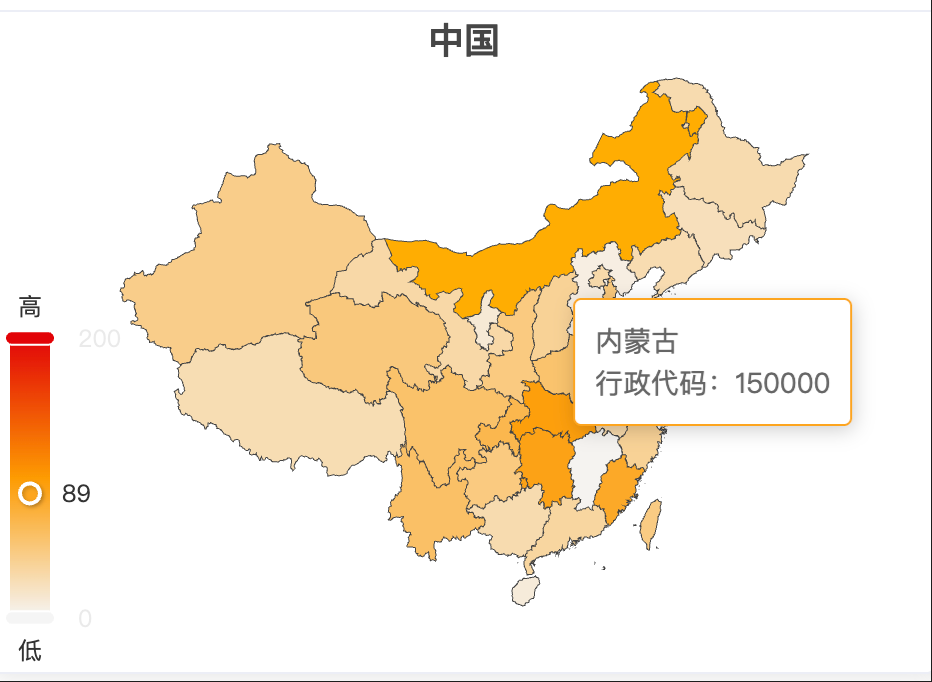
2、省市
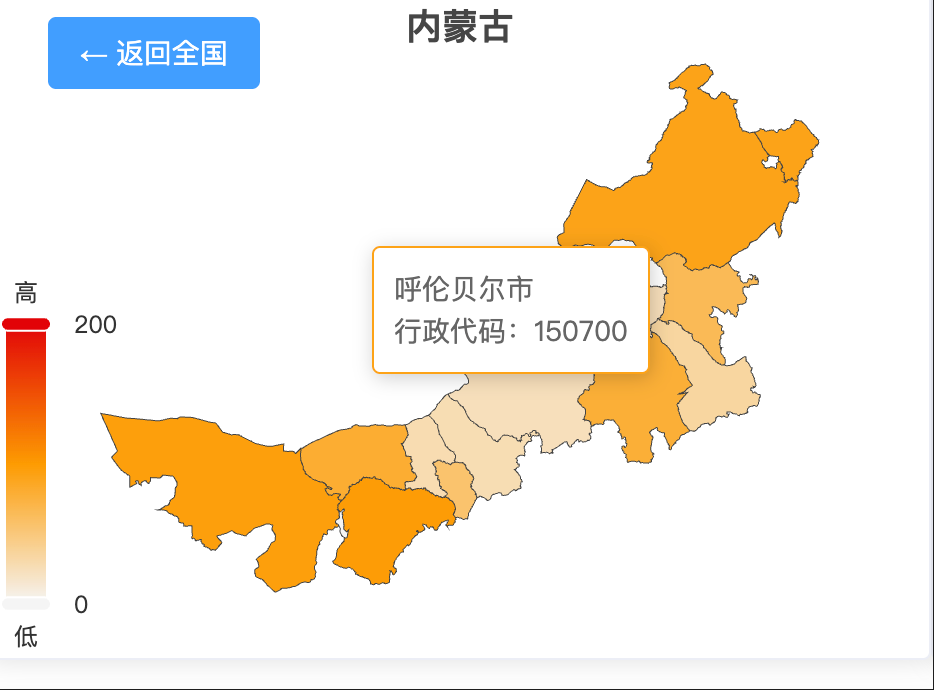
3、区县
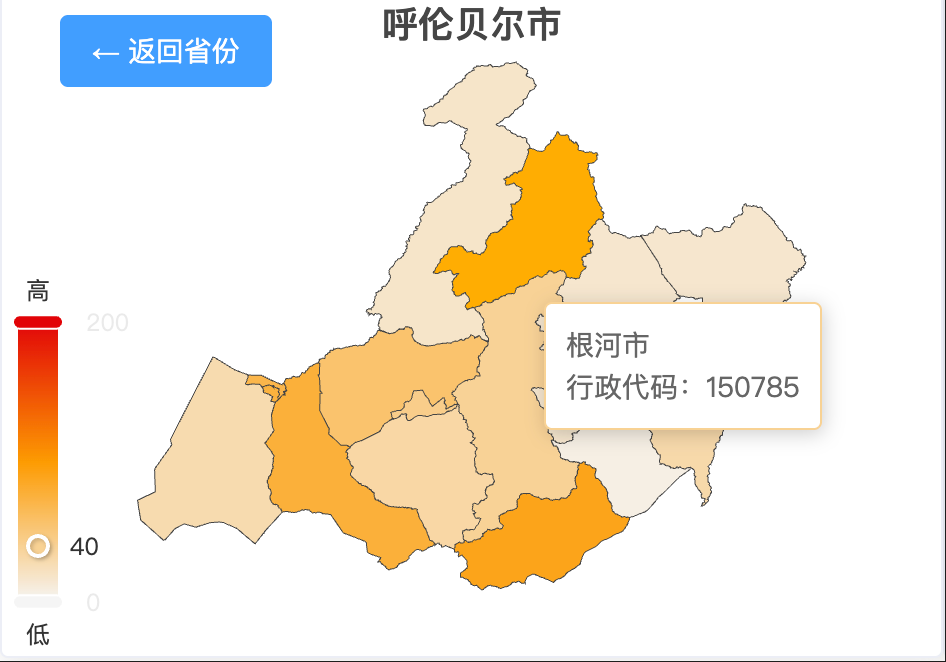
三级下钻,示例
资源存放
public/json 存放地图json文件,可以直接下载放到public/json目录下
注意
1、两处红色注释区域为测试,实际红色注册区域上下文 注释打开
2、存在public/json文件过旧,是一定存在的,如果有最新直接替换。新旧文件取值不同,直接下载地图文件,覆盖原有的json文件即可,不要改动代码
adcode: feature.id || feature.properties.adcode, // 兼容 旧文件与新文件地图 json文件
3、阿里云 地图资源下载
4、如果其它异常,需要额外处理
vue完整代码,可以直接运行,echarts 需要下载echarts5
<template>
  <div class="map-wrapper">
    <el-card>
      <div slot="header" class="clearfix">专项检直分/村行疑点业务统计-07</div>
      <!-- 返回按钮(层级>1时显示) -->
      <button v-if="level > 1" @click="goBack" class="back-btn">
        ← 返回{{ level === 2 ? "全国" : level === 3 ? "省份" : "城市" }}
      </button>
      <!-- 地图容器 -->
      <div id="map" ref="mapContainer" class="map-container"></div>

      <!-- 当前层级提示 -->
      <!-- <div class="level-tip">{{ currentLevelName }}</div> -->
    </el-card>
  </div>
</template>

<script>
// import * as echarts from "echarts";
import * as echarts from "echarts5";

export default {
  name: "EchartsMapDrill",
  data() {
    return {
      mapJson: "",
      mapInstance: null, // ECharts 实例
      level: 1, // 当前层级:1=全国(省),2=省(市),3=市(县)
      currentAdcode: "100000", // 当前区域 adcode(全国默认 100000)
      history: [
        // 层级历史(用于返回)
        { level: 1, adcode: "100000", name: "中国" },
      ],
      currentLevelName: "中国(省级地图)", // 当前层级名称
      currentHeatData: [], //当前层级的热力原点数据
      // { name: '浙江', lng: 120.1536, lat: 30.2875, value: 90, code: '330000' },
      // testData: [
      //   { name: "杭州", lng: 120.1551, lat: 30.2741, value: 80 }, // 正确GCJ-02坐标
      //   { name: "宁波", lng: 121.5497, lat: 29.8683, value: 60 },
      // ],
      heatDataMap: {
        // 全国层级热力数据(省级)
        // { name: '浙江', lng: 120.1536, lat: 30.2875, value: 90, code: '330000' },
        100000: [
          { name: "浙江", lng: 120.153576, lat: 30.287459, value: 90 },
          { name: "广东", lng: 113.264434, lat: 23.129113, value: 95 },
          { name: "江苏", lng: 118.767413, lat: 32.045897, value: 88 },
          { name: "山东", lng: 117.000923, lat: 36.675807, value: 82 },
        ],
      },
    };
  },
  mounted() {
    // 测试使用
    this.initMap()
    // 地图
    this.mapInstance = echarts.init(this.$refs.mapContainer);
    // 监听窗口 resize 实现自适应
    window.addEventListener("resize", () => this.mapInstance?.resize());
  },
  beforeDestroy() {
    // 销毁实例,避免内存泄漏
    this.mapInstance?.dispose();
    window.removeEventListener("resize", () => this.mapInstance?.resize());
  },
  methods: {
    //第1步:
    reqApi(){
      // sendReq({code:100000}).then(res=>{
        // 接口请求成功,获取当前热力信息,比如首次是全国100000,成功后存入值为:
        // this.heatDataMap[this.currentAdcode] = res.data
        this.heatDataMap[this.currentAdcode] =  [{name:'北京',code:121212,value:22}]
        // 成功后,渲染地图数据
          this.initMap()
      // })

    },
    // 初始化地图
    initMap() {
      // 加载当前层级地图和热力数据
      // this.currentHeatData = this.heatDataMap[this.currentAdcode] || [];
      this.getHotValue()

      this.loadMapData(this.currentAdcode); // 加载当前层级地图数据
    },
    // 获取热点值
    getHotValue() {
      this.currentHeatData = this.heatDataMap[this.currentAdcode] || [];
    },

    // 加载地图 JSON 数据(核心方法)
    async loadMapData(adcode) {
      try {
        // 1. 请求地图数据(public/map/目录下)
        const fileName = adcode === "100000" ? "china" : adcode;
        const res = await fetch(`/json/${fileName}.json`);

        if (!res.ok) throw new Error(`数据加载失败(状态码:${res.status})`);
        const mapJson = await res.json();

        console.log("mapJson", mapJson);
        this.mapJson = mapJson;

        // 2. 注册地图(ECharts 需先注册才能渲染)
        echarts.registerMap(adcode, mapJson);

        // 获取 热力值数据
        const apidata = this.currentHeatData
        // 3. 格式化地图数据(提取 name 和 adcode,用于点击下钻)
        // const mapData = mapJson.features.map(feature => {
        //   for(let i =0; i< apidata.length; i++){
        //     if([feature.id, feature.properties.adcode].includes(apidata[i].code)){
        //       return{
        //           name: feature.properties.name,
        //           adcode: feature.id || feature.properties.adcode, // 兼容 旧文件与新文件地图 json文件
        //           // 可选:添加自定义数据(如人口、GDP,用于后续可视化)
        //           value: apidata[i].score // 占位,可替换为实际数据
        //       }
        //     }
        //   }
        // });

        // 如果测试直接打开注释,把上边注释掉预览效果
         const mapData = mapJson.features.map((feature) => ({
          name: feature.properties.name,
          adcode: feature.id || feature.properties.adcode,
          value: Math.floor(Math.random() *100) // 占位,可替换为实际数据
        }));

        // 4. 配置地图 option
        const option = this.getMapOption(adcode, mapData, mapJson);

        // 5. 渲染地图
        this.mapInstance.setOption(option, true); // true 避免重复合并配置

        // 6. 绑定点击事件(实现下钻)
        this.bindClickEvent();
      } catch (err) {
        console.error("地图加载失败:", err.message);
        alert(`地图加载失败:${err.message}`);
      }
    },

    // 地图配置项(根据层级动态调整)
    getMapOption(adcode, mapData, mapJson) {
      // 提取当前区域名称(如“浙江省”“杭州市”)
      const areaName = this.history[this.history.length - 1].name;

      return {
        title: {
          //  title: { text: `${areaName}热力地图`, left: 'center', textStyle: { fontSize: 18 } },
          text: areaName,
          left: "center",
          textStyle: { fontSize: 18, fontWeight: 600 },
        },
        tooltip: {
          trigger: "item",
          // formatter: (params) =>
          //   `${params.name}<br/>行政代码:${params.data.adcode}`,
          formatter: (params) => {
            // 区分地图区域和热力原点的tooltip
            if (params.seriesType === "map") {
              return `${params.name}<br/>行政代码:${params.data.adcode}`;
            } else if (params.seriesType === "scatter") {
              return `${params.name}<br/>经纬度:${params.value[0].toFixed(
                2
              )}, ${params.value[1].toFixed(2)}<br/>热力值:${params.value[2]}`;
            }
          },
        },
        // geo: [
        //   {
        //     map: adcode, // 关联已注册的地图
        //     roam: true,
        //     //  data: mapData, // 格式化后的地图数据
        //     label: {
        //       show: false,
        //       fontSize: this.getLabelFontSize(),
        //     },
        //     itemStyle: { areaColor: "#ececec" },
        //     label: false,
        //   },
        // ],
        // map 系列:绑定 geo 组件,不独立渲染地图
        visualMap:{
          min:0,
          max:200,
          calculable:true,
          text:['高','低'],
          left:'left',
          top:'bottom',
          inRange:{
            color:['#f5f5f5','#fd9b02','#e20508']
          }

        },
        series: [
          {
            name: this.getSeriesName(), // 系列名称(根据层级动态变化)
            type: "map",
            mapType: adcode,
            // map: adcode, // 对应注册的地图名称(adcode)
            roam: true, // 禁止缩放平移(按需开启)
            label: {
              show: false,
              fontSize: this.getLabelFontSize(), // 按层级调整字体大小(避免重叠)
            },
            // geoIndex: 0,
            data: mapData, // 格式化后的地图数据
            itemStyle: {
              areaColor: '#f5f5f5', // 默认区域颜色
              // borderColor: '#ffffff', // 边界颜色
              // borderWidth: 1.5 // 边界宽度
            },

            emphasis: {
              // 鼠标 hover 高亮样式
              itemStyle: { areaColor: "#ffae00" },
              // itemStyle:false,
              label: false,
              // label: { color: '#fff', fontWeight: 'bold', fontSize: this.getLabelFontSize() + 1 }
            },
          },
          // {
          //   name: "热力点",
          //   type: "scatter",
          //   coordinateSystem: "geo", // 绑定地图坐标系
          //   geoIndex: 0, // 关联第1个geo系列(即map系列)
          //   // this.formatHeatData(this.currentHeatData),
          //   data: this.formatHeatData(this.currentHeatData), // 格式化热力数据
          //   symbol: "circle", // 原点形状(circle/rect/triangle等)
          //   symbolSize: (value) => {
          //     // 热力值越大,原点越大(10~30px动态调整)
          //     return 1 + (value[2] / 100) * 10;
          //   },
          //   itemStyle: {
          //     color: "#f17b1b", // 固定红色(支持十六进制、RGB、颜色名)
          //     opacity: 0.8, // 透明度(0~1,避免遮挡地图)
          //     shadowBlur: 16, // 阴影增强视觉效果
          //     shadowColor: "rgba(255, 77, 79, 0.5)",
          //   },
          //   emphasis: {
          //     symbolSize: (value) => 20 + (value[2] / 100) * 20, // hover时放大
          //     itemStyle: { opacity: 1 },
          //   },
          // },
        ],
      };
    },

    // 格式化热力数据:ECharts scatter 需传入 [lng, lat, value] 格式
    formatHeatData(heatData) {
      const formatted = heatData.map((item) => ({
        name: item.name,
        value: [item.lng, item.lat, item.value],
      }));
      console.log("格式化后的热力数据:", formatted); // 新增打印
      return formatted;
    },

    // 根据层级获取系列名称(如“省份”“城市”“区县”)
    getSeriesName() {
      switch (this.level) {
        case 1:
          return "省份";
        case 2:
          return "城市";
        case 3:
          return "区县";
        default:
          return "区域";
      }
    },

    // 根据层级调整标签字体大小(层级越深,字体越小)
    getLabelFontSize() {
      switch (this.level) {
        case 1:
          return 12; // 全国(省):字体稍大
        case 2:
          return 10; // 省(市):字体中等
        case 3:
          return 8; // 市(县):字体偏小(避免区县名称重叠)
        default:
          return 10;
      }
    },

    // 绑定地图点击事件(实现下钻)
    bindClickEvent() {
      this.mapInstance.off("click"); // 先解绑旧事件,避免重复触发

      this.mapInstance.on("click", (params) => {
        console.log("params", params);
        const { adcode, name } = params.data;
        const nextLevel = this.level + 1;

        // 限制最大层级(3级:市→县,县之后不再下钻)
        if (nextLevel > 3) {
          alert(`已到达最细层级(${name}),无更下级地图数据`);
          return;
        }

        console.log("namename", name);

       this.currentAdcode = adcode;

        // 更新状态:层级、当前 adcode、历史记录、层级名称
        this.level = nextLevel;

        this.history.push({
          level: nextLevel,
          adcode: this.currentAdcode,
          name,
        });
        this.currentLevelName = `${name}(${
          nextLevel === 2 ? "市级" : "县级"
        }地图)`;

        // 加载下一级地图数据 --测试
        this.getHotValue();
        this.loadMapData(this.currentAdcode);

        // 加载下一级地图数据 --测试


        // 正式请求
        // this.currentHeatData = this.heatDataMap[this.currentAdcode] || [];
        // if(!this.currentHeatData || !this.currentHeatData.length){
        //    this.reqApi()
        // }else{
        //   this.loadMapData(this.currentAdcode);
        // }
      });
    },

    // 返回上一级
    goBack() {
      if (this.history.length <= 1) return; // 已到全国层级,无法返回

      // 移除当前层级历史
      this.history.pop();
      // 获取上一级状态
      const prev = this.history[this.history.length - 1];
      this.level = prev.level;
      this.currentAdcode = prev.adcode;
      this.currentLevelName = `${prev.name}(${
        prev.level === 1 ? "省级" : "市级"
      }地图)`;

      this.getHotValue();
      // 加载上一级地图数据
      this.loadMapData(prev.adcode);
    },
  },
};
</script>

<style scoped>
.map-wrapper {
  position: relative;
  width: 100%;
  height: 100%;
  box-sizing: border-box;
}

.back-btn {
  position: absolute;
  top: 70px;
  left: 30px;
  padding: 8px 16px;
  background: #409eff;
  color: #fff;
  border: none;
  border-radius: 4px;
  cursor: pointer;
  z-index: 10;
  font-size: 14px;
  transition: background 0.3s;
}

.back-btn:hover {
  background: #269aff;
}

.map-container {
  width: 100%;
  height: 330px;
  /* height: 100%; */
  /* height: calc(100% - 10px); */
}

.level-tip {
  position: absolute;
  bottom: 20px;
  left: 50%;
  transform: translateX(-50%);
  font-size: 14px;
  color: #666;
  background: rgba(255, 255, 255, 0.8);
  padding: 4px 12px;
  border-radius: 16px;
}

.heat-legend {
  position: absolute;
  bottom: 20px;
  right: 20px;
  background: rgba(255, 255, 255, 0.8);
  padding: 6px 12px;
  border-radius: 4px;
  font-size: 12px;
  color: #666;
}
.legend-item {
  display: inline-block;
  width: 20px;
  height: 8px;
  margin: 0 4px;
  border-radius: 4px;
}
.legend-item.low {
  background: #e0f7fa;
}
.legend-item.mid {
  background: #4dd0e1;
}
.legend-item.high {
  background: #006064;
}
.el-card{
  /* display: flex;
  flex-direction: column; */
}

::v-deep .el-card__body {
  /* flex: 1;   */
  /* overflow: hidden;  */
  padding: 0 !important;
}

.el-card__body{
  padding: 0 !important;
}
</style>


 浙公网安备 33010602011771号