vue2 项目架构--layout(二)
项目整体框架布局Layout
目录结构
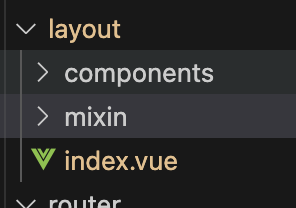
展开结构
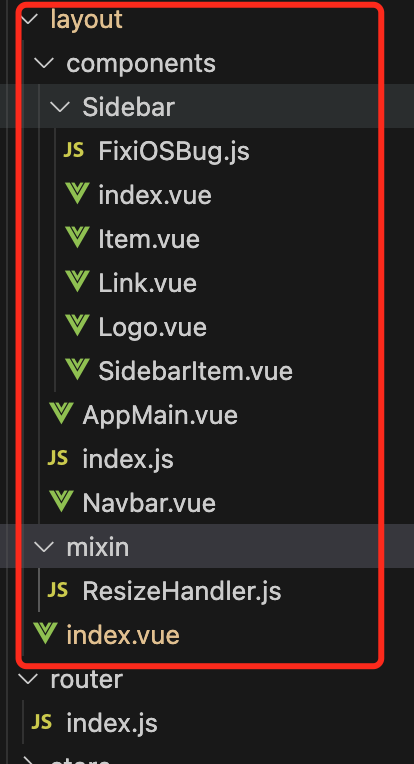
index.vue
分为两部分: 左边菜单栏 与 右边主区域
:class = "{name: true,age:false}" true 显示类名,false隐藏类名
<template>
  <div :class="classObj" class="app-wrapper">
    <div v-if="device==='mobile'&&sidebar.opened" class="drawer-bg" @click="handleClickOutside" />
    <sidebar class="sidebar-container"/>
    <div class="main-container">
      <div :class="{'fixed-header':fixedHeader}">
        <navbar />
      </div>
      <app-main />
    </div>
  </div>
</template>

<script>
import { Navbar, Sidebar, AppMain } from './components'
import ResizeMixin from './mixin/ResizeHandler'

export default {
  name: 'Layout',
  components: {
    Navbar,
    Sidebar,
    AppMain
  },
  mixins: [ResizeMixin],
  computed: {
    sidebar() {
      return this.$store.state.app.sidebar
    },
    device() {
      return this.$store.state.app.device
    },
    fixedHeader() {
      return this.$store.state.settings.fixedHeader
    },
    classObj() {
      return {
        hideSidebar: !this.sidebar.opened,
        openSidebar: this.sidebar.opened,
        withoutAnimation: this.sidebar.withoutAnimation,
        mobile: this.device === 'mobile'
      }
    }
  },
  methods: {
    handleClickOutside() {
      this.$store.dispatch('app/closeSideBar', { withoutAnimation: false })
    }
  }
}
</script>

<style lang="scss" scoped>
  @import "~@/styles/mixin.scss";
  @import "~@/styles/variables.scss";

  .app-wrapper {
    @include clearfix;
    position: relative;
    height: 100%;
    width: 100%;
    &.mobile.openSidebar{
      position: fixed;
      top: 0;
    }
  }
  .drawer-bg {
    background: #000;
    opacity: 0.3;
    width: 100%;
    top: 0;
    height: 100%;
    position: absolute;
    z-index: 999;
  }

  .fixed-header {
    position: fixed;
    top: 0;
    right: 0;
    z-index: 9;
    width: calc(100% - #{$sideBarWidth});
    transition: width 0.28s;
  }

  .hideSidebar .fixed-header {
    width: calc(100% - 54px)
  }

  .mobile .fixed-header {
    width: 100%;
  }
</style>
简单理解:
index.vue页面是入口文件,左右两部分: 左边导航,右边展示区域(分导航区域与展示区域)
router.js 路由文件 为示例
  {
    path: 'external-link',
    component: Layout,
    children: [
      {
        path: 'https://panjiachen.github.io/vue-element-admin-site/#/',
        meta: { title: 'External Link', icon: 'link' }
      }
    ]
  },
Layout 为布局,加载 layout/index.vue文件
<sidebar class="sidebar-container" style="border:1px solid red"/>
    <div class="main-container" style="border:1px solid blue">
      <div :class="{'fixed-header':fixedHeader}">
        <navbar />
      </div>
      <app-main />
 ....
整体拆分过于多,需要额外梳理,简单理解:页面布局分成不同区域,把组件组装起来渲染页面,先理解后续继续添加逻辑


 浙公网安备 33010602011771号