CSS技巧(四)radio图片&font-face&Box Shadow
https://blog.csdn.net/zxj0904010228/article/details/82859725
更改radio默认样式,使用图片代替
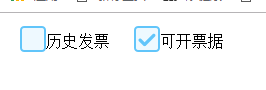
input[type="radio"]{
        appearance: none;
        -webkit-appearance: none;
      }
      input[type="radio"] + label:before{
        content: '';
        background: url(img_checkbox.png) no-repeat;
        background-size: contain;
        width: 26px;
        height: 26px;
        display: inline-block;
        position: relative;
        top: 5px;
      }

      input[type="radio"]:checked + label:before{
        background: url(img_checkbox_checked.png) no-repeat;
        background-size: contain;
        width: 26px;
        height: 26px;
      }
HTML
<input type="radio" name="tabletype" id="tabletype">
<label for="tabletype" style="border:1px solid red;">历史发票</label>


<input type="radio" name="tabletype" id="tabletype1">
<label for="tabletype1">可开票据</label>
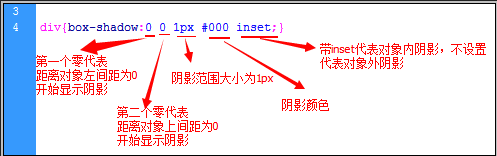
Box Shadow ,x ,y 设置为0 时 四边有模糊效果;
引入外部字体库
<style>
@font-face
{
font-family: myFirstFont;
src: url('Sansation_Light.ttf'),
     url('Sansation_Light.eot'); /* IE9+ */
}

div
{
font-family:myFirstFont;
}
</style>


 浙公网安备 33010602011771号