renrenfast-vue与node12不兼容的问题
刚开始以为是 node 或 npm 版本问题,前前后后折腾了好久,终于解决了

2|0解决:
- 如果执行过
npm install,先删除 node_modules 文件夹,不然运行的时候可能会报错 - 执行下面的命令
- 再执行
npm install即可正常下载
3|0分析:
经分析发现,某些版本下,chromedriver 的 zip 文件 url 的响应是 302 跳转,而在 install.js 里使用的是 Node.js 内置的 http 对象的 get 方法无法处理 302 跳转的情况;而在另外一些情况下,则是因为 googleapis.com 被墙了,此时即使采用****的方法也仍然无法获取文件。
=========================================
nodes-sass releases地址:https://github.com/sass/node-sass/releases
nodejs releases地址:https://nodejs.org/zh-cn/download/releases/
Node-sass is a library that provides binding for Node.js to LibSass, the C version of the popular stylesheet preprocessor, Sass.
It allows you to natively compile .scss files to css at incredible speed and automatically via a connect middleware.
Find it on npm: https://www.npmjs.com/package/node-sass
Follow @nodesass on twitter for release updates: https://twitter.com/nodesass
Install
npm install node-sass@4.9.0
Some users have reported issues installing on Ubuntu due to node being registered to another package. Follow the official NodeJS docs to install NodeJS so that #!/usr/bin/env node correctly resolves.
Compiling on Windows machines requires the node-gyp prerequisites.
Are you seeing the following error? Check out our Troubleshooting guide.**
SyntaxError: Use of const in strict mode.
Having installation troubles? Check out our Troubleshooting guide.
Install from mirror in China
npm install -g mirror-config-china --registry=http://registry.npm.taobao.org
npm install node-sass
npm install node-sass@4.9.0 --save
Usage
var sass = require('node-sass');
sass.render({
  file: scss_filename,
  [, options..]
}, function(err, result) { /*...*/ });
// OR
var result = sass.renderSync({
  data: scss_content
  [, options..]
});
Options
file
- Type:
String - Default:
null
Special: file or data must be specified
Path to a file for LibSass to compile.
data
- Type:
String - Default:
null
Special: file or data must be specified
A string to pass to LibSass to compile. It is recommended that you use includePaths in conjunction with this so that LibSass can find files when using the @import directive.
nodej版本10以上,NODE_MODULE_VERSION 6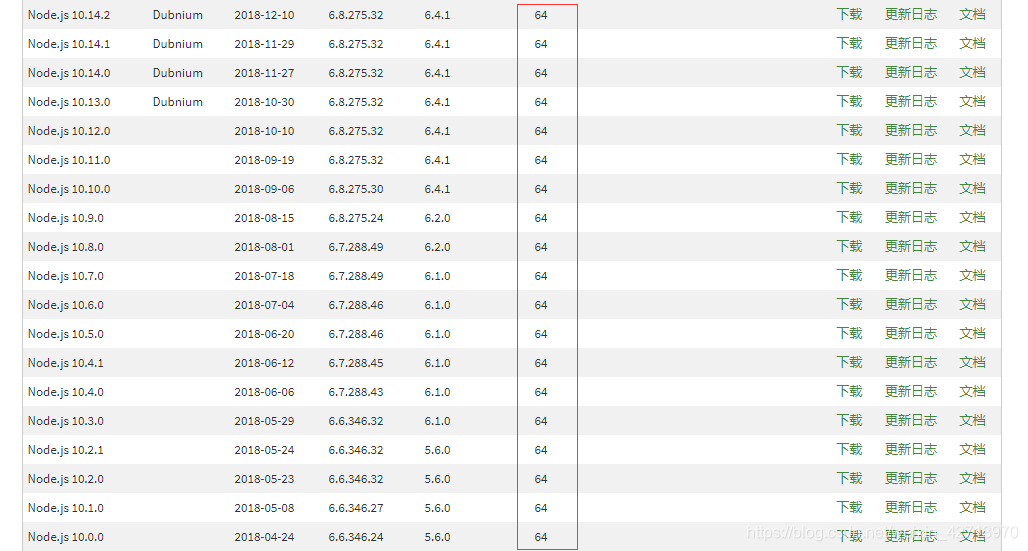
而工程下的node-sass版本为4.5.3,最高支持的版本NODE_MODULE_VERSION为57,无法支持node10版本NODE_MODULE_VERSION64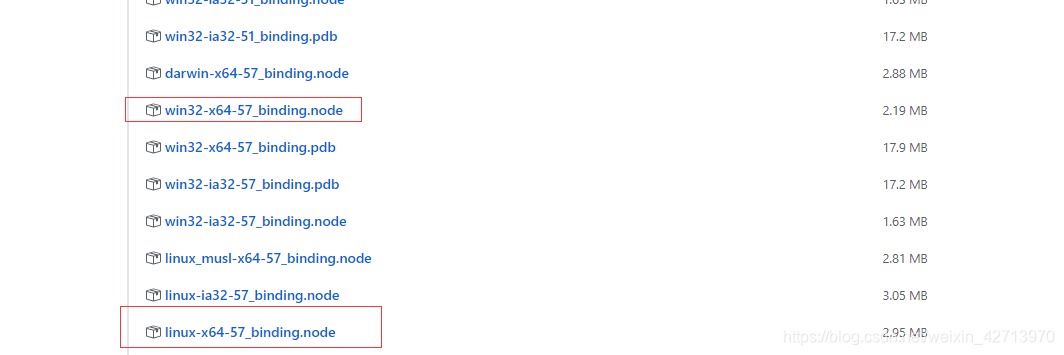
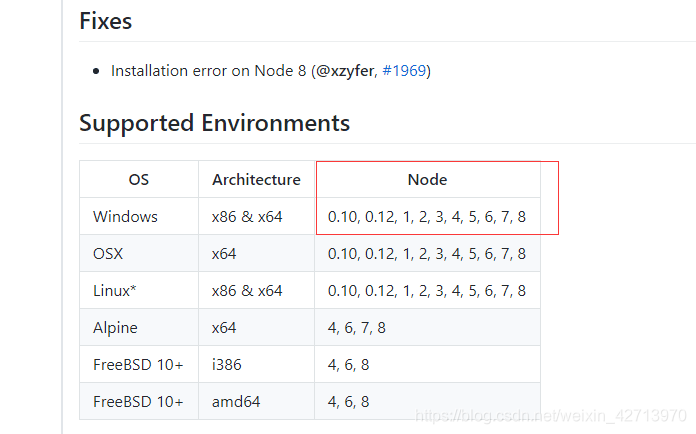
所以执行npm install 会出现类似的情况
Cannot download "https://github.com/sass/node-sass/releases/download/v4.5.3/win32-x64-64_binding.node":
HTTP error 404 Not Found
因为node-sass4.5.3 不支持node10, node10版本NODE_MODULE_VERSION 64,这文件就是不存在的,下载不下来。
处理办法:
1、修改package.json中 node-sass 版本,下载高版本node-sass,支持node10
注:node-sass 4.9.0 版本开始支持node10

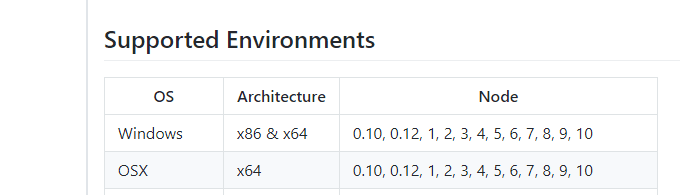
1.1 手动下载node文件,安装 npm i node-sass --sass_binary_path=/{path}/win32-x64-64_binding.node
1.2 指定版本安装:npm install node-sass@4.9.0 --save

2.下载低版本的node,node-sass4.5.3 最高支持node8

 浙公网安备 33010602011771号