
PVE8.3换源及关闭无效订阅弹窗
适用于PVE8+
手动方法
1.删除订阅弹窗
sed -Ezi.bak "s/(Ext.Msg.show\(\{\s+title: gettext\('No valid sub)/void\(\{ \/\/\1/g" /usr/share/javascript/proxmox-widget-toolkit/proxmoxlib.js && systemctl restart pveproxy.service
2.修改软件源
# 屏蔽订阅企业源
mv /etc/apt/sources.list.d/pve-enterprise.list /etc/apt/sources.list.d/pve-enterprise.list.bak
# 使用Proxmox非企业版中科大源
wget https://mirrors.ustc.edu.cn/proxmox/debian/proxmox-release-bookworm.gpg -O /etc/apt/trusted.gpg.d/proxmox-release-bookworm.gpg
echo "deb https://mirrors.ustc.edu.cn/proxmox/debian bookworm pve-no-subscription" > /etc/apt/sources.list.d/pve-no-subscription.list
# 将Debian官方源替换为中科大源
sed -i 's|^deb http://ftp.debian.org|deb https://mirrors.ustc.edu.cn|g' /etc/apt/sources.list
sed -i 's|^deb http://security.debian.org|deb https://mirrors.ustc.edu.cn/debian-security|g' /etc/apt/sources.list
# 替换Ceph源
echo "deb https://mirrors.ustc.edu.cn/proxmox/debian/ceph-quincy bookworm no-subscription" > /etc/apt/sources.list.d/ceph.list
# 替换CT镜像下载源(重启PVE才能生效)
sed -i 's|http://download.proxmox.com|https://mirrors.ustc.edu.cn/proxmox|g' /usr/share/perl5/PVE/APLInfo.pm
3.软件及系统更新
#更新源列表
apt update
#升级软件包
apt upgrade
#升级系统
apt dist-upgrade
#安装OVS
apt install openvswitch-switch
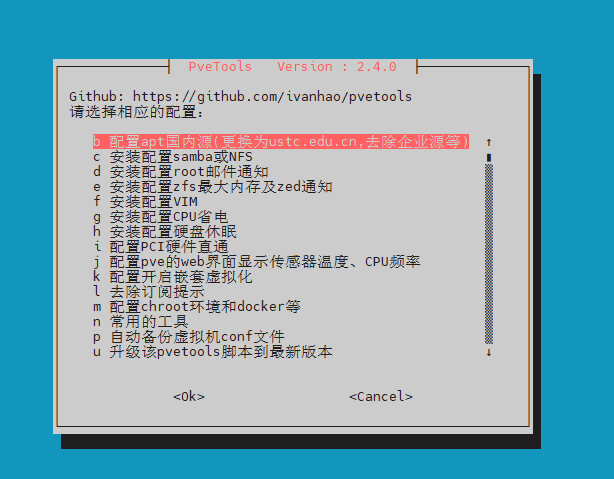
脚本方法
使用方法:
-
上传到PVE主机中相应的目录
-
cd /root/你上传的目录
-
chmod 777 pvetools.sh
-
bash pvetools.sh
脚本效果
刘飞博客:http://www.cnblogs.com/colinliu/
博客版权:本文以学习、记录、分享为目的。欢迎大家转载,但务必注明原文地址,谢谢合作!
博客版权:本文以学习、记录、分享为目的。欢迎大家转载,但务必注明原文地址,谢谢合作!

 浙公网安备 33010602011771号