
spring-IOC
1 spring优点
• spring是一个开源的免费的框架
•spring是一个轻量级的,非入侵式的框架
•控制反转(IOC),面向切面编程(AOP)
•支持事务的处理,对框架整合的支持
2.1 IOC
在之前的业务中,用户的需求可能会影响我们原来的代码,我们需要去修改原来的代码!代码量如果十分大,修改一次的成本就十分昂贵!

以往的程序是主动创建对象!控制权在程序员手中!
使用set注入后,程序不再具有主动性,而是变成了被动接受的对象!
这种思想,从本质上解决了问题,程序员不用再去管理对象的创建了。系统的耦合性大大降低,可以更加专注在业务的实现上!这就是IOC的原型!
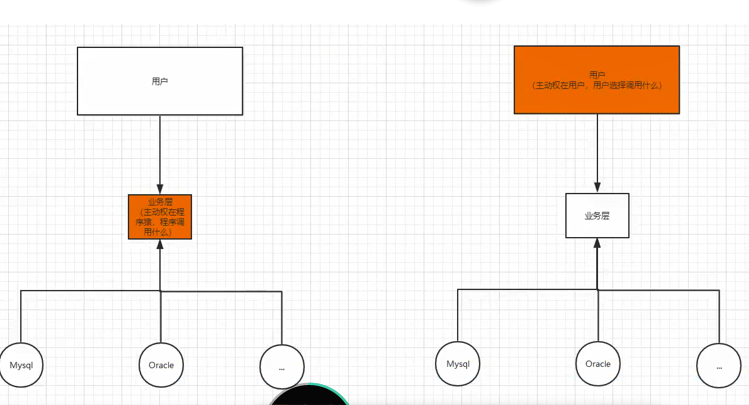
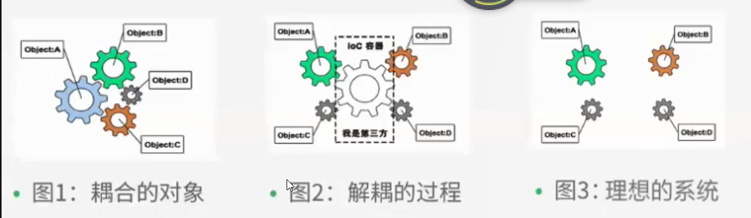
IOC本质:控制反转IOC,是一种设计思想,DI(依赖注入)是实现IOC的一种方法,也有人认为DI只是Ioc的另一种说法。没有IOC的程序中,我们使用面向对象编程,对象的创建和对象之间的依赖关系完全编码在程序中,对象的创建由程序自己控制,控制反转后将对象的创建转交给第三方。
2.1XML方式注入bean
xml配置--spring官网 ApplicationContext.xml 文件--也可命名为其他名称
 1 <?xml version="1.0" encoding="UTF-8"?>
 2 <beans xmlns="http://www.springframework.org/schema/beans"
 3     xmlns:xsi="http://www.w3.org/2001/XMLSchema-instance"
 4     xsi:schemaLocation="http://www.springframework.org/schema/beans
 5         https://www.springframework.org/schema/beans/spring-beans.xsd">
 6
 7     <bean id="..." class="...">
 8         <!-- collaborators and configuration for this bean go here -->
 9     </bean>
10
11     <bean id="..." class="...">
12         <!-- collaborators and configuration for this bean go here -->
13     </bean>
14
15     <!-- more bean definitions go here -->
16
17 </beans>
实体类:
public class Hello {
    private  String str;

    public String getStr() {
        return str;
    }

    public void setStr(String str) {
        this.str = str;
    }

    @Override
    public String toString() {
        return "Hello{" +
                "str='" + str + '\'' +
                '}';
    }
}
使用spring来创建对象,在spring中都成为bean
<bean id="hello" class="com.lilang.Hello" >
    <property name="str" value="Spring"></property>
</bean>
此时必须要有set方法,没有会报错
测试:
    public static void main(String[] args) {
        //获取spring上下文对象
          ApplicationContext context = new ClassPathXmlApplicationContext("beans.xml");
          //对象都在spring中管理了,我们要使用直接去里面取出来
        Hello hello = (Hello) context.getBean("hello");

        System.out.println(hello.toString());

    }
控制:谁来控制对象的创建,传统应用程序的对象由程序本身控制创建,使用spring后,对象是spring容器创建的。
反转:程序本身不创建对象,而变成被动的接受对象。
依赖注入:就是利用set方法进行注入的。
IOC是一种编程思想,由主动的编程变成被动的接受。
2.2 有参构造器注入
真实类:
public class User {
        private  String name;
        public  User(String name){
      this.name=name;
        }

        public String getName() {
            return name;
        }

        public void setName(String name) {
            this.name = name;
        }
        public void show(){
            System.out.println("name="+name);
        }
}
applicatonContext.xml 文件
 <!-- 无参构造-->
<bean id="user" class="com.lilang.User">
        <property name="name" value="李浪"></property>
    </bean>
<!-- 有参构造-->
   <!-- 下标赋值-->
    <bean id="user" class="com.lilang.User">
        <constructor-arg index="0" value="lilang"></constructor-arg>
    </bean>
index代表第一个构造器参数,以此类推。
 <!-- 类型赋值:不建议  相同类型不行-->
    <bean id="user" class="com.lilang.User">
        <constructor-arg type="java.lang.String" value="lilang"></constructor-arg>

    </bean>
 <!-- 第三种 直接用参数名-->
 <bean id="user" class="com.lilang.User">
     <constructor-arg name="name" value="lilang"></constructor-arg>
  </bean>
Spring 容器 只要注册 就会创建实体 ,被实例化 都是同一个对象,内存中只有一个实例(可修改传播参数)
2.3 import
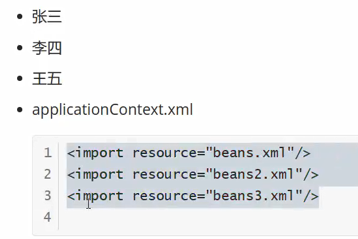
import,一般用于团队开发中使用,它可以将多个配置文件,导入合并为一个。
假设,现在有一个项目有多个人开发,这三个人负责不同的类开发,不同的类需要注册不同的bean中,我们可以用import将所有人的applicationContext合并为一个总的!
2.4 其他类型属性注入
实体类:
User:
public class User {
    private String name;
    private  String age;

    public User() {

    }

    public User(String name, String age) {
        this.name = name;
        this.age = age;
    }

    public String getName() {
        return name;
    }

    public void setName(String name) {
        this.name = name;
    }

    public String getAge() {
        return age;
    }

    public void setAge(String age) {
        this.age = age;
    }

    @Override
    public String toString() {
        return "User{" +
                "name='" + name + '\'' +
                ", age='" + age + '\'' +
                '}';
    }
使用C或P命名空间进行注入时需要导入
       xmlns:p="http://www.springframework.org/schema/p"
       xmlns:c="http://www.springframework.org/schema/c"
<?xml version="1.0" encoding="UTF-8"?>
<beans xmlns="http://www.springframework.org/schema/beans"
       xmlns:xsi="http://www.w3.org/2001/XMLSchema-instance"
       xmlns:p="http://www.springframework.org/schema/p"
       xmlns:c="http://www.springframework.org/schema/c"
       xsi:schemaLocation="http://www.springframework.org/schema/beans
        https://www.springframework.org/schema/beans/spring-beans.xsd">
<!-- p命名空间注入 可以直接注入属性-->
<bean id="user" class="com.lilang.User" p:name="lilang" p:age="18"></bean>

<!-- c命名空间 构造器注入-->
<bean id="user2" class="com.lilang.User" c:age="18" c:name="ad"></bean>

</beans>
Student
public class Student {
    private String name;
    private Address address;
    private String[] books;
    private List<String> hobbys;

    public String[] getBooks() {
        return books;
    }

    public void setBooks(String[] books) {
        this.books = books;
    }

    public void setHobbys(List<String> hobbys) {
        this.hobbys = hobbys;
    }

    private Map<String ,String > card;
    private Set<String> games;
    private  String wife;
    private Properties info;

    public String getName() {
        return name;
    }

    public void setName(String name) {
        this.name = name;
    }

    public Address getAddress() {
        return address;
    }

    public void setAddress(Address address) {
        this.address = address;
    }

    public Map<String, String> getCard() {
        return card;
    }

    public void setCard(Map<String, String> card) {
        this.card = card;
    }

    public Set<String> getGames() {
        return games;
    }

    public void setGames(Set<String> games) {
        this.games = games;
    }

    public String getWife() {
        return wife;
    }

    public void setWife(String wife) {
        this.wife = wife;
    }

    public Properties getInfo() {
        return info;
    }

    public void setInfo(Properties info) {
        this.info = info;
    }

    @Override
    public String toString() {
        return "Student{" +
                "name='" + name + '\'' +
                ", address=" + address +
                ", books=" + Arrays.toString(books) +
                ", hobbys=" + hobbys +
                ", card=" + card +
                ", games=" + games +
                ", wife='" + wife + '\'' +
                ", info=" + info +
                '}';
    }
    <bean id="student" class="com.lilang.Student">
        <property name="name" value="lilang"></property>
        <property name="address" ref="address"></property>
       <!-- 数组注入-->
        <property name="books">
            <array>
                <value>老人与海</value>
                <value>水浒传</value>
            </array>
        </property>
        <!-- list注入-->
      <property name="hobbys">
          <list>
              <value>听歌</value>
              <value>看电影</value>
          </list>
      </property>
        <!-- set集合注入-->
        <property name="games">
            <set>
                <value>魂斗罗</value>
                <value>lol</value>
            </set>
        </property>

        <!-- map-->
      <property name="card">
          <map>
              <entry key="身份证" value="123456"></entry>
              <entry key="姓名" value="lilang"></entry>
          </map>
      </property>
        <!-- null 值-->
        <property name="wife" >
            <null></null>
        </property>
        <!-- properties 注入-->
        <property name="info">
            <props>
                <prop key="学号" >1740840231</prop>
                <prop key="性别">男</prop>
            </props>
        </property>
    </bean>
Address
public class Address {
    private String Address;

    public String getAddress() {
        return Address;
    }

    public void setAddress(String address) {
        Address = address;
    }

    @Override
    public String toString() {
        return "Address{" +
                "Address='" + Address + '\'' +
                '}';
    }
    <bean id="address" class="com.lilang.Address">
        <property name="address" value="乌鲁木齐"></property>
    </bean>
测试:
  public static void main(String[] args) {
     ApplicationContext context = new ClassPathXmlApplicationContext("ApplicationContext.xml");
        Student student = (Student)context.getBean("student");
        System.out.println(student);
       // Address address = (Address)context.getBean("address");
       // System.out.println(address);
    }

    @Test
    public void user(){
       ApplicationContext context = new ClassPathXmlApplicationContext("userBeans.xml");
        User user = context.getBean("user2", User.class);
        System.out.println(user.toString());
    }
3 bean作用域
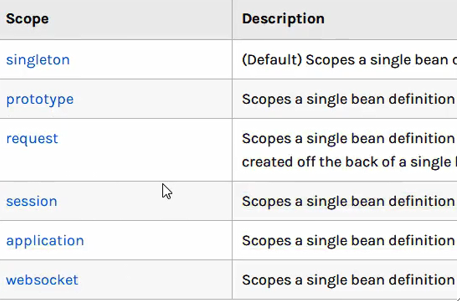
singleton:单例模式,spring默认
prototype:原型模式,每次从容器中 get的时候,都会产生一个新的对象
其余的request,session,application 这些只能在web开发中使用到。
3 注解方式注入bean
3.1 注解
1.导入约束:context约束
2.配置注解的支持:
<beans xmlns="http://www.springframework.org/schema/beans"
       xmlns:xsi="http://www.w3.org/2001/XMLSchema-instance"
       xmlns:context="http://www.springframework.org/schema/context"
       xsi:schemaLocation="http://www.springframework.org/schema/beans
        https://www.springframework.org/schema/beans/spring-beans.xsd
        http://www.springframework.org/schema/context
        https://www.springframework.org/schema/context/spring-context.xsd">
    <!-- 注解支持-->
    <context:annotation-config></context:annotation-config>
    <!-- 指定要扫描的包 ,包下的注解会生效-->
    <context:component-scan base-package="com.lilang"></context:component-scan>

</beans>
dao层:使用@Repository 注释
@Repository
public class UserDao {
}
domain层: @Component 组件
@Component //相当于bean
public class User {
    @Value("lilang")
    public String name;
}
service层: @Service
@Service
public class UserService {

}
测试:
    public static void main(String[] args) {
        ApplicationContext context = new ClassPathXmlApplicationContext("beans.xml");
        User user = context.getBean("user", User.class);
        System.out.println(user.name);

    }
3.2 @Autowied
@Autowied:自动注入,通常配合@Qualifier注释一起用 (需要导入注释依赖)
@Qualifier:指定bean的id
     import org.springframework.beans.factory.annotation.Autowired;
     import org.springframework.beans.factory.annotation.Qualifier;
     import javax.annotation.Resource;
cat:
public class Cat {
    public void shoot(){
        System.out.println("喵");
    }

}
Dog:
public class Dog {
    public void shoot(){
        System.out.println("汪");
    }
}
People:人可以养猫养狗
    @Autowired
    @Qualifier(value = "cat1")   注入name为cat1的bean
    byname: 需要保证bean的id的唯一性,并且这个bean需要和注入的属性的set方法的值一致!
    byType: 需要保证bean的class的唯一性,并且这个bean需要和自动注入的属性的类型一致!
public class People {
    @Autowired
    @Qualifier(value = "cat1")
    private Cat cat;

    @Resource
    private Dog dog;
    private String name;

    public Cat getCat() {
        return cat;
    }

    public void setCat(Cat cat) {
        this.cat = cat;
    }

    public Dog getDog() {
        return dog;
    }

    public void setDog(Dog dog) {
        this.dog = dog;
    }

    public String getName() {
        return name;
    }

    public void setName(String name) {
        this.name = name;
    }

    @Override
    public String toString() {
        return "People{" +
                "cat=" + cat +
                ", dog=" + dog +
                ", name='" + name + '\'' +
                '}';
    }
注入:
<beans xmlns="http://www.springframework.org/schema/beans"
       xmlns:xsi="http://www.w3.org/2001/XMLSchema-instance"
       xmlns:context="http://www.springframework.org/schema/context"
      xsi:schemaLocation="http://www.springframework.org/schema/beans
        https://www.springframework.org/schema/beans/spring-beans.xsd
        http://www.springframework.org/schema/context
        https://www.springframework.org/schema/context/spring-context.xsd">
    <!-- 注解支持-->
<context:annotation-config></context:annotation-config>


    <bean id="cat1" class="com.lilang.Cat"></bean>
    <bean id="dog" class="com.lilang.Dog"></bean>
    <!-- byname 自动在容器上下文查找,和自己对象set对应的bean-->
   <bean id="people" class="com.lilang.People"></bean>

</beans>
@Resource和@Autowired区别
• 都是用来自动装配的,都可以放在属性字段上
• @Autowired 通过byType的方式实现,而且必须要求这个对象存在!(常用)
• @Resource 默认通过byName的方式实现,如果找不到名字,则通过byType实现!如果两个都找不到就会报错。
• 执行顺序不同:@Autowired通过byType的方式实现
3.3 完全采用注释,不需要xml
1:在spring4之后,要使用注解开发,必须保证aop的包导入
2:使用注解需要导入context约束,增加注释的支持

配置类:等价于applicationContext.xml
import org.springframework.context.annotation.Bean;
import org.springframework.context.annotation.ComponentScan;
import org.springframework.context.annotation.Configuration;
import org.springframework.context.annotation.Import;

//这个也会被spring容器托管,注册到容器中,因为他本身就是一个@Component
//@Configuration代表一个配置类,就和我们之前的beans.xml一样
@Configuration
@ComponentScan("com.lilang")
@Import(Config2.class)  //合并beans
@Scope("singleton")     //单例模式 默认
public class Config {

    @Bean
    public User getUser(){
        return new User();
    }


}
@Bean: z注册一个bean,相当于我们之前写的一个bean标签,这个方法名就相当于标签中的id属性
返回值就相当于bean标签中的class属性
@Component有几个衍生注释,在web开发中,会按照mvc三层架构分成!
• dao @Repository
• service @Service
• controller @Controller
这四个注解功能都是一样的,都是代表某个类注册到spring中,装配Bean
测试:
    public static void main(String[] args) {
      //注解配置 获取类是AnnotationConfigApplicationContext
        ApplicationContext annotationConfigApplicationContext = new AnnotationConfigApplicationContext(Config.class);
        User getUser = annotationConfigApplicationContext.getBean("getUser", User.class);
        System.out.println(getUser.toString());
    }
使用注解配置时获取类是AnnotationConfigApplicationContext,不再是ClassPathXmlApplicationContext.
4 小结
xml与注释:
• xml更加万能,适用于任何场合!维护简单。
• 注解不是自己类使用不了,维护相对复杂!
xml与注释的最佳实践:
• xml用来管理bean
• 之间只负责完成属性的注入
• 我们在使用过程中,只需要注意一个问题:必须让注解生效,就需要开启注解的支持。


 浙公网安备 33010602011771号