

Go Lang给应用添加带彩色的启动横幅
1.命令行安装相关依赖包:
- go get github.com/dimiro1/banner
- go get github.com/mattn/go-colorable
banner.go代码:
package main

import (
	"fmt"
	"github.com/dimiro1/banner"
	"github.com/mattn/go-colorable"
)

func init() {
	isEnabled := true
	isColorEnabled := true
	templ := `{{ .Title "Banner" "" 4 }}
   {{ .AnsiColor.BrightCyan }}The title will be ascii and indented 4 spaces{{ .AnsiColor.Default }}
   GoVersion: {{ .GoVersion }}
   GOOS: {{ .GOOS }}
   GOARCH: {{ .GOARCH }}
   NumCPU: {{ .NumCPU }}
   GOPATH: {{ .GOPATH }}
   GOROOT: {{ .GOROOT }}
   Compiler: {{ .Compiler }}
   ENV: {{ .Env "GOPATH" }}
   Now: {{ .Now "Monday, 2 Jan 2006" }}
   {{ .AnsiColor.BrightGreen }}This text will appear in Green
   {{ .AnsiColor.BrightRed }}This text will appear in Red{{ .AnsiColor.Default }}`
	banner.InitString(colorable.NewColorableStdout(), isEnabled, isColorEnabled, templ)
	fmt.Println("\nGo应用添加带彩色的启动横幅")
}

func main() {
	fmt.Println("Hi World!")
}
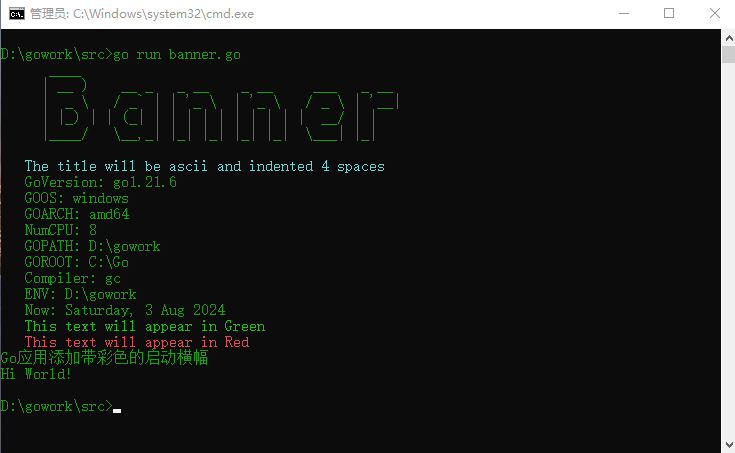
2.运行banner.go源码文件

 浙公网安备 33010602011771号