
Vuejs学习笔记--CLI2笔记
1. 安装
1.1 命令
npm install -g @vue/cli@3.2.1
1.2 拉取2.X模板
npm install -g @vue/cli-init@3.2.0
1.3 脚手架2创建项目的指令
vue init webpack my-project
补充:脚手架3创建项目的指令
vue create my-project
2. vuecli-cli2构建项目
2.1 命令
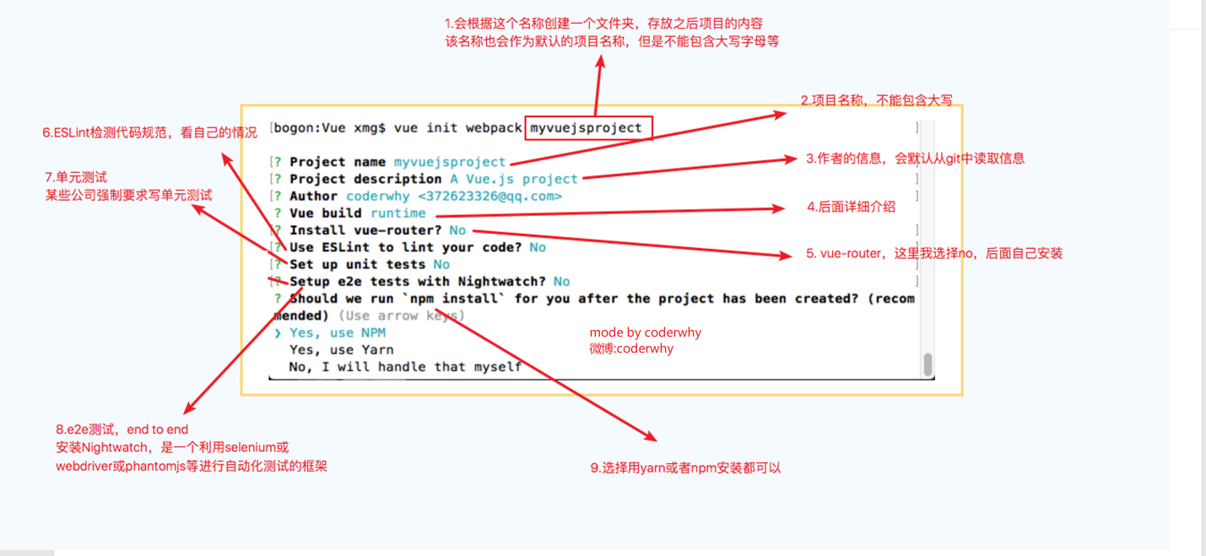
vue init webpack 项目名字
2.2 配置项(package.json)
Project name:项目名称
Project description:项目描述
Author:作者(因为.gitconfig当中配置了信息,所以会有默认信息,可以在C盘找到gitconfig文件进行修改)
Vue build:
- runtime-compiler:推荐使用
- runtime-only:实际开发使用
Install vue-router?(Y/N):是否安装vue-router,一般大型项目要使用vue全家桶(vue-core,vue-router,vuex),这里学习先不安装了
Use ESLint to lint your code(Y/N):是否使用ESlint限制代码规范
- Standard:ESlint的标准规范
- Airbnb:Airbnb规范
Set up unit tests(Y/N):是否设置单元测试,国内很少
Setup e2e tests with Nightwatch?(Y/n):是否选择e2e测试。就是endpoint to endpoint,端到端测试
Should we run npm install for you after the project has been created(recommended)(use arrow keys):选择包管理工具
- npm
- yarn
3. 项目目录结构解析
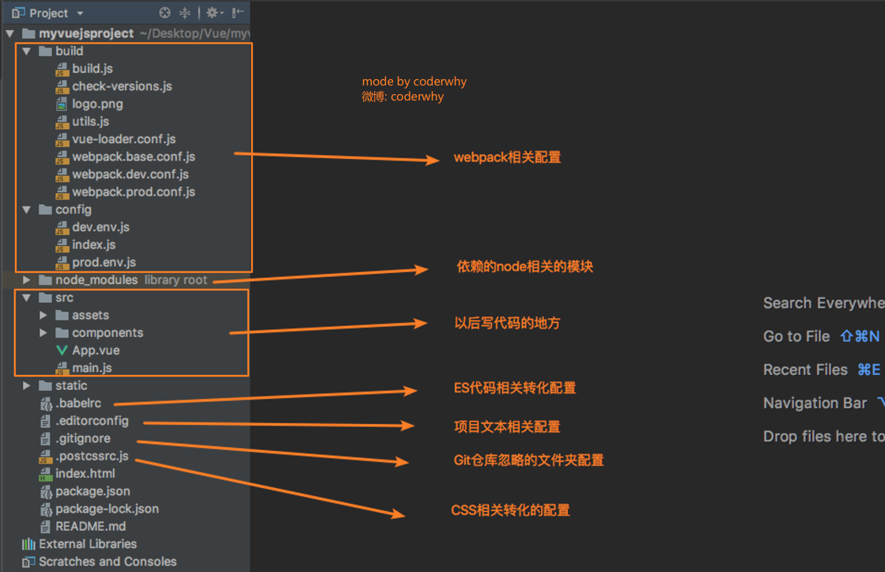
详情可参考:
https://blog.csdn.net/weixin_41748874/article/details/120404009
4. Vue-CLI2运行项目
- 开发:npm run dev
- 打包:npm run build
5. 常见问题处理
5.1 项目初始化选择了ESlint,后续不想使用,如何调整?
项目根目录-->config文件夹-->index.js-->useESlint:false

 浙公网安备 33010602011771号