
uniCloud
1、关系型数据库于nosql数据库的关系
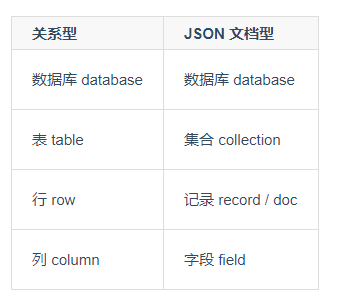
2、基本使用
//创建数据库
const db = uniCloud.database();
//创建集合 , 如果集合存在会报错
db.createCollection(collectionName)
//操作集合(表),获取集合的引用
db.collection(collectionName).doc(docId)
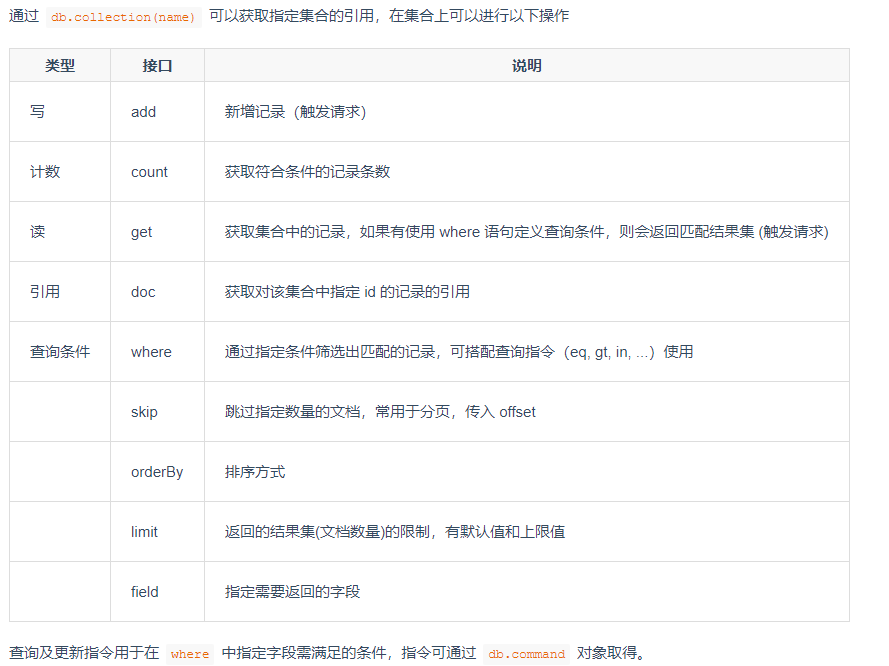
3、操作Collection
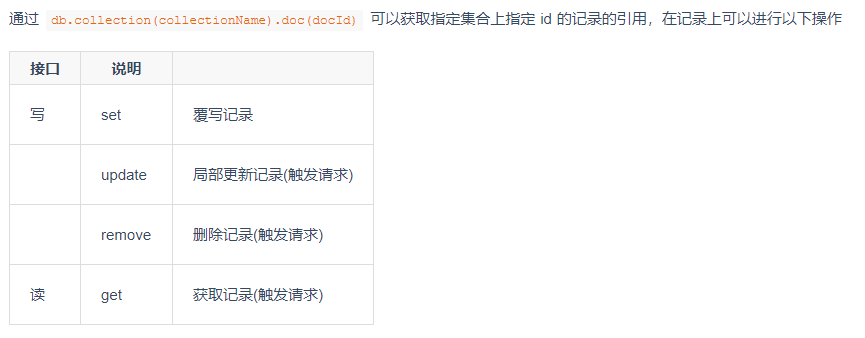
4、操作Record/Document
5、查询筛选(db.command)
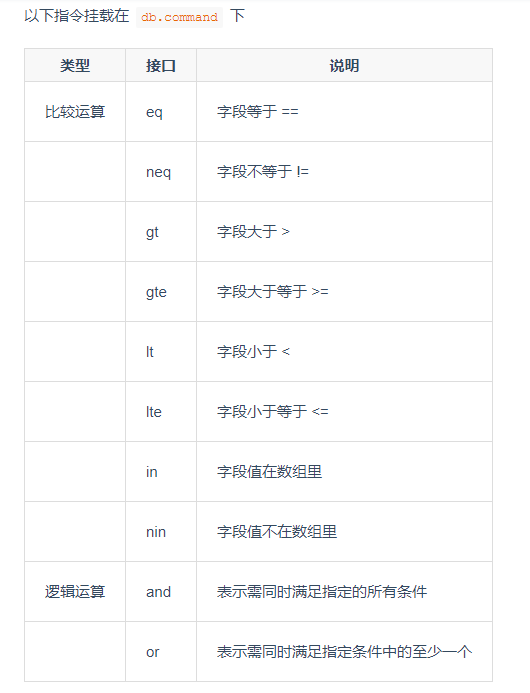
在where查询中 eq()和:都是等于的意思 ,二者区别在于 eq查询到的引用数据 是全等的 必须一模一样的,而:包含就好了
in和nin表示包含与不包含关系,里边传需要查询的数组。cmd.in(<Array>)
and表示且,cmd.and( cmd指令 ),一般用于单个字段中,前置语法更加方便cmd.and(语法一,语法二)
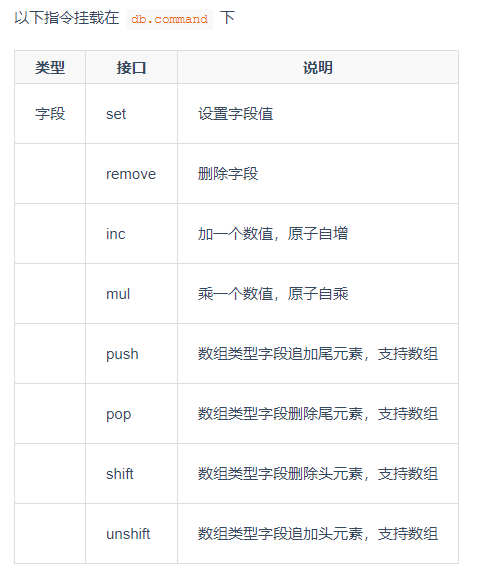
6、更新字段(db.command)
7、数据类型
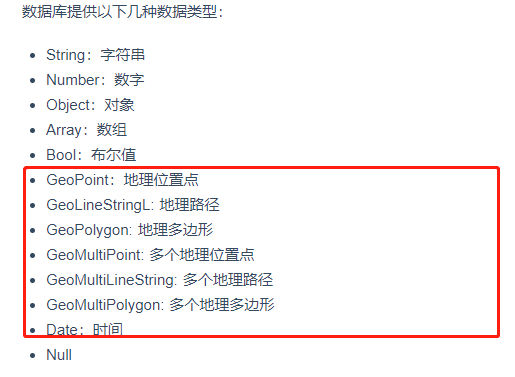
注:Date表示客户端时间,Null表示占位符,有字段当时值为空
服务端时间使用 new db.serverDate()获取
日期比较需要先进行聚合操作进行日期转换
'use strict';
const db = uniCloud.database()
exports.main = async (event, context) => {
    const dbCmd = db.command
    const $ = dbCmd.aggregate
    let res = await db.collection('unicloud-test').where(dbCmd.expr(
        $.gte(['$time',$.dateFromString({
            dateString: new Date('2020-02-02').toISOString()
        })])
    )).get()
    return res
};
集合新增
  //新增单条
  let res = await user.add({
        name:'Ben'
    })
  //新增多条
    let ress = await user.add([
        {name:'jack'},
        {name:'rose'},
        {name:'cc',like:'pp'}
    ])
集合查询
支持 where()、limit()、skip()、orderBy()、get()、field()、count() 等
let user = db.collection('user')
// 高级查询指令
const cmd = db.command
// 查询限制
let res =await user.limit(5).get()
// 查询数量
let res1 = await user.where({name:'lisi'}).count(2)
// where正则
let res2 = await user.where({name:/^l/}).get()
// 高级查询
let res3 = await user.where({
age:cmd.gt(18)
}).get()
// 高级查询于过滤,排序,限制数量,指定字段
let res4 = await user
.where({age:cmd.exists(true)})
.where({age:cmd.gt(18)})
.orderBy('age','asc')
.limit(2)
.field({'name':true,'_id':true})
.get()
let res5 = await user.where({age:cmd.gt(25)}).get()
let res6 = await user.where({age:cmd.gte(25)}).count()
let res7 = await user.where({age:cmd.lte(5)}).field({name:true}).get()
let res8 = await user.where({age:cmd.nin([25,40,5]).and(cmd.gte(18))}).get()
let res9 = await user.where({

age:cmd.and(cmd.lt(40),cmd.gt(18)).or(cmd.eq(5))

}).get()
get():默认取前100条,最大取前100条,get()是查询必备的条件
where():做筛选,字段可以使用正则匹配
count():查询到的数量,需要跟where一起用,不需要加get
limit():查询多少条
orderBy():结果排序,asc表升序,desc表降序;用点表示法进行连接嵌套
field():查询需要的字段
集合删除
集合删除就是先找到集合的引用 然后再调用remove方法
通过id删除:collection.doc(_id).remove()
通过条件删除:collection.where().remove()
    let user = db.collection('user')
    // 高级查询指令
    const cmd = db.command
    // docId删除
    let res  =await user.doc('5f9a73ed266d14000151d653').remove()
    // 条件删除
    let res1 = await user.where({
        age:cmd.or(cmd.eq(40),cmd.eq(5))
    }).remove()

 浙公网安备 33010602011771号