Maven的配置
简介
Maven 是一个项目管理工具,可以对 Java 项目进行构建、依赖管理。
Maven官网地址:http://maven.apache.org
Maven的配置
一.配置环境变量
1.首先必须配置好java的环境变量
2.MAVEN_HOME:maven整个项目所在的文件夹
3.PATH:maven所在文件夹的bin文件夹
二.设置本地仓库以及远程仓库
1.找到maven目录/conf/settings.xml
2.找到profiles标签
3.在其中加入自己想要的远程仓库。例
    <profile>
      <id>ali</id>
      <repositories>
        <repository>
          <id>alimaven</id>
          <name>aliyun maven</name>
          <url>http://maven.aliyun.com/nexus/content/groups/public/</url>
          <releases>
            <enabled>true</enabled>
          </releases>
          <snapshots>
            <enabled>true</enabled>
          </snapshots>
        </repository>
      </repositories>
      <pluginRepositories>
        <pluginRepository>
          <id>alimaven</id>
          <name>aliyun maven</name>
          <url>http://maven.aliyun.com/nexus/content/groups/public/</url>
        </pluginRepository>
      </pluginRepositories>
    </profile>
4.修改本地仓库位置
<localRepository>仓库路径</localRepository>
idea中创建maven项目
在创建新项目中选择需要的maven项目类型,这里选择的是webapp

在指定项目名和储存地址之后,进入如下界面
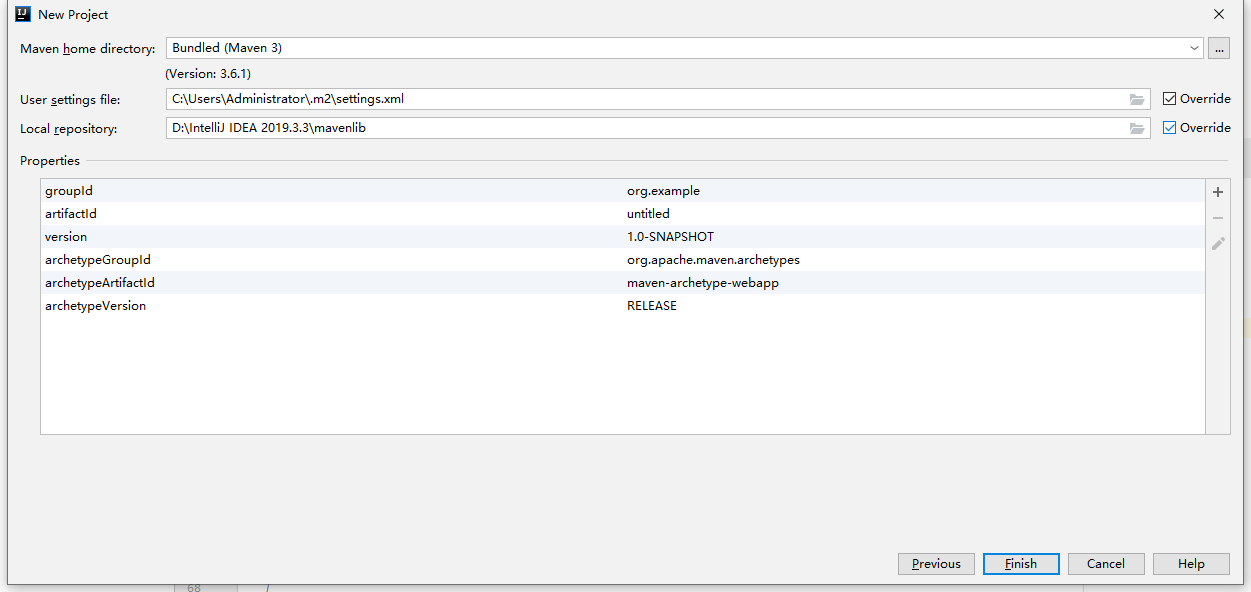
三个选项分别是
1.您所要使用的maven工具
2.maven配置文件setting.xml文件所在的位置
3.本地仓库所在位置
由于创建项目时,默认的setting.xml的指向位置为C:\Users\xxx\.m2
所以我们可以将自己所用的setting.xml放在本文件夹下。就不用每次都要重新选择路径了。

 浙公网安备 33010602011771号