mybatis接口代理方式实现dao、动态SQL操作、多表操作
Mapper 接口开发方法只需要程序员编写Mapper 接口(相当于Dao 接口),由Mybatis 框架根据接口定义创建接口的动态代理对象,代理对象的方法体同上边Dao接口实现类方法。
Mapper 接口开发需要遵循以下规范;
2) Mapper接口方法名和Mapper.xml中定义的每个statement的id相同
3) Mapper接口方法的输入参数类型和mapper.xml中定义的每个sql的parameterType的类型相同
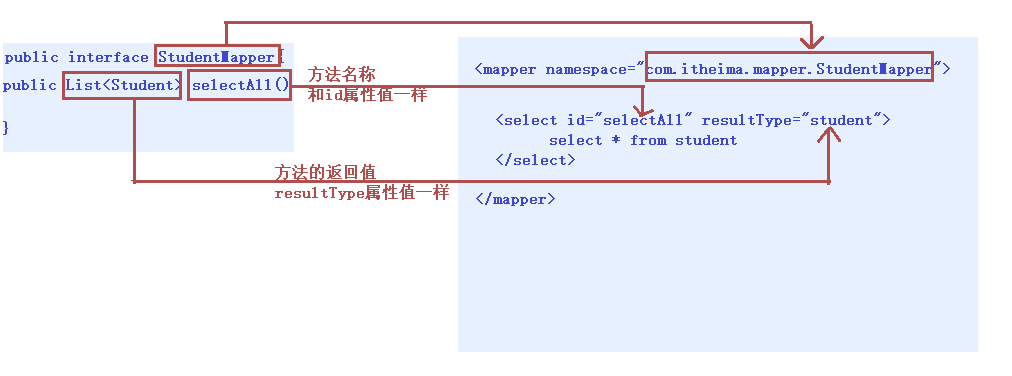
测试代码:
public Student selectById(Integer id) {
        Student stu = null;
        SqlSession sqlSession = null;
        InputStream is = null;
        try{
            //1.加载核心配置文件
            is = Resources.getResourceAsStream("MyBatisConfig.xml");

            //2.获取SqlSession工厂对象
            SqlSessionFactory sqlSessionFactory = new SqlSessionFactoryBuilder().build(is);

            //3.通过工厂对象获取SqlSession对象
            sqlSession = sqlSessionFactory.openSession(true);

            //4.获取StudentMapper接口的实现类对象
            StudentMapper mapper = sqlSession.getMapper(StudentMapper.class); // StudentMapper mapper = new StudentMapperImpl();

            //5.通过实现类对象调用方法,接收结果
            stu = mapper.selectById(id);

        } catch (Exception e) {

        } finally {
            //6.释放资源
            if(sqlSession != null) {
                sqlSession.close();
            }
            if(is != null) {
                try {
                    is.close();
                } catch (IOException e) {
                    e.printStackTrace();
                }
            }
        }

        //7.返回结果
        return stu;
    }
1.2源码分析
-
通过动态代理开发模式,我们只编写一个接口,不写实现类,我们通过 getMapper() 方法最终获取到 org.apache.ibatis.binding.MapperProxy 代理对象,然后执行功能,而这个代理对象正是 MyBatis 使用了 JDK 的动态代理技术,帮助我们生成了代理实现类对象。从而可以进行相关持久化操作。
-
分析方法是如何执行的?
动态代理实现类对象在执行方法的时候最终调用了 mapperMethod.execute() 方法,这个方法中通过 switch 语句根据操作类型来判断是新增、修改、删除、查询操作,最后一步回到了 MyBatis 最原生的 SqlSession 方式来执行增删改查。
1.3多参数处理
在Mapper接口里面处理
int insert(@Param("name")String name,@Parem("age")int age)
Mybatis 的映射文件中,前面我们的 SQL 都是比较简单的,有些时候业务逻辑复杂时,我们的 SQL是动态变化的,此时在前面的学习中我们的 SQL 就不能满足要求了
<select id="findByCondition" parameterType="student" resultType="student">
    select * from student
    <where>
        <if test="id!=0">
            and id=#{id}
        </if>
        <if test="username!=null">
            and username=#{username}
        </if>
    </where>
</select>
<where>:条件标签。如果有动态条件,则使用该标签代替 where 关键字。
<if>:条件判断标签。
<if test=“条件判断”>
查询条件拼接
</if>
<select id="findByIds" parameterType="list" resultType="student">
    select * from student
    <where>
        <foreach collection="array" open="id in(" close=")" item="id" separator=",">
            #{id}
        </foreach>
    </where>
</select>
<foreach>:循环遍历标签。适用于多个参数或者的关系。
    <foreach collection=“”open=“”close=“”item=“”separator=“”>
        获取参数
    </foreach>
属性;
<!--抽取sql片段简化编写-->
<sql id="selectStudent" select * from student</sql>
<select id="findById" parameterType="int" resultType="student">
    <include refid="selectStudent"></include> where id=#{id}
</select>
<select id="findByIds" parameterType="list" resultType="student">
    <include refid="selectStudent"></include>
    <where>
        <foreach collection="array" open="id in(" close=")" item="id" separator=",">
            #{id}
        </foreach>
    </where>
</select>
 <sql>:抽取 SQL 语句标签。
-  <include>:引入 SQL 片段标签。
   <sql id=“片段唯一标识”>抽取的 SQL 语句</sql> <include refid=“片段唯一标识”/>
2.5小结
<select>:查询
<insert>:插入
<update>:修改
<delete>:删除
<where>:where条件
<if>:if判断
<foreach>:循环
<sql>:sql片段抽取
<include>引入 SQL 片段标签
-
-
一对多:在多的一方建立外键,关联一的一方的主键。
-
多对多:借助中间表,中间表至少两个字段,分别关联两张表的主键
一对一模型: 人和身份证,一个人只有一个身份证
配置文件:
<?xml version="1.0" encoding="UTF-8" ?>
<!DOCTYPE mapper
        PUBLIC "-//mybatis.org//DTD Mapper 3.0//EN"
        "http://mybatis.org/dtd/mybatis-3-mapper.dtd">

<mapper namespace="com.itheima.table01.OneToOneMapper">
    <!--配置字段和实体对象属性的映射关系-->
    <resultMap id="oneToOne" type="card">
        <id column="cid" property="id" />
        <result column="number" property="number" />
        <!--
            association:配置被包含对象的映射关系
            property:被包含对象的变量名
            javaType:被包含对象的数据类型
        -->
        <association property="p" javaType="person">
            <id column="pid" property="id" />
            <result column="name" property="name" />
            <result column="age" property="age" />
        </association>
    </resultMap>

    <select id="selectAll" resultMap="oneToOne">
        SELECT c.id cid,number,pid,NAME,age FROM card c,person p WHERE c.pid=p.id
    </select>
</mapper>
一对一配置总结:
<resultMap>:配置字段和对象属性的映射关系标签。
    id 属性:唯一标识
    type 属性:实体对象类型
<id>:配置主键映射关系标签。
<result>:配置非主键映射关系标签。
    column 属性:表中字段名称
    property 属性: 实体对象变量名称
<association>:配置被包含对象的映射关系标签。
    property 属性:被包含对象的变量名
    javaType 属性:被包含对象的数据类型
CREATE TABLE classes(
    id INT PRIMARY KEY AUTO_INCREMENT,
    NAME VARCHAR(20)
);
INSERT INTO classes VALUES (NULL,'黑马一班');
INSERT INTO classes VALUES (NULL,'黑马二班');


CREATE TABLE student(
    id INT PRIMARY KEY AUTO_INCREMENT,
    NAME VARCHAR(30),
    age INT,
    cid INT,
    CONSTRAINT cs_fk FOREIGN KEY (cid) REFERENCES classes(id)
);
INSERT INTO student VALUES (NULL,'张三',23,1);
INSERT INTO student VALUES (NULL,'李四',24,1);
INSERT INTO student VALUES (NULL,'王五',25,2);
INSERT INTO student VALUES (NULL,'赵六',26,2);
<mapper namespace="com.itheima.table02.OneToManyMapper">
    <resultMap id="oneToMany" type="classes">
        <id column="cid" property="id"/>
        <result column="cname" property="name"/>
     <!--这上面是配置对象班级类classes和数据库表字段名称映射-->
        <!--
            collection:配置被包含的集合对象映射关系
            property:被包含对象的变量名
            ofType:被包含对象的实际数据类型
       classes类中包含students对象集合,一个班级有多个学生
        -->
        <collection property="students" ofType="student">
            <id column="sid" property="id"/>
            <result column="sname" property="name"/>
            <result column="sage" property="age"/>
        </collection>
    </resultMap>
    <select id="selectAll" resultMap="oneToMany">
        SELECT c.id cid,c.name cname,s.id sid,s.name sname,s.age sage FROM classes c,student s WHERE c.id=s.cid
    </select>
</mapper>
一对多配置总结:
<resultMap>:配置字段和对象属性的映射关系标签。
    id 属性:唯一标识
    type 属性:实体对象类型
<id>:配置主键映射关系标签。
<result>:配置非主键映射关系标签。
    column 属性:表中字段名称
    property 属性: 实体对象变量名称
<collection>:配置被包含集合对象的映射关系标签。
    property 属性:被包含集合对象的变量名
    ofType 属性:集合中保存的对象数据类型
<?xml version="1.0" encoding="UTF-8" ?>
<!DOCTYPE mapper
        PUBLIC "-//mybatis.org//DTD Mapper 3.0//EN"
        "http://mybatis.org/dtd/mybatis-3-mapper.dtd">

<mapper namespace="com.itheima.table03.ManyToManyMapper">
    <resultMap id="manyToMany" type="student">
        <id column="sid" property="id"/>
        <result column="sname" property="name"/>
        <result column="sage" property="age"/>

        <collection property="courses" ofType="course">
            <id column="cid" property="id"/>
            <result column="cname" property="name"/>
        </collection>
    </resultMap>
    <select id="selectAll" resultMap="manyToMany">
        SELECT sc.sid,s.name sname,s.age sage,sc.cid,c.name cname FROM student s,course c,stu_cr sc WHERE sc.sid=s.id AND sc.cid=c.id
    </select>
</mapper>
多对多配置总结:
<resultMap>:配置字段和对象属性的映射关系标签。
    id 属性:唯一标识
    type 属性:实体对象类型
 <id>:配置主键映射关系标签。
 <result>:配置非主键映射关系标签。
    column 属性:表中字段名称
    property 属性: 实体对象变量名称
<collection>:配置被包含集合对象的映射关系标签。
    property 属性:被包含集合对象的变量名
    ofType 属性:集合中保存的对象数据类型
 <resultMap>:配置字段和对象属性的映射关系标签。
    id 属性:唯一标识
    type 属性:实体对象类型
<id>:配置主键映射关系标签。
<result>:配置非主键映射关系标签。
    column 属性:表中字段名称
    property 属性: 实体对象变量名称
<association>:配置被包含对象的映射关系标签。
    property 属性:被包含对象的变量名
    javaType 属性:被包含对象的数据类型
<collection>:配置被包含集合对象的映射关系标签。
    property 属性:被包含集合对象的变量名
    ofType 属性:集合中保存的对象数据类型

 浙公网安备 33010602011771号