maven打包异常
INFO] Total time: 1.633 s
[INFO] Finished at: 2018-03-23T15:43:32+08:00
[INFO] Final Memory: 16M/209M
[INFO] ------------------------------------------------------------------------
[ERROR] Failed to execute goal org.apache.maven.plugins:maven-compiler-plugin:3.1:compile (default-compile) on project aimai: Compilation failure: Compilation failure:
[ERROR] /F:/aimai/src/main/java/com/aimai/util/EsConfig.java:[28,40] -source 1.5 中不支持 diamond 运算符
[ERROR] (请使用 -source 7 或更高版本以启用 diamond 运算符)
[ERROR] /F:/aimai/src/main/java/com/aimai/service/impl/SearchServiceImpl.java:[157,41] -source 1.5 中不支持 lambda 表达式
[ERROR] (请使用 -source 8 或更高版本以启用 lambda 表达式)
[ERROR] -> [Help 1]
[ERROR]
[ERROR] To see the full stack trace of the errors, re-run Maven with the -e switch.
[ERROR] Re-run Maven using the -X switch to enable full debug logging.
[ERROR]
[ERROR] For more information about the errors and possible solutions, please read the following articles:
[ERROR] [Help 1] http://cwiki.apache.org/confluence/display/MAVEN/MojoFailureException
解决方法:
eclipse中使用maven创建项目JDK版本默认是1.5解决方法
请看解决方案:
1. 修改maven的settings.xml文件。
添加以下行,jdk版本改为自己需要的版本:

<profile>
    <id>jdk-1.7</id>
    <activation>
        <activeByDefault>true</activeByDefault>
        <jdk>1.7</jdk>
    </activation>
    <properties>
        <maven.compiler.source>1.7</maven.compiler.source>
        <maven.compiler.target>1.7</maven.compiler.target>
        <maven.compiler.compilerVersion>1.7</maven.compiler.compilerVersion>
    </properties>
</profile>
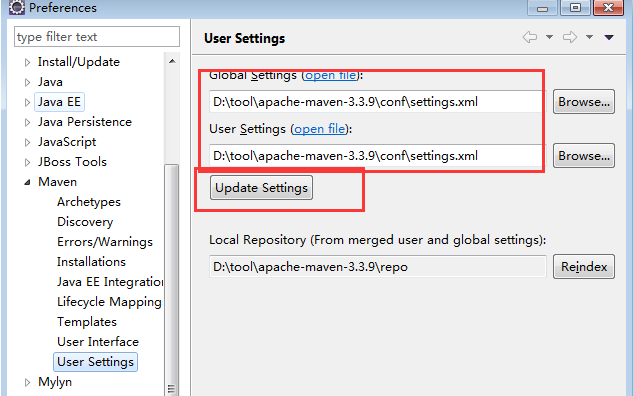
2. 在eclipse中检查配置文件是否被引用到,之前我的user settting使用的位置不对。
然后update setttings。
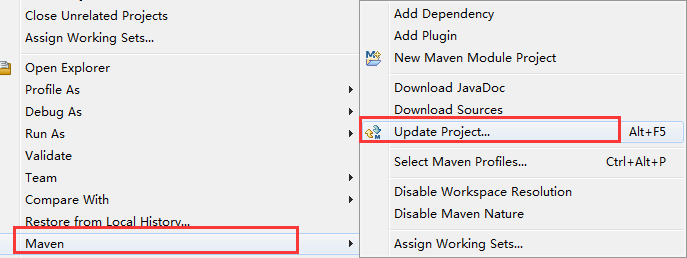
3. 最后选择创建的项目,更新项目后,引用的jdk版本自动刷新。

 浙公网安备 33010602011771号