
利用socket技术,java简易实现http使用,Java课设大作业(前端代码的使用,Main方法,运行)
一.前端实现代码
在实现这个功能的时候,我们第一步需要去构建一个前端项目,为了方便简洁,我们可以直接创建一个较为简单的项目,例如“Hello Client!!!”
代码如下展示出来:
如下:
<!DOCTYPE html>
<html>

<head>
    <meta http-equiv="content-type" content="text/html; charset=utf-8">
    <meta name="viewport" content="width=device-width,initial-scale=1,maximum-scale=1,user-scalable=no">

    <title>Java课程设计作业展示</title>
</head>

<body>
<div class="container">
    <div class="tit">登录</div>
    <input type="text" placeholder="账号">
    <input type="password" placeholder="密码">
    <button>登录</button>
    <span>没有账号?<a href="#">去注册</a></span>
</div>
<div class="square">
    <ul>
        <li></li>
        <li></li>
        <li></li>
        <li></li>
        <li></li>
    </ul>
</div>
<div class="circle">
    <ul>
        <li></li>
        <li></li>
        <li></li>
        <li></li>
        <li></li>
    </ul>
</div>
</body>
<style>
    *{
        /* 初始化 */
        margin: 0;
        padding: 0;
    }
    body{
        /* 100%窗口高度 */
        height: 100vh;
        /* 弹性布局 居中 */
        display: flex;
        justify-content: center;
        align-items: center;
        /* 渐变背景 */
        background: linear-gradient(200deg,#e3c5eb,#a9c1ed);
        /* 溢出隐藏 */
        overflow: hidden;
    }
    .container{
        /* 相对定位 */
        position: relative;
        z-index: 1;
        background-color: #fff;
        border-radius: 15px;
        /* 弹性布局 垂直排列 */
        display: flex;
        flex-direction: column;
        align-items: center;
        width: 350px;
        height: 500px;
        /* 阴影 */
        box-shadow: 0 5px 20px rgba(0,0,0,0.1);
    }
    .container .tit{
        font-size: 26px;
        margin: 65px auto 70px auto;
    }
    .container input{
        width: 280px;
        height: 30px;
        text-indent: 8px;
        border: none;
        border-bottom: 1px solid #ddd;
        outline: none;
        margin: 12px auto;
    }
    .container button{
        width: 280px;
        height: 40px;
        margin: 35px auto 40px auto;
        border: none;
        background: linear-gradient(-200deg,#fac0e7,#aac2ee);
        color: #fff;
        font-weight: bold;
        letter-spacing: 8px;
        border-radius: 10px;
        cursor: pointer;
        /* 动画过渡 */
        transition: 0.5s;
    }
    .container button:hover{
        background: linear-gradient(-200deg,#aac2ee,#fac0e7);
        background-position-x: -280px;
    }
    .container span{
        font-size: 14px;
    }
    .container a{
        color: plum;
        text-decoration: none;
    }
    ul li{
        position: absolute;
        border: 1px solid #fff;
        background-color: #fff;
        width: 30px;
        height: 30px;
        list-style: none;
        opacity: 0;
    }
    .square li{
        top: 40vh;
        left: 60vw;
        /* 执行动画:动画名 时长 线性的 无限次播放 */
        animation: square 10s linear infinite;
    }
    .square li:nth-child(2){
        top: 80vh;
        left: 10vw;
        /* 设置动画延迟时间 */
        animation-delay: 2s;
    }
    .square li:nth-child(3){
        top: 80vh;
        left: 85vw;
        /* 设置动画延迟时间 */
        animation-delay: 4s;
    }
    .square li:nth-child(4){
        top: 10vh;
        left: 70vw;
        /* 设置动画延迟时间 */
        animation-delay: 6s;
    }
    .square li:nth-child(5){
        top: 10vh;
        left: 10vw;
        /* 设置动画延迟时间 */
        animation-delay: 8s;
    }
    .circle li{
        bottom: 0;
        left: 15vw;
        /* 执行动画 */
        animation: circle 10s linear infinite;
    }
    .circle li:nth-child(2){
        left: 35vw;
        /* 设置动画延迟时间 */
        animation-delay: 2s;
    }
    .circle li:nth-child(3){
        left: 55vw;
        /* 设置动画延迟时间 */
        animation-delay: 6s;
    }
    .circle li:nth-child(4){
        left: 75vw;
        /* 设置动画延迟时间 */
        animation-delay: 4s;
    }
    .circle li:nth-child(5){
        left: 90vw;
        /* 设置动画延迟时间 */
        animation-delay: 8s;
    }

    /* 定义动画 */
    @keyframes square {
        0%{
            transform: scale(0) rotateY(0deg);
            opacity: 1;
        }
        100%{
            transform: scale(5) rotateY(1000deg);
            opacity: 0;
        }
    }
    @keyframes circle {
        0%{
            transform: scale(0) rotateY(0deg);
            opacity: 1;
            bottom: 0;
            border-radius: 0;
        }
        100%{
            transform: scale(5) rotateY(1000deg);
            opacity: 0;
            bottom: 90vh;
            border-radius: 50%;
        }
    }
</style>
</html>
<!DOCTYPE html> <html lang="en"> <head> <meta charset="UTF-8"> <title>Java课程设计作业展示</title> </head> <body> Hello Client!!! </body> </html>
绝对路径记录C:\Users\HP\Desktop\com.itczhAndghrAndxlc\src\HTMLTest
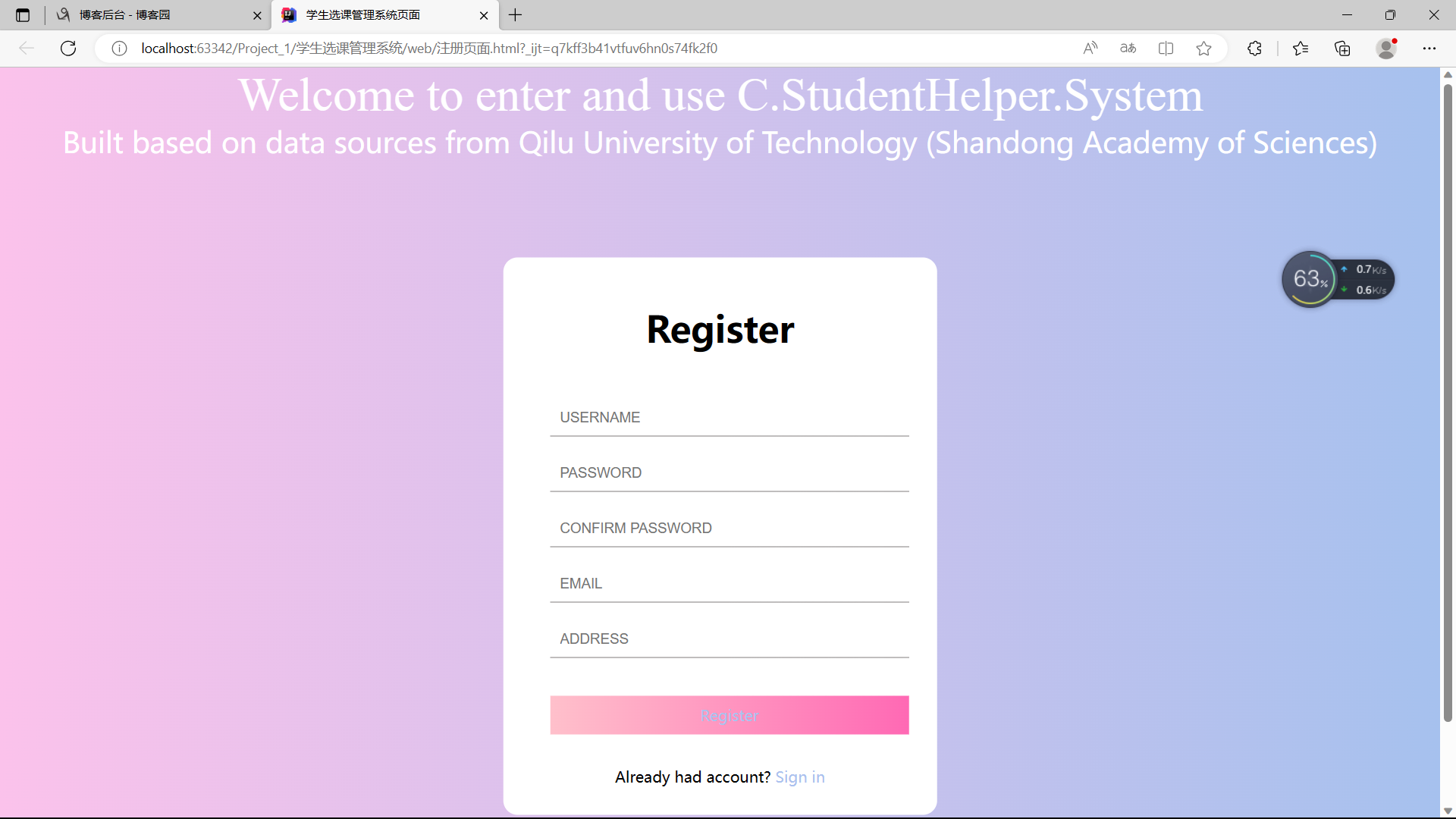
或者也可以使用一个较大的项目,这个是由本人自行编写的一个系统的首页界面的项目(技术栈 :JavaWeb,前端,HTML,CSS,JavaScript , Tomcat , Vue , Servlet , JSON , MySQL , JDBC...):
成品:
<!DOCTYPE html>
<html lang="en">
<head>
    <meta charset="UTF-8">
    <meta name="viewport" content="width=device-width, initial-scale=1.0">
    <title>学生选课管理系统页面</title>
    <style>
        * {
            margin: 0;
            padding: 0;
        }
        html {
            height: 100%;
        }
        body {
            height: 100%;
        }
        .container {
            height: 100%;
            background-image: linear-gradient(to right, #fbc2eb, #a6c1ee);
        }
        .login-wrapper {
            background-color: #fff;
            width: 358px;
            height: 588px;
            border-radius: 15px;
            padding: 0 50px;
            position: relative;
            left: 50%;
            top: 50%;
            transform: translate(-50%, -50%);
        }
        .header {
            font-size: 38px;
            font-weight: bold;
            text-align: center;
            line-height: 150px;
        }
        .input-item {
            display: block;
            width: 100%;
            margin-bottom: 20px;
            border: 0;
            padding: 10px;
            border-bottom: 1px solid rgb(128, 125, 125);
            font-size: 15px;
            outline: none;
        }
        .input-item::placeholder {
            text-transform: uppercase;
        }
        .btn {
            text-align: center;
            padding: 10px;
            width: 100%;
            margin-top: 40px;
            background-image: linear-gradient(to right, #a6c1ee, #fbc2eb);
            color: #fff;
        }
        .msg {
            text-align: center;
            line-height: 88px;
        }
        a {
            text-decoration-line: none;
            color: #abc1ee;
        }
        .header1{
            text-align: -webkit-center;
            font-family: "Times New Roman";
            font-size: 50px;
        }
        .btn1 {
            text-align: center;
            width: 100%;
            background-image: linear-gradient(to left, #a6c1ee, #fbc2eb);
            color: #fff;
        }
        .header2{
            text-align: -webkit-center;
            font-size: 30px;
        }
        .btn2 {
            text-align: center;
            padding: 10px;
            width: 100%;
            margin-top: 40px;
            background-image: linear-gradient(to right, pink, hotpink);
            color: #fff;
        }
    </style>
</head>
<body>
<div class="btn1">
    <div class="header1">Welcome to enter and use C.StudentHelper.System<br></div>
    <div class="header2">Built based on data sources from Qilu University of Technology (Shandong Academy of Sciences)</div>
</div>

<div class="container">
    <div class="login-wrapper">
        <div class="header">Register<br></div>
        <div class="form-wrapper">
            <input type="text" name="username" placeholder="username" class="input-item">
            <input type="password" name="password" placeholder="password" class="input-item">
            <input type="password" name="confirm password" placeholder="confirm password" class="input-item">
            <input type="text" name="email" placeholder="email" class="input-item">
            <input type="text" name="adddress" placeholder="address" class="input-item">
            <div class="btn2"><a href="登入界面.html">Register</a></div>
<!--            <input type="submit" value="Register" name="Register">-->
        </div>
        <div class="msg">
            Already had account?
            <a href="登入界面.html">Sign in</a>
        </div>
    </div>
</div>
</body>
</html>
具体文件已经上传至百度网盘了
二.Java项目当中Main
我们主要的操作就是Main,在这个文件里面我们可以去开启这个应用,我们监听本地的localhost地址为80,我们就会返回
HTTP Server is listening on port 80
然后停止运行这个文件,这样就可以开始进行我们最重要的一步,开始启动服务器代理模式,我们一定要复制
D:\jdk-11.0.2\bin\java.exe "-javaagent:D:\IntelliJ IDEA 2020.2.3\lib\idea_rt.jar=60747:D:\IntelliJ IDEA 2020.2.3\bin" -Dfile.encoding=UTF-8 -classpath C:\Users\HP\Downloads\com.itczhAndghrAndxlc\out\production\SimpleHttpServer Main
Main.java:
import info.zpss.SimpleHttpServer.Arguable;
import info.zpss.SimpleHttpServer.SimpleHttpServer;

public class Main implements Arguable {
    public static final String VERSION = "1.0.0";
    public static void main(String[] args) {
        new Main().init(args);
        new Thread(() -> {
            SimpleHttpServer httpServer = SimpleHttpServer.getInstance();
            httpServer.init(args);
            httpServer.start();
        }).start();
    }

    @Override
    public void init(String[] args) {
        if (Arguable.paramInArgs(args, "-h", "--help")) {
            System.out.println("Usage: java -jar SimpleHttpServer.jar [options]");
            System.out.println("Options:");
            System.out.println("  -h, --help\t\t\tShow this help message and exit");
            System.out.println("  -v, --version\t\t\tShow version info and exit");
            System.out.println("  -H, --host <host>\t\tSpecify the server host like \"http://example.com\"");
            System.out.println("  -P, --port <port>\t\tSpecify the port to listen on");
            System.out.println("  -d, --dir <dir>\t\tSpecify the root directory");
            System.out.println("  -a, --absolute-dir <dir>\tSpecify the absolute root directory");
            System.exit(0);
        }
        if (Arguable.paramInArgs(args, "-v", "--version")) {
            System.out.printf("SimpleHttpServer v%s%n", VERSION);
            System.exit(0);
        }
        String dir = Arguable.stringInArgs(args, "-d", "--dir");
        if (dir != null) {
            System.out.println("Root directory: " + dir);
            SimpleHttpServer.getInstance().setRootDir(dir);
        }
        String absDir = Arguable.stringInArgs(args, "-a", "--absolute-dir");
        if (absDir != null) {
            System.out.println("Absolute root directory: " + absDir);
            SimpleHttpServer.getInstance().setAbsoluteRootDir(absDir);
        }
    }
}
由于在使用-d 这个名称的时候使用的是相对路径,所以可能会存在代码安全性不高,我们直接使用绝对路径-a 名称,复制一下上面前端代码就可以

运行结果为:

这个时候我们就可以开始访问了,我们的localhost就已经可以开始使用了
一些注意事项:我们如果使用了localhost(80默认值)这个以后如果不让这个端口号(地址)结束(Ctrl + C),那么就会报错因为我们这个Address已经使用过,不能重复去使用它,如果我们没有把它结束我们就可以使用-P 名称去改变端口号,很重要
-h 名称:(" -h, --help\t\t\tShow this help message and exit"的语句,其中"\t"表示插入一个Tab键,达到对齐的效果。通常这段代码会被用在命令行工具的帮助信息中,用于显示帮助参数的说明。具体的表现效果会根据输出端(如终端、IDE等)而有所差异。)
-v 名称:(" -v, --version\t\t\tShow version info and exit"的语句,其中 “\t” 表示插入一个Tab键,达到对齐的效果。通常这段代码会被用在命令行工具的帮助信息中,用于显示版本信息的说明。具体的表现效果会根据输出端(如终端、IDE等)而有所差异。)
-H 名称:(" -H, --host <host>\t\tSpecify the server host like “http://example.com”“的语句,其中 “\t” 表示插入一个Tab键,达到对齐的效果,”<host>"表示该参数需要用户在命令行中指定的内容是一个主机名或者是主机地址(host name or address),而"http://example.com"则是一个示例,用于提示用户正确参数的格式。通常这段代码会被用在命令行工具的帮助信息中,用于说明指定参数的格式和用途。具体的表现效果会根据输出端(如终端、IDE等)而有所差异。)
-P, -d, -a,在上面已经解释了,这里不予解释!
三.Http协议
1.首先是HTTP具有的方法:
package info.zpss.SimpleHttpServer.HttpObj;

public enum HttpMethod {
    GET("GET"),
    POST("POST"),
    PUT("PUT"),
    DELETE("DELETE"),
    HEAD("HEAD"),
    OPTIONS("OPTIONS"),
    TRACE("TRACE"), //  测试连接方式
    CONNECT("CONNECT");
    /**
     * 这是一个Java枚举类型,定义了HTTP协议中支持的请求方法,
     * 包括GET、POST、PUT、DELETE、HEAD、OPTIONS、TRACE和CONNECT。
     * 每个请求方法都有一个对应的字符串名称和一个方法来获取其名称。
     * 此外,这个枚举类型还定义了一个静态方法fromString,
     * 用于将字符串类型的请求方法名称转换为对应的HttpMethod枚举值。
     */
    private final String name;

    HttpMethod(String name) {
        this.name = name;
    }

    public String getName() {
        return name;
    }

    public static HttpMethod fromString(String name) {
        for (HttpMethod method : HttpMethod.values())
            if (method.name.equalsIgnoreCase(name)) // 忽略大小写差异
                return method;
        return null;
    }
}
2.然后就是我们 HTTP包含的类型:
package info.zpss.SimpleHttpServer.HttpObj;

public enum HttpContentType {
    TEXT_HTML("text/html"),
    TEXT_CSS("text/css"),
    TEXT_PLAIN("text/plain"),
    TEXT_JAVASCRIPT("text/javascript"),
    IMAGE_JPEG("image/jpeg"),
    IMAGE_PNG("image/png"),
    IMAGE_GIF("image/gif"),
    IMAGE_BMP("image/bmp"),
    IMAGE_X_ICON("image/x-icon"),
    IMAGE_SVG_XML("image/svg+xml"),
    IMAGE_WEBP("image/webp"),
    APPLICATION_JAVASCRIPT("application/javascript"),
    APPLICATION_OCTET_STREAM("application/octet-stream");
    /**
     * 这是一个Java枚举类型,定义了HTTP协议中支持的媒体类型,包含了一系列常见的文本、
     * 图像和应用程序类型。
     * 每个媒体类型都有一个对应的字符串名称和一个方法来获取其名称。
     * 此外,这个枚举类型还定义了一个静态方法fromString,
     * 用于从文件扩展名中获取对应的HttpContentType枚举值。
     * 在这个方法中,通过对文件扩展名进行switch-case判断,将文件扩展名转换为对应的媒体类型,如果没有对应项,则使用默认值TEXT_HTML。
     * 这个方法通常用于确定要在HTTP响应中使用的Content-Type头。
     */
    private final String name;

    HttpContentType(String name) {
        this.name = name;
    }

    public String getName() {
        return name;
    }

    public static HttpContentType fromString(String extension) {
        switch (extension.toLowerCase()) {
            case "css":
                return TEXT_CSS;
            case "txt":
                return TEXT_PLAIN;
            case "js":
                return TEXT_JAVASCRIPT;
            case "jpg":
            case "jpeg":
                return IMAGE_JPEG;
            case "png":
                return IMAGE_PNG;
            case "gif":
                return IMAGE_GIF;
            case "bmp":
                return IMAGE_BMP;
            case "ico":
                return IMAGE_X_ICON;
            case "svg":
                return IMAGE_SVG_XML;
            case "webp":
                return IMAGE_WEBP;
            case "html":
            case "htm":
            default:
                return TEXT_HTML;
        }
    }
}
3.最后就是我们需要判断的HTTP状态码:
package info.zpss.SimpleHttpServer.HttpObj;

public enum HttpStatus {
    OK(200, "OK"),
    NO_CONTENT(204, "No Content"),
    PARTIAL_CONTENT(206, "Partial Content"),
    MOVED_PERMANENTLY(301, "Moved Permanently"),
    FOUND(302, "Found"),
    SEE_OTHER(303, "See Other"),
    NOT_MODIFIED(304, "Not Modified"),
    TEMPORARY_REDIRECT(307, "Temporary Redirect"),
    BAD_REQUEST(400, "Bad Request"),
    UNAUTHORIZED(401, "Unauthorized"),
    FORBIDDEN(403, "Forbidden"),
    NOT_FOUND(404, "Not Found"),
    INTERNAL_SERVER_ERROR(500, "Internal Server Error"),
    SERVICE_UNAVAILABLE(503, "Service Unavailable");
    /**
     * 这是一个Java枚举类型,定义了HTTP协议中支持的状态码,
     * 包括了常见的成功、客户端错误、服务器错误等类型的状态码。每个状态码都有一个对应的整数值和一个字符串类型的原因短语。此外,这个枚举类型还定义了一个静态方法fromCode,根据传入的整数状态代码返回对应的HttpStatus枚举值。在这个方法中,首先遍历所有的状态码,
     * 如果找到对应的状态,则返回此状态枚举值。如果没有找到,则根据状态码的第一位数字进行判断,返回对应的预定义枚举值,
     * 例如2开头的状态码返回OK枚举值,
     * 3开头的状态码返回MOVED_PERMANENTLY枚举值,
     * 4开头的状态码返回NOT_FOUND枚举值,其他状态码返回INTERNAL_SERVER_ERROR枚举值。
     * 这个方法通常用于确定在HTTP响应中使用的状态代码和原因短语。
     */
    private final int code;
    private final String reason;

    HttpStatus(int code, String reason) {
        this.code = code;
        this.reason = reason;
    }

    public int getCode() {
        return code;
    }

    public String getReason() {
        return reason;
    }

    public static HttpStatus fromCode(int code) {
        for (HttpStatus status : HttpStatus.values())
            if (status.code == code)
                return status;
        int firstDigit = code / 100;
        if (firstDigit == 2)
            return OK;
        if (firstDigit == 3)
            return MOVED_PERMANENTLY;
        if (firstDigit == 4)
            return NOT_FOUND;
        return INTERNAL_SERVER_ERROR;
    }
}
Last.具体实现与效果
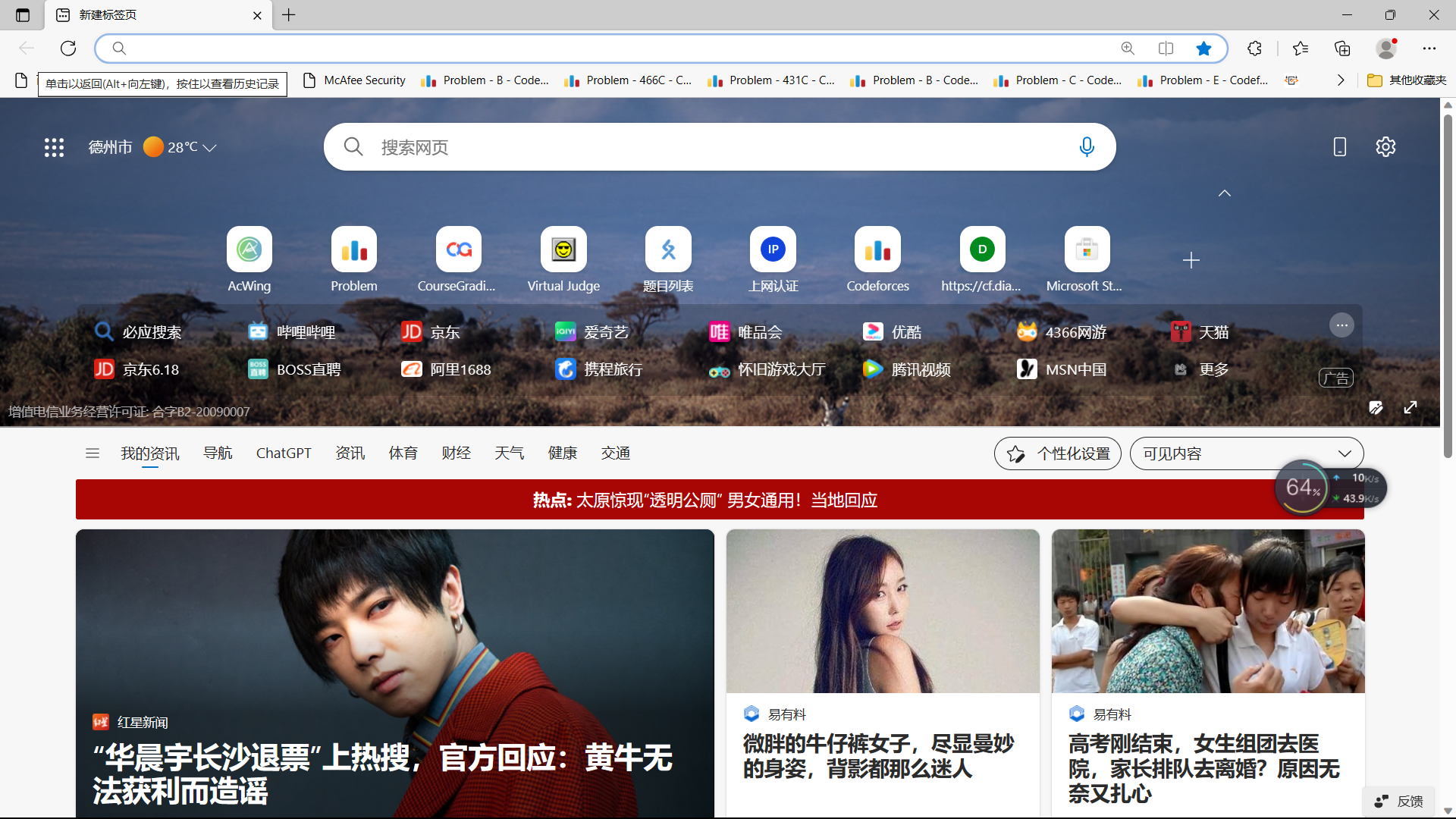
在上述操作以后我们可以打开浏览器,不论是QQ浏览器或者是,Edge,还是谷歌都可以进行操作,我们就是用Edge进行演示:
Step1:
Step2:
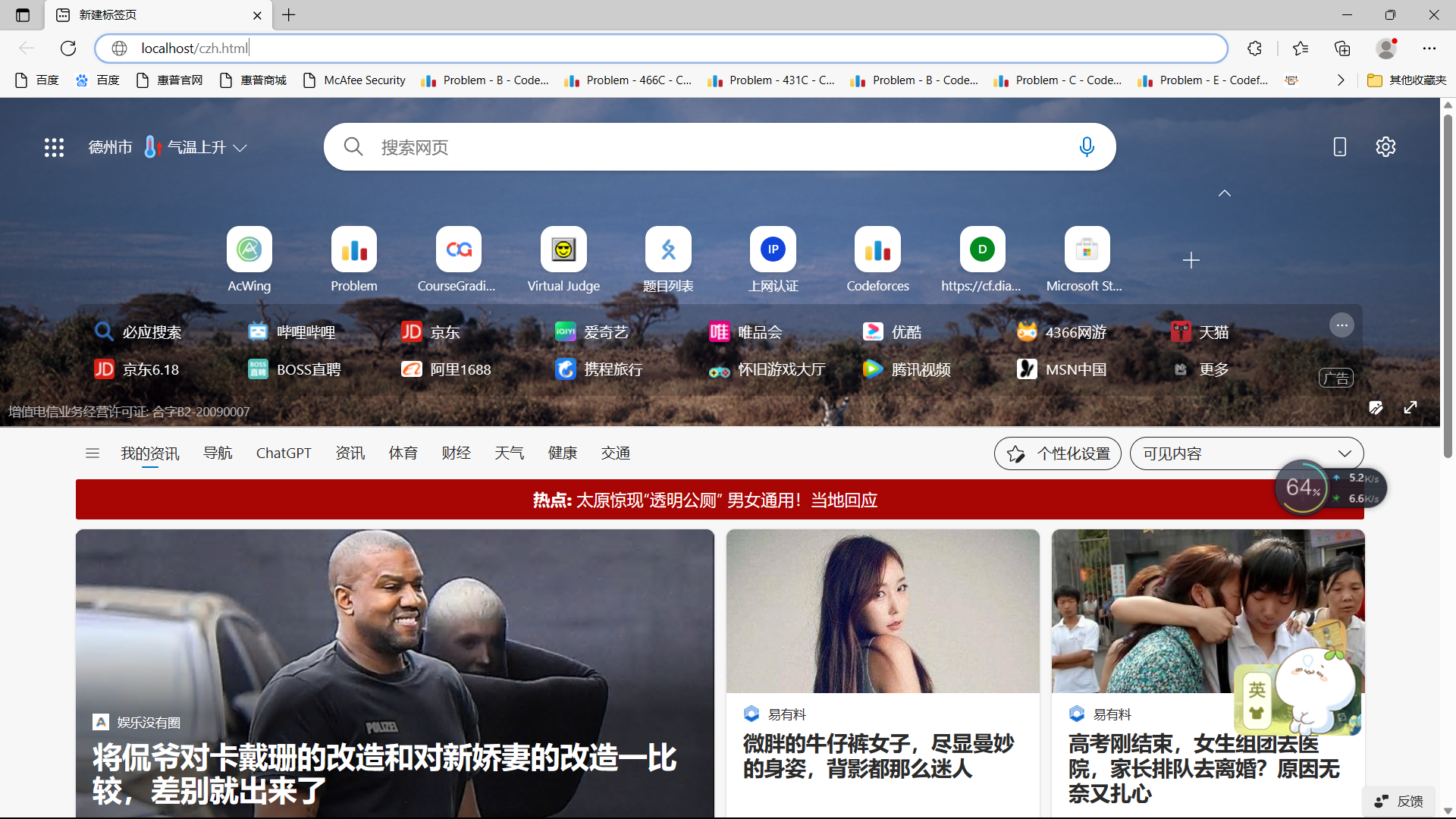
Step3: Enter
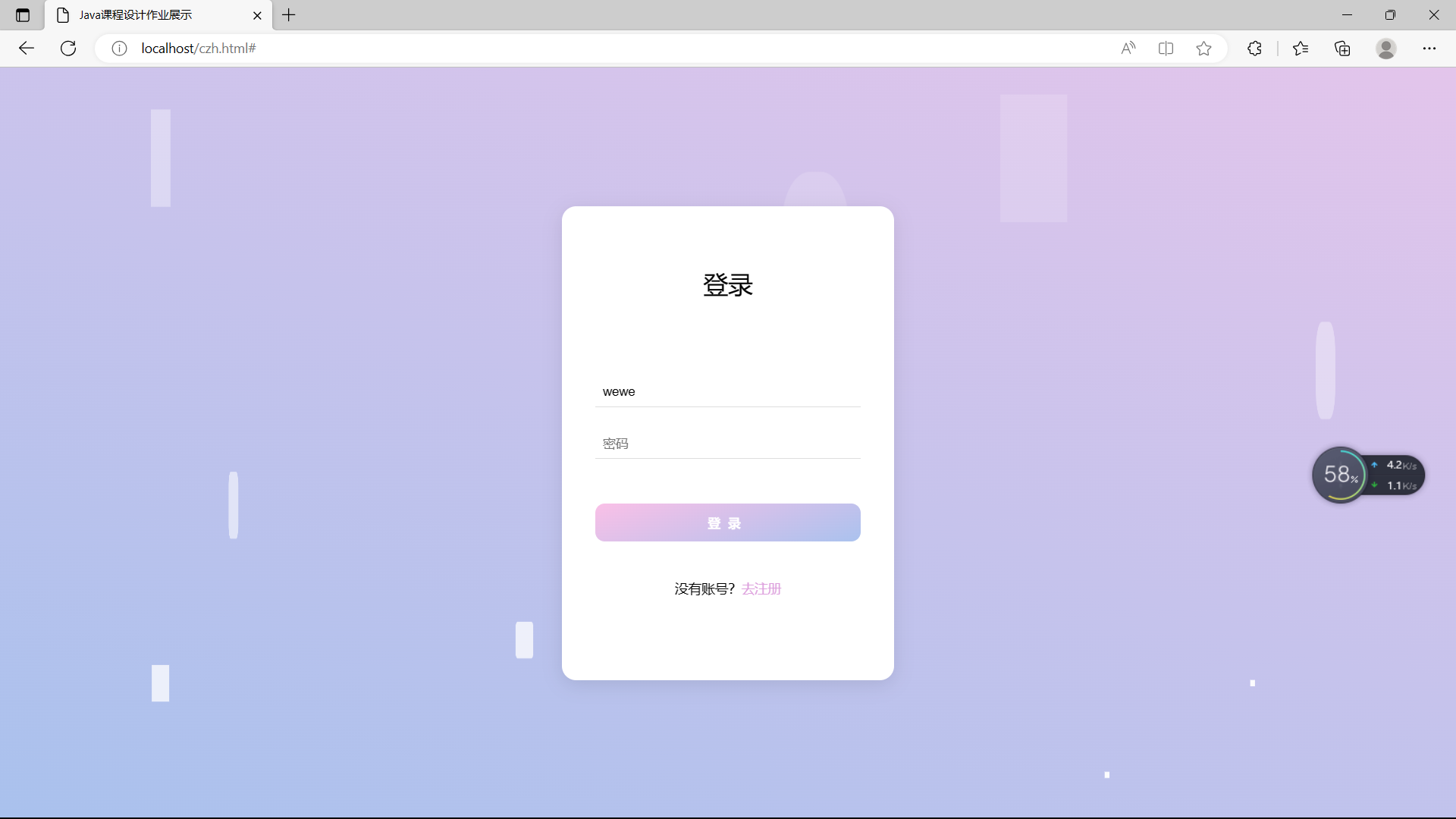
这样我们的整个项目就弄好了!!!

 浙公网安备 33010602011771号