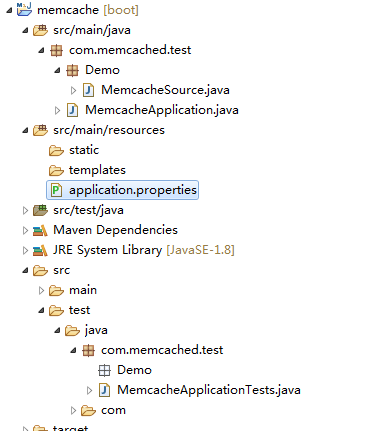
memcached的简单使用


memcached的简单使用

因工作项目本身就安装了memcached,需要安装的请自行百度


 需要额外引入的依赖

<dependency>
<groupId>net.spy</groupId>
<artifactId>spymemcached</artifactId>
<version>2.12.2</version>
</dependency>
<dependency>
<groupId>org.springframework.boot</groupId>
<artifactId>spring-boot-configuration-processor</artifactId>
<optional>true</optional>
</dependency>
<dependency>
<groupId>org.springframework.boot</groupId>
<artifactId>spring-boot-starter-test</artifactId>
<scope>test</scope>
</dependency>


1.启动类

package com.memcached.test;
​
import java.io.IOException;
import java.net.InetSocketAddress;
​
import javax.annotation.Resource;
​
import org.springframework.boot.CommandLineRunner;
import org.springframework.boot.SpringApplication;
import org.springframework.boot.autoconfigure.SpringBootApplication;
​
import com.memcached.test.Demo.MemcacheSource;
​
import net.spy.memcached.MemcachedClient;
​
@SpringBootApplication
public class MemcacheApplication implements CommandLineRunner{
@Resource
   private  MemcacheSource memcacheSource;
​
   private MemcachedClient client = null;
public static void main(String[] args) {
SpringApplication.run(MemcacheApplication.class, args);
}
​
@Override
public void run(String... args) throws Exception {
try {
           client = new MemcachedClient(new InetSocketAddress(memcacheSource.getIp(),memcacheSource.getPort()));
      } catch (IOException e) {
           e.printStackTrace();
      }
}
public MemcachedClient getClient() {
       return client;
  }
   
}
​

2.加载ip端口

package com.memcached.test.Demo;
​
import org.springframework.boot.context.properties.ConfigurationProperties;
import org.springframework.stereotype.Component;
​
@Component
@ConfigurationProperties(prefix = "memcache")//意思会以 memcache.* 为开通将对应的配置文件加载到属性中
public class MemcacheSource {
​
   private String ip;
​
   private int port;
​
   public String getIp() {
       return ip;
  }
​
   public void setIp(String ip) {
       this.ip = ip;
  }
​
   public int getPort() {
       return port;
  }
​
   public void setPort(int port) {
       this.port = port;
  }
}
​

3.测试memcached的启动类

package com.memcached.test;
​
import javax.annotation.Resource;
​
import org.junit.Test;
import org.junit.runner.RunWith;
import org.springframework.boot.test.context.SpringBootTest;
import org.springframework.test.context.junit4.SpringRunner;
import net.spy.memcached.MemcachedClient;
​
@RunWith(SpringRunner.class)
@SpringBootTest
public class MemcacheApplicationTests {
@Resource
   public MemcacheApplication memcachedRunner;
​
@Test
public void testSetGet() {
   MemcachedClient memcachedClient = memcachedRunner.getClient();
   memcachedClient.set("asd",1000,"123");
   System.out.println(""+memcachedClient.get("asd").toString());
}
​
}
​

resources下建一个application.properties

#缓存配置

memcache.ip=127.0.0.1

memcache.port=11211

配置类会自行读取该配置


posted @ 2019-10-30 15:17  代码可乐  阅读(458)  评论(0)    收藏  举报