

Nexus私服的一些基本操作
Nexus私服的一些基本操作
一:基本使用
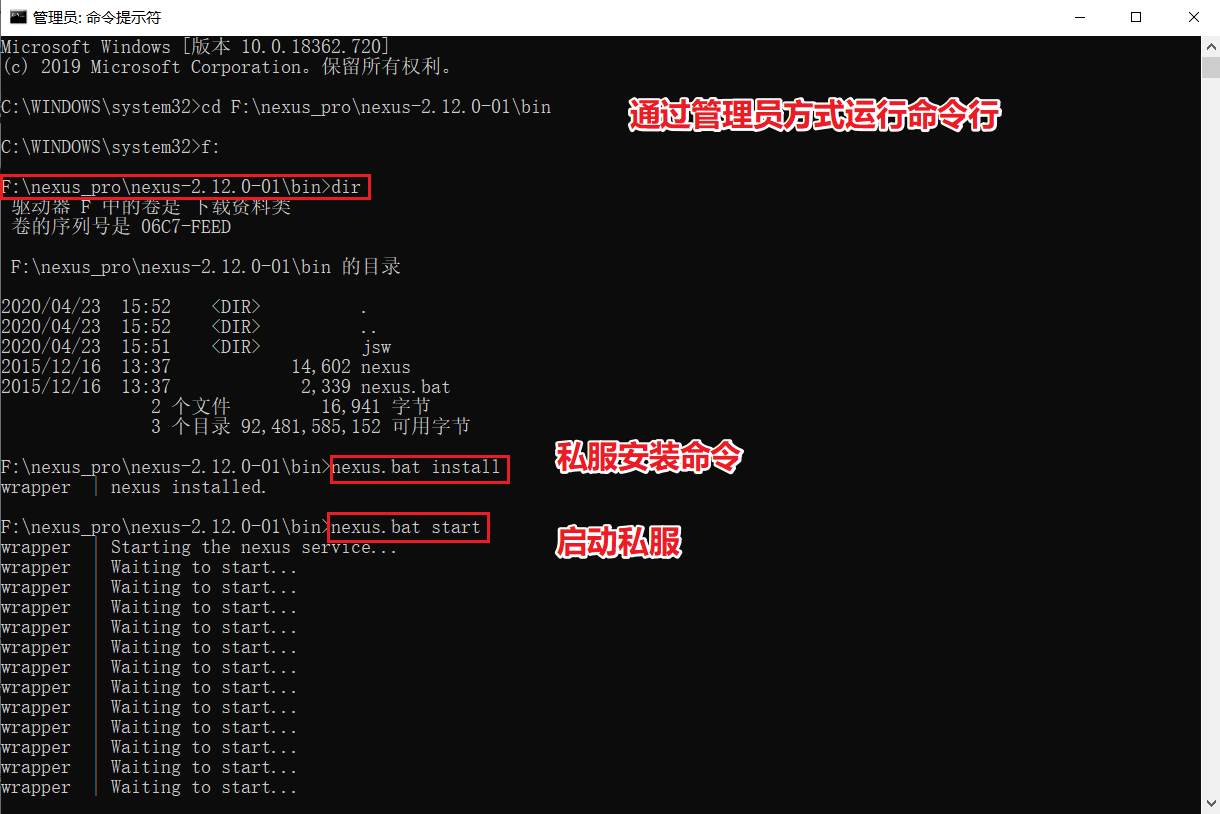
A) 安装和启动
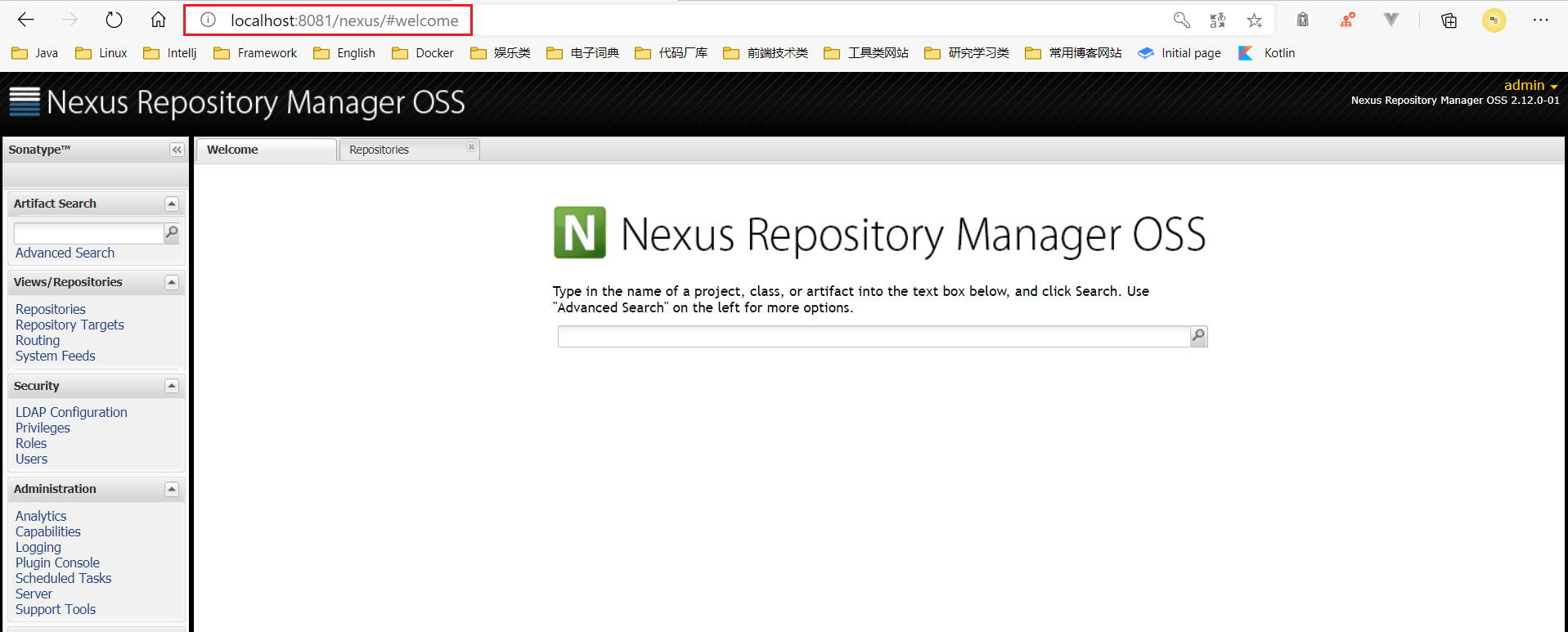
B)浏览器访问私服
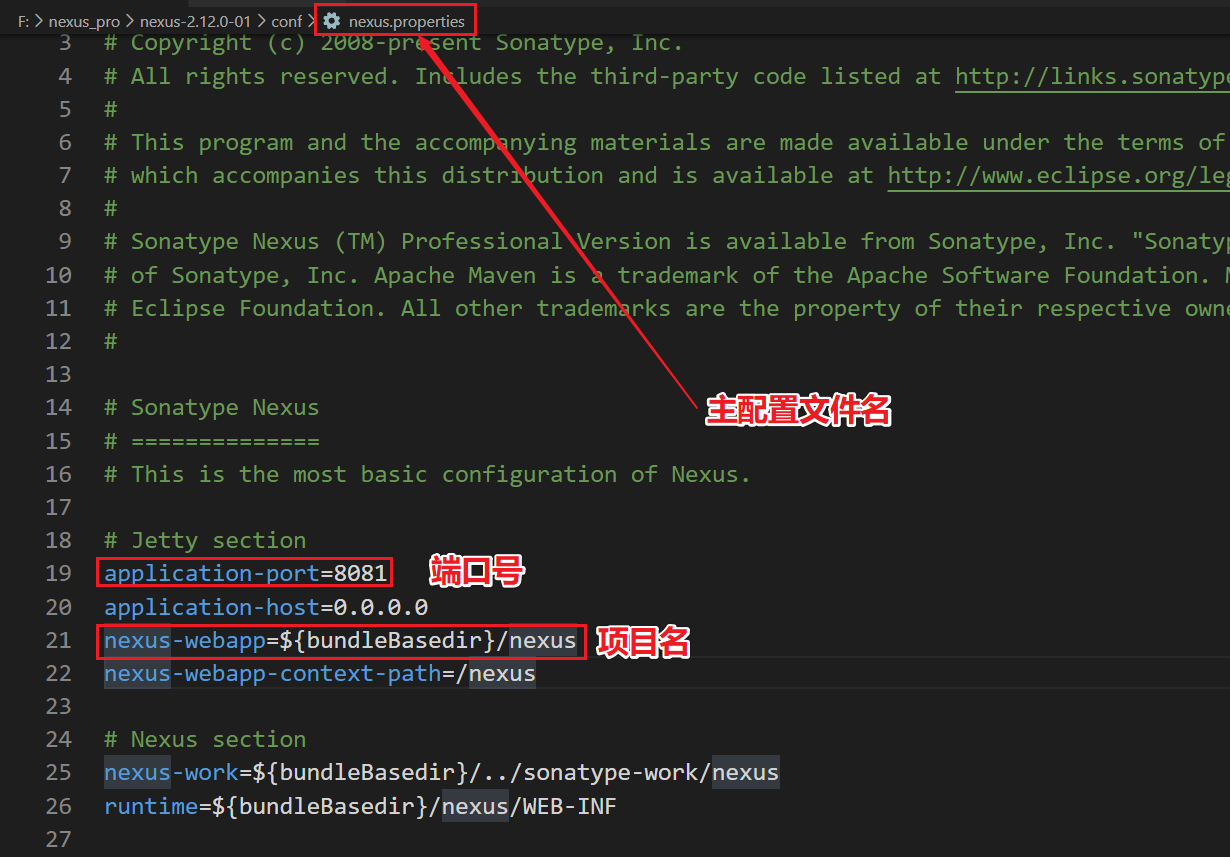
a)此链接是通过配置文件查到:
二:通过maven整合配置私服
A) 给maven配置文件添加私服的访问权限
 1 <server>
 2   <id>releases</id>
 3   <username>admin</username>
 4   <password>admin123</password>
 5 </server>
 6 <server>
 7   <id>snapshots</id>
 8   <username>admin</username>
 9   <password>admin123</password>
10 </server>
B) 配置上传私服关键代码
 1 <!--上传文件到远程厂库-->
 2 <distributionManagement>
 3     <repository>
 4         <id>releases</id>
 5         <url>http://localhost:8081/nexus/content/repositories/releases/</url>
 6     </repository>
 7     <snapshotRepository>
 8         <id>snapshots</id>
 9         <url>http://localhost:8081/nexus/content/repositories/snapshots/</url>
10     </snapshotRepository>
11 </distributionManagement>
C) 配置下载私服关键代码
a) 第一步:配置profile
 1 <!-- 下载jar包配置 -->
 2 <profile>
 3 <!--profile的id -->
 4 <id>dev</id>
 5 <repositories>
 6   <repository> <!--仓库id,repositories可以配置多个仓库,保证id不重复 -->
 7     <id>nexus</id> <!--仓库地址,即nexus仓库组的地址 -->
 8     <url>http://localhost:8081/nexus/content/groups/public/</url> <!--是否下载releases构件 -->
 9     <releases>
10       <enabled>true</enabled>
11     </releases> <!--是否下载snapshots构件 -->
12     <snapshots>
13       <enabled>true</enabled>
14     </snapshots>
15   </repository>
16 </repositories>
17 <pluginRepositories> <!-- 插件仓库,maven的运行依赖插件,也需要从私服下载插件 -->
18   <pluginRepository> <!-- 插件仓库的id不允许重复,如果重复后边配置会覆盖前边 -->
19     <id>public</id>
20     <name>Public Repositories</name>
21     <url>http://localhost:8081/nexus/content/groups/public/</url>
22   </pluginRepository>
23 </pluginRepositories>
24 </profile>
b) 激活profile
1 <!--激活下载jar的命令-->
2 <activeProfiles>
3     <activeProfile>dev</activeProfile>
4 </activeProfiles>
D) 安装第三方jar包
 1 --安装第三方jar包到本地仓库
 2
 3 ----进入jar包所在目录运行
 4     mvn install:install-file
 5         -DgroupId=com.alibaba
 6         -DartifactId=fastjson
 7         -Dversion=1.1.37
 8         -Dfile=fastjson-1.1.37.jar
 9         -Dpackaging=jar
10
11
12 ----打开cmd直接运行
13     mvn install:install-file
14         -DgroupId=com.alibaba
15         -DartifactId=fastjson
16         -Dversion=1.1.37
17         -Dpackaging=jar
18         -Dfile=[文件的绝对路径]
19
20
21 --安装第三方jar包到私服
22
23 --在settings配置文件中添加登录私服第三方登录信息
24 <server>
25     <id>thirdparty</id>
26     <username>admin</username>
27     <password>admin123</password>
28 </server>
29
30
31 ----进入jar包所在目录运行
32 mvn deploy:deploy-file -DgroupId=com.alibaba
33     -DartifactId=fastjson
34     -Dversion=1.1.37
35     -Dpackaging=jar
36     -Dfile=fastjson-1.1.37.jar
37     -Durl=http://localhost:8081/nexus/content/repositories/thirdparty/
38     -DrepositoryId=thirdparty
39
40
41 ----打开cmd直接运行
42 mvn deploy:deploy-file -DgroupId=com.alibaba
43     -DartifactId=fastjson
44     -Dversion=1.1.37
45     -Dpackaging=jar
46     -Dfile=【文件的绝对路径】
47     -Durl=http://localhost:8081/nexus/content/repositories/thirdparty/
48     -DrepositoryId=thirdparty

 浙公网安备 33010602011771号